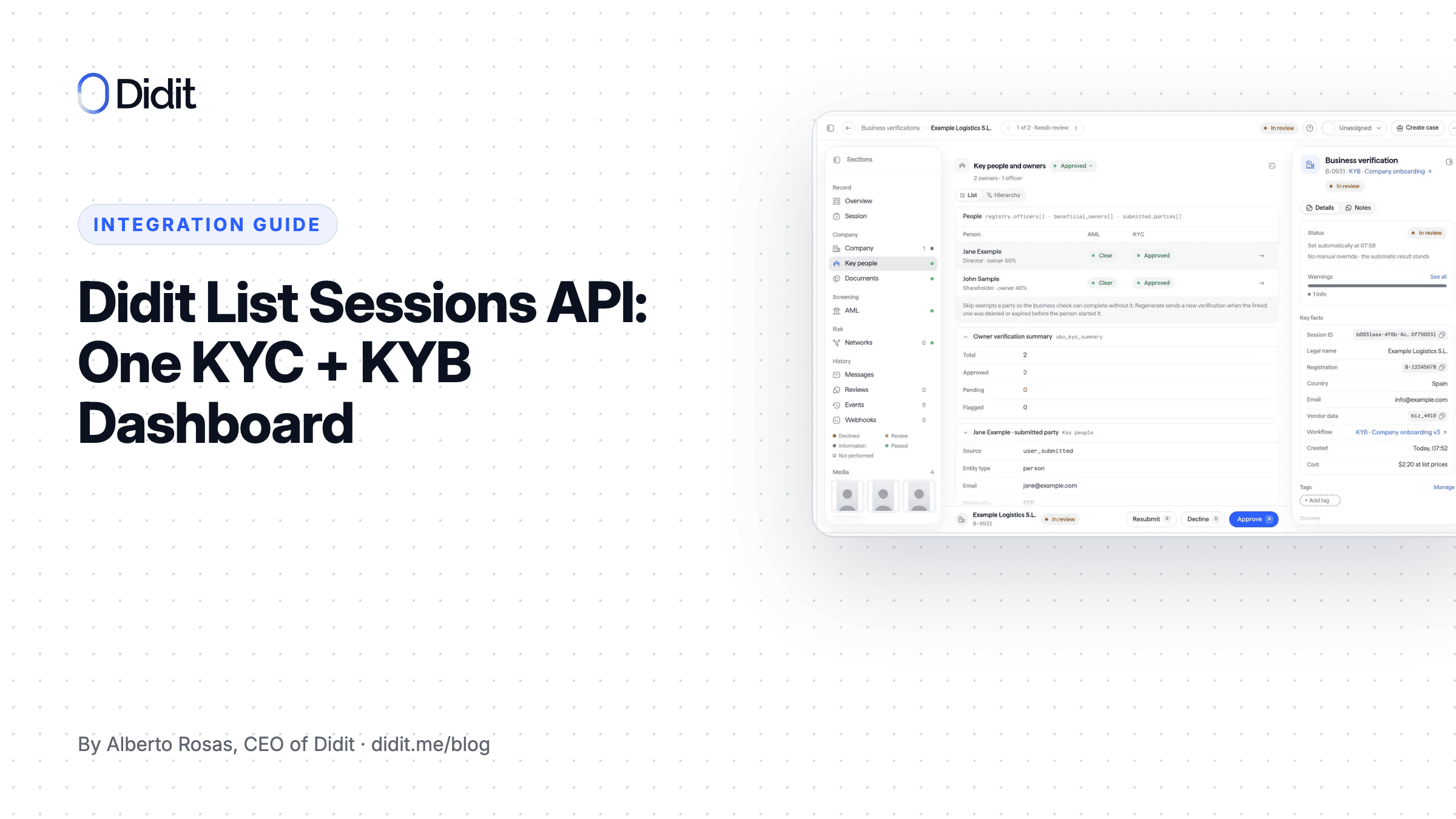
Didit List Sessions API: One KYC + KYB Dashboard
Use GET /v3/sessions/ with the all filter to list KYC and KYB sessions from one endpoint. It concatenates the two kinds, it does not interleave them by timestamp. For high volume, call each kind and merge client-side.
 Alberto RosasCo-founder and CEO
Contents
In this guide
Jump to the part you need.
If you run KYC and KYB in one application, you can build a single dashboard from one endpoint: GET /v3/sessions/ with session_kind=all. The public price book has no line for list calls; you pay per completed check, $0.33 for a full ID check and from $2.00 per company for KYB. The caveat comes first: all concatenates the two kinds, it does not interleave them by timestamp.
Last updated: November 26, 2026. Prices checked against the live Didit price feed on November 26, 2026.
The short answer
We run one Sessions API for both kinds of verification. A User Verification session verifies a person (KYC). A Business Verification session verifies a company and its key people (KYB). Every row carries a session_kind field, and session_kind on the list call chooses which kind you get back. That is the whole design: one endpoint, one row shape at the top level, two payload shapes underneath.
| Question | Answer |
|---|---|
| Endpoint | GET https://verification.didit.me/v3/sessions/ |
| Kind filter | session_kind accepts user, business or all. Default is user, which keeps older integrations working unchanged. |
What all returns | User Verification rows first, then Business Verification rows appended. Each block is newest first. The two blocks are not interleaved by timestamp. |
| Server ordering | Ordered by -session_number within each kind. |
| Pagination | limit (default 50), offset (default 0), plus next and previous URLs in the envelope. |
count field | Exact up to 100 and capped at 100 beyond that. Paginate with next, do not trust count as a total. |
| Row discriminator | session_kind on every row is "user" or "business". |
| Price | The public price book has no line for list calls. You are billed per completed check: $0.33 full ID check, KYB from $2.00 per company. |
| Permission | An API key that holds read:sessions. |
Start free in the sandbox at business.didit.me, no sales call. For developers, connect Didit to an AI assistant through the Didit MCP server.
user versus business: which kind am I listing?
The caller never picks the kind directly. Kind is determined by the workflow. When you create a session you pass a workflow_id, and the workflow type decides whether the session lands as a User Verification or a Business Verification. KYB workflows create Business Verification sessions, the flow described on our Business Verification product page. KYC workflows create User Verification sessions. The list filter then selects from what already exists.
The kinds are distinct, and IDs are UUIDs, so collisions are impossible. When you call a single-session endpoint with a session_id, Didit looks in the User Verification table first and falls back to the Business Verification table. You never tell the API which kind you mean on a retrieve call. On a list call you do, because a list has to choose a scope.
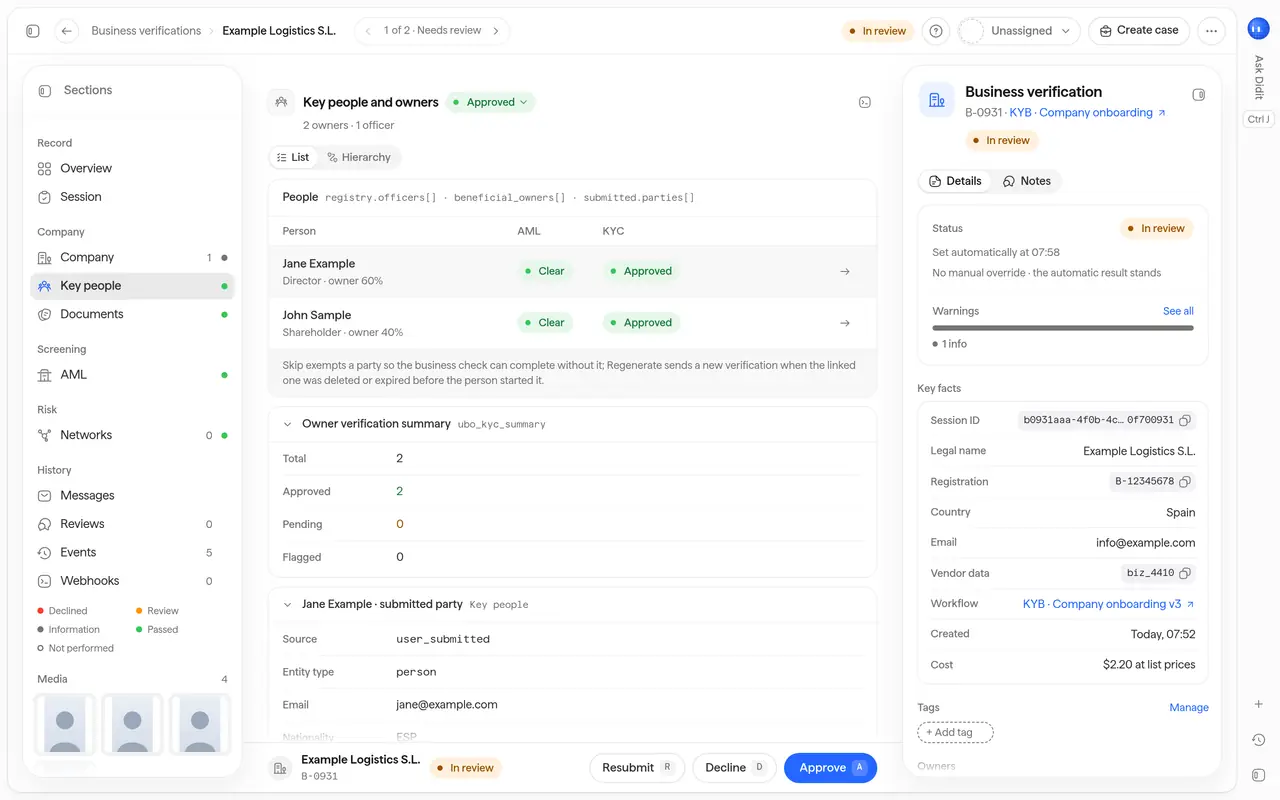
Feature arrays differ by kind. User rows carry ID verification, liveness, face match, NFC, proof of address and database validation. Business rows carry registry checks, document verifications and key people checks. AML screening, phone, email, questionnaires, IP analysis, reviews and contact details exist on both. Fields absent from one kind simply do not appear, with no nulls and no placeholders.
Why the rows are not interleaved
This is the part that surprises almost everyone building a mixed dashboard. With session_kind=all, Didit appends the Business Verification rows after the User Verification rows. It does not merge the two streams into one chronological list. Each block is internally ordered newest first by session_number, which is what the docs mean when they say the server orders by -session_number within each kind.
For a dashboard, sorting is your job. Merge the two blocks client-side on created_at and sort the merged array newest first. That gives the single timeline your reviewers expect.
At high volume, call each kind separately and merge client-side. Two streams, two offsets, one merge. That is also the clearest way to walk one kind deeper than the other.

Prerequisites
| Requirement | Detail |
|---|---|
| Plan | Any plan works. Sandbox testing is free and unlimited. Eligible organizations get $10 of monthly credit on Free. Growth is $99 a month with $115 of monthly credit and 4% off every Didit price. Scale is $299 a month with $350 of monthly credit and 10% off. See pricing. |
| Client | Any HTTPS client that can set an x-api-key header. curl is enough. An AI assistant can reach the documented hosted MCP server at https://mcp.didit.me/mcp with OAuth sign-in. |
| Permission | A key holding read:sessions. Without it the endpoint returns 403 with {"detail": "You do not have permission to perform this action."} |
| Workflows | At least one KYC workflow and one KYB workflow, so both kinds exist to list. Kind comes from the workflow type. |
| Host | https://verification.didit.me. This host uses the x-api-key header, not an OAuth bearer token. |
Build it in seven steps
- Copy an API key. Sign in to the Didit Business Console, pick the Application in the dropdown at the top, open Developers then API keys, and copy the Primary key or create a scoped key with
read:sessions. New sandbox keys start withsk_test_; older keys may have no prefix. Keep the key server-side. Full detail in API authentication. - Create one session of each kind in the sandbox. Use a KYC workflow for the person and a KYB workflow for the company. Every check is mocked in sandbox, so this costs nothing and gives you rows to render.
- Call the list with both kinds. This is the mixed call from the docs, trimmed to the parameters that matter for a dashboard:
Statuses are matched exactly as the API returns them, including the space incurl -G https://verification.didit.me/v3/sessions/ -H "x-api-key: $DIDIT_API_KEY" --data-urlencode 'session_kind=all' --data-urlencode 'status=Approved,In Review' --data-urlencode 'date_from=2026-01-01' --data-urlencode 'limit=50'In Review. - Read the envelope, not just the rows. The response is
count,next,previousandresults. Treatcountas exact only up to 100. Beyond that it is capped, andnextis the source of truth for whether more pages exist. - Page with limit and offset, or follow next.
limitdefaults to 50 andoffsetto 0. Both accept values up to 1000000, and larger values return 400. Follownextuntil it is null, or incrementoffsetby the number of rows you received. - Switch on the row shape. Read
session_kindfirst and render from the matching field set. A KYB row hascompany_name, a KYC row hasfull_name. Never read a field that only exists on the other kind. - For volume, split the crawl. Call
session_kind=userandsession_kind=businessas two traversals and merge the results yourself. That keeps each cursor independent. Here is the minimum glue over documented fields, run server-side:async function listKind(kind, params) { const out = []; let offset = 0; for (;;) { const q = new URLSearchParams({ ...params, session_kind: kind, limit: '100', offset: String(offset) }); const res = await fetch('https://verification.didit.me/v3/sessions/?' + q.toString(), { headers: { 'x-api-key': process.env.DIDIT_API_KEY } }); const page = await res.json(); out.push(...page.results); if (!page.next) return out; offset += page.results.length; } } const [kyc, kyb] = await Promise.all([listKind('user', {}), listKind('business', {})]); const timeline = [...kyc, ...kyb].sort((a, b) => new Date(b.created_at) - new Date(a.created_at));
Field mapping: one table for both kinds
| Field | KYC row | KYB row | Use in the dashboard |
|---|---|---|---|
session_id | Yes | Yes | Primary key. Use it for the decision call and for row links. |
session_kind | user | business | Switch on this before reading any other field. |
session_number | Yes | Yes | Displayed reference. Users see S-0001, businesses see B-0001. |
status | Yes | Yes | Same status enum for both kinds. |
vendor_data | Yes | Yes | Your own identifier. Exact-match filter for one entity's history. |
created_at | Yes | Yes | The column you sort the merged array on. |
full_name | Yes | No | Person column. |
document_type | Yes | No | Passport, identity card, driver's license and so on. |
country | Yes | Yes | Different meaning per kind: issuing state on a KYC row, country of incorporation on a KYB row. |
company_name | No | Yes | Company column. |
registration_number | No | Yes | Registry number, normalized where the registry requires it. |
workflow_type, workflow_label | No | Yes | Which KYB workflow produced the row, for a filter chip. |
phone_number, email_address | Yes | No | Contact columns on the person view. |
top_warnings, warnings_count | Yes | No | Risk badge on the person row. |
assignee, waiting_since, sla_due_at | Yes | No | Review queue counters. |
Rows are a light projection by design. For the full feature payload behind a row, call GET /v3/session/{session_id}/decision/ as described in retrieve session. List rows are light projections; the decision endpoint returns the full payload. Media fields on the decision payload are presigned URLs with a limited validity window, so download them promptly rather than storing the URL.
Some filters exist on only one kind and are silently ignored on the other: is_kyc_to_be_reviewed, status_initialized_as_in_review, session_type, api_service, screened_full_name and warning. Silently ignored means no error and no warning, so a KYB page filtered on a KYC-only flag will quietly return everything. Keep those flags on the person view only.
Pagination, limit, offset and the count cap at 100
The page envelope has four keys: count, next, previous and results. count is exact up to 100 and capped at 100 beyond that. A large account with 40,000 sessions will report 100. That is not an error and not a truncation; the field is documented as exact up to 100 and capped above it. Use next to decide whether to keep going, and keep your own running total if you need one.
The defaults are limit=50 and offset=0. Both accept values up to 1000000, and anything larger returns 400. A dashboard that shows 50 rows per page can stay on the default. A nightly export should raise limit to 100, follow next, and stop when it is null. Use next to determine whether another page exists.
Two filters are worth pairing with pagination. date_from and date_to are ISO 8601 dates, inclusive on created_at, which lets you pull a bounded window per crawl. decided_from and decided_to are ISO 8601 datetimes on the last status change, from inclusive and to exclusive, which is the right window for a review queue that only cares about recent decisions.
Test it with sandbox data
Run the same curl against a sandbox key. Every check is mocked, the sandbox is free on every plan, and no live company data is touched. A successful mixed list looks like this, truncated:
{
  "count": 2,
  "next": null,
  "previous": null,
  "results": [
    {
      "session_id": "...",
      "session_kind": "user",
      "session_number": 1024,
      "status": "Approved",
      "vendor_data": "user-42",
      "created_at": "...",
      "full_name": "...",
      "document_type": "Passport",
      "country": "ESP"
    },
    {
      "session_id": "...",
      "session_kind": "business",
      "session_number": 41,
      "status": "In Review",
      "vendor_data": "company-7",
      "created_at": "...",
      "company_name": "...",
      "registration_number": "...",
      "country": "ESP",
      "workflow_type": "...",
      "workflow_label": "..."
    }
  ]
}
Expected success: both kinds appear in one response, every row has session_kind, and the business block follows the user block. If your UI needs one timeline, the sort happens in your code.
| Symptom | Cause | Fix |
|---|---|---|
| 401 | API key wrong, malformed, revoked or expired. | Re-fetch the key. New sandbox keys start with sk_test_ and new live keys with sk_live_; older keys may have no prefix. Never validate a key by its prefix alone. |
403 with {"detail": "You do not have permission to perform this action."} | The key lacks read:sessions. | Create a scoped key in Developers then API keys with that permission. |
400 with {"date_from": ["..."]} | Malformed ISO 8601 date. | Send a date, for example 2026-01-01, not a localized string. |
400 with {"document_name": ["This filter is not available."]} | The document_name filter is retired. | Use document_type. |
| Filter appears to do nothing | A malformed UUID in workflow_id or didit_internal_id is silently dropped, with no error. | Validate UUIDs on your side before sending. |
count stuck at 100 | Documented cap. | Paginate with next. Do not treat 100 as a total. |
| Rows look unsorted | session_kind=all concatenates, it does not interleave. | Sort the merged array on created_at. |
| A KYB-only field is missing on a KYC row | Fields absent from a kind are not returned at all. | Branch on session_kind before reading fields. |
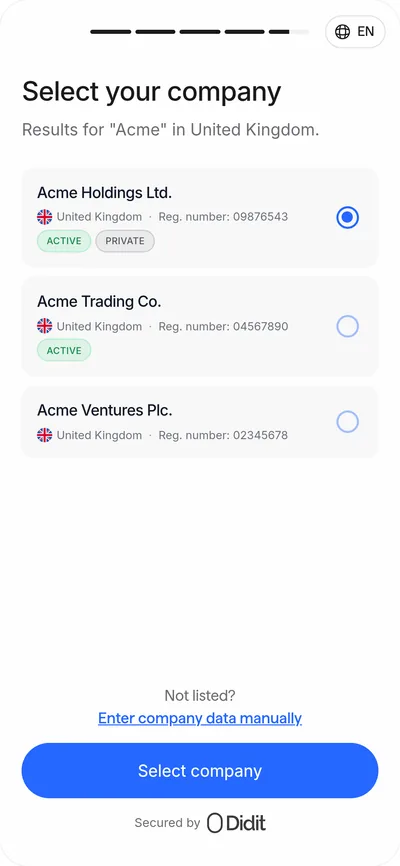
company_name and registration_number come from the selected registry result. Manual submissions provide the company data directly.Assistant access with the hosted MCP server
If the dashboard is for you and a few reviewers, an assistant may be faster than a build. Didit runs a hosted MCP server at https://mcp.didit.me/mcp with OAuth sign-in, free on every plan. The REST API remains the answer for anything automated, scheduled or embedded in a product.
Cost of both ends
Didit side: the public price book has no line for list calls or for the Sessions API itself. Billing is per completed check from prepaid credit. A full ID check is $0.33 and always covers three parts in one check, the ID document at $0.15, biometrics at $0.15 (passive liveness $0.10 plus face match $0.05) and device and IP analysis at $0.03. KYB is priced by country and data tier from $2.00 per company, with company AML at $0.20 per check, person AML at $0.20 per person, KYB document steps at $0.20 and key people extraction free. Linked KYC for each owner or officer is billed as its own full check.
Your side: one HTTP request per page per refresh, one decision call per row a reviewer opens, and whatever storage you keep for your own copy. The list rows are a light projection, so you are not pulling document images or media URLs on page load. For context, Didit serves 4,000+ active companies on one public price list, so the arithmetic below is the same list every customer sees.
Worked example: one month on a mixed dashboard
Assume a month with 400 completed person checks and 40 completed company checks, each company with two owners screened, plus a dashboard that refreshes every two hours. The $2.00 line is the starting KYB registry price; your actual registry price varies by country and data tier.
- Person checks: 400 × $0.33 = $132.00
- Company registry checks: 40 × $2.00 starting registry price = $80.00
- Company AML: 40 × $0.20 = $8.00
- Person AML for owners: 40 companies × 2 owners = 80 people, 80 × $0.20 = $16.00
- Dashboard list calls: 12 refreshes a day × 30 days = 360 list calls. No line item, so $0.00
- Total for the month at list price: 132.00 + 80.00 + 8.00 + 16.00 = $236.00
On Scale, the same volume takes 10% off every Didit price: 400 × $0.297 = $118.80 for person checks, 80 × $0.18 = $14.40 for owner AML and 40 × $0.18 = $7.20 for company AML. Registry tiers are priced by country and tier, so apply the plan discount to the tier you actually deliver. The plan fee is separate and its monthly credit is applied first.
Sources
- Didit docs: List Sessions API
- Didit docs: Sessions API overview
- Didit docs: Retrieve a session decision
- Didit docs: Create a session
- Didit docs: API authentication
- Didit docs: Rate limiting
- Didit docs: Company registry data
- Didit docs: Data models
- Didit pricing and pricing as JSON, read November 26, 2026
- Didit docs: Pricing and billing
- Didit MCP server
- Didit integration prompt and raw Markdown
- Didit Business Verification product page
- Image referenced in this post: session detail overview image
- Image referenced in this post: KYB key people linked KYC image
- Image referenced in this post: kyb-search-results.webp
Next step: open the sandbox at business.didit.me, create one KYC workflow and one KYB workflow, and run the mixed list call from step 3 against a sandbox key. No sales call, and sandbox testing is free on every plan.
Try it
Try this in the sandbox
Run the check this guide describes, free.
The product this post is about, taken from its topic. Run it free in the sandbox.
Author
Alberto Rosas
Co-founder and CEO

Keep reading
Other guides in the same topic.
 What Is the Purpose of FICA in South Africa? 2026 Guide
FICA is South Africa's anti-money laundering law. It creates the Financial Intelligence Centre and requires accountable institutions to identify and verify clients, screen for PEP and sanctions risk and report suspicious.
Alberto RosasNov 26, 2026 Sixth Money Laundering Directive (6AMLD): What Changed and Which Rules Apply
6AMLD is Directive (EU) 2018/1673: Member States must criminalise laundering, widen predicate offences and set a four-year penalty floor. It adds no new due diligence duties for firms.
Alberto RosasNov 26, 2026 Automated Sanctions Screening: Canada, the Entity List and Embargoes
Automated sanctions screening matches people and companies against lists such as Canada's autonomous sanctions made under SEMA and JVCFOA and the OFAC SDN List, and returns candidate hits scored for identity confidence and.
Alberto RosasNov 26, 2026Questions
Frequently asked questions
What does session_kind=all return in the Didit List Sessions API?
It returns both User Verification (KYC) sessions and Business Verification (KYB) sessions in one response. The user rows come first and the business rows are appended after them. Each block is ordered newest first by session number. The two blocks are not merged into a single timeline.
Why are my KYC and KYB sessions not sorted together by date?
Because session_kind=all concatenates the two kinds rather than interleaving them by timestamp. The server orders each block by -session_number within its own kind. If you need one chronological list, merge the blocks in your own code and sort on created_at.
What happens if I leave session_kind out of the call?
You get user, which returns only KYC sessions. That default is backward compatible, so integrations written before KYB existed keep behaving exactly as they did. Pass business for KYB only, or all for both.
How many sessions can I fetch per call, and what does count mean when it says 100?
limit defaults to 50 and offset to 0, and both accept values up to 1000000. count is exact up to 100 and capped at 100 beyond that, so a large account will report 100. Use the next and previous URLs to paginate rather than reading a total from count.
Can I filter status across both kinds in one call?
Yes. status is shared by both kinds and accepts one or more values, comma-separated, written exactly as the API returns them, for example Approved,In Review with the space inside In Review. Matching is exact and case-sensitive. Some other filters are kind-specific and are silently ignored on the other kind.
How do I tell a KYC row from a KYB row in the response?
Read session_kind on the row. It is user for a person and business for a company, and it is present on every row from create, retrieve, list, update-status, share and import. KYC rows then expose full_name and document_type, while KYB rows expose company_name, registration_number, workflow_type and workflow_label.
What does country mean on a KYC row versus a KYB row?
On a KYC row, country is the issuing state of the identity document. On a KYB row, country is the country of incorporation. The same field name carries the country filter on both kinds, so a single filter chip can drive both views as long as the label says which meaning applies.
How do I get the full decision for one row?
Call GET /v3/session/{session_id}/decision/ with the row's session_id. The list row is a light projection, so the decision call is what returns the feature arrays: id_verifications, liveness_checks and face_matches for a person, registry_checks, document_verifications and key_people_checks for a company.
Does listing sessions cost anything?
The public price book has no line item for list or retrieve calls. Billing is per completed check from prepaid credit: $0.33 for a full ID check and from $2.00 per company for KYB, with company AML, person AML and linked KYC billed separately. Sandbox testing is free and unlimited.
What permission does the API key need?
The key must hold read:sessions. Without it the endpoint returns 403 with the detail message that you do not have permission to perform this action. An invalid, revoked or expired key returns 401 instead. Keys are scoped to an Application, so create the key in the right Application in the console.
How do I find one company's KYB sessions by my own identifier?
Use vendor_data with the exact identifier you attached at creation, alongside session_kind=business. If you only have the displayed reference, search accepts a complete reference such as B-0001 for a business or S-0001 for a person, ignoring leading zeros and letter case.
Can an AI assistant query our sessions instead of a custom build?
Yes, Didit documents a hosted MCP server at https://mcp.didit.me/mcp with OAuth sign-in, and it is free on every plan. Use it when an assistant needs to reach Didit from a supported MCP client. For automated, scheduled or embedded flows, use the REST API described above.
Compliance built in
Audited, certified and attested.
We hold the certifications and build each country's rules into your flows, so you can launch anywhere without worrying. Security and Compliance center
- Regulation encoded into your flows
Tell us what you do and where. Didit lists the rules that apply to you, with sources, and builds the checks each country needs into one workflow.
- Ready for AMLR
Every requirement of the new EU anti-money laundering rules, from checking customers to human review, is already covered by a Didit check.
- Tested in Spain's Treasury sandbox
Spain's Treasury published its supervised sandbox report on Didit's NFC plus active liveness onboarding; SEPBLAC took part and valued the added measures positively.
- Audited, not self-declared
iBeta Level 1 and Level 2. Liveness tested under ISO/IEC 30107-3.
Your obligations · 3 regions
 SOC 2 Type 2
 ISO 27001
 iBeta Level 1 and Level 2
 EU regulator attestation
 FSM youth protection
 GDPR
 EBA remote onboarding
 MiCA compatible
 FIDO Alliance member
- AMLREU AML Regulation ready
Integration · Didit MCP
Run Didit from your own AI agent
Connect Didit to Claude, Cursor, VS Code or ChatGPT and just ask in plain words. Your agent can do anything you can do in the console, with the same permissions you have.
 Add to Claude
 ChatGPT
 Cursor
- Build workflowsDescribe the checks you need. The agent creates and publishes the flow.
- Run investigationsAsk why a session was declined, review cases, search people and companies.
- Change rulesCreate payment rules, test them on past data and switch them on.
- Pull reportsAsk for numbers, exports or the audit log.
Didit Academy