How to Configure UBO and Director KYC Requirements in a KYB Workflow
Configure each Key People role on the KYB workflow: enable it, require KYC, map a KYC workflow, allow skipping, set the UBO threshold. We start child KYC per person. From $2.00 per company.
 Alberto RosasCo-founder and CEO
Contents
In this guide
Jump to the part you need.
This guide is for teams running Didit business verification who need different identity checks for different people: full KYC on every UBO at or above your ownership threshold, and no individual check on a non-executive director who only attends board meetings. You set that per role on the KYB workflow, and we start the child checks from those rules. Business verification starts at $2.00 per company, priced by country and data tier.
Last updated: November 26, 2026. Prices checked against the live Didit price feed on November 26, 2026.
Role settings at a glance
| Setting | Where | What it controls |
|---|---|---|
| Role enabled | Workflows > [KYB workflow] > Key People | Whether a role can be attached to a party: ubo, director, authorized_signatory and the rest of the taxonomy |
| Requires KYC | Same | Whether a natural person holding the role requires child KYC, subject to the applicable ownership threshold and skip settings. |
| KYC workflow per role | Same | Which KYC workflow the child session runs, or the default when none is mapped |
| Skippable | Same | Whether the end user can choose skip verification for that role |
| UBO threshold | Workflows > [KYB workflow] > Risk | Minimum ownership or voting percentage for verification under an ownership role that requires KYC. |
| Nested KYB | KYB workflow Key People settings | Whether a corporate UBO triggers its own child KYB sub-session. Off by default |
| Custom fields | KYB workflow | Any number of extra fields per person or company, returned in custom_fields |
Start free in the sandbox at business.didit.me, no sales call. Developers can connect Didit to an AI assistant through the Didit MCP server. The product page is Business Verification and every unit price sits on didit.me/pricing.
A sample role configuration
Here is an illustrative configuration for a workflow whose policy requires KYC on owners and board members and allows a company secretary to skip. It shows the shape of the decision, not a recommendation for your business.
| Role | Enabled | KYC required | KYC workflow | Skippable |
|---|---|---|---|---|
ubo | Yes | Yes | Standard KYC workflow | No |
director | Yes | Yes | Director KYC workflow | No |
secretary | Yes | Yes | Standard KYC workflow | Yes |
authorized_signatory | Yes | No | Not mapped | Not applicable |
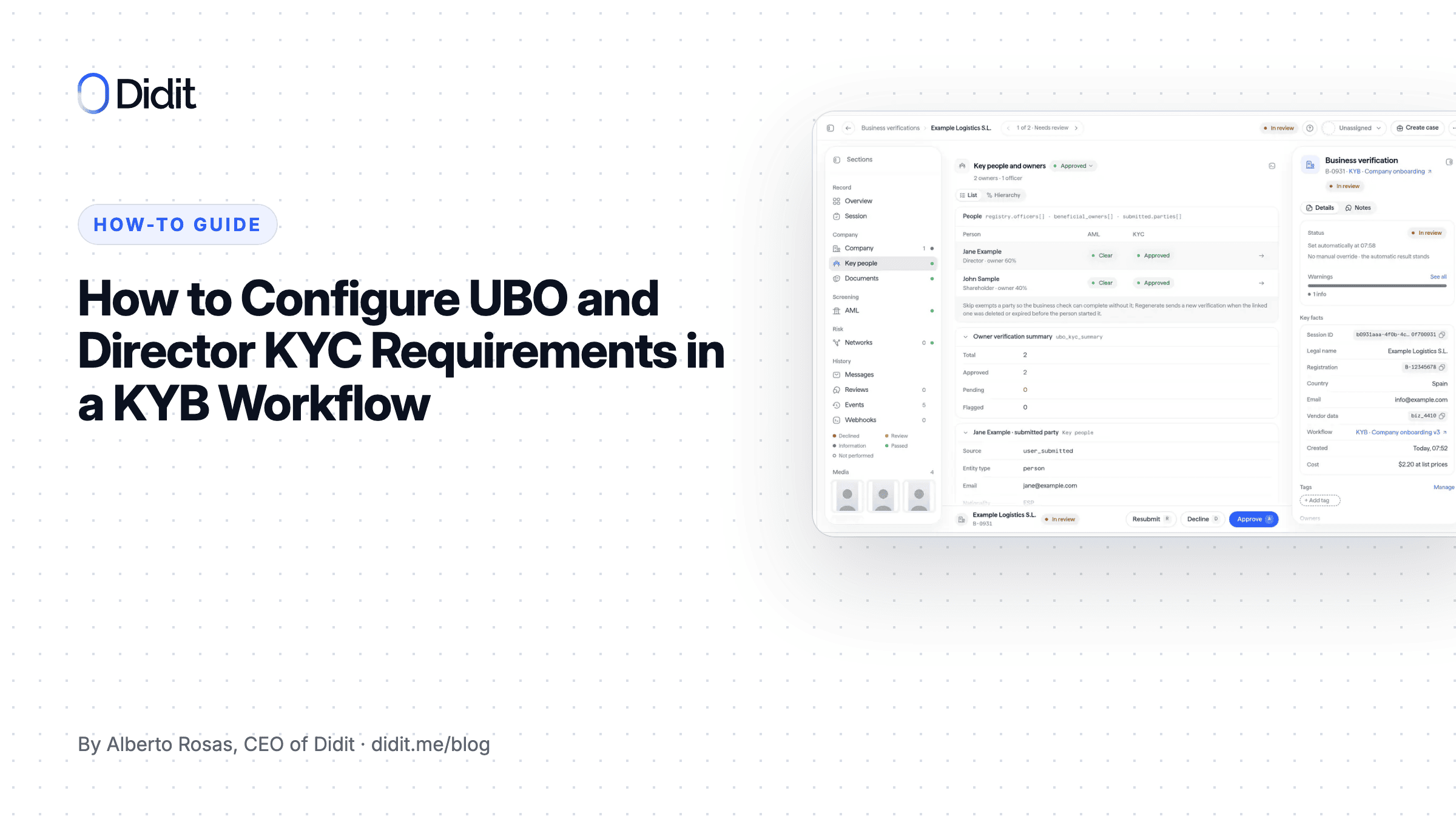
The role rows live under Workflows > [KYB workflow] > Key People. The percentage that limits the ubo row lives under Risk.
What requires_verification means for a director, a UBO and an authorized signatory
Every submitted party carries a requires_verification flag. It answers one question: does this person need a completed individual KYC before the parent KYB session can reach Approved? true means KYC must finish for this person before the session can approve. false means the person is identified and AML-screened but no individual KYC gates the session.
Read requires_verification for whether the workflow requires individual KYC. Read is_skipped for whether the party was skipped and excluded from the gate. An applicant can skip when the role permits it, and an analyst can skip a party from the console. Use kyc_session_url and kyc_status to inspect the linked session.
| Role on the party | Documented typical default | What the person goes through |
|---|---|---|
ubo at or above the threshold | KYC required | Child KYC session, plus automatic AML screening |
director | KYC required | Child KYC session, plus AML screening |
shareholder below the threshold | No individual verification | Recorded and AML-screened, no KYC gate |
authorized_signatory | Optional | KYC only if you require it, and skippable if you allow it |
secretary | Optional | Same as above |
non_executive_director | Optional | Recorded and AML-screened, KYC only when you require it |
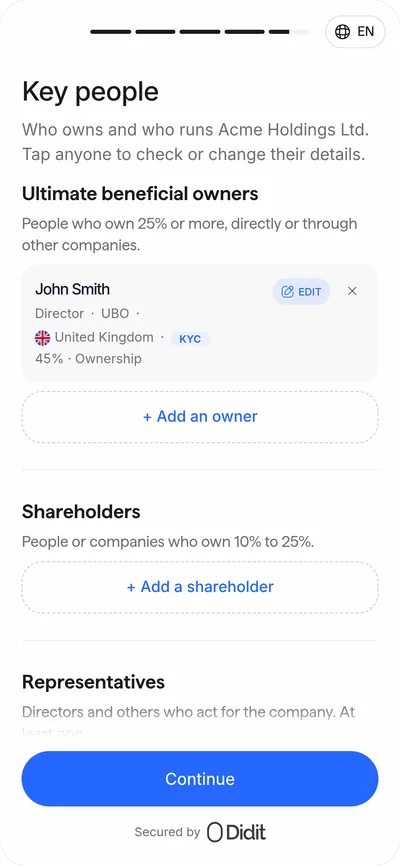
We record directors, representatives, secretaries and authorized signatories as role tags in Key People, alongside UBOs and shareholders. A person tagged as founder, director and shareholder has all three roles on one record. The shareholder role can carry its own ownership and voting percentages.
Prerequisites
- A Didit organization with KYB enabled, created at business.didit.me.
- An API key from Developer Settings > API Keys.
- A KYC workflow ready for the roles that need individual verification, so you can map it per role.
- A webhook endpoint reachable from the internet, or a polling loop, so you receive the decision.
- Your UBO threshold in writing. Set the threshold in Workflows > [KYB workflow] > Risk > UBO threshold. Use the threshold and control criteria your compliance team has approved for this workflow. The setting is per workflow, so a regulated product and a low-risk product can differ.
How to configure UBO and director KYC requirements, step by step
Create or open the workflow. Go to Workflows > Create workflow and choose Business Verification as the workflow type. Enable Company registry lookup and Key People for this workflow. Add Company AML and Documents as needed.
Set the ownership threshold. Open Workflows > [KYB workflow] > Risk > UBO threshold and enter the percentage. Below the threshold, a UBO or shareholder role does not trigger individual KYC. At or above the threshold, a UBO or shareholder role that requires KYC triggers a child KYC session for a natural person unless an allowed skip is used.
Open the role settings at Workflows > [KYB workflow] > Key People. The full taxonomy is listed there: ownership roles
ubo,shareholder,beneficiary,settlor,protector,investor; governance rolesdirector,non_executive_director,chairman,secretary,representative,authorized_signatory,trustee,company_officer,founder,legal_advisor,other.Configure every role you keep. Four decisions per role: enabled or disabled, KYC required or not, which KYC workflow it maps to, and whether the end user may skip it. If your policy requires KYC for UBOs and directors, set both roles to KYC required, map each to its intended KYC workflow, and turn off skipping. Configure other roles according to your policy.
Decide nested KYB. Enable nested KYB when your workflow needs a child KYB session for a corporate UBO. The child result feeds back into the parent.
Add custom fields if you need them. Add custom fields for people or companies on the KYB workflow, such as a tax-residency field for people. The decision returns these values in
custom_fieldson each party.Save the workflow and copy the
workflow_id. Confirm the workflow type is KYB, otherwise the session runs KYC steps. Confirm that each intended role is enabled before you start a test session.Create the session with the call below and deliver the returned
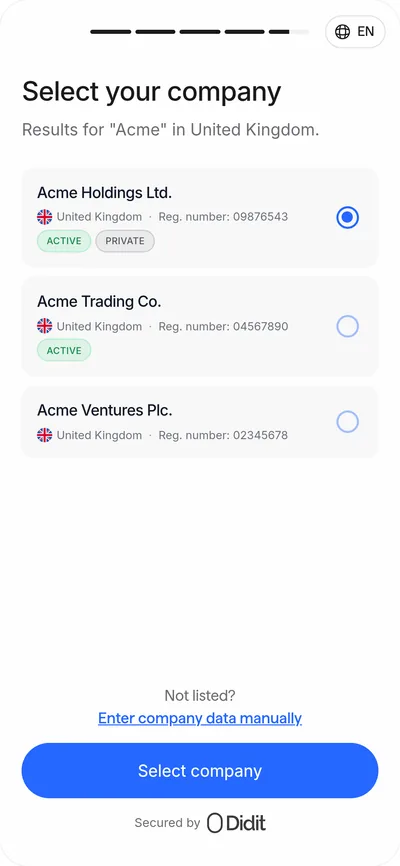
urlto the business contact.Let the business admin submit the people. If you enable registry prefill, we add available people while the ownership report is pending. If you leave it disabled, the applicant enters people manually and late registry results do not populate the form. The applicant can still edit, add or remove parties before submitting. Before submission, late registry results fill untouched fields and add missing people. After submission, late results remain registry evidence: they create no extra child sessions and do not change the submitted list. On submission we check each party's roles against your settings and start the child sessions.
Follow the status. While any required child session is in progress, the Key People feature reads
Awaiting User. When every child finishes it aggregates toApproved,DeclinedorIn Review.
Create a KYB session with the API
The snippet requires you to substitute your own API key and workflow id.
curl -X POST https://verification.didit.me/v3/session/ \
  -H "x-api-key: YOUR_API_KEY" \
  -H "Content-Type: application/json" \
  -d '{
    "workflow_id": "YOUR_KYB_WORKFLOW_ID",
    "vendor_data": "biz-acme-001"
  }'
The response returns session_id, session_number and url. The url is the hosted flow you send to the company admin. Add callback and metadata if you want a return URL and your own reporting tags attached to the session.
Follow the session with webhooks
Subscribe to status.updated at POST /v3/webhook/destinations/ with webhook_version: "v3". Business sessions carry session_kind: "business" in the event, so filter on that field and route the event to your KYB handler. Verify the X-Signature-V2 signature before you trust the payload, then read key_people_checks[] in the decision to see each party, its roles and the linked KYC status. You only need the decision call below when you did not subscribe to webhooks or you want the payload again later.
Read the decision
curl https://verification.didit.me/v3/session/$SESSION_ID/decision/ \
  -H "x-api-key: $DIDIT_API_KEY"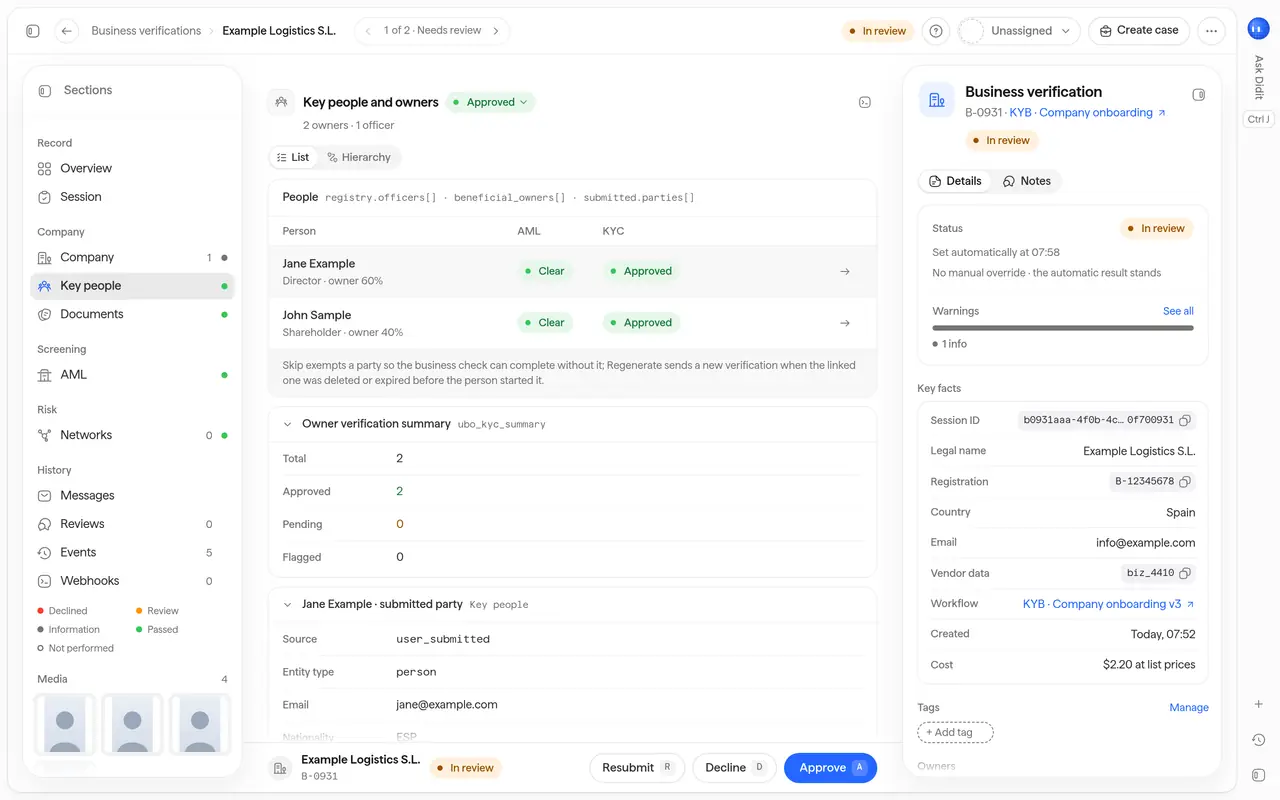
Expected output
The decision carries key_people_checks[] split into two buckets, registry for what the provider disclosed and submitted for what the business admin confirmed, plus a ubo_kyc_summary rollup of UBO KYC progress. A party that holds two roles looks like this, using the documented shape:
{
  "entity_type": "person",
  "roles": [
    { "role": "director", "ownership_percent": null, "voting_percent": null },
    { "role": "shareholder", "ownership_percent": 15.0, "voting_percent": 15.0 }
  ],
  "kyc_status": "Approved",
  "kyc_session_url": "https://verify.didit.me/..."
}
Each party also carries requires_verification and is_skipped. kyc_status is Approved, Declined or Pending, and kyc_session_url is the child session the person is working through.
Inputs and outputs
| Input | What we do | Output |
|---|---|---|
| Party with one or more roles | Check each role against the workflow role settings | roles[] on the party |
| Person or corporate party holding a role that requires KYC | Record whether individual KYC is required for that party | requires_verification |
| Natural-person UBO or shareholder at or above the threshold whose role requires KYC and who has not skipped it | Start a child User Verification session | kyc_session_url, kyc_status |
| Owner below the threshold | Record the party and evaluate any other roles separately. | No child KYC triggered by the ownership role. |
| Skippable role and the applicant skips it, or an analyst skips from the console | Keep the party for audit, exclude it from the gate | is_skipped: true |
| Corporate UBO with nested KYB enabled | Start a child KYB sub-session under the same process | Result aggregated back into the parent |
| Every identified person | Screen the person against AML watchlists | Person hits under aml_screenings[] |
Natural-person and corporate shareholders
A shareholder can be a natural person or a company. For a natural person we record the ownership or voting percentage on the role, and when the percentage is at or above the workflow threshold the party goes through the verification the role requires. For a corporate shareholder we record the company name, registration number, ownership percentage and country of incorporation, then trace the chain down to the natural persons behind it.
Effective ownership through a chain is the product of the percentages along the chain. In the documented three-layer example, Acme Holdings Ltd holds 60% of Acme Corp and Jane Doe holds 75% of Acme Holdings Ltd, so her effective ownership of Acme Corp is 60% x 75% = 45%. John Smith holds 40% directly. Against a hypothetical workflow threshold of 25% both are UBOs. Against a threshold of 50% neither meets the cut, and the workflow can flag or route the case for review.
Failure cases and recovery
| Scenario | What you see | Recovery |
|---|---|---|
| Invalid workflow id | 400 Bad Request | Fix the workflow_id and retry |
| KYC workflow passed instead of KYB | Session created but it runs KYC steps | Check the workflow's type is KYB and recreate the session |
| Company country outside the workflow's allowed countries | KYB_COUNTRY_RESTRICTED warning | Check the company's country against the workflow's approved country allowlist. Correct the country if it was entered incorrectly. |
| Registry provider outage | 502 with kyb_registry_provider_unavailable, not billed | The hosted flow offers the business manual company entry instead of a retry-only error |
| Rate limit | 429 with a Retry-After header | Honour the header before retrying |
| Child KYC declined | The declined child contributes to the Key People outcome | If you resubmit that child's KYC session, Key People returns to Awaiting User and re-aggregates when the child finishes |
| Child session deleted or link expired before the person started | The child cannot be resubmitted | POST /v3/session/{session_id}/kyb/parties/{party_uuid}/regenerate/ to issue a new link on the same party |
| One person needs re-verification | Key People and Registry Check cannot be resubmitted directly | Resubmit that person's individual child KYC session |
Paid steps and review boundaries
- Registry retrieval: priced by country and data tier, from $2.00 per company. Lite provides core company fields, including the tax number where available. The Shareholders and UBOs tiers add the ownership report.
- Standalone company search: a successful standalone search using a paid company-data source costs $0.50 per request. Retrieval is billed separately. Empty results, failed searches and results served only by other sources are not charged.
- Key People extraction: free. The form itself has no separate fee.
- Company AML costs $0.20 per completed check. Person AML costs $0.20 per person screened and is billed separately from KYC. Skipping KYC does not skip person AML.
- Linked KYC: $0.33 per person for the full ID check, billed separately from the registry step.
- KYB documents: $0.20 per document-collection step, regardless of how many files are uploaded in that step.
The listed-company declaration is off by default. If enabled, it still requires at least one director or other person who manages the company. The default outcome is review, and we do not verify the declaration against a stock exchange. The workflow can flag or route the case for review when no UBO meets the threshold. An analyst can skip a party from the console, and skipped parties stay in the response for audit. In Review means an analyst decides and you receive another webhook when it resolves.
Worked cost example
Assume a completed registry retrieval at the published $2.00 starting price. The company has one director and two UBOs at 30% each, all three are required to complete KYC, and the workflow runs one document-collection step. The director holds no other role, so the director role is the only reason that person needs KYC:
- Registry retrieval: $2.00, the published starting price for one completed retrieval
- Company AML: $0.20
- Person AML: 3 x $0.20 = $0.60
- Linked KYC: 3 x $0.33 = $0.99
- KYB documents step: 1 x $0.20 = $0.20
- Illustrative total: $2.00 + $0.20 + $0.60 + $0.99 + $0.20 = $3.99
Now change one setting. Mark director skippable and let the applicant skip the director. The KYC line drops to 2 x $0.33 = $0.66 and the illustrative total becomes $2.00 + $0.20 + $0.60 + $0.66 + $0.20 = $3.66, because person AML is billed per person screened and skipping KYC does not skip it. Actual registry pricing depends on the country and the tier delivered. A pending report is not a completed registry check.
Sources
- Didit docs: KYB Key People API, UBOs and officers
- Didit docs: UBO API, beneficial ownership extraction and thresholds
- Didit docs: KYB officers, representatives and the requires-verification flag
- Didit docs: Company Registry API and retrieved fields
- Didit docs: KYB quickstart
- Didit docs: KYB integration guide, failure modes and child KYC
- Didit docs: KYB decision response schema
- Didit docs: standalone KYB Registry API, company search and select
- Didit docs: pricing and billing rules
- Didit pricing page and cost estimator
- Didit MCP server setup
- Didit pricing as JSON, the live price feed
Next step: start in the sandbox at business.didit.me with no sales call, create a KYB workflow, set the per-role requirements, and push one test company through the flow to see the child KYC sessions appear.
Try it
Try this in the sandbox
Run the check this guide describes, free.
The product this post is about, taken from its topic. Run it free in the sandbox.
Author
Alberto Rosas
Co-founder and CEO

Keep reading
Other guides in the same topic.
 How to Add Identity Verification to Okta with Didit (2026)
Didit connects to Okta’s BYO IDV profile through an OpenID Connect bridge using PAR, PKCE S256 and verified claims. Full ID checks cost $0.33 at list price. The request profile is strict.
Alberto RosasNov 26, 2026 Didit Proof of Address API: cURL Tutorial With Name Matching
POST a utility bill to /v3/poa/ with your x-api-key plus the expected address and names. Set a client timeout of at least 45 seconds, read poa.status and poa.warnings, and budget $0.20 at list price per completed live check.
Alberto RosasNov 26, 2026 Didit ID Verification API: cURL, File Limits, Dual-Sided Docs
Send an uncropped front image and, for dual-sided IDs, a back image to Didit's standalone API. The limit is 5 MB per file. Completed live calls cost $0.20 at list price.
Alberto RosasNov 26, 2026Questions
Frequently asked questions
What does requires_verification mean in Didit KYB?
In Didit KYB, requires_verification indicates whether the workflow requires individual KYC for a party. true means KYC must complete for that person before the session can approve. false means the person is identified and AML-screened but does not need individual KYC. It is separate from is_skipped, which records that a party was skipped.
How do I require KYC for a director but not for a company secretary?
Open Workflows > [KYB workflow] > Key People and configure the two roles differently. Enable both roles, turn on Requires KYC for director, and leave Requires KYC off for secretary. Whether the end user can skip a role is a separate setting on that same role. We read those settings at submission and only start child sessions for the parties holding roles that require them.
Can one person be both a UBO and a director?
Yes. Each key person record holds a list of roles, each with its own ownership and voting percentages where relevant. A person who is both a UBO and a director appears once, with a ubo role tag and a director role tag on the same record. The ownership percentages sit on the ownership role. The decision returns the roles, kyc_status and kyc_session_url on that one record.
What happens to a shareholder below the UBO threshold?
A shareholder below the workflow threshold is recorded and AML-screened. The ownership role does not trigger individual KYC, but another role on the same person, such as director, can still require it. The threshold is configured per workflow at Workflows > [KYB workflow] > Risk > UBO threshold. Parties at or above it go through the verification the role requires, subject to the role settings and any skip.
Can the end user skip a UBO's KYC?
Only when the role is configured as skippable. The end user then sees a skip verification option and the party comes back with is_skipped: true, which keeps it in the response for audit and out of the verification gate. An analyst can also skip a party from the console. Person AML still runs and is still billed.
How much does a KYB with three key people cost?
Assume a completed registry retrieval at the published $2.00 starting price: $2.00 plus $0.20 company AML plus 3 x $0.20 person AML plus 3 x $0.33 linked KYC plus $0.20 for the document step gives an illustrative $3.99. Actual registry pricing depends on the country and the tier delivered. A pending report is not a completed registry check.
Which registry tier should I buy, Lite, Shareholders or UBOs?
Buy Lite when you only need core company fields such as name, registration number, status, company type, incorporation date, registered address and the tax number where available. Choose Shareholders for registered shareholder data and UBOs for beneficial-owner data. When registry prefill is enabled, we use available registry parties to prefill the Key People form. What a tier returns depends on the registry. Retrieval is priced per country and tier, from $2.00.
How do I re-verify one director without restarting the whole KYB?
Key People and Registry Check cannot be resubmitted directly, so resubmit that person's individual child KYC session. The parent Key People feature returns to Awaiting User and re-aggregates when the child finishes. If the child session was deleted, or the link expired before the person started it, regenerate the party at POST /v3/session/{session_id}/kyb/parties/{party_uuid}/regenerate/.
Is nested KYB for corporate UBOs on by default?
No. Nested KYB is off by default and you opt in per workflow. Once enabled, each corporate UBO starts its own child KYB sub-session that runs the same process as the top level, and the child result feeds back into the parent.
Does the Key People form cost anything on its own?
No. Key People extraction is free and the form has no separate fee. You pay for registry retrieval by country and tier, company AML at $0.20 per completed check, person AML at $0.20 per person screened, linked KYC at $0.33 per person and $0.20 per document-collection step.
What happens when no owner reaches the UBO threshold?
The workflow can flag or route the case for review when no UBO meets the threshold. The listed-company declaration is off by default, and if enabled it still requires at least one director or other person who manages the company. The default outcome is review, and we do not verify the declaration against a stock exchange.
Does skipping a person's KYC remove them from the decision?
No. Skipped parties stay in the decision response for audit and are simply excluded from the verification gate. is_skipped records the skip, while requires_verification records whether the workflow required individual KYC for that party in the first place.
Compliance built in
Audited, certified and attested.
We hold the certifications and build each country's rules into your flows, so you can launch anywhere without worrying. Security and Compliance center
- Regulation encoded into your flows
Tell us what you do and where. Didit lists the rules that apply to you, with sources, and builds the checks each country needs into one workflow.
- Ready for AMLR
Every requirement of the new EU anti-money laundering rules, from checking customers to human review, is already covered by a Didit check.
- Tested in Spain's Treasury sandbox
Spain's Treasury published its supervised sandbox report on Didit's NFC plus active liveness onboarding; SEPBLAC took part and valued the added measures positively.
- Audited, not self-declared
iBeta Level 1 and Level 2. Liveness tested under ISO/IEC 30107-3.
Your obligations · 3 regions
 SOC 2 Type 2
 ISO 27001
 iBeta Level 1 and Level 2
 EU regulator attestation
 FSM youth protection
 GDPR
 EBA remote onboarding
 MiCA compatible
 FIDO Alliance member
- AMLREU AML Regulation ready
Integration · Didit MCP
Run Didit from your own AI agent
Connect Didit to Claude, Cursor, VS Code or ChatGPT and just ask in plain words. Your agent can do anything you can do in the console, with the same permissions you have.
 Add to Claude
 ChatGPT
 Cursor
- Build workflowsDescribe the checks you need. The agent creates and publishes the flow.
- Run investigationsAsk why a session was declined, review cases, search people and companies.
- Change rulesCreate payment rules, test them on past data and switch them on.
- Pull reportsAsk for numbers, exports or the audit log.
Didit Academy