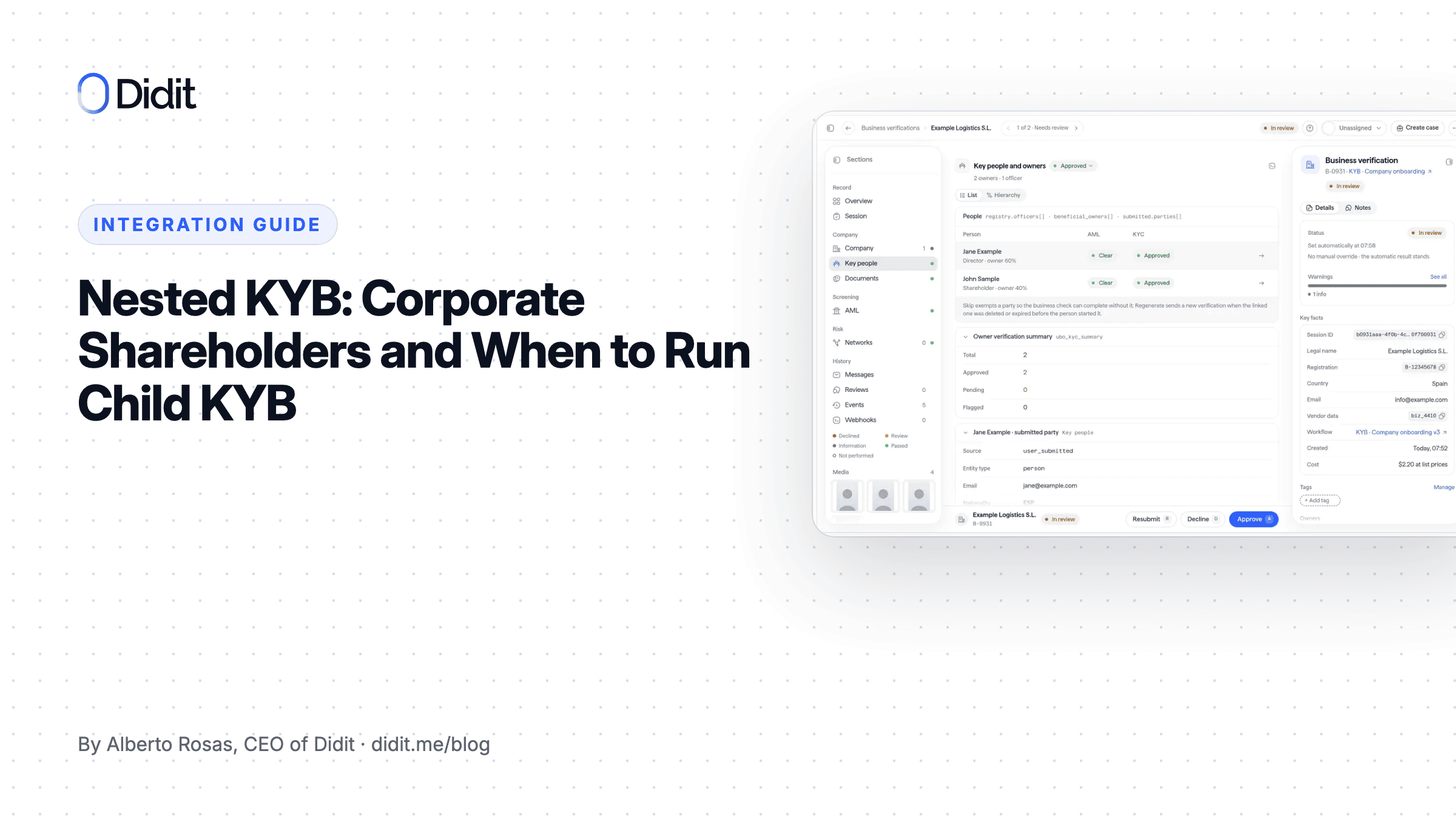
Nested KYB: Corporate Shareholders and When to Run Child KYB
Nested KYB is off by default. Enabled per workflow, we start a child Business Verification (KYB) sub-session for each qualifying corporate UBO, and the child's result feeds the parent.
 Alberto RosasCo-founder and CEO
Contents
In this guide
Jump to the part you need.
Nested KYB fits teams onboarding businesses with corporate owners. We record the shareholder’s company name and country of incorporation, which are required, and its registration number and ownership percentage when supplied. When you enable nested KYB for corporate UBOs, we start a child Business Verification (KYB) sub-session for each qualifying corporate UBO. The child's result feeds back into the parent. The setting is off by default. Registry retrieval starts at $2.00 per company and varies by country and data tier.
Last updated: November 26, 2026. Prices checked against the live Didit price feed on November 26, 2026.
| Item | Detail |
|---|---|
| Fields recorded per corporate shareholder | The company name and country of incorporation are required. We record the registration number, ownership percentage and voting percentage when the applicant supplies them. Ownership and voting percentages are optional per-role fields. |
| Nested KYB default | Off. Opt in per workflow |
| Where you switch it on | Business Console, Workflows → [KYB workflow] → Key People |
| What a corporate party starts | We start a child Business Verification (KYB) sub-session for a submitted corporate UBO when nested KYB is enabled, the party meets the ownership threshold, its role requires verification, and the applicant has not used a permitted skip. |
| What a person party starts | We start a child User Verification (KYC) session when the role requires it, the applicant has not used a permitted skip, and the party meets the ownership threshold if it is a UBO or shareholder. |
| Below the ownership threshold | UBOs and shareholders below the threshold do not trigger individual verification, even when the role would otherwise require it. At or above the threshold, the workflow still applies role settings, permitted skips and the nested KYB setting. |
| Parent status while children run | Awaiting User on the Key People feature |
| Registry price | Registry retrieval starts at $2.00 per company and varies by country and data tier. When completed, company AML costs $0.20 per check, KYB document collection $0.20 per step, linked full KYC $0.33 per check and person AML $0.20 per person. The Key People form has no separate fee. |
| Session endpoint | POST https://verification.didit.me/v3/session/ with a KYB workflow_id |
Start free in the sandbox at https://business.didit.me/, no sales call needed. Developers can connect Didit to an AI assistant through the Didit MCP setup page.
What we record for a corporate shareholder
We set entity_type to company automatically for a corporate party. The party carries the roles you assign, the contact fields and the ownership figures used for the threshold test and for effective ownership arithmetic.
| Field | Required | What it does |
|---|---|---|
company_name | Yes | Legal name of the corporate shareholder |
registration_number | Optional | Company registration identifier, when provided |
| Country of incorporation | Yes | Country where the shareholder company is incorporated |
ownership_percent | Optional, per role | Economic share held by the corporate shareholder |
voting_percent | Optional, per role | Voting share, which can differ with dual-class shares or preferred equity |
role | Yes | One or more roles, for example shareholder and ubo |
email | Yes | Contact address held on the party record |
We keep economic and voting rights apart on purpose. The two can diverge with dual-class shares or preferred equity, and the workflow can test either figure against its threshold. Both land on the party in the decision response, so a rule that only looks at economic ownership can miss a control case.
The product this guide configures is Business Verification (KYB), and every module price is on the Didit pricing page.
Nested KYB: what the child session is and when to run it
When you enable nested KYB for corporate UBOs, we start a child Business Verification (KYB) sub-session for each qualifying corporate UBO. The child's result feeds back into the parent.
| Case | What happens |
|---|---|
| Record the company as a party | The corporate shareholder is stored on the party record with its name and country, plus registration number and ownership percentage when supplied. No child session starts. |
| Start child KYB for a qualifying corporate UBO | Nested KYB is on, the role requires verification, no permitted skip was used and the corporate party meets the workflow threshold, so we start a child Business Verification sub-session. |
| Start child KYC for a person whose role requires it | The role is enabled and marked as requiring verification, no permitted skip was used, and the party meets the ownership threshold if it is a UBO or shareholder, so we start a child User Verification session with the role-specific KYC workflow or the default. |
| Record a below-threshold shareholder | The party is recorded, and no individual verification starts even if its role would otherwise require it. |
The setting is off by default and you opt in per workflow. Enable nested KYB when your onboarding policy calls for independent verification of an intermediate company. Check that its country is allowed in your workflow and that the registry offers the data tier you need. A child session is a second company verification, so it changes your conversion path. A completed child check can add to the total.
Effective ownership through a chain is computed by multiplying the percentages along the path. In the worked example below, Acme Corp is owned 60% by Acme Holdings Ltd, which is owned 75% by Jane Doe, and John Smith holds 40% of Acme Corp directly.
- Jane Doe: 60% × 75% = 45% effective ownership of Acme Corp.
- John Smith: 40% effective ownership of Acme Corp.
Both meet the example workflow's 25% economic ownership threshold. At a 50% threshold neither named person reaches 50%, and the workflow can flag or route that result for review instead of approving it silently.
How role settings decide which child sessions start
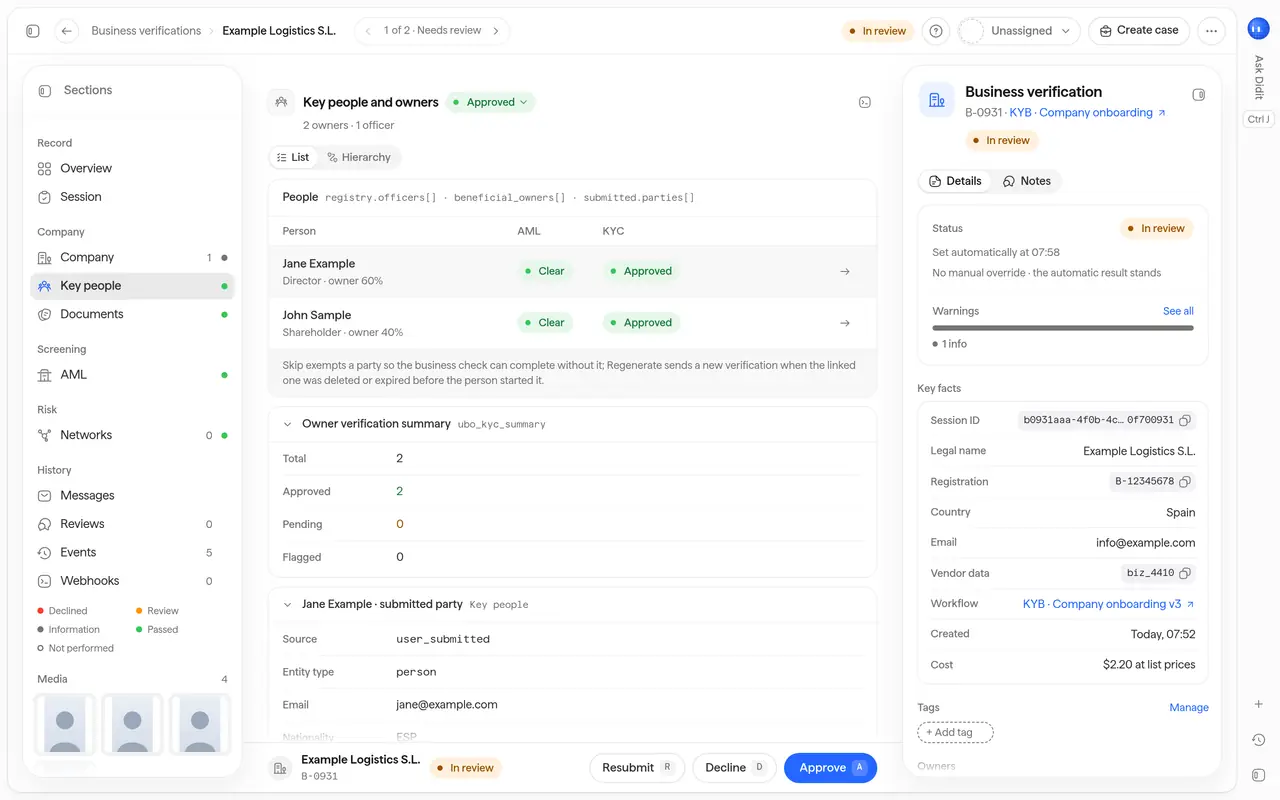
Every role is configured per KYB workflow. You control four things per role: whether it is enabled, whether it requires verification, which KYC workflow that role maps to, and whether the end user may skip it.
Enable nested KYB for corporate UBOs in Key People. For person roles that require verification, use the role-specific or default KYC workflow and configure whether applicants may skip verification. UBOs and shareholders below the configured ownership threshold do not trigger individual verification.
- For person parties, we start a child User Verification (KYC) session when the role requires verification, the applicant has not used a permitted skip, and the party meets the ownership threshold if it is a UBO or shareholder. The session uses the role-specific KYC workflow or the default.
- For a submitted corporate UBO, we start a child Business Verification (KYB) sub-session when nested KYB is enabled, the party meets the ownership threshold, its role requires verification, and the applicant has not used a permitted skip.
- Skippable roles show the end user a skip verification option; we record skipped parties and they do not block the parent.
- UBOs and shareholders below the workflow's ownership threshold do not trigger individual verification, even if the role would otherwise require it.
Person child sessions start with the person's declared name, nationality and date of birth as expected details, so the ID check inside the child compares the document against what the business already told you. When Document AI prefill for Key People is configured, details extracted in the business flow can fill missing expected details for the child KYC session.
Prerequisites
| Requirement | Detail |
|---|---|
| Plan | Free includes $10 of monthly credit for eligible organizations; Growth $99 a month; Scale $299 a month; Enterprise from $15,000 a year. Sandbox testing is free and unlimited on every plan. |
| API client | An application API key sent as x-api-key. Reading a decision needs the read:sessions privilege. |
| Workflow | A workflow whose workflow_type is kyb, with its stable UUID from /v3/workflows/. |
| Console access | Permission to edit the KYB workflow, because nested KYB and thresholds live in the workflow, not in the request. |
| Roles configured | For person roles, enable the role, mark it as requiring verification, map it to a KYC workflow and decide whether applicants may skip. For corporate UBOs, enable nested KYB in Key People. |
| Webhook (recommended) | A destination registered with POST /v3/webhook/destinations/ and webhook_version: "v3". |
Steps to enable nested KYB and run the first parent session
- Configure the roles. In the Business Console open Workflows → [KYB workflow] → Key People. For each person role that should be verified, enable it, mark it as requiring verification, map it to the KYC workflow you want for that role and decide whether the end user can skip it. For corporate UBOs, enable nested KYB in the same Key People settings.
- Set the ownership threshold. Go to Workflows → [KYB workflow] → Risk → UBO threshold and enter the percentage your policy uses. UBOs and shareholders below the threshold do not trigger individual verification. At or above the threshold, the workflow still applies role settings, permitted skips and the nested KYB setting.
- Confirm nested KYB is on. The option is off by default, so a workflow that has never had it enabled records corporate parties without starting child KYB sub-sessions.
- Create the parent session. Send the KYB workflow id and your business identifier to the unified session endpoint. There is no separate KYB endpoint; the workflow type decides the session kind.
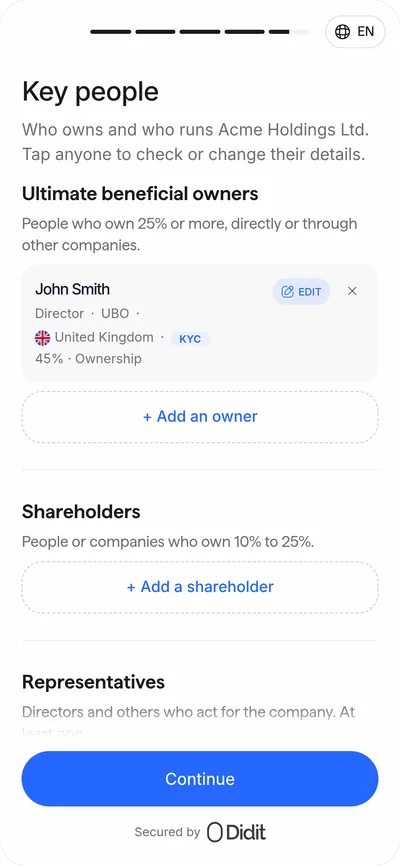
Replacecurl -X POST https://verification.didit.me/v3/session/ \ -H "x-api-key: $DIDIT_API_KEY" \ -H "Content-Type: application/json" \ -d '{ "workflow_id": "YOUR_KYB_WORKFLOW_UUID", "vendor_data": "biz-acme", "callback": "https://myapp.com/kyb/return", "metadata": {"plan": "growth", "country": "GBR"} }'YOUR_KYB_WORKFLOW_UUIDwith the UUID of your KYB workflow before you run the command. The response gives yousession_id,urlandsession_token. If you already know the company, useexpected_detailsto prefill the search. The hosted flow locks the country and applicable state, and the applicant can edit the company name and registration number. - Deliver the URL and let the business submit its people. The applicant confirms the registry match, then adds the key people. The applicant adds the corporate shareholder with its required company name, country of incorporation, email and at least one role. The applicant can also supply a registration number and per-role ownership and voting percentages. Registry prefill helps but never blocks the form.
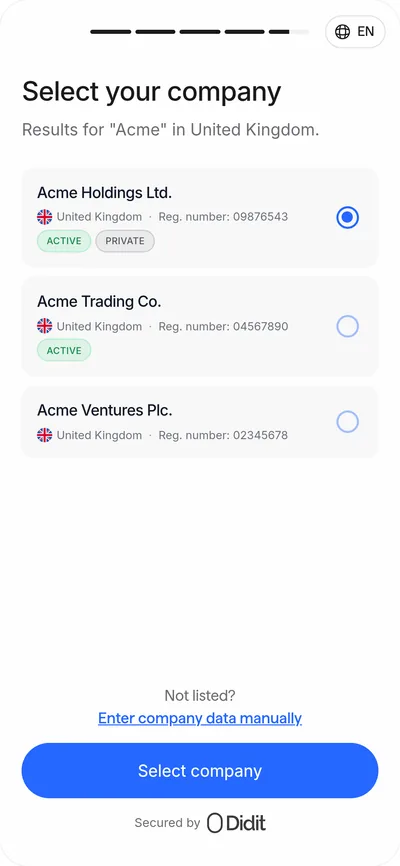
The applicant picks the company from registry results, then confirms the data before the Key People step. - Follow the webhooks. Subscribe to
status.updatedand branch onsession_kind === "business". Verify theX-Signature-V2header, de-dupe onevent_idand respond within 5 seconds. - Read the decision and branch. Fetch the decision and switch on
decision.status.
Handlecurl https://verification.didit.me/v3/session/$SESSION_ID/decision/ \ -H "x-api-key: $DIDIT_API_KEY"Approved,Declined,In Review,ResubmittedandAwaiting User. Handle the top-leveldecision.statusseparately. In the Key People feature,Awaiting Userindicates that a required child session is still in progress.
If you keep your own front end instead of the hosted Key People step, the API documentation shows how to create a party draft and how to submit parties.
Field and event mapping
| Request or payload path | Carries | Notes |
|---|---|---|
workflow_id | Parent KYB workflow UUID | The workflow's workflow_type must be kyb |
expected_details.company_name, registry_country, registration_number | Registry pre-fill | registry_country is ISO 3166-1 alpha-2 and can include a state such as US-CA |
key_people_checks[].submitted.parties[] | What the business confirmed, including corporate parties | Corporate party carries company_name, country, roles and entity_type: company. We record the registration number and per-role ownership and voting percentages when the applicant supplies them. |
key_people_checks[].registry.beneficial_owners[] | What the registry disclosed | Evidence, not the submitted list |
key_people_checks[].ubo_kyc_summary | Rollup of UBO KYC progress | Read it beside the per-party results |
status.updated with session_kind: "business" | Parent progress | The event to follow for KYB |
data.updated with session_kind: "business" | A reviewer edited registry data or Key People in the console | Not sent for document uploads or Key People submissions |
business.status.updated, business.data.updated | Changes to a linked Business entity | The entity bound to the session through vendor_data |
Reconciling registry owners with submitted parties
The decision keeps two buckets side by side. key_people_checks[].registry.beneficial_owners[] holds what the registry disclosed. key_people_checks[].submitted.parties[] holds what the business confirmed and submitted, including corporate parties.
Registry data that arrives after submission remains part of the registry evidence. It does not rewrite the submitted parties, and it does not automatically create additional child verification sessions. Compare the two buckets and let the reviewer see both, rather than treating the registry list as an override of what the business declared.
Test with sandbox data
The sandbox is free and unlimited on every plan, so build the whole chain there before you touch live traffic. If your application is a sandbox application you can pass sandbox_scenario on create, using a slug from GET /v1/sandbox/scenarios/, to reproduce a specific outcome. The parameter is rejected with a 400 on live applications.
Expected success: submit an eligible corporate UBO in the parent Key People step, verify that its child KYB starts, and complete that child and any required person KYC checks with approved outcomes. Then check the parent Key People outcome and the submitted party data in the decision. Repeat the run with nested KYB off, then with a shareholder below the configured threshold, and confirm that no child session starts in either case.
| Symptom | Cause | Fix |
|---|---|---|
400 Bad Request on create | Invalid workflow_id | Re-read the UUID from /v3/workflows/ for the right application |
| Session created but runs KYC steps | Wrong workflow type | Check the workflow's workflow_type is kyb |
403 on the decision | Key lacks read:sessions | Issue a key with the read privilege |
404 on the decision | Wrong session id, or a session from another application | Use the session_id from the create response and confirm the API key belongs to the application that created the session |
| No child KYB for a corporate party | Nested KYB is off, the party is not a corporate UBO that meets the workflow threshold, or the role is not configured as required | Check Workflows → [KYB workflow] → Key People and the UBO threshold |
KYB_COUNTRY_RESTRICTED warning | Company country outside the workflow's allowed countries | Check whether the company's country is allowed by the workflow and whether the registry offers the data tier you need. |
502 with kyb_registry_provider_unavailable | Registry provider outage during company search | Not billed. In the hosted flow the business is offered manual company entry instead of a retry-only error |
429 | Rate limit | Honor the Retry-After header |
A person's child KYC link that expired before the person started it, or a child KYC session that was deleted, is reissued by regenerating the party with POST /v3/session/{session_id}/kyb/parties/{party_uuid}/regenerate/ rather than recreating the parent. To re-verify a person on an existing child KYC session, resubmit that session, and the parent Key People status returns to Awaiting User until it finishes again.
Turning nested KYB off
Nested KYB is an opt-in workflow setting, so you turn it off in Workflows → [KYB workflow] → Key People. Disabling it removes the child KYB trigger for that workflow. The company name and country of incorporation are required, and we record the registration number and ownership percentage when the applicant supplies them. Corporate parties still count toward the ownership picture; they are simply not independently verified.
What it costs at both ends
Registry retrieval starts at $2.00 per company and varies by country and data tier. When completed, company AML costs $0.20 per check, KYB document collection costs $0.20 per step, linked full KYC costs $0.33 per check and person AML costs $0.20 per person. The Key People form has no separate fee.
What each session runs is decided by your workflow: the child follows the same Business Verification process as the parent, runs the configured checks and feeds its result back into the parent. Estimate parent and child registry retrieval separately by country and data tier. Registry billing uses the tier actually delivered. Add the separately priced checks each session completes.
The calculation below is an illustrative list-price scenario. It assumes both registry retrievals are available at the $2.00 starting price and it includes only the listed completed checks.
- Parent, Acme Corp: registry $2.00 + company AML $0.20 + one KYB document step $0.20 = $2.40.
- Child, Acme Holdings Ltd: registry $2.00 + company AML $0.20 = $2.20.
- Jane Doe, submitted in the parent Key People step and verified by a child KYC: $0.33 + person AML $0.20 = $0.53.
- John Smith, submitted in the same step and verified by a child KYC: $0.33 + person AML $0.20 = $0.53.
- Total at list price: 2.40 + 2.20 + 0.53 + 0.53 = $5.66 for the whole structure.
- On Growth, 4% off Didit prices: 5.66 × 0.96 = $5.43 rounded. On Scale, 10% off: 5.66 × 0.90 = $5.09 rounded.
Without nesting, the same structure comes to 2.40 + 0.53 + 0.53 = $3.46, but that figure assumes both people are already collected and verified without a child KYB, and the intermediate company is never verified. The $2.20 increment is one assumed registry retrieval plus one completed company AML check for the intermediate company.
Sources
- Didit docs: UBO API and beneficial ownership extraction, including corporate shareholders, nested KYB, thresholds and role routing.
- Didit docs: KYB Key People, role taxonomy, child session dispatch and resubmit behaviour.
- Didit docs: Key people, listed companies, the public-ownership declaration and its outcomes.
- Didit docs: KYB integration guide, session creation, webhooks, decision shape and failure modes.
- Didit docs: Company Registry API, retrieved fields,
expected_detailsprefill and registry statuses. - Didit docs: Create Session API and Retrieve Session API.
- Didit docs: create a party draft and submit parties, for custom front ends.
- Didit docs: regenerate a KYB party, for expired or deleted child KYC links.
- Didit docs: KYB response schema,
key_people_checks. - Didit pricing and the machine-readable price feed, read November 26, 2026.
- Didit Business Verification (KYB) product page, read November 26, 2026.
- Didit MCP setup, read November 26, 2026.
Next step: open your sandbox KYB workflow at https://business.didit.me/, switch on nested KYB in the Key People settings and run one structure with a corporate shareholder before you point live traffic at it. No sales call required.
Try it
Try this in the sandbox
Run the check this guide describes, free.
The product this post is about, taken from its topic. Run it free in the sandbox.
Author
Alberto Rosas
Co-founder and CEO

Keep reading
Other guides in the same topic.
 Didit Face Match Score 30 and Low Similarity Warnings
We score a 1:1 face comparison from 0 to 100 and approve only a score strictly above the default decline threshold of 30. A score at or below it returns Declined with a low-similarity warning. Unscored pairs return a warning.
Alberto RosasNov 26, 2026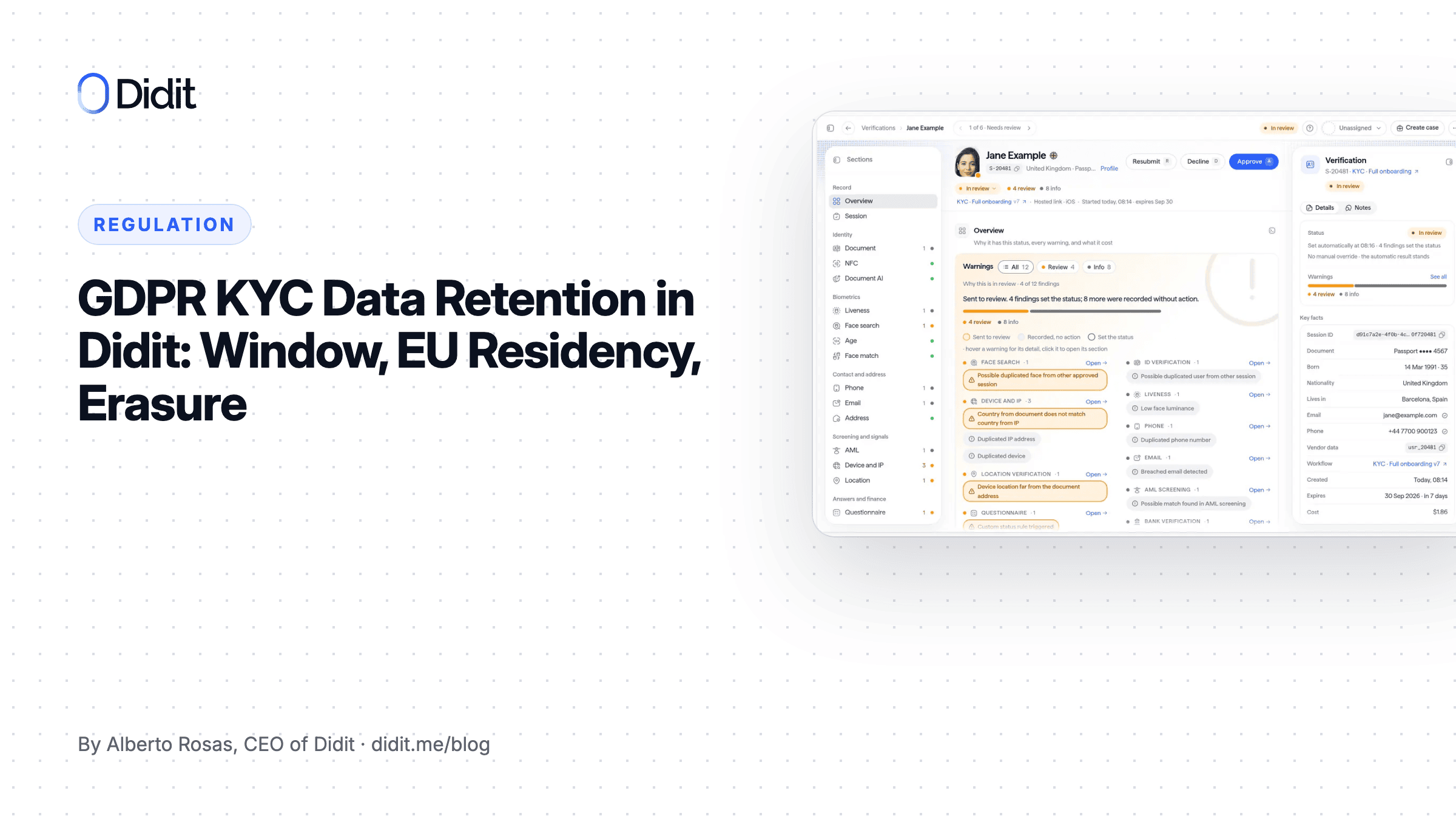 GDPR KYC Data Retention in Didit: Window, EU Residency, Erasure
We act as your processor. You choose the retention window within your plan ceiling, keep verification data in the EU by default, and send an explicit API erasure instruction that no app policy can override.
Alberto RosasNov 26, 2026 Didit KYB API Integration: Sessions, AML and Webhooks (2026)
Create one session with a KYB workflow ID. The workflow type makes it a business session. Send the hosted link, handle the status webhook, then read the decision. KYB from $2.00 per company.
Alberto RosasNov 26, 2026Questions
Frequently asked questions
What is nested KYB for corporate shareholders?
When nested KYB is enabled and a submitted corporate UBO qualifies under the workflow settings, we start a separate Business Verification sub-session for that company. The child follows the same Business Verification process as the parent, runs the configured checks and feeds its result back into the parent. You enable it per workflow in the Key People settings, and it is off by default.
Is nested KYB on by default in Didit?
No. Nested KYB for corporate UBOs is off by default and you opt in per workflow in the Business Console under Workflows → [KYB workflow] → Key People. While the setting is off, corporate parties are still recorded: the company name and country of incorporation are required, and we record the registration number and ownership percentage when the applicant supplies them. They are simply not independently verified.
What data does Didit collect for a corporate shareholder?
We record the company name and the country where the shareholder company is incorporated, both of which are required. We record the company registration identifier and the ownership percentage held by that corporate shareholder when the applicant supplies them. Ownership and voting percentages are optional per-role fields, and the role field is required. The party also carries an email, and we set entity_type to company automatically.
How do I calculate effective ownership through a corporate chain?
Multiply the percentages along the chain. In the worked example, Acme Corp is 60% owned by Acme Holdings Ltd and Acme Holdings Ltd is 75% owned by Jane Doe, so her effective ownership is 60% × 75% = 45%, while John Smith holds 40% of Acme Corp directly. Both meet the example workflow's 25% economic ownership threshold. At a 50% threshold neither named person reaches 50%, and the workflow can flag or route that result for review.
Does a 20% shareholder trigger a KYC session?
Not in the example workflow, which uses a 25% economic ownership threshold. UBOs and shareholders below the configured threshold do not trigger individual verification, even when their role would otherwise require it. You set the threshold in Workflows → [KYB workflow] → Risk → UBO threshold, and it screens UBOs and shareholders, whether they are people or companies.
What status does the parent's Key People feature show while a required child KYB runs?
In the Key People feature, Awaiting User indicates that a required child session is still in progress. When every child finishes, the feature status aggregates to Approved, Declined or In Review based on the outcomes. Handle the top-level decision.status separately, and follow the status.updated webhook filtered to session_kind: "business" for the transitions.
How much does nested KYB cost per corporate layer?
Registry retrieval starts at $2.00 per company and varies by country and data tier. When completed, company AML costs $0.20 per check, KYB document collection costs $0.20 per step, linked full KYC costs $0.33 per check and person AML costs $0.20 per person. The Key People form has no separate fee.
Can I turn nested KYB off after enabling it?
Yes. Nested KYB is an opt-in workflow setting, so you turn it off in Workflows → [KYB workflow] → Key People. Disabling it removes the child KYB trigger for that workflow, and corporate parties are still recorded with their required name and country, and we record the registration number and ownership percentage when the applicant supplies them.
What if the company being verified is listed or owned by a listed company?
A workflow can accept a declaration of public ownership for a company that is listed or owned by a listed company. That option is off by default, and the workflow owner chooses its outcome: send to review, which is the default, leave the Key People outcome unchanged, or decline. The company must still name at least one director or other person who manages it. We do not check the declaration against a stock exchange. If the workflow sends it to review, an analyst can confirm the listing.
How do I reissue an expired child KYC link for a person?
Regenerate the party with POST /v3/session/{session_id}/kyb/parties/{party_uuid}/regenerate/ when the child KYC session was deleted or the link expired before the person started it. That issues a new link on the same party, so do not recreate the parent session. To re-verify a person on an existing child KYC session, resubmit that session rather than regenerating the party, and the parent Key People status returns to Awaiting User until it finishes again. The party regeneration reference covers the request.
Where do I find submitted corporate shareholders in the parent decision?
They arrive in key_people_checks[].submitted.parties[], with the registry-derived owners in key_people_checks[].registry.beneficial_owners[] beside them. Each submitted corporate party carries its company_name, country, roles and entity_type, and we record the registration number and per-role ownership and voting percentages when the applicant supplies them. Read key_people_checks[].ubo_kyc_summary for the rollup of UBO KYC progress.
Which endpoint creates a nested KYB session?
We start the child automatically after the eligible party is submitted. Your integration calls POST https://verification.didit.me/v3/session/ with a KYB workflow_id to create the parent. You confirm it by reading session_kind: "business" in the decision; child sub-sessions follow your role settings and the ownership threshold.
Can an AI assistant help set this up?
Connect an AI assistant using the Didit MCP setup page. The hosted MCP server uses OAuth and is free. Configure nested KYB in the Business Console, create the parent with the REST API and follow its status by webhook.
Compliance built in
Audited, certified and attested.
We hold the certifications and build each country's rules into your flows, so you can launch anywhere without worrying. Security and Compliance center
- Regulation encoded into your flows
Tell us what you do and where. Didit lists the rules that apply to you, with sources, and builds the checks each country needs into one workflow.
- Ready for AMLR
Every requirement of the new EU anti-money laundering rules, from checking customers to human review, is already covered by a Didit check.
- Tested in Spain's Treasury sandbox
Spain's Treasury published its supervised sandbox report on Didit's NFC plus active liveness onboarding; SEPBLAC took part and valued the added measures positively.
- Audited, not self-declared
iBeta Level 1 and Level 2. Liveness tested under ISO/IEC 30107-3.
Your obligations · 3 regions
 SOC 2 Type 2
 ISO 27001
 iBeta Level 1 and Level 2
 EU regulator attestation
 FSM youth protection
 GDPR
 EBA remote onboarding
 MiCA compatible
 FIDO Alliance member
- AMLREU AML Regulation ready
Integration · Didit MCP
Run Didit from your own AI agent
Connect Didit to Claude, Cursor, VS Code or ChatGPT and just ask in plain words. Your agent can do anything you can do in the console, with the same permissions you have.
 Add to Claude
 ChatGPT
 Cursor
- Build workflowsDescribe the checks you need. The agent creates and publishes the flow.
- Run investigationsAsk why a session was declined, review cases, search people and companies.
- Change rulesCreate payment rules, test them on past data and switch them on.
- Pull reportsAsk for numbers, exports or the audit log.
Didit Academy