Verify a User With a National ID Number Without Document Upload
Didit checks a national ID number and a few personal details against the country’s authoritative source. No document upload is required. Data-only sources also require no selfie.
 Alberto RosasCo-founder and CEO
Contents
In this guide
Jump to the part you need.
We built non-document lookup for onboarding flows that need to match a user's typed details against an authoritative record. The user enters a national ID number and the personal details their country requires. Data-only sources require no selfie. Some other sources do. We charge per lookup at a rate that varies by country. A successful lookup confirms a record match and provides no evidence of document authenticity.
Last updated: November 26, 2026. Prices checked against the live Didit price feed on November 26, 2026.
| Question | Answer |
|---|---|
| What is checked | The national ID number and the personal details the country asks for, against the authoritative source for the country the user picks |
| Assurance tier | data_match. No document was inspected, so nothing about a document's authenticity is claimed |
| What the user does | Picks a country, types the fields that country asks for, and takes a selfie only where the source asks for one |
| Endpoints | POST /v3/session/ to start, GET /v3/session/{session_id}/decision/ to read the result |
| Price | Non-document verification has a variable per-lookup price. Check the country entry in the non-document lookup documentation's Coverage and pricing section for the applicable rate. It is not the $0.15 ID document price |
| Document upload | None for the lookup itself. If you enable document fallback, an unsuccessful lookup can send the user to document capture |
| When a lookup does not land | Choose how to handle partial matches, no matches and provider errors for each country. Document fallback requires document capture to be enabled |
| Where the source is named | id_lookup.source on the session payload, in the console and in exports. End users never see it |
Start free in the sandbox at business.didit.me (no sales call). Developers can connect Didit to an AI assistant through the Didit MCP server.
What non-document ID verification is
ID Verification in Didit has three methods, and you choose which ones a country may use. Document capture photographs a passport, ID card, driving licence or residence permit. Wallet sign-in uses a government or bank digital identity such as MitID or BankID. Non-document lookup is a separate method: the user types their national ID number plus a few personal details, and we check those details against a record the country's authoritative source holds. The verification methods documentation records what each method proves.
Every ID Verification result carries an assurance tier derived from the method used. A non-document lookup carries the data_match tier.
| Tier | Value on the session | What it means |
|---|---|---|
| Documentary | documentary | A physical document was captured, read and checked for authenticity |
| Data match | data_match | The details the user gave matched a record held by the source that was queried. No document was inspected |
| Cryptographic | cryptographic | A digital identity provider authenticated the user and signed the attributes it shared |
The tier is admin-facing. It appears on the session payload, in the console and in exports, and end users never see the tier, the price or the name of the source that was queried.
When to use it, and the method we recommend
The outcome you get is a completed session that says whether the typed details matched a record. The lookup itself requires no document upload. If you enable document fallback, an unsuccessful lookup can send the user to document capture. Four situations justify it:
- The user is unlikely to have the physical document with them, for example a national ID card left at home during a remote sign-up.
- You want a record match before you spend a document capture and a biometric on the same person.
- You are onboarding in a market where a national register is the practical source of truth, such as South Africa, Argentina, India or Denmark.
- You are re-checking details you already hold, and a typed match is enough for that step.
Our recommendation is to start with the lookup alone for a country. Add document capture only if you want an unsuccessful lookup to have a route to capture, and then configure on_partial_match, on_no_match and on_provider_error: the documented settings are fallback_to_document, which requires document capture to be enabled for the country. If your policy is to decline a non-match outright, the documented decline example is Denmark's on_no_match set to decline, which ends the session instead of sending the user to capture.
Do not use it where you must be able to say a document was inspected. A lookup cannot support that statement, and the data_match tier is the honest label for what it does support.
Which source is queried for each country
In most supported countries, Didit queries a government register. Some are not, and the difference changes what the match proves, which consent regime the query runs under, and what you can tell a regulator about provenance. The documentation names the exact source per country and never generalises, so read the Source queried column before you enable a country.
| Country | Source queried |
|---|---|
| South Africa | Department of Home Affairs |
| Argentina | RENAPER |
| India | UIDAI |
| Denmark | The CPR register |
| Canada, France, Indonesia, the Netherlands, Norway, Singapore, the United Kingdom, the United States | A credit-bureau, financial-services, utility or residential-records file rather than a state register |
The end user never sees the source name. It is on the session payload (id_lookup.source), in the console and in exports, for you and your auditors.
Prerequisites
- A Didit organization and an API key. The key needs the
read:sessionsprivilege to fetch a decision. - A KYC workflow (User Verification) with an ID Verification step in it. The workflow UUID is what you pass on create.
- The country must offer lookup in the capability catalog your environment reads. The console only shows methods the catalog offers, and a source marked Coming soon is listed but cannot be switched on.
- A decision on fallbacks for partial match, no match and provider error.
- The applicable country lookup rate, read from the Coverage and pricing section of the non-document lookup documentation before you commit to a volume.
- A sandbox application for testing. Sandbox testing is free on every plan.
Configure a national ID lookup and create a session
- Configure Denmark, the lookup-only example. In the console, open the workflow, select the ID Verification node and open Countries. Turn Non-doc lookup on, which writes
id_lookup.enabled, and turn Document capture off for Denmark. Save the country settings. For the optional fallback route instead, turn document capture on and set Additional settings to Offer document capture only as the fallback. South Africa is the selfie example, because its source returns a portrait.
{
  "feature": "OCR",
  "config": {
    "methods": {
      "ZAF": {
        "document": { "enabled": true },
        "id_lookup": {
          "enabled": true,
          "max_attempts": 2,
          "skip_liveness_and_face_match": true,
          "on_partial_match": "fallback_to_document",
          "on_no_match": "fallback_to_document",
          "on_provider_error": "fallback_to_document"
        },
        "wallet": { "enabled": false, "providers": [], "on_failure": "fallback_to_document" }
      },
      "DNK": {
        "document": { "enabled": true },
        "id_lookup": { "enabled": true, "on_no_match": "decline" }
      }
    }
  }
}
The JSON example above is the documented two-country configuration, shown with document capture enabled in both countries. A country where you turn every method off is rejected on save, because that configuration cannot verify anybody.
- Publish the workflow. Save the country settings, then publish. The graph validation runs before publish and flags a Face Match step that no path can give a reference.
- Create a session. Pass the workflow UUID and a stable identifier for the person in
vendor_data. Theexpected_detailsblock is optional. Mismatches surface as decision warnings.
curl -X POST https://verification.didit.me/v3/session/ \
  -H "x-api-key: <API_KEY>" \
  -H "Content-Type: application/json" \
  -d '{
    "workflow_id": "<WORKFLOW_UUID>",
    "vendor_data": "user_8127",
    "callback": "https://app.example.com/kyc/done",
    "expected_details": { "id_country": "ZAF" }
}'- Save the session and read the decision. The create response returns
session_id. Keep it, then call the documented decision endpoint with it to readsession_url, the hosted URL you send the user to. The key must holdread:sessions.
curl https://verification.didit.me/v3/session/<SESSION_ID>/decision/ \
-H "x-api-key: <API_KEY>"- Send the user to
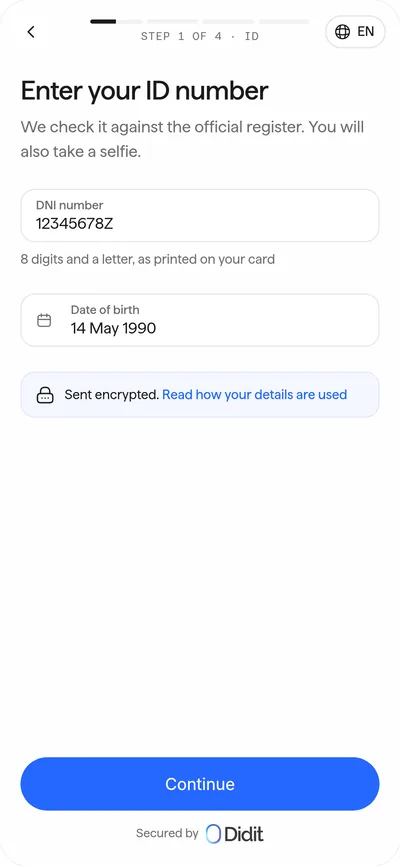
session_url. The user picks their country and types the details that country asks for. If you setcallback, Didit appends?verificationSessionId={session_id}&status={status}when the user finishes. - Fetch the same endpoint again after the user finishes. Read
statusand the rest of the decision, or wait for the webhook.
Expected output
A successful lookup records a data_match result and lets the user proceed through the workflow. Read the top-level status for the overall session decision.
status, the overall session decision: Approved, Declined, In Review, In Progress, Not Started, Expired, Abandoned, Kyc Expired, Resubmitted or Awaiting User.- Read the verification method and assurance tier recorded on the session payload.
id_lookup.source, the exact source that was queried.decision_trace, how the status was reached, andbiometric_retention, the date the session's live biometric data is deleted.
Every source does one of three things. It returns the holder's photograph: the lookup includes a selfie, passive liveness and a match against the registry portrait, and a later Face Match step can use that portrait if the workflow keeps registry_portrait. Or it verifies the selfie itself, as Brazil, Argentina (RENAPER), Nigeria and Panama do, and returns a verdict rather than a portrait, so a later Face Match step compares the live capture with the selfie the source verified. Or it returns data only: no selfie is taken and nothing is left for a later Face Match step to compare.

Failure cases and recovery
| What happened | Setting that decides it | Recovery |
|---|---|---|
| The details partly matched the record | id_lookup.on_partial_match | The documented configuration sets it to fallback_to_document, which requires document capture enabled for that country |
| No record matched | id_lookup.on_no_match | Denmark's documented example sets decline, which ends the session. The South Africa example sets fallback_to_document, which requires document capture enabled for that country |
| The source returned an error | id_lookup.on_provider_error | The documented configuration sets it to fallback_to_document, which requires document capture enabled for that country |
| The number was mistyped | id_lookup.max_attempts | It sets the limit on answered lookup attempts. The documented South Africa example sets it to 2. |
| The Face Match step has no reference | Workflow graph validation | A data-only lookup leaves Face Match nothing to compare. It reports FACE_MATCH_NOT_COMPUTED with a null score instead of declining automatically. The editor blocks publishing for a country when every path into Face Match uses methods that leave no reference and every route out of the ID Verification step leads to Face Match. Didit warns if the country also offers document capture or a lookup that returns a portrait or verifies a selfie, or if a branch can send users to an outcome that bypasses Face Match. Didit accepts portrait_image for Biometric Authentication workflows and graph workflows where Face Match can run before ID Verification. |
| The API returned 401, 403 or 404 | Key and session lookup | 401 is an invalid API key, 403 means the key lacks read:sessions, 404 means the session does not exist or belongs to a different application |
Inputs and outputs
| Item | Field | Notes |
|---|---|---|
| User input: the identifier | National ID number, as the country asks for it | Always requested |
| User input: personal details | Usually a name, sometimes a date of birth or an address | Set per country by the source |
| User input: selfie | Only where the country's lookup asks for one | Face matched to the registry portrait where a portrait is returned |
| Request: workflow | workflow_id | Required UUID from your workflow |
| Request: identity binding | vendor_data | Strongly recommended, used for duplicate detection |
| Request: optional fields | callback and expected_details, the two this walkthrough uses | The full list is documented on Create Session |
| Response: the session | session_id and status, with session_url on the documented decision response | session_url is the hosted URL you send the user to |
| Response: the proof | id_verifications, the documented KYC feature array, plus id_lookup.source, the data_match tier and registry_portrait where returned | Use the recorded method, assurance tier and source to explain the lookup's provenance. Handle any portrait separately under the applicable retention and access rules |
| Response: the reasoning | decision_trace, reviews, linked_records | reviews lists manual-review activity |
Paid steps and review boundaries
Billing is per completed check from prepaid credit, and a check is charged when it finishes with a result. The lookup is the Non-document verification line in the live price feed, priced as variable per lookup. It is not the $0.15 ID document price, and the two lines are not interchangeable.
- Where the source returns a portrait, the selfie, passive liveness and the match against that portrait happen inside the lookup and inside the lookup price. There is no separate Liveness or Face Match charge on that path.
- Where the lookup leaves no photo, the baseline is the lookup alone, at L per billable lookup and no add-ons. Passive Liveness at $0.10 and Device and IP Analysis at $0.03 are optional workflow steps, and adding Passive Liveness requires a live capture. Face Match 1:1 at $0.05 needs a separate documented reference to compare the live capture against; without one it reports
FACE_MATCH_NOT_COMPUTED. - The pricing feed notes that some no-match lookups and retries are billable, so check the docs pricing page for the line that applies to your country.
max_attemptssets the limit on answered lookup attempts, and the documented South Africa example sets it to 2. - A session awaiting Console review can show
In Review,waiting_sinceandsla_due_at. - Growth takes 4% off every Didit price and Scale takes 10%. A lookup does not establish that you may treat the session as document-verified.

Worked cost example
Take 1,000 users in a country whose lookup rate you have read from the Coverage and pricing section of the non-document lookup documentation. Call that per-lookup figure L, the country's USD list rate.
Case 1, a portrait-backed source. South Africa returns a portrait, so the selfie, passive liveness and the face match to the registry portrait run inside the lookup price and cost nothing extra. Add device and IP analysis at $0.03 per check.
Per user: L + $0.03. For 1,000 users: 1,000 x L + 1,000 x $0.03 = 1,000 x L + $30.00. On Growth, L itself carries the 4% discount and the device and IP line is $0.0288: 1,000 x (0.96 x L) + 1,000 x $0.0288 = 1,000 x (0.96 x L) + $28.80.
Case 2, a data-only source with no add-ons. No selfie is taken and no portrait is returned, so a Face Match step has nothing to compare unless the workflow already holds a separate documented reference. The baseline is the lookup alone: L per billable lookup.
For 1,000 users with one billable lookup each: 1,000 x L. On Growth, L carries the 4% discount: 1,000 x (0.96 x L).
Case 3, the same source with optional steps. Passive Liveness and Device and IP Analysis are optional workflow steps, and adding Passive Liveness requires a live capture, so the user takes a selfie even though the lookup left no photo. Per user: L + $0.10 (passive liveness) + $0.03 (device and IP) = L + $0.13. For 1,000 users with one billable lookup, one completed Passive Liveness check and one completed Device & IP Analysis check each: 1,000 x L + 1,000 x $0.13 = 1,000 x L + $130.00. On Growth: $0.096 + $0.0288 = $0.1248 per user, so 1,000 x (0.96 x L) + 1,000 x $0.1248 = 1,000 x (0.96 x L) + $124.80.
The fallback, priced. If 100 users complete a billable document check after lookup fallback, the document checks cost 100 × $0.15 = $15.00 at list price or 100 × $0.144 = $14.40 on Growth. Add the cost of all billable lookup attempts in the cohort, counting each billable no-match or retry once.
For comparison, the full document route. A full ID check is $0.33, and the published arithmetic is $0.15 ID document + $0.10 passive liveness + $0.05 face match + $0.03 device and IP = $0.33. For 1,000 users: 1,000 x $0.33 = $330.00. Compare totals on the same plan. Include the applicable lookup rate, completed add-on checks and any billable lookup attempts or document fallback.
Plan credit pays for all of it: the Free plan carries $10 of credit a month for eligible organizations, Growth carries $115 and Scale carries $350, and a top-up runs from $50 to $20,000 at face value and lasts 12 months.
Sources
- Didit docs: Non-Document ID Verification, Authoritative Source Lookup
- Didit docs: ID Verification Methods, Document, Lookup, Wallet
- Didit ID Verification product page
- Didit docs: ID Verification overview
- Didit docs: Configure ID Verification Methods in the Console
- Didit docs: Create Session API
- Didit docs: Retrieve Session API
- Didit docs: Webhooks
- Didit docs: Identity Verification Pricing
- Didit pricing page, read November 26, 2026
- Didit pricing as JSON, read November 26, 2026
- Didit site index for AI agents
- Didit MCP server
Next step: open the sandbox at business.didit.me, create a workflow with non-document lookup enabled for one country, and run a test session. There is no sales call, and sandbox testing is free on every plan.
Try it
Try this in the sandbox
Run the check this guide describes, free.
The product this post is about, taken from its topic. Run it free in the sandbox.
Author
Alberto Rosas
Co-founder and CEO

Keep reading
Other guides in the same topic.
 How to Normalize Names and Dates of Birth Before Database Verification
Normalize names to the spelling the registry holds and send date of birth as ISO 8601 before a Didit Database Validation call. Pricing varies by service; $0.05 per check is the lowest published example.
Alberto RosasNov 26, 2026 How to Reverify an Account Holder After Account Takeover
Reverify with a fresh full KYC session ($0.33) bound to the original account ID, compare the new face to the enrolled identity with Face Search ($0.05), and make the hand-back a human decision.
Alberto RosasNov 26, 2026Passkey Account Recovery After a Lost Phone (2026)Passkey account recovery after a lost phone depends on whether the platform synced the passkey. If it did not, the person signs in with another enabled method, such as an email code, then enrolls a new passkey.
Alberto RosasNov 26, 2026Questions
Frequently asked questions
Can I verify someone with just a national ID number and no document?
Didit requires a national ID number and the personal details requested by the source. Data-only sources let the user complete the lookup without uploading a document or taking a selfie. Where the source returns a portrait or checks a selfie itself, the same step asks the user for a selfie.
What does a data match actually prove?
A data match proves that the details the user typed matched a record held by the source that was queried. It does not prove that any document is genuine, because no document was inspected. Didit labels the result with the data_match tier on the session payload, in the console and in exports.
Which countries support national ID number verification in Didit?
Coverage is read from the capability catalog your environment uses, not from a static list. Government registers named in the documentation include South Africa (Department of Home Affairs), Argentina (RENAPER), India (UIDAI) and Denmark (the CPR register). Canada, France, Indonesia, the Netherlands, Norway, Singapore, the United Kingdom and the United States use a credit-bureau, financial-services, utility or residential-records file instead, so read the Source queried column before you enable a country.
How much does a non-document ID lookup cost?
Non-document verification has a variable per-lookup price. Check the country entry in the non-document lookup documentation's Coverage and pricing section for the applicable rate. It is not the $0.15 ID document price, and where the source returns a portrait, passive liveness and face match are included in the lookup price rather than charged separately.
Does a lookup need a selfie?
A lookup needs a selfie only where the country's source asks for one. Where the source returns the holder's photograph, the user takes a selfie, passive liveness runs on it and it is matched to the registry portrait, all inside the lookup. Where the source checks the selfie against the face on record itself, as Brazil, Argentina (RENAPER), Nigeria and Panama do, the check returns a verdict rather than a portrait.
What happens if the national ID number does not match?
Didit configures no-match handling per country. on_no_match can send the user to document capture, which requires document capture enabled for that country, and Denmark's documented example sets it to decline instead. on_partial_match and on_provider_error take the documented fallback_to_document setting, and max_attempts sets the limit on answered lookup attempts, 2 in the documented South Africa example.
Can I skip document capture entirely for a country?
A country can run the lookup with document capture turned off, and then the fallback switches are unavailable because there is nowhere to fall back to. Turn document capture on for that country if you want an unsuccessful lookup to have a route to capture. A country with every method turned off is rejected on save, because nobody could verify there.
Can a Face Match step run after a data-only lookup?
A Face Match step after a data-only lookup has no reference to compare the live capture against, so it reports FACE_MATCH_NOT_COMPUTED with a null score rather than declining automatically. Didit blocks publishing for a country when every path into Face Match uses methods that leave no reference and every route out of the ID Verification step leads to Face Match. Didit warns if the country also offers document capture or a lookup that returns a portrait or verifies a selfie, or if a branch can send users to an outcome that bypasses Face Match. Didit accepts portrait_image for Biometric Authentication workflows and graph workflows where Face Match can run before ID Verification.
Can the user see which source Didit queried?
The end user never sees the source name, the assurance tier or the price. Didit records the source on the session payload as id_lookup.source and shows it in the console and in exports, for you and your auditors.
Does the API on this page create the session where the user types the number?
The Create Session call creates a hosted verification session, and you send the user to the hosted verification URL to complete it. The user picks their country and types the national ID number and the other details the source asks for inside that session. The Create Session request shown on this page does not take the national ID number as a lookup input; it takes the workflow, vendor_data and optional context such as expected_details.
Is non-document verification enough for my compliance checks?
Whether non-document verification is enough depends on what your regime requires you to evidence. The session records the lookup source and assurance tier, and the decision response includes the session decision trace. Check the named source and its documented consent requirements before enabling it for your use case.
Is Didit's API documented for AI coding agents?
Didit publishes a site index at llms.txt and machine-readable pricing at pricing.json. Didit also offers a free hosted MCP server with OAuth sign-in at didit.me/developers/mcp.
Compliance built in
Audited, certified and attested.
We hold the certifications and build each country's rules into your flows, so you can launch anywhere without worrying. Security and Compliance center
- Regulation encoded into your flows
Tell us what you do and where. Didit lists the rules that apply to you, with sources, and builds the checks each country needs into one workflow.
- Ready for AMLR
Every requirement of the new EU anti-money laundering rules, from checking customers to human review, is already covered by a Didit check.
- Tested in Spain's Treasury sandbox
Spain's Treasury published its supervised sandbox report on Didit's NFC plus active liveness onboarding; SEPBLAC took part and valued the added measures positively.
- Audited, not self-declared
iBeta Level 1 and Level 2. Liveness tested under ISO/IEC 30107-3.
Your obligations · 3 regions
 SOC 2 Type 2
 ISO 27001
 iBeta Level 1 and Level 2
 EU regulator attestation
 FSM youth protection
 GDPR
 EBA remote onboarding
 MiCA compatible
 FIDO Alliance member
- AMLREU AML Regulation ready
Integration · Didit MCP
Run Didit from your own AI agent
Connect Didit to Claude, Cursor, VS Code or ChatGPT and just ask in plain words. Your agent can do anything you can do in the console, with the same permissions you have.
 Add to Claude
 ChatGPT
 Cursor
- Build workflowsDescribe the checks you need. The agent creates and publishes the flow.
- Run investigationsAsk why a session was declined, review cases, search people and companies.
- Change rulesCreate payment rules, test them on past data and switch them on.
- Pull reportsAsk for numbers, exports or the audit log.
Didit Academy


