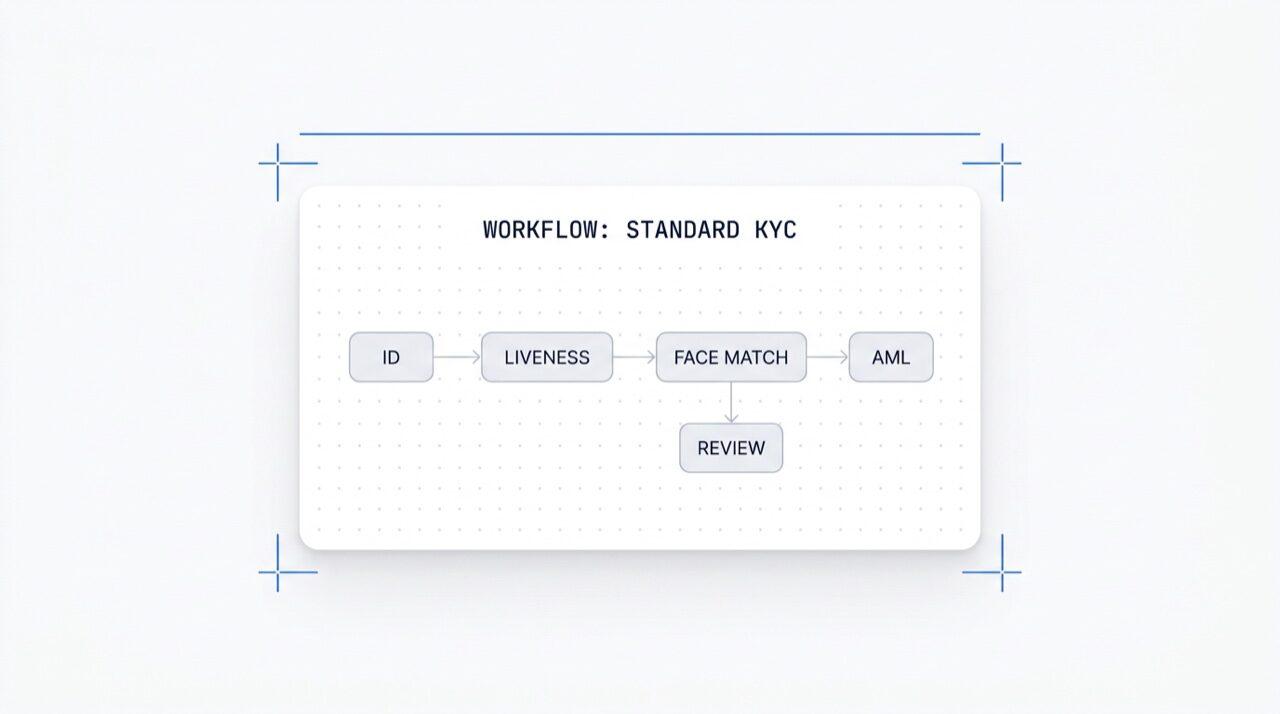
Zeichne jeden Verifizierungs-Flow auf einer Canvas. Ziehen, ablegen, verzweigen, A/B-Tests durchführen und jedes der über 25 Module mit einem Klick aktivieren. Kostenlos in jedem Plan.
Aktiviere jedes Modul mit einem Klick. Visueller Editor für KYC (Know Your Customer),
KYB (Know Your Business), AML (Anti-Money Laundering) und Monitoring-Flows.
A/B-Tests in der Produktion. Kostenlos, keine Gebühren pro Workflow.
So funktioniert's
Vom Sign-up zum verifizierten Nutzer in vier Schritten.
Schritt 01 / 04
01
Workflow erstellen
Wähle die gewünschten Prüfungen aus, ID, Liveness, Gesichtsabgleich, Sanktionen, Adresse, Alter, Telefon, E-Mail, benutzerdefinierte Fragen. Ziehe sie im Dashboard in einen Flow oder poste denselben Flow an unsere API. Verzweige nach Bedingungen, führe A/B-Tests durch, kein Code erforderlich.
Integrieren
Bette nativ mit unserem Web-, iOS-, Android-, React Native- oder Flutter-SDK ein. Leite zu einer gehosteten Seite weiter. Oder sende deinem Nutzer einfach einen Link, per E-Mail, SMS, WhatsApp, überall. Wähle, was zu deinem Stack passt.
Nutzer durchläuft den Flow
Didit hostet die Kamera, die Beleuchtungshinweise, die mobile Übergabe und die Barrierefreiheit. Während der Nutzer im Flow ist, bewerten wir über 200 Betrugssignale in Echtzeit und verifizieren jedes Feld anhand autoritativer Datenquellen. Ergebnis in unter zwei Sekunden.
Du erhältst die Ergebnisse
Echtzeit-signierte Webhooks halten deine Datenbank synchron, sobald ein Nutzer genehmigt, abgelehnt oder zur Überprüfung gesendet wird. Frage die API bei Bedarf ab. Oder öffne die Konsole, um jede Session und jedes Signal zu überprüfen und Fälle nach deinen Wünschen zu verwalten.
Für Entwickler gemacht · Gegen Betrug gebaut · Offen im Design
Sechs Funktionen. Eine Canvas. $0 pro Workflow.
Der Workflow Orchestrator ist die Canvas hinter jeder Didit-Verifizierung. Erstelle ihn in der Konsole oder aus deinem Code. Jede der unten genannten Funktionen ist in jedem Workspace ohne zusätzliche Kosten enthalten.
Nodes per Drag-and-drop. Smart-Connect. Kein Code.
Eine unendliche Arbeitsfläche mit Modulknoten (ID, Liveness, Face Match, AML, NFC, IP, Fragebogen, Adressnachweis, Datenbankvalidierung, Altersschätzung, E-Mail, Telefon), Verzweigungsknoten, die auf Live-Sitzungsdaten routen, Aktionsknoten (Tag, Metadaten setzen, zur manuellen Überprüfung leiten) und Ergebnis-Knoten (genehmigt, abgelehnt, in Überprüfung).
Jeder Workflow hat eine Modul-Umschaltliste. Einfach einen Schalter umlegen und der Knoten wird aktiv, keine Codeänderung, kein erneutes Deployment auf deiner Seite. Neue Module, die wir monatlich veröffentlichen, erscheinen in derselben Liste. Du zahlst nur pro Prüfung zu den veröffentlichten Modulpreisen; der Workflow selbst kostet nichts.
Modulaktivierung
Über 25 Module aktivieren · pro Erfolg zahlen
25+ Module
25+
Module
1 /mo
Neues Modul veröffentlicht
$0
Workflow-Aufschlag
ID-Verifizierung$0.15An
Passive Liveness$0.10An
Face Match 1:1$0.05An
AML-Screening$0.20Aus
Wallet-Screening (KYT)$0.15Aus
03 · Multi-App
Dev, Staging, Production. Ein Workspace.
Jeder Workspace beherbergt mehrere Apps, typischerweise Development, Staging, Production. Jede App hat ihren eigenen API-Schlüssel, veröffentlichte Workflows und Webhook-Ziele. Einen Workflow bewirbst du, indem du ihn in der Ziel-App neu veröffentlichst oder die Versions-JSON exportierst.
Anwendungen
Dev · Staging · Production · isolierte Keys
3 Apps
3
Anwendungen
1 Schlüssel
Pro Anwendung
JSON
Exportierbar
Entwicklungsk_dev_4f8adraft v4Entwurf
Stagingsk_stg_9c12v3Staging
Produktionsk_prd_b201v3Live
Bewerben · Workflow-JSON neu veröffentlichen oder exportieren
04 · A/B-Tests
Live-Traffic-Splits für Varianten ohne erneutes Deployment.
Veröffentliche zwei Varianten, lege eine prozentuale Aufteilung fest, und der Orchestrator leitet den eingehenden Traffic entsprechend. Verfolge Abschlussrate, Ablehnungsrate, Abbruch und Time-to-Verdict pro Variante in den Analysen. Den Gewinner mit einem Klick auf 100 % hochfahren; mit einem Klick zurücksetzen.
A/B-Experiment · Onboarding_v5
Traffic-Splitting · Live-Conversion-Telemetrie
Variante B gewinnt
Variante A50%
87.4%
Abschlussrate
Variante B50%
91.2%
Abschlussrate
Ablehnungsrate6.1%4.3%
Abbruchrate6.5%4.5%
Zeit bis zur Entscheidung38s32s
Ramp B · 5% → 100% · Rollback mit einem Klick+3.8 pp
05 · Verzweigung
Bedingte Logik für jedes Feld.
Verzweigungsknoten leiten Nutzer basierend auf Live-Sitzungsdaten, Land, Risikobewertung, Dokumententyp, Alter, Zeit seit Ausstellung oder jede benutzerdefinierte Regel. Bei grenzwertigem Alter auf ID-Verifizierung zurückgreifen. AML für Regionen mit geringem Risiko überspringen. Bei reinen Pass-Flows auf NFC umsteigen. Kein Code.
Verzweigungsknoten
Routing nach Land · Risiko · Dokumententyp · Alter
5 Bedingungen
Wenn-BedingungRoute
country in {DE, FR, ES, IT}
Genehmigen
risk_score > 80
AML + Überprüfung
doc.type == PASSPORT
NFC-Lesen
age < 18
Altersschätzung
default
Manuelle Überprüfung
7 Felder · Land · Risiko · Dokument · AlterNo-Code
06 · Kostenlos + offen
Kostenlos in jedem Plan. Webhooks, Zapier, MCP.
Keine Gebühr pro Workflow, keine Gebühr pro Benutzer. Unbegrenzte Workflows, Versionen und Webhook-Ziele. Jeder Workflow lässt sich mit Zapier, Shopify, Salesforce und dem MCP (Model Context Protocol) Server integrieren, sodass KI-Agenten Sessions mit derselben Workflow-ID steuern können. Webhooks werden signiert versendet.
POST /webhooks/destinations
Inklusive
workflow.session.verified200 OK
{
"workflow_id": "wf_3daf4c64",
"session_id": "sess_8a2f9c10",
"status": "verified",
"vendor_data": "user-42",
"version": 3,
Ziele: unlimited
}
HeaderX-Signature-V2: hmac-sha256
Ziele
WebhookZapierShopifySalesforceMCP
$0 / workflow
Integrieren
Zwei Endpunkte. Eine workflow_id.
Erstelle einen Workflow einmal, in der visuellen Canvas oder aus deinem Code. Referenziere seine ID bei jeder Session, die du startest. Dieselbe Workflow-ID treibt SDKs für Web, iOS, Android, React Native, Flutter und den MCP-Server an.
Jeden Verifizierungs-Flow mit einem Prompt einrichten.
Füge den folgenden Block in Claude Code, Cursor, Codex, Devin, Aider oder Replit Agent ein. Gib dein Framework, deine Sprache und deinen Anwendungsfall an. Der Agent provisioniert Didit, erstellt den Workflow, verbindet den Webhook und sendet einen Verifizierungslink an deinen Nutzer, gleiche Oberfläche, gleiche Bausteine, AI-Agent-freundlich.
didit-integration-prompt.md
# Didit Workflow Orchestrator — integrate in 5 minutes

You are wiring the Didit Workflow Orchestrator into <my_stack>. Follow
these steps exactly. Every URL, header, and enum value below is
canonical — do not paraphrase or "improve" them.

Workflows are versioned JSON documents that string together any subset
of Didit's 25+ verification modules:
  - Feature nodes (Optical Character Recognition (OCR), LIVENESS, FACE_MATCH, Anti-Money Laundering (AML), Near Field Communication (NFC), IP, QUESTIONNAIRE,
    PROOF_OF_ADDRESS, DATABASE_VALIDATION, AGE_ESTIMATION, EMAIL_VERIFICATION,
    PHONE_VERIFICATION)
  - Branch nodes (route by country, risk score, document type, age, ...)
  - Action nodes (add tag, set metadata, route to manual review)
  - Status nodes (APPROVED, DECLINED, IN_REVIEW)

## 1. Provision an account
- Sign up: https://business.didit.me (no credit card required).
- Or provision programmatically: POST https://apx.didit.me/auth/v2/programmatic/register/

## 2. Two ways to build a workflow — pick one

### Path A — Visual canvas (recommended for humans)
1. Open https://docs.didit.me/console/workflows.
2. Pick Simple Mode for a template-based build (Know Your Customer (KYC), Age Verification,
   Biometric Auth, Address, Questionnaire) or Advanced Mode for the
   node-based graph builder.
3. Drag feature nodes onto the canvas. Connect handles with the smart-
   connect cursor. Drop branch nodes between features to route on data.
4. Click Publish. The published workflow's UUID is your workflow_id.

### Path B — Management API (recommended for AI agents)
Programmatically create a linear workflow with the simple v3 features
array — Didit converts it into a node-based graph internally.

POST https://verification.didit.me/v3/workflows/
Headers:
  x-api-key: <your-api-key>
  Content-Type: application/json
Body:
  {
    "workflow_label": "Standard KYC",
    "features": [
      {
        "feature": "OCR",
        "config": {
          "documents_allowed": {},
          "duplicated_user_action": "REVIEW"
        }
      },
      { "feature": "LIVENESS", "config": { "face_liveness_method": "PASSIVE" } },
      { "feature": "FACE_MATCH" },
      { "feature": "AML" }
    ]
  }

Hard rules for POST /v3/workflows/:
  - features[].feature values are UPPERCASE strict enum:
    OCR, LIVENESS, FACE_MATCH, AML, NFC, IP, QUESTIONNAIRE,
    PROOF_OF_ADDRESS, DATABASE_VALIDATION, AGE_ESTIMATION,
    EMAIL_VERIFICATION, PHONE_VERIFICATION
  - Put dependency features first. OCR before FACE_MATCH, NFC,
    DATABASE_VALIDATION, or user-AML checks that depend on document
    data. LIVENESS before FACE_MATCH.
  - For QUESTIONNAIRE features, create the questionnaire first via
    POST /v3/questionnaires/ and use the returned questionnaire_id as
    config.questionnaire_uuid.
  - The endpoint supports linear workflows only. To add branches,
    actions, webhooks, or conditional routing, edit the published
    workflow in the canvas.
  - Save the returned workflow uuid — that is your workflow_id for
    creating sessions, and your settings_uuid for future updates.

Reference for every config field per feature:
  https://docs.didit.me/management-api/workflows/feature-configs

## 3. Use the workflow in a session
POST https://verification.didit.me/v3/session/
Headers:
  x-api-key: <your-api-key>
  Content-Type: application/json
Body:
  {
    "workflow_id": "<uuid from step 2>",
    "vendor_data": "user-42"
  }

Response includes the hosted verification link in url. Redirect the user
there. The hosted Didit UI handles capture UX, mobile handoff,
accessibility, retries, and webhook delivery on completion.

## 4. Webhooks
Register one webhook destination per workspace:

POST https://verification.didit.me/v3/webhook/destinations/
Body: { "url": "https://yourapp.com/didit/webhooks",
        "events": ["session.verified", "session.review_started",
                   "session.declined", "session.expired"] }

Every delivery carries an X-Signature-V2 Hash-based Message Authentication
Code (HMAC) header.  HMAC-SHA256 verification MUST run against the raw body bytes (the raw payload as Didit sent it) BEFORE any JSON parsing — re-serialising the parsed body changes whitespace and key order, which invalidates the signature.Verify before trusting the payload:

  signature = hmac_sha256(secret, raw_body).hex()
  if signature != request.headers["X-Signature-V2"]:
      return 401

Retries use exponential backoff over 24 hours. The Console shows every
delivery, retry, and signature verification result.

## 5. Workflow versioning
Workflows support draft / publish versioning. Drafts are fully editable.
Publishing creates an immutable version that new sessions will use.
Sessions always reference the specific version they were created with,
so behaviour stays consistent even after you publish updates. Previous
versions are preserved and inspectable via the Management API.

## 6. Multi-app management
Each workspace can host multiple applications — typically Development,
Staging, Production. Each application carries its own API key, its own
workflows, and its own webhook destinations. Promote a published
workflow from Staging to Production by re-publishing in the target app
or by exporting and re-importing the workflow JSON.

## 7. A/B testing
Split traffic across two published workflow variants from inside the
canvas. Configure a percentage split, route by user cohort, ramp a new
module to 5% before going to 100%. Conversion metrics surface on the
workflow analytics view at https://docs.didit.me/console/analytics.

## 8. Hard rules — do not change
- Base URL stays  https://verification.didit.me  (NOT apx.didit.me).
- Auth header stays  x-api-key  (lowercase, hyphenated).
- Webhook signature header stays  X-Signature-V2  (NOT X-Signature).
- Feature enum is UPPERCASE strict — OCR, LIVENESS, FACE_MATCH, AML,
  NFC, IP, QUESTIONNAIRE, PROOF_OF_ADDRESS, DATABASE_VALIDATION,
  AGE_ESTIMATION, EMAIL_VERIFICATION, PHONE_VERIFICATION.
- Session status casing stays  "Approved" / "Declined" / "In Review" /
  "Expired" / "Not Finished"  (mixed case on session statuses,
  UPPERCASE_SNAKE on transaction and case statuses).

## 9. Pricing reference
The Workflow Orchestrator itself is FREE on every plan — no per-workflow
fee, no per-seat fee, unlimited workflows. You pay only for the modules
that run inside the workflow at the published per-success rates on
https://didit.me/pricing.

500 free verifications every month, forever, on every account.

## 10. Verify your integration
1. Create a sandbox API key at https://business.didit.me.
2. POST /v3/workflows/ with the Standard KYC body above. Save the uuid.
3. POST /v3/session/ with that workflow_id. Open the url in a
   browser and complete the flow with the sandbox test fixtures.
4. Confirm the session.verified webhook fires and X-Signature-V2 verifies.
5. Open the workflow in the canvas — verify the linear feature array
   was converted into the expected node graph.

Done. The Workflow Orchestrator is live. Reach out to support@didit.me
with the workspace id if you hit a wall.
Compliant by Design
Ein neues Land mit einem Klick erschließen. Wir machen die Arbeit.
Wir gründen lokale Tochtergesellschaften, sichern Lizenzen, führen Penetrationstests durch, erhalten Zertifizierungen und passen uns jeder neuen Regulierung an. Um Verifizierungen in einem neuen Land zu starten, legst du einfach einen Schalter um. Über 220 Länder live, vierteljährlich auditiert und Pen-getestet, der einzige Identitätsanbieter, den eine EU-Mitgliedsregierung offiziell als sicherer als die persönliche Verifizierung eingestuft hat.
Von der Anmeldung bis zum Live-Workflow in einer echten Session.
Drei Stufen, eine Preisliste
Kostenlos starten. Nach Verbrauch zahlen. Bis zum Enterprise-Level skalieren.
500 kostenlose Verifizierungen jeden Monat, für immer. Danach zahlst du nur, wenn ein Modul läuft. Individuelle Verträge, Datenresidenz und Service Level Agreements (SLAs) für Enterprise-Kunden.
Kostenlos
$0/ Monat · keine Kreditkarte nötig
Zum Entwickeln, Testen und für deine ersten Nutzer.
Alles, was du für den Start brauchst:
500 vollständige KYC-Verifizierungen pro Monat
ID, Liveness, Face Match, Gerät & IP
Über 200 Betrugssignale, Blocklist, Duplikate
Wiederverwendbares KYC im Didit-Netzwerk
Workflow Builder, Case Management, SDKs
KI-SupportKI-Agent in der Konsole, Docs und Community.