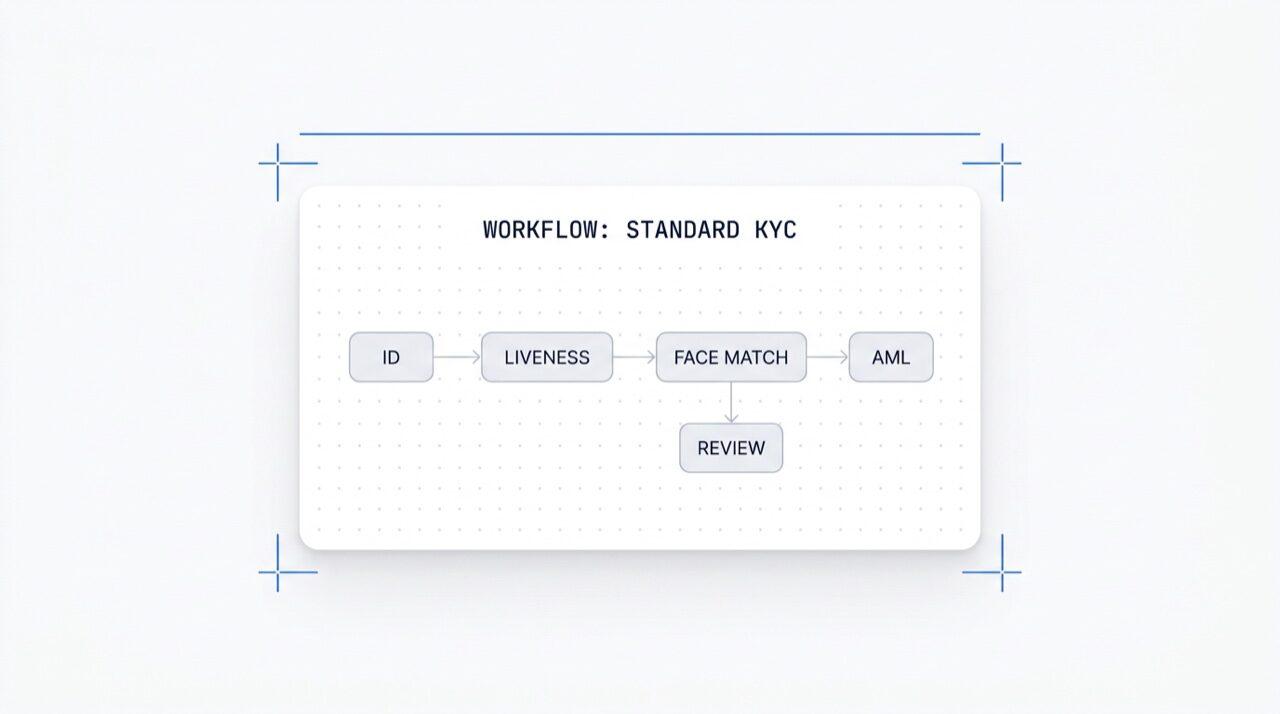
Switch any module on in one click. Visual editor for KYC (know your customer),
KYB (know your business), AML (anti-money laundering), and monitoring flows.
A/B test in production. Free, no per-workflow charge.
How it works
From sign-up to verified user in four steps.
Step 01 / 04
01
Create the workflow
Pick the checks you want, ID, liveness, face match, sanctions, address, age, phone, email, custom questions. Drag them into a flow in the dashboard, or post the same flow to our API. Branch on conditions, run A/B tests, no code required.
Integrate
Embed natively with our Web, iOS, Android, React Native, or Flutter SDK. Redirect to a hosted page. Or just send your user a link, by email, SMS, WhatsApp, anywhere. Pick what fits your stack.
User goes through the flow
Didit hosts the camera, the lighting cues, the mobile hand-off, and accessibility. While the user is in the flow, we score 200+ fraud signals in real time and verify every field against authoritative data sources. Result in under two seconds.
You receive the results
Real-time signed webhooks keep your database in sync the moment a user is approved, declined, or sent to review. Poll the API on demand. Or open the console to inspect every session, every signal, and manage cases your way.
Built for developers · Built against fraud · Open by design
Six capabilities. One canvas. $0 per workflow.
The Workflow Orchestrator is the canvas behind every Didit verification. Build it in the console or create it from your code. Every capability below ships with every workspace at no extra cost.
Infinite canvas with module nodes (ID, Liveness, Face Match, AML, NFC, IP, Questionnaire, Proof of Address, Database Validation, Age Estimation, Email, Phone), branch nodes routing on live session data, action nodes (tag, set metadata, route to manual review), and verdict nodes (approved, declined, in review).
Workflow canvas
Drag-drop · smart-connect · keyboard shortcuts
Advanced mode
12
Feature
6
Branch
4
Action
3
Status
FeatureOCR
FeatureLIVENESS
Branchrisk > 80
Actiontag:hi-risk
StatusIN REVIEW
OCRFACE_MATCHAMLNFCIPPHONEEMAILAGE_EST
No code · smart-connect · zoom & panInfinite canvas
02 · Module activation
Toggle any of 25+ modules per workflow.
Each workflow has a module toggle list. Flip a switch and the node activates, no code change, no redeploy on your side. New modules we ship every month show up in the same list. Pay only per check at the published per-module rates; the workflow itself costs nothing.
Module activation
Toggle any of 25+ modules · pay per success
25+ modules
25+
Modules
1 /mo
New module shipped
$0
Workflow surcharge
ID Verification$0.15On
Passive Liveness$0.10On
Face Match 1:1$0.05On
AML Screening$0.20Off
Wallet Screening (KYT)$0.15Off
03 · Multi-app
Dev, staging, production. One workspace.
Every workspace hosts multiple apps, typically Development, Staging, Production. Each app carries its own API key, published workflows, and webhook destinations. Promote a workflow by re-publishing in the target app or exporting the version JSON.
Applications
Dev · Staging · Production · isolated keys
3 apps
3
Applications
1 key
Per application
JSON
Exportable
Developmentsk_dev_4f8adraft v4Draft
Stagingsk_stg_9c12v3Staging
Productionsk_prd_b201v3Live
Promote · republish or export workflow JSON
04 · A/B testing
Live split-traffic variants without redeploys.
Publish two variants, set a percentage split, and the Orchestrator routes incoming traffic across both. Watch completion rate, decline rate, abandonment, and time-to-verdict per variant in analytics. Ramp the winner to 100% in one click; rollback in one click.
A/B experiment · onboarding_v5
Split traffic · live conversion telemetry
Variant B winning
Variant A50%
87.4%
Completion rate
Variant B50%
91.2%
Completion rate
Decline rate6.1%4.3%
Abandonment6.5%4.5%
Time-to-verdict38s32s
Ramp B · 5% → 100% · rollback in one click+3.8 pp
05 · Branching
Conditional logic on every field.
Branch nodes route users on live session data, country, risk score, document type, age, time since issue, or any custom rule. Fall back to ID Verification at borderline ages. Skip AML for low-risk regions. Step up to NFC on passport-only flows. No code.
Branch node
Routes on country · risk · doc type · age
5 conditions
If conditionRoute
country in {DE, FR, ES, IT}
Approve
risk_score > 80
AML + Review
doc.type == PASSPORT
NFC Reading
age < 18
Age Estimation
default
Manual review
7 fields · country · risk · doc · ageNo code
06 · Free + open
Free on every plan. Webhooks, Zapier, MCP.
No per-workflow fee, no per-seat fee. Unlimited workflows, versions, and webhook destinations. Every workflow integrates with Zapier, Shopify, Salesforce, and the MCP (Model Context Protocol) server so AI agents can drive sessions with the same workflow ID. Webhooks ship signed.
POST /webhooks/destinations
Included
workflow.session.verified200 OK
{
"workflow_id": "wf_3daf4c64",
"session_id": "sess_8a2f9c10",
"status": "verified",
"vendor_data": "user-42",
"version": 3,
Destinations: unlimited
}
HeaderX-Signature-V2: hmac-sha256
Destinations
WebhookZapierShopifySalesforceMCP
$0 / workflow
Integrate
Two endpoints. One workflow_id.
Build a workflow once, in the visual canvas, or from your code. Reference its ID on every session you start. Same workflow ID powers SDKs for Web, iOS, Android, React Native, Flutter, and the MCP server.
Paste the block below into Claude Code, Cursor, Codex, Devin, Aider, or Replit Agent. Fill in your framework, language, and use case. The agent provisions Didit, builds the workflow, wires the webhook, and ships a verification link to your user, same canvas, same primitives, AI-agent-friendly.
didit-integration-prompt.md
# Didit Workflow Orchestrator — integrate in 5 minutes

You are wiring the Didit Workflow Orchestrator into <my_stack>. Follow
these steps exactly. Every URL, header, and enum value below is
canonical — do not paraphrase or "improve" them.

Workflows are versioned JSON documents that string together any subset
of Didit's 25+ verification modules:
  - Feature nodes (Optical Character Recognition (OCR), LIVENESS, FACE_MATCH, Anti-Money Laundering (AML), Near Field Communication (NFC), IP, QUESTIONNAIRE,
    PROOF_OF_ADDRESS, DATABASE_VALIDATION, AGE_ESTIMATION, EMAIL_VERIFICATION,
    PHONE_VERIFICATION)
  - Branch nodes (route by country, risk score, document type, age, ...)
  - Action nodes (add tag, set metadata, route to manual review)
  - Status nodes (APPROVED, DECLINED, IN_REVIEW)

## 1. Provision an account
- Sign up: https://business.didit.me (no credit card required).
- Or provision programmatically: POST https://apx.didit.me/auth/v2/programmatic/register/

## 2. Two ways to build a workflow — pick one

### Path A — Visual canvas (recommended for humans)
1. Open https://docs.didit.me/console/workflows.
2. Pick Simple Mode for a template-based build (Know Your Customer (KYC), Age Verification,
   Biometric Auth, Address, Questionnaire) or Advanced Mode for the
   node-based graph builder.
3. Drag feature nodes onto the canvas. Connect handles with the smart-
   connect cursor. Drop branch nodes between features to route on data.
4. Click Publish. The published workflow's UUID is your workflow_id.

### Path B — Management API (recommended for AI agents)
Programmatically create a linear workflow with the simple v3 features
array — Didit converts it into a node-based graph internally.

POST https://verification.didit.me/v3/workflows/
Headers:
  x-api-key: <your-api-key>
  Content-Type: application/json
Body:
  {
    "workflow_label": "Standard KYC",
    "features": [
      {
        "feature": "OCR",
        "config": {
          "documents_allowed": {},
          "duplicated_user_action": "REVIEW"
        }
      },
      { "feature": "LIVENESS", "config": { "face_liveness_method": "PASSIVE" } },
      { "feature": "FACE_MATCH" },
      { "feature": "AML" }
    ]
  }

Hard rules for POST /v3/workflows/:
  - features[].feature values are UPPERCASE strict enum:
    OCR, LIVENESS, FACE_MATCH, AML, NFC, IP, QUESTIONNAIRE,
    PROOF_OF_ADDRESS, DATABASE_VALIDATION, AGE_ESTIMATION,
    EMAIL_VERIFICATION, PHONE_VERIFICATION
  - Put dependency features first. OCR before FACE_MATCH, NFC,
    DATABASE_VALIDATION, or user-AML checks that depend on document
    data. LIVENESS before FACE_MATCH.
  - For QUESTIONNAIRE features, create the questionnaire first via
    POST /v3/questionnaires/ and use the returned questionnaire_id as
    config.questionnaire_uuid.
  - The endpoint supports linear workflows only. To add branches,
    actions, webhooks, or conditional routing, edit the published
    workflow in the canvas.
  - Save the returned workflow uuid — that is your workflow_id for
    creating sessions, and your settings_uuid for future updates.

Reference for every config field per feature:
  https://docs.didit.me/management-api/workflows/feature-configs

## 3. Use the workflow in a session
POST https://verification.didit.me/v3/session/
Headers:
  x-api-key: <your-api-key>
  Content-Type: application/json
Body:
  {
    "workflow_id": "<uuid from step 2>",
    "vendor_data": "user-42"
  }

Response includes a session_url. Redirect the user there. The hosted
Didit UI handles capture UX, mobile handoff, accessibility, retries,
and webhook delivery on completion.

## 4. Webhooks
Register one webhook destination per workspace:

POST https://verification.didit.me/v3/webhook/destinations/
Body: { "url": "https://yourapp.com/didit/webhooks",
        "events": ["session.verified", "session.review_started",
                   "session.declined", "session.expired"] }

Every delivery carries an X-Signature-V2 Hash-based Message Authentication
Code (HMAC) header.  HMAC-SHA256 verification MUST run against the raw body bytes (the raw payload as Didit sent it) BEFORE any JSON parsing — re-serialising the parsed body changes whitespace and key order, which invalidates the signature.Verify before trusting the payload:

  signature = hmac_sha256(secret, raw_body).hex()
  if signature != request.headers["X-Signature-V2"]:
      return 401

Retries use exponential backoff over 24 hours. The Console shows every
delivery, retry, and signature verification result.

## 5. Workflow versioning
Workflows support draft / publish versioning. Drafts are fully editable.
Publishing creates an immutable version that new sessions will use.
Sessions always reference the specific version they were created with,
so behaviour stays consistent even after you publish updates. Previous
versions are preserved and inspectable via the Management API.

## 6. Multi-app management
Each workspace can host multiple applications — typically Development,
Staging, Production. Each application carries its own API key, its own
workflows, and its own webhook destinations. Promote a published
workflow from Staging to Production by re-publishing in the target app
or by exporting and re-importing the workflow JSON.

## 7. A/B testing
Split traffic across two published workflow variants from inside the
canvas. Configure a percentage split, route by user cohort, ramp a new
module to 5% before going to 100%. Conversion metrics surface on the
workflow analytics view at https://docs.didit.me/console/analytics.

## 8. Hard rules — do not change
- Base URL stays  https://verification.didit.me  (NOT apx.didit.me).
- Auth header stays  x-api-key  (lowercase, hyphenated).
- Webhook signature header stays  X-Signature-V2  (NOT X-Signature).
- Feature enum is UPPERCASE strict — OCR, LIVENESS, FACE_MATCH, AML,
  NFC, IP, QUESTIONNAIRE, PROOF_OF_ADDRESS, DATABASE_VALIDATION,
  AGE_ESTIMATION, EMAIL_VERIFICATION, PHONE_VERIFICATION.
- Session status casing stays  "Approved" / "Declined" / "In Review" /
  "Expired" / "Not Finished"  (mixed case on session statuses,
  UPPERCASE_SNAKE on transaction and case statuses).

## 9. Pricing reference
The Workflow Orchestrator itself is FREE on every plan — no per-workflow
fee, no per-seat fee, unlimited workflows. You pay only for the modules
that run inside the workflow at the published per-success rates on
https://didit.me/pricing.

500 free verifications every month, forever, on every account.

## 10. Verify your integration
1. Create a sandbox API key at https://business.didit.me.
2. POST /v3/workflows/ with the Standard KYC body above. Save the uuid.
3. POST /v3/session/ with that workflow_id. Open the session_url in a
   browser and complete the flow with the sandbox test fixtures.
4. Confirm the session.verified webhook fires and X-Signature-V2 verifies.
5. Open the workflow in the canvas — verify the linear feature array
   was converted into the expected node graph.

Done. The Workflow Orchestrator is live. Reach out to support@didit.me
with the workspace id if you hit a wall.
Compliant by design
Open a new country in one click. We do the hard work.
We open the local subsidiaries, secure the licenses, run the penetration tests, earn the certifications, and align with every new regulation. To ship verifications in a new country, flip a toggle. 220+ countries live, audited and pen-tested every quarter, the only identity provider an EU member-state government has formally called safer than in-person verification.
From signup to a live workflow running in a real session.
Three tiers, one price list
Start free. Pay as you go. Scale to Enterprise.
500 free verifications every month, forever. Then pay only when a module runs. Custom contracts, data residency, and service level agreements (SLAs) on Enterprise.
Free
$0/ month · no card
For building, testing, and your first users.
Everything you need to start:
500 full KYC verifications every month
ID, liveness, face match, device & IP
200+ fraud signals, blocklist, duplicates
Reusable KYC across the Didit network
Workflow builder, case management, SDKs
AI supportIn-console AI agent, docs, and community.