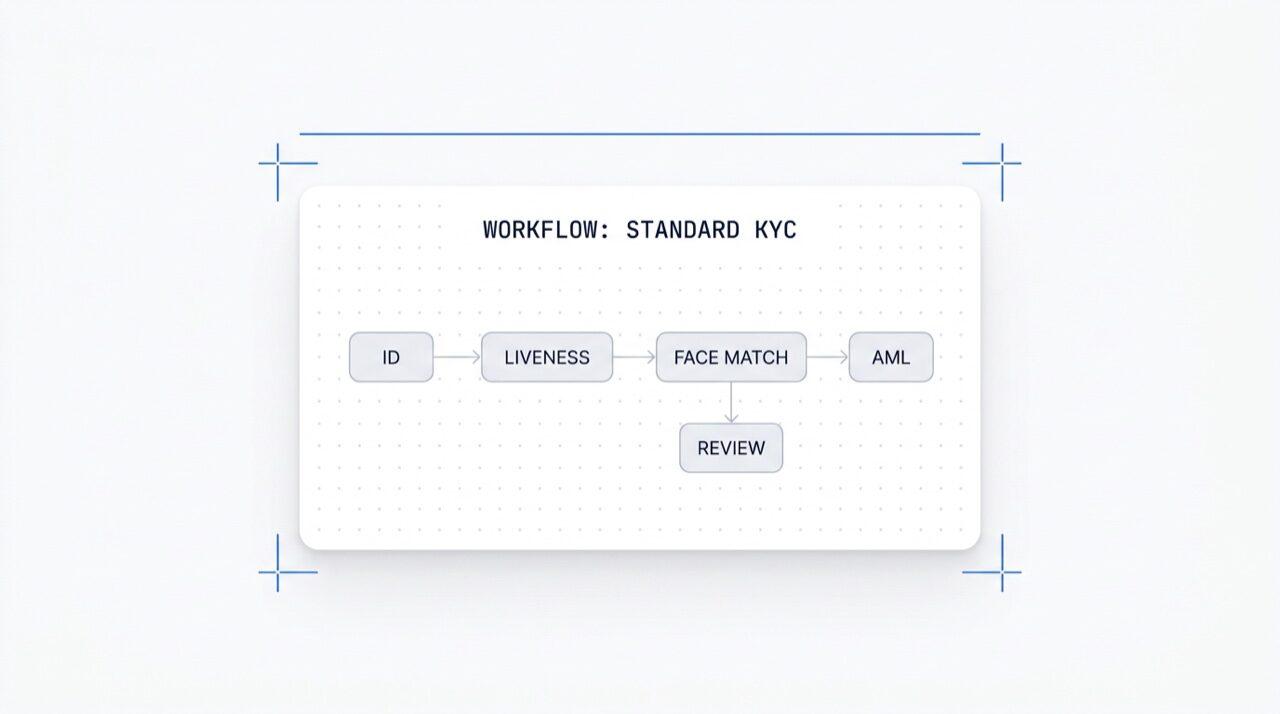
Diseña cualquier flujo de verificación en un lienzo. Arrastra, suelta, crea ramas, haz pruebas A/B y activa cualquiera de los más de 25 módulos con un solo clic. Gratis en todos los planes.
Activa cualquier módulo con un clic. Editor visual para KYC (Know Your Customer),
KYB (Know Your Business), AML (Anti-Money Laundering) y flujos de monitoreo.
Haz pruebas A/B en producción. Gratis, sin cargos por flujo de trabajo.
Cómo funciona
Del registro al usuario verificado en cuatro pasos.
Paso 01 / 04
01
Crea el flujo de trabajo
Elige las verificaciones que necesites: ID, prueba de vida, coincidencia facial, sanciones, dirección, edad, teléfono, email, preguntas personalizadas. Arrástralas a un flujo en el panel de control, o publica el mismo flujo en nuestra API. Crea ramas condicionales, ejecuta pruebas A/B, sin necesidad de código.
Integra
Intégralo de forma nativa con nuestros SDK para Web, iOS, Android, React Native o Flutter. Redirige a una página alojada. O simplemente envía a tu usuario un enlace, por email, SMS, WhatsApp, donde quieras. Elige lo que mejor se adapte a tu stack.
El usuario completa el flujo
Didit aloja la cámara, las indicaciones de iluminación, la transferencia móvil y la accesibilidad. Mientras el usuario está en el flujo, puntuamos más de 200 señales de fraude en tiempo real y verificamos cada campo contra fuentes de datos autorizadas. Resultados en menos de dos segundos.
Recibes los resultados
Los webhooks firmados en tiempo real mantienen tu base de datos sincronizada en el momento en que un usuario es aprobado, rechazado o enviado a revisión. Consulta la API bajo demanda. O abre la consola para inspeccionar cada sesión, cada señal y gestionar los casos a tu manera.
Diseñado para desarrolladores · Creado contra el fraude · Abierto por diseño
Seis funcionalidades. Un lienzo. $0 por flujo de trabajo.
El Orquestador de flujos de trabajo es el lienzo detrás de cada verificación de Didit. Constrúyelo en la consola o créalo desde tu código. Todas las funcionalidades que se describen a continuación se incluyen con cada espacio de trabajo sin coste adicional.
Arrastra y suelta nodos. Conexión inteligente. Sin código.
Un lienzo infinito con nodos de módulo (ID, prueba de vida, coincidencia facial, AML, NFC, IP, cuestionario, prueba de domicilio, validación de base de datos, estimación de edad, correo electrónico, teléfono), nodos de ramificación que enrutan datos de sesión en vivo, nodos de acción (etiquetar, establecer metadatos, enrutar a revisión manual) y nodos de veredicto (aprobado, rechazado, en revisión).
Lienzo de flujo de trabajo
Arrastrar y soltar · conexión inteligente · atajos de teclado
Modo avanzado
12
Funcionalidad
6
Rama
4
Acción
3
Estado
FunciónOCR
FunciónLIVENESS
Ramarisk > 80
Accióntag:hi-risk
EstadoIN REVIEW
OCRFACE_MATCHAMLNFCIPPHONEEMAILAGE_EST
Sin código · conexión inteligente · zoom y panorámicaLienzo infinito
02 · Activación de módulos
Activa o desactiva cualquiera de los más de 25 módulos por flujo de trabajo.
Cada flujo de trabajo tiene una lista de módulos que puedes activar o desactivar. Enciende un interruptor y el nodo se activa, sin cambios de código ni necesidad de volver a desplegar por tu parte. Los nuevos módulos que lanzamos cada mes aparecen en la misma lista. Paga solo por cada verificación según las tarifas publicadas por módulo; el flujo de trabajo en sí no tiene coste.
Activación de módulos
Activa cualquiera de los más de 25 módulos · paga por éxito
Más de 25 módulos
25+
Módulos
1 /mo
Nuevo módulo lanzado
$0
Recargo de flujo de trabajo
Verificación de ID$0.15Activado
Prueba de vida pasiva$0.10Activado
Coincidencia facial 1:1$0.05Activado
Detección AML$0.20Desactivado
Detección de monederos (KYT)$0.15Desactivado
03 · Multi-aplicación
Desarrollo, staging, producción. Un solo espacio de trabajo.
Cada espacio de trabajo aloja múltiples aplicaciones, normalmente Desarrollo, Staging y Producción. Cada aplicación tiene su propia clave API, flujos de trabajo publicados y destinos de webhook. Promociona un flujo de trabajo volviéndolo a publicar en la aplicación de destino o exportando la versión JSON.
Aplicaciones
Desarrollo · Staging · Producción · claves aisladas
3 apps
3
Aplicaciones
1 clave
Por aplicación
JSON
Exportable
Desarrollosk_dev_4f8adraft v4Borrador
Stagingsk_stg_9c12v3Staging
Producciónsk_prd_b201v3En vivo
Promocionar · republica o exporta el JSON del flujo de trabajo
04 · Pruebas A/B
Variantes de tráfico dividido en vivo sin necesidad de volver a desplegar.
Publica dos variantes, establece un porcentaje de división y el Orquestador enruta el tráfico entrante entre ambas. Observa la tasa de finalización, la tasa de rechazo, el abandono y el tiempo hasta el veredicto por variante en los análisis. Escala la variante ganadora al 100% con un solo clic; revierte con un solo clic.
Experimento A/B · onboarding_v5
Tráfico dividido · telemetría de conversión en vivo
Variante B ganadora
Variante A50%
87.4%
Tasa de finalización
Variante B50%
91.2%
Tasa de finalización
Tasa de rechazo6.1%4.3%
Abandono6.5%4.5%
Tiempo hasta el veredicto38s32s
Rampa B · 5% → 100% · reversión en un clic+3.8 pp
05 · Ramificación
Lógica condicional en cada campo.
Los nodos de ramificación dirigen a los usuarios según los datos de la sesión en vivo: país, puntuación de riesgo, tipo de documento, edad, tiempo desde la emisión o cualquier regla personalizada. Vuelve a la verificación de identidad en edades límite. Omite AML para regiones de bajo riesgo. Pasa a NFC en flujos solo con pasaporte. Sin código.
Nodo de bifurcación
Rutas por país · riesgo · tipo de documento · edad
5 condiciones
Condición «si»Ruta
country in {DE, FR, ES, IT}
Aprobar
risk_score > 80
AML + Revisión
doc.type == PASSPORT
Lectura NFC
age < 18
Estimación de edad
default
Revisión manual
7 campos · país · riesgo · doc · edadSin código
06 · Gratis + abierto
Gratis en todos los planes. Webhooks, Zapier, MCP.
Sin tarifa por flujo de trabajo, sin tarifa por puesto. Flujos de trabajo, versiones y destinos de webhook ilimitados. Cada flujo de trabajo se integra con Zapier, Shopify, Salesforce y el servidor MCP (Model Context Protocol) para que los agentes de IA puedan gestionar sesiones con el mismo ID de flujo de trabajo. Los webhooks se envían firmados.
POST /webhooks/destinations
Incluido
workflow.session.verified200 OK
{
"workflow_id": "wf_3daf4c64",
"session_id": "sess_8a2f9c10",
"status": "verified",
"vendor_data": "user-42",
"version": 3,
Destinos: unlimited
}
EncabezadoX-Signature-V2: hmac-sha256
Destinos
WebhookZapierShopifySalesforceMCP
$0 / workflow
Integra
Dos endpoints. Un `workflow_id`.
Crea un flujo de trabajo una vez, en el lienzo visual o desde tu código. Haz referencia a su ID en cada sesión que inicies. El mismo ID de flujo de trabajo impulsa los SDK para Web, iOS, Android, React Native, Flutter y el servidor MCP.
Conecta cualquier flujo de verificación con un solo prompt.
Pega el siguiente bloque en Claude Code, Cursor, Codex, Devin, Aider o Replit Agent. Rellena tu framework, lenguaje y caso de uso. El agente provisiona Didit, construye el flujo de trabajo, conecta el webhook y envía un enlace de verificación a tu usuario. Mismo lienzo, mismas primitivas, compatible con agentes de IA.
didit-integration-prompt.md
# Didit Workflow Orchestrator — integrate in 5 minutes

You are wiring the Didit Workflow Orchestrator into <my_stack>. Follow
these steps exactly. Every URL, header, and enum value below is
canonical — do not paraphrase or "improve" them.

Workflows are versioned JSON documents that string together any subset
of Didit's 25+ verification modules:
  - Feature nodes (Optical Character Recognition (OCR), LIVENESS, FACE_MATCH, Anti-Money Laundering (AML), Near Field Communication (NFC), IP, QUESTIONNAIRE,
    PROOF_OF_ADDRESS, DATABASE_VALIDATION, AGE_ESTIMATION, EMAIL_VERIFICATION,
    PHONE_VERIFICATION)
  - Branch nodes (route by country, risk score, document type, age, ...)
  - Action nodes (add tag, set metadata, route to manual review)
  - Status nodes (APPROVED, DECLINED, IN_REVIEW)

## 1. Provision an account
- Sign up: https://business.didit.me (no credit card required).
- Or provision programmatically: POST https://apx.didit.me/auth/v2/programmatic/register/

## 2. Two ways to build a workflow — pick one

### Path A — Visual canvas (recommended for humans)
1. Open https://docs.didit.me/console/workflows.
2. Pick Simple Mode for a template-based build (Know Your Customer (KYC), Age Verification,
   Biometric Auth, Address, Questionnaire) or Advanced Mode for the
   node-based graph builder.
3. Drag feature nodes onto the canvas. Connect handles with the smart-
   connect cursor. Drop branch nodes between features to route on data.
4. Click Publish. The published workflow's UUID is your workflow_id.

### Path B — Management API (recommended for AI agents)
Programmatically create a linear workflow with the simple v3 features
array — Didit converts it into a node-based graph internally.

POST https://verification.didit.me/v3/workflows/
Headers:
  x-api-key: <your-api-key>
  Content-Type: application/json
Body:
  {
    "workflow_label": "Standard KYC",
    "features": [
      {
        "feature": "OCR",
        "config": {
          "documents_allowed": {},
          "duplicated_user_action": "REVIEW"
        }
      },
      { "feature": "LIVENESS", "config": { "face_liveness_method": "PASSIVE" } },
      { "feature": "FACE_MATCH" },
      { "feature": "AML" }
    ]
  }

Hard rules for POST /v3/workflows/:
  - features[].feature values are UPPERCASE strict enum:
    OCR, LIVENESS, FACE_MATCH, AML, NFC, IP, QUESTIONNAIRE,
    PROOF_OF_ADDRESS, DATABASE_VALIDATION, AGE_ESTIMATION,
    EMAIL_VERIFICATION, PHONE_VERIFICATION
  - Put dependency features first. OCR before FACE_MATCH, NFC,
    DATABASE_VALIDATION, or user-AML checks that depend on document
    data. LIVENESS before FACE_MATCH.
  - For QUESTIONNAIRE features, create the questionnaire first via
    POST /v3/questionnaires/ and use the returned questionnaire_id as
    config.questionnaire_uuid.
  - The endpoint supports linear workflows only. To add branches,
    actions, webhooks, or conditional routing, edit the published
    workflow in the canvas.
  - Save the returned workflow uuid — that is your workflow_id for
    creating sessions, and your settings_uuid for future updates.

Reference for every config field per feature:
  https://docs.didit.me/management-api/workflows/feature-configs

## 3. Use the workflow in a session
POST https://verification.didit.me/v3/session/
Headers:
  x-api-key: <your-api-key>
  Content-Type: application/json
Body:
  {
    "workflow_id": "<uuid from step 2>",
    "vendor_data": "user-42"
  }

Response includes the hosted verification link in url. Redirect the user
there. The hosted Didit UI handles capture UX, mobile handoff,
accessibility, retries, and webhook delivery on completion.

## 4. Webhooks
Register one webhook destination per workspace:

POST https://verification.didit.me/v3/webhook/destinations/
Body: { "url": "https://yourapp.com/didit/webhooks",
        "events": ["session.verified", "session.review_started",
                   "session.declined", "session.expired"] }

Every delivery carries an X-Signature-V2 Hash-based Message Authentication
Code (HMAC) header.  HMAC-SHA256 verification MUST run against the raw body bytes (the raw payload as Didit sent it) BEFORE any JSON parsing — re-serialising the parsed body changes whitespace and key order, which invalidates the signature.Verify before trusting the payload:

  signature = hmac_sha256(secret, raw_body).hex()
  if signature != request.headers["X-Signature-V2"]:
      return 401

Retries use exponential backoff over 24 hours. The Console shows every
delivery, retry, and signature verification result.

## 5. Workflow versioning
Workflows support draft / publish versioning. Drafts are fully editable.
Publishing creates an immutable version that new sessions will use.
Sessions always reference the specific version they were created with,
so behaviour stays consistent even after you publish updates. Previous
versions are preserved and inspectable via the Management API.

## 6. Multi-app management
Each workspace can host multiple applications — typically Development,
Staging, Production. Each application carries its own API key, its own
workflows, and its own webhook destinations. Promote a published
workflow from Staging to Production by re-publishing in the target app
or by exporting and re-importing the workflow JSON.

## 7. A/B testing
Split traffic across two published workflow variants from inside the
canvas. Configure a percentage split, route by user cohort, ramp a new
module to 5% before going to 100%. Conversion metrics surface on the
workflow analytics view at https://docs.didit.me/console/analytics.

## 8. Hard rules — do not change
- Base URL stays  https://verification.didit.me  (NOT apx.didit.me).
- Auth header stays  x-api-key  (lowercase, hyphenated).
- Webhook signature header stays  X-Signature-V2  (NOT X-Signature).
- Feature enum is UPPERCASE strict — OCR, LIVENESS, FACE_MATCH, AML,
  NFC, IP, QUESTIONNAIRE, PROOF_OF_ADDRESS, DATABASE_VALIDATION,
  AGE_ESTIMATION, EMAIL_VERIFICATION, PHONE_VERIFICATION.
- Session status casing stays  "Approved" / "Declined" / "In Review" /
  "Expired" / "Not Finished"  (mixed case on session statuses,
  UPPERCASE_SNAKE on transaction and case statuses).

## 9. Pricing reference
The Workflow Orchestrator itself is FREE on every plan — no per-workflow
fee, no per-seat fee, unlimited workflows. You pay only for the modules
that run inside the workflow at the published per-success rates on
https://didit.me/pricing.

500 free verifications every month, forever, on every account.

## 10. Verify your integration
1. Create a sandbox API key at https://business.didit.me.
2. POST /v3/workflows/ with the Standard KYC body above. Save the uuid.
3. POST /v3/session/ with that workflow_id. Open the url in a
   browser and complete the flow with the sandbox test fixtures.
4. Confirm the session.verified webhook fires and X-Signature-V2 verifies.
5. Open the workflow in the canvas — verify the linear feature array
   was converted into the expected node graph.

Done. The Workflow Orchestrator is live. Reach out to support@didit.me
with the workspace id if you hit a wall.
Cumplimiento por diseño
Abre un nuevo país en un clic. Nosotros hacemos el trabajo duro.
Abrimos las filiales locales, aseguramos las licencias, realizamos las pruebas de penetración, obtenemos las certificaciones y nos alineamos con cada nueva regulación. Para lanzar verificaciones en un nuevo país, activa un interruptor. Más de 220 países en vivo, auditados y probados trimestralmente, el único proveedor de identidad que un gobierno de un estado miembro de la UE ha calificado formalmente como más seguro que la verificación presencial.
En todos los planes. Sin coste por flujo de trabajo. Sin coste por usuario.
25+
Módulos que puedes activar por flujo de trabajo con un clic.
5
Plantillas listas para usar: KYC, Edad, Autenticación Biométrica, Dirección, Cuestionario.
5 min
Desde el registro hasta un flujo de trabajo en vivo funcionando en una sesión real.
Tres niveles, una lista de precios
Empieza gratis. Paga por uso. Escala a Enterprise.
500 verificaciones gratis cada mes, para siempre. Después, paga solo cuando se ejecute un módulo. Contratos personalizados, residencia de datos y acuerdos de nivel de servicio (SLA) en Enterprise.
Gratis
$0/ mes · sin tarjeta
Para construir, probar y tus primeros usuarios.
Todo lo que necesitas para empezar:
500 verificaciones KYC completas cada mes
ID, prueba de vida, coincidencia facial, dispositivo e IP
Más de 200 señales de fraude, lista de bloqueo, duplicados
KYC reutilizable en toda la red Didit
Constructor de flujos de trabajo, gestión de casos, SDKs
Soporte con IAAgente de IA en consola, documentación y comunidad.