Dessine n'importe quel flux. Déploie en quelques minutes.
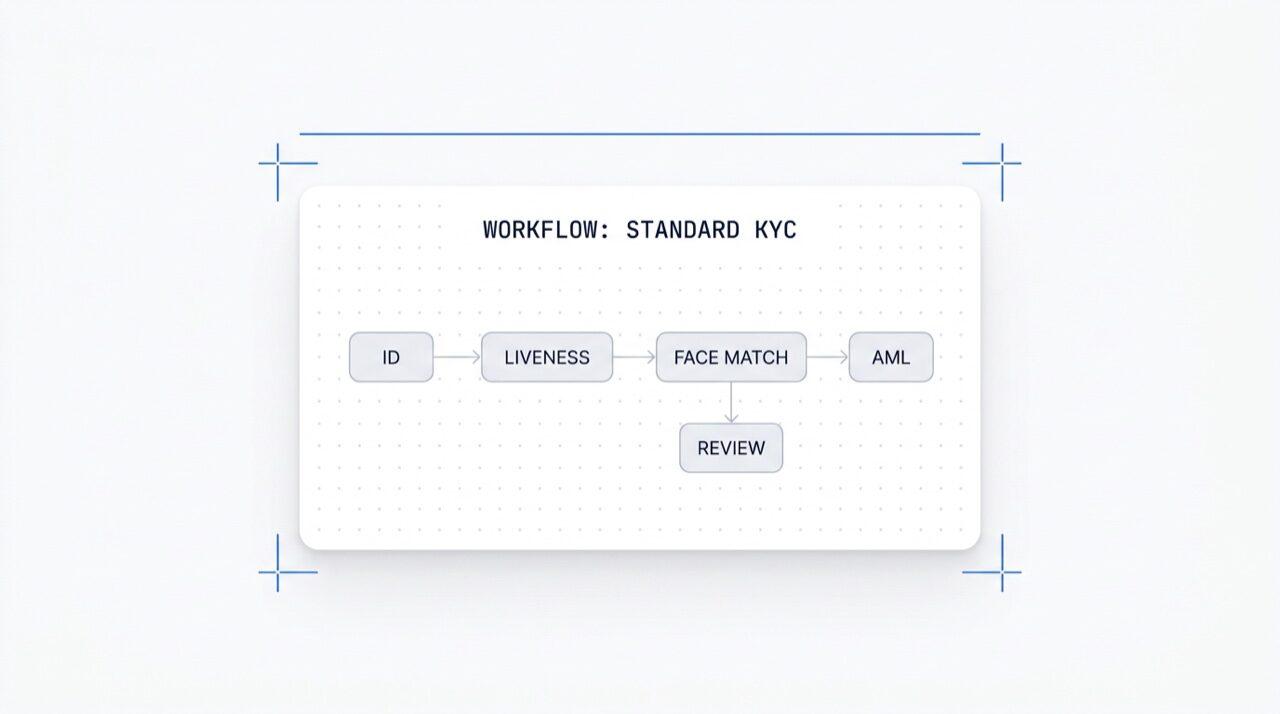
Dessine n'importe quel flux de vérification sur un canevas. Glisse, dépose, branche, teste A/B et active n'importe lequel des plus de 25 modules en un clic. Gratuit avec chaque plan.
Active n'importe quel module en un clic. Éditeur visuel pour les flux KYC (Know Your Customer),
KYB (Know Your Business), AML (Anti-Money Laundering) et de surveillance.
Tests A/B en production. Gratuit, sans frais par flux.
Comment ça marche
De l'inscription à l'utilisateur vérifié en quatre étapes.
Étape 01 / 04
01
Crée le flux
Choisis les vérifications que tu souhaites, ID, détection du vivant, correspondance faciale, sanctions, adresse, âge, téléphone, e-mail, questions personnalisées. Glisse-les dans un flux sur le tableau de bord, ou publie le même flux sur notre API. Branche sur des conditions, exécute des tests A/B, aucun code requis.
Intègre
Intègre nativement avec nos SDK Web, iOS, Android, React Native ou Flutter. Redirige vers une page hébergée. Ou envoie simplement un lien à ton utilisateur, par e-mail, SMS, WhatsApp, n'importe où. Choisis ce qui convient à ta stack.
L'utilisateur suit le flux
Didit gère la caméra, les repères lumineux, le transfert mobile et l'accessibilité. Pendant que l'utilisateur est dans le flux, nous évaluons plus de 200 signaux de fraude en temps réel et vérifions chaque champ par rapport à des sources de données fiables. Résultat en moins de deux secondes.
Tu reçois les résultats
Des webhooks signés en temps réel maintiennent ta base de données synchronisée dès qu'un utilisateur est approuvé, refusé ou envoyé pour examen. Interroge l'API à la demande. Ou ouvre la console pour inspecter chaque session, chaque signal et gérer les cas à ta manière.
Conçu pour les développeurs · Conçu contre la fraude · Ouvert par nature
Six fonctionnalités. Un seul canevas. $0 par flux.
L'Orchestrateur de flux est le canevas derrière chaque vérification Didit. Construis-le dans la console ou crée-le à partir de ton code. Chaque fonctionnalité ci-dessous est incluse avec chaque espace de travail sans frais supplémentaires.
Nœuds glisser-déposer. Connexion intelligente. Sans code.
Un canevas infini avec des nœuds modulaires (ID, Liveness, Face Match, AML, NFC, IP, Questionnaire, Preuve d'adresse, Validation de base de données, Estimation de l'âge, Email, Téléphone), des nœuds de branchement pour le routage basé sur les données de session en direct, des nœuds d'action (tag, définir les métadonnées, acheminer vers une révision manuelle) et des nœuds de verdict (approuvé, refusé, en révision).
Sans code · connexion intelligente · zoom et panoramiqueToile infinie
02 · Activation de module
Active plus de 25 modules par workflow.
Chaque workflow dispose d'une liste de modules activables. Un simple interrupteur active le nœud, pas de changement de code, pas de redéploiement de ton côté. Les nouveaux modules que nous lançons chaque mois apparaissent dans cette même liste. Tu ne paies que par vérification, aux tarifs publiés par module ; le workflow lui-même est gratuit.
Activation des modules
Activez l'un des 25+ modules · payez au succès
25+ modules
25+
Modules
1 /mo
Nouveau module déployé
$0
Surtaxe de workflow
Vérification d'identité$0.15Activé
Détection de vivacité passive$0.10Activé
Correspondance faciale 1:1$0.05Activé
Filtrage AML$0.20Désactivé
Filtrage de portefeuille (KYT)$0.15Désactivé
03 · Multi-application
Dev, staging, production. Un seul espace de travail.
Chaque espace de travail héberge plusieurs applications, généralement Développement, Staging, Production. Chaque application possède sa propre clé API, ses workflows publiés et ses destinations de webhook. Pour promouvoir un workflow, republie-le dans l'application cible ou exporte la version JSON.
Applications
Dev · Staging · Production · clés isolées
3 applications
3
Applications
1 clé
Par application
JSON
Exportable
Développementsk_dev_4f8adraft v4Brouillon
Stagingsk_stg_9c12v3Staging
Productionsk_prd_b201v3En ligne
Promouvoir · republier ou exporter le JSON du workflow
04 · Tests A/B
Variantes de trafic en direct sans redéploiement.
Publie deux variantes, définis un pourcentage de répartition, et l'Orchestrator achemine le trafic entrant entre les deux. Suis le taux de complétion, le taux de refus, l'abandon et le temps de verdict par variante dans les analyses. Fais passer le gagnant à 100 % en un clic ; reviens en arrière en un clic.
Expérience A/B · onboarding_v5
Trafic divisé · télémétrie de conversion en direct
Variante B gagnante
Variante A50%
87.4%
Taux de complétion
Variante B50%
91.2%
Taux de complétion
Taux de refus6.1%4.3%
Abandon6.5%4.5%
Temps de décision38s32s
Ramp B · 5% → 100% · retour en arrière en un clic+3.8 pp
05 · Branchement
Logique conditionnelle sur chaque champ.
Les nœuds de branchement acheminent les utilisateurs en fonction des données de session en direct, pays, score de risque, type de document, âge, temps écoulé depuis l'émission, ou toute règle personnalisée. Reviens à la vérification d'identité pour les âges limites. Ignore l'AML pour les régions à faible risque. Passe au NFC pour les flux uniquement basés sur le passeport. Sans code.
Gratuit sur tous les plans. Webhooks, Zapier, MCP.
Pas de frais par workflow, pas de frais par utilisateur. Workflows, versions et destinations de webhook illimités. Chaque workflow s'intègre avec Zapier, Shopify, Salesforce et le serveur MCP (Model Context Protocol) pour que les agents IA puissent gérer les sessions avec le même ID de workflow. Les webhooks sont signés.
POST /webhooks/destinations
Inclus
workflow.session.verified200 OK
{
"workflow_id": "wf_3daf4c64",
"session_id": "sess_8a2f9c10",
"status": "verified",
"vendor_data": "user-42",
"version": 3,
Destinations: unlimited
}
En-têteX-Signature-V2 : hmac-sha256
Destinations
WebhookZapierShopifySalesforceMCP
$0 / workflow
Intègre
Deux endpoints. Un seul workflow_id.
Construis un flux une seule fois, sur le canevas visuel, ou à partir de ton code. Référence son ID sur chaque session que tu démarres. Le même ID de flux alimente les SDK pour Web, iOS, Android, React Native, Flutter et le serveur MCP.
Connecte n'importe quel flux de vérification en une seule invite.
Colle le bloc ci-dessous dans Claude Code, Cursor, Codex, Devin, Aider ou Replit Agent. Renseigne ton framework, ton langage et ton cas d'utilisation. L'agent provisionne Didit, construit le workflow, connecte le webhook et envoie un lien de vérification à ton utilisateur, même canevas, mêmes primitives, compatible avec les agents IA.
didit-integration-prompt.md
# Didit Workflow Orchestrator — integrate in 5 minutes

You are wiring the Didit Workflow Orchestrator into <my_stack>. Follow
these steps exactly. Every URL, header, and enum value below is
canonical — do not paraphrase or "improve" them.

Workflows are versioned JSON documents that string together any subset
of Didit's 25+ verification modules:
  - Feature nodes (Optical Character Recognition (OCR), LIVENESS, FACE_MATCH, Anti-Money Laundering (AML), Near Field Communication (NFC), IP, QUESTIONNAIRE,
    PROOF_OF_ADDRESS, DATABASE_VALIDATION, AGE_ESTIMATION, EMAIL_VERIFICATION,
    PHONE_VERIFICATION)
  - Branch nodes (route by country, risk score, document type, age, ...)
  - Action nodes (add tag, set metadata, route to manual review)
  - Status nodes (APPROVED, DECLINED, IN_REVIEW)

## 1. Provision an account
- Sign up: https://business.didit.me (no credit card required).
- Or provision programmatically: POST https://apx.didit.me/auth/v2/programmatic/register/

## 2. Two ways to build a workflow — pick one

### Path A — Visual canvas (recommended for humans)
1. Open https://docs.didit.me/console/workflows.
2. Pick Simple Mode for a template-based build (Know Your Customer (KYC), Age Verification,
   Biometric Auth, Address, Questionnaire) or Advanced Mode for the
   node-based graph builder.
3. Drag feature nodes onto the canvas. Connect handles with the smart-
   connect cursor. Drop branch nodes between features to route on data.
4. Click Publish. The published workflow's UUID is your workflow_id.

### Path B — Management API (recommended for AI agents)
Programmatically create a linear workflow with the simple v3 features
array — Didit converts it into a node-based graph internally.

POST https://verification.didit.me/v3/workflows/
Headers:
  x-api-key: <your-api-key>
  Content-Type: application/json
Body:
  {
    "workflow_label": "Standard KYC",
    "features": [
      {
        "feature": "OCR",
        "config": {
          "documents_allowed": {},
          "duplicated_user_action": "REVIEW"
        }
      },
      { "feature": "LIVENESS", "config": { "face_liveness_method": "PASSIVE" } },
      { "feature": "FACE_MATCH" },
      { "feature": "AML" }
    ]
  }

Hard rules for POST /v3/workflows/:
  - features[].feature values are UPPERCASE strict enum:
    OCR, LIVENESS, FACE_MATCH, AML, NFC, IP, QUESTIONNAIRE,
    PROOF_OF_ADDRESS, DATABASE_VALIDATION, AGE_ESTIMATION,
    EMAIL_VERIFICATION, PHONE_VERIFICATION
  - Put dependency features first. OCR before FACE_MATCH, NFC,
    DATABASE_VALIDATION, or user-AML checks that depend on document
    data. LIVENESS before FACE_MATCH.
  - For QUESTIONNAIRE features, create the questionnaire first via
    POST /v3/questionnaires/ and use the returned questionnaire_id as
    config.questionnaire_uuid.
  - The endpoint supports linear workflows only. To add branches,
    actions, webhooks, or conditional routing, edit the published
    workflow in the canvas.
  - Save the returned workflow uuid — that is your workflow_id for
    creating sessions, and your settings_uuid for future updates.

Reference for every config field per feature:
  https://docs.didit.me/management-api/workflows/feature-configs

## 3. Use the workflow in a session
POST https://verification.didit.me/v3/session/
Headers:
  x-api-key: <your-api-key>
  Content-Type: application/json
Body:
  {
    "workflow_id": "<uuid from step 2>",
    "vendor_data": "user-42"
  }

Response includes the hosted verification link in url. Redirect the user
there. The hosted Didit UI handles capture UX, mobile handoff,
accessibility, retries, and webhook delivery on completion.

## 4. Webhooks
Register one webhook destination per workspace:

POST https://verification.didit.me/v3/webhook/destinations/
Body: { "url": "https://yourapp.com/didit/webhooks",
        "events": ["session.verified", "session.review_started",
                   "session.declined", "session.expired"] }

Every delivery carries an X-Signature-V2 Hash-based Message Authentication
Code (HMAC) header.  HMAC-SHA256 verification MUST run against the raw body bytes (the raw payload as Didit sent it) BEFORE any JSON parsing — re-serialising the parsed body changes whitespace and key order, which invalidates the signature.Verify before trusting the payload:

  signature = hmac_sha256(secret, raw_body).hex()
  if signature != request.headers["X-Signature-V2"]:
      return 401

Retries use exponential backoff over 24 hours. The Console shows every
delivery, retry, and signature verification result.

## 5. Workflow versioning
Workflows support draft / publish versioning. Drafts are fully editable.
Publishing creates an immutable version that new sessions will use.
Sessions always reference the specific version they were created with,
so behaviour stays consistent even after you publish updates. Previous
versions are preserved and inspectable via the Management API.

## 6. Multi-app management
Each workspace can host multiple applications — typically Development,
Staging, Production. Each application carries its own API key, its own
workflows, and its own webhook destinations. Promote a published
workflow from Staging to Production by re-publishing in the target app
or by exporting and re-importing the workflow JSON.

## 7. A/B testing
Split traffic across two published workflow variants from inside the
canvas. Configure a percentage split, route by user cohort, ramp a new
module to 5% before going to 100%. Conversion metrics surface on the
workflow analytics view at https://docs.didit.me/console/analytics.

## 8. Hard rules — do not change
- Base URL stays  https://verification.didit.me  (NOT apx.didit.me).
- Auth header stays  x-api-key  (lowercase, hyphenated).
- Webhook signature header stays  X-Signature-V2  (NOT X-Signature).
- Feature enum is UPPERCASE strict — OCR, LIVENESS, FACE_MATCH, AML,
  NFC, IP, QUESTIONNAIRE, PROOF_OF_ADDRESS, DATABASE_VALIDATION,
  AGE_ESTIMATION, EMAIL_VERIFICATION, PHONE_VERIFICATION.
- Session status casing stays  "Approved" / "Declined" / "In Review" /
  "Expired" / "Not Finished"  (mixed case on session statuses,
  UPPERCASE_SNAKE on transaction and case statuses).

## 9. Pricing reference
The Workflow Orchestrator itself is FREE on every plan — no per-workflow
fee, no per-seat fee, unlimited workflows. You pay only for the modules
that run inside the workflow at the published per-success rates on
https://didit.me/pricing.

500 free verifications every month, forever, on every account.

## 10. Verify your integration
1. Create a sandbox API key at https://business.didit.me.
2. POST /v3/workflows/ with the Standard KYC body above. Save the uuid.
3. POST /v3/session/ with that workflow_id. Open the url in a
   browser and complete the flow with the sandbox test fixtures.
4. Confirm the session.verified webhook fires and X-Signature-V2 verifies.
5. Open the workflow in the canvas — verify the linear feature array
   was converted into the expected node graph.

Done. The Workflow Orchestrator is live. Reach out to support@didit.me
with the workspace id if you hit a wall.
Conforme par nature
Ouvre un nouveau pays en un clic. On s'occupe du plus dur.
Nous ouvrons les filiales locales, obtenons les licences, effectuons les tests d'intrusion, obtenons les certifications et nous alignons sur chaque nouvelle réglementation. Pour déployer des vérifications dans un nouveau pays, il suffit d'activer un interrupteur. Plus de 220 pays en direct, audités et testés chaque trimestre, le seul fournisseur d'identité qu'un gouvernement d'un État membre de l'UE a formellement jugé plus sûr que la vérification en personne.
Inclus dans chaque forfait. Pas de frais par workflow. Pas de frais par utilisateur.
25+
Modules que tu peux activer par workflow en un clic.
5
Templates prêts à l'emploi, KYC, Âge, Authentification Biométrique, Adresse, Questionnaire.
5 min
De l'inscription à un workflow actif en session réelle.
Trois niveaux, une seule grille tarifaire
Commence gratuitement. Payez à l'usage. Passez à l'Enterprise.
500 vérifications gratuites chaque mois, pour toujours. Ensuite, ne payez que lorsqu'un module s'exécute. Contrats personnalisés, résidence des données et accords de niveau de service (SLA) pour l'offre Enterprise.
Gratuit
$0/ mois · sans carte bancaire
Pour le développement, les tests et tes premiers utilisateurs.
Tout ce qu'il te faut pour démarrer :
500 vérifications KYC complètes chaque mois
ID, preuve de vie, correspondance faciale, appareil et IP
Plus de 200 signaux de fraude, liste noire, doublons
KYC réutilisable sur le réseau Didit
Éditeur de workflows, gestion des cas, SDK
Support IAAgent IA intégré à la console, documentation et communauté.