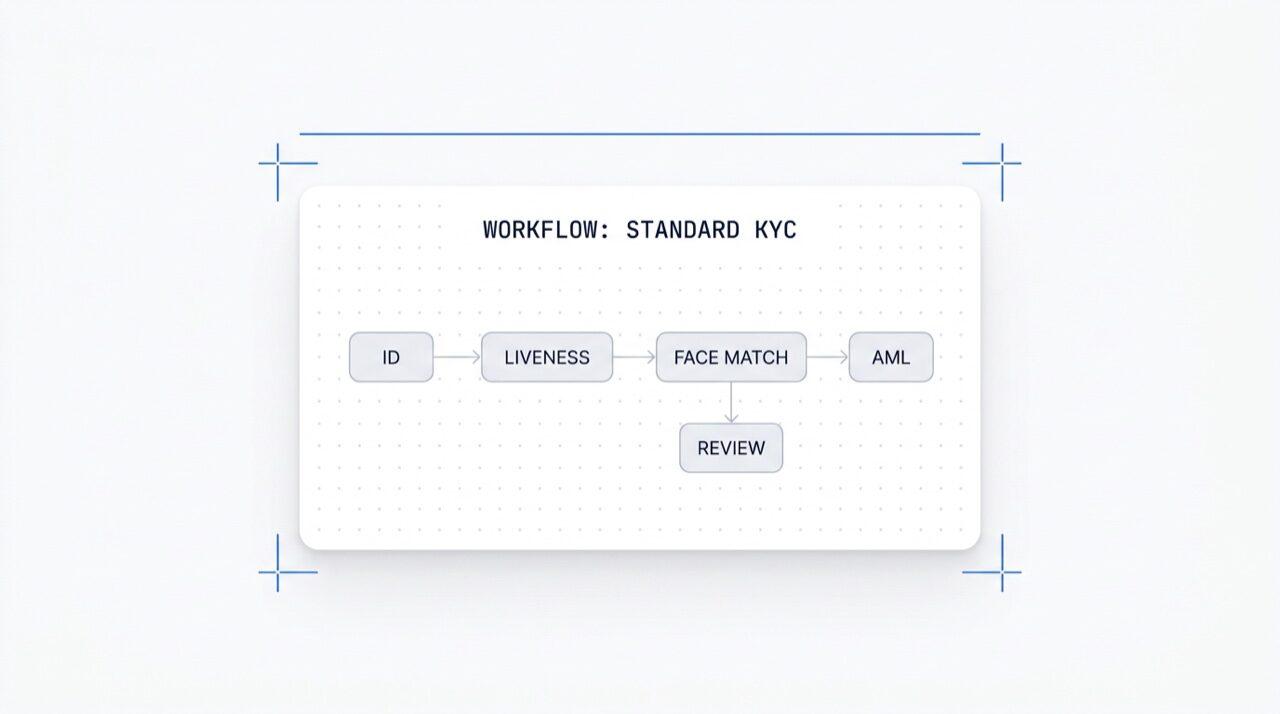
Buat alur verifikasi apa pun di kanvas. Cukup drag, drop, buat cabang, A/B test, dan aktifkan salah satu dari 25+ modul dalam sekali klik. Gratis di semua paket.
Dipercaya oleh 2.000+ organisasi di seluruh dunia.
No-code workflow builder
Drag, drop, A/B test. Conditional branching.
Aktifkan modul apa pun dalam sekali klik. Editor visual untuk KYC (know your customer),
KYB (know your business), AML (anti-money laundering), dan alur monitoring.
A/B test di production. Gratis, tanpa biaya per-workflow.
Cara kerjanya
Dari pendaftaran hingga pengguna terverifikasi dalam empat langkah.
Langkah 01 / 04
01
Buat workflow
Pilih pemeriksaan yang Anda inginkan, ID, liveness, face match, sanksi, alamat, usia, telepon, email, pertanyaan kustom. Drag ke dalam alur di dashboard, atau post alur yang sama ke API kami. Buat cabang berdasarkan kondisi, jalankan A/B test, tanpa perlu coding.
Integrasikan
Embed secara native dengan Web, iOS, Android, React Native, atau Flutter SDK kami. Redirect ke halaman yang di-host. Atau cukup kirim link ke pengguna Anda, via email, SMS, WhatsApp, di mana saja. Pilih yang sesuai dengan stack Anda.
Pengguna melewati alur
Didit meng-host kamera, isyarat pencahayaan, hand-off seluler, dan aksesibilitas. Saat pengguna berada dalam alur, kami menilai 200+ sinyal fraud secara real time dan memverifikasi setiap bidang terhadap sumber data otoritatif. Hasilnya dalam waktu kurang dari dua detik.
Anda menerima hasilnya
Webhook yang ditandatangani secara real-time menjaga database Anda tetap sinkron saat pengguna disetujui, ditolak, atau dikirim untuk ditinjau. Poll API sesuai permintaan. Atau buka konsol untuk memeriksa setiap sesi, setiap sinyal, dan mengelola kasus sesuai keinginan Anda.
Dibuat untuk developer · Dibuat untuk melawan fraud · Desain terbuka
Enam kapabilitas. Satu kanvas. $0 per workflow.
Workflow Orchestrator adalah kanvas di balik setiap verifikasi Didit. Buat di konsol atau dari kode Anda. Setiap kapabilitas di bawah ini tersedia di setiap workspace tanpa biaya tambahan.
Kanvas tanpa batas dengan node modul (ID, Liveness, Face Match, AML, NFC, IP, Kuesioner, Bukti Alamat, Validasi Database, Estimasi Usia, Email, Telepon), node cabang yang merutekan data sesi langsung, node aksi (tag, set metadata, rute ke peninjauan manual), dan node keputusan (disetujui, ditolak, dalam peninjauan).
Kanvas alur kerja
Drag-drop · smart-connect · keyboard shortcuts
Mode lanjutan
12
Fitur
6
Cabang
4
Aksi
3
Status
FiturOCR
FiturLIVENESS
Cabangrisk > 80
Aksitag:hi-risk
StatusIN REVIEW
OCRFACE_MATCHAMLNFCIPPHONEEMAILAGE_EST
Tanpa kode · smart-connect · zoom & panKanvas tak terbatas
02 · Aktivasi modul
Aktifkan salah satu dari 25+ modul per workflow.
Setiap workflow punya daftar toggle modul. Cukup aktifkan, node langsung berfungsi, tanpa perlu ubah kode atau redeploy dari sisi Anda. Modul baru yang kami rilis tiap bulan akan muncul di daftar yang sama. Bayar hanya per pemeriksaan sesuai tarif per modul yang dipublikasikan; workflow-nya sendiri gratis.
Aktivasi modul
Aktifkan salah satu dari 25+ modul · bayar per keberhasilan
25+ modul
25+
Modul
1 /mo
Modul baru dirilis
$0
Biaya tambahan workflow
Verifikasi ID$0.15Aktif
Passive Liveness$0.10Aktif
Face Match 1:1$0.05Aktif
AML Screening$0.20Nonaktif
Wallet Screening (KYT)$0.15Nonaktif
03 · Multi-aplikasi
Dev, staging, production. Satu workspace.
Setiap workspace bisa menampung banyak aplikasi, biasanya Development, Staging, Production. Tiap aplikasi punya API key, workflow yang dipublikasikan, dan tujuan webhook-nya sendiri. Promosikan workflow dengan mempublikasikan ulang di aplikasi target atau ekspor JSON versinya.
Aplikasi
Dev · Staging · Production · kunci terisolasi
3 aplikasi
3
Aplikasi
1 kunci
Per aplikasi
JSON
Bisa diekspor
Developmentsk_dev_4f8adraft v4Draft
Stagingsk_stg_9c12v3Staging
Productionsk_prd_b201v3Live
Promosikan · publikasikan ulang atau ekspor JSON workflow
04 · A/B testing
Split traffic varian secara langsung tanpa redeploy.
Publikasikan dua varian, atur persentase pembagian, dan Orchestrator akan merutekan traffic masuk ke keduanya. Pantau completion rate, decline rate, abandonment, dan time-to-verdict per varian di analitik. Tingkatkan varian pemenang ke 100% dengan satu klik; rollback juga satu klik.
Eksperimen A/B · onboarding_v5
Split traffic · telemetri konversi langsung
Varian B unggul
Varian A50%
87.4%
Tingkat penyelesaian
Varian B50%
91.2%
Tingkat penyelesaian
Tingkat penolakan6.1%4.3%
Pengabaian6.5%4.5%
Waktu-ke-verdict38s32s
Ramp B · 5% → 100% · rollback sekali klik+3.8 pp
05 · Percabangan
Logika kondisional di setiap field.
Node cabang merutekan pengguna berdasarkan data sesi langsung, negara, skor risiko, jenis dokumen, usia, waktu sejak penerbitan, atau aturan kustom apa pun. Kembali ke Verifikasi ID untuk usia yang mendekati batas. Lewati AML untuk wilayah berisiko rendah. Tingkatkan ke NFC untuk alur khusus paspor. Tanpa kode.
Node cabang
Rute berdasarkan negara · risiko · jenis dokumen · usia
5 kondisi
Kondisi ifRute
country in {DE, FR, ES, IT}
Setujui
risk_score > 80
AML + Review
doc.type == PASSPORT
Pembacaan NFC
age < 18
Estimasi Usia
default
Manual review
7 bidang · negara · risiko · dokumen · usiaTanpa coding
06 · Gratis + terbuka
Gratis di semua paket. Webhook, Zapier, MCP.
Tidak ada biaya per workflow, tidak ada biaya per kursi. Workflow, versi, dan tujuan webhook tak terbatas. Setiap workflow terintegrasi dengan Zapier, Shopify, Salesforce, dan server MCP (Model Context Protocol) sehingga agen AI dapat menjalankan sesi dengan ID workflow yang sama. Webhook dikirim dengan tanda tangan.
POST /webhooks/destinations
Termasuk
workflow.session.verified200 OK
{
"workflow_id": "wf_3daf4c64",
"session_id": "sess_8a2f9c10",
"status": "verified",
"vendor_data": "user-42",
"version": 3,
Destinasi: unlimited
}
HeaderX-Signature-V2: hmac-sha256
Destinasi
WebhookZapierShopifySalesforceMCP
$0 / workflow
Integrasikan
Dua endpoint. Satu workflow_id.
Buat workflow sekali, di kanvas visual, atau dari kode Anda. Referensikan ID-nya di setiap sesi yang Anda mulai. ID workflow yang sama mendukung SDK untuk Web, iOS, Android, React Native, Flutter, dan server MCP.
Integrasikan alur verifikasi apa pun dengan satu prompt.
Tempel blok di bawah ini ke Claude Code, Cursor, Codex, Devin, Aider, atau Replit Agent. Isi framework, bahasa, dan use case Anda. Agent akan menyiapkan Didit, membangun workflow, mengintegrasikan webhook, dan mengirim link verifikasi ke pengguna Anda, kanvas yang sama, primitif yang sama, ramah AI-agent.
didit-integration-prompt.md
# Didit Workflow Orchestrator — integrate in 5 minutes

You are wiring the Didit Workflow Orchestrator into <my_stack>. Follow
these steps exactly. Every URL, header, and enum value below is
canonical — do not paraphrase or "improve" them.

Workflows are versioned JSON documents that string together any subset
of Didit's 25+ verification modules:
  - Feature nodes (Optical Character Recognition (OCR), LIVENESS, FACE_MATCH, Anti-Money Laundering (AML), Near Field Communication (NFC), IP, QUESTIONNAIRE,
    PROOF_OF_ADDRESS, DATABASE_VALIDATION, AGE_ESTIMATION, EMAIL_VERIFICATION,
    PHONE_VERIFICATION)
  - Branch nodes (route by country, risk score, document type, age, ...)
  - Action nodes (add tag, set metadata, route to manual review)
  - Status nodes (APPROVED, DECLINED, IN_REVIEW)

## 1. Provision an account
- Sign up: https://business.didit.me (no credit card required).
- Or provision programmatically: POST https://apx.didit.me/auth/v2/programmatic/register/

## 2. Two ways to build a workflow — pick one

### Path A — Visual canvas (recommended for humans)
1. Open https://docs.didit.me/console/workflows.
2. Pick Simple Mode for a template-based build (Know Your Customer (KYC), Age Verification,
   Biometric Auth, Address, Questionnaire) or Advanced Mode for the
   node-based graph builder.
3. Drag feature nodes onto the canvas. Connect handles with the smart-
   connect cursor. Drop branch nodes between features to route on data.
4. Click Publish. The published workflow's UUID is your workflow_id.

### Path B — Management API (recommended for AI agents)
Programmatically create a linear workflow with the simple v3 features
array — Didit converts it into a node-based graph internally.

POST https://verification.didit.me/v3/workflows/
Headers:
  x-api-key: <your-api-key>
  Content-Type: application/json
Body:
  {
    "workflow_label": "Standard KYC",
    "features": [
      {
        "feature": "OCR",
        "config": {
          "documents_allowed": {},
          "duplicated_user_action": "REVIEW"
        }
      },
      { "feature": "LIVENESS", "config": { "face_liveness_method": "PASSIVE" } },
      { "feature": "FACE_MATCH" },
      { "feature": "AML" }
    ]
  }

Hard rules for POST /v3/workflows/:
  - features[].feature values are UPPERCASE strict enum:
    OCR, LIVENESS, FACE_MATCH, AML, NFC, IP, QUESTIONNAIRE,
    PROOF_OF_ADDRESS, DATABASE_VALIDATION, AGE_ESTIMATION,
    EMAIL_VERIFICATION, PHONE_VERIFICATION
  - Put dependency features first. OCR before FACE_MATCH, NFC,
    DATABASE_VALIDATION, or user-AML checks that depend on document
    data. LIVENESS before FACE_MATCH.
  - For QUESTIONNAIRE features, create the questionnaire first via
    POST /v3/questionnaires/ and use the returned questionnaire_id as
    config.questionnaire_uuid.
  - The endpoint supports linear workflows only. To add branches,
    actions, webhooks, or conditional routing, edit the published
    workflow in the canvas.
  - Save the returned workflow uuid — that is your workflow_id for
    creating sessions, and your settings_uuid for future updates.

Reference for every config field per feature:
  https://docs.didit.me/management-api/workflows/feature-configs

## 3. Use the workflow in a session
POST https://verification.didit.me/v3/session/
Headers:
  x-api-key: <your-api-key>
  Content-Type: application/json
Body:
  {
    "workflow_id": "<uuid from step 2>",
    "vendor_data": "user-42"
  }

Response includes the hosted verification link in url. Redirect the user
there. The hosted Didit UI handles capture UX, mobile handoff,
accessibility, retries, and webhook delivery on completion.

## 4. Webhooks
Register one webhook destination per workspace:

POST https://verification.didit.me/v3/webhook/destinations/
Body: { "url": "https://yourapp.com/didit/webhooks",
        "events": ["session.verified", "session.review_started",
                   "session.declined", "session.expired"] }

Every delivery carries an X-Signature-V2 Hash-based Message Authentication
Code (HMAC) header.  HMAC-SHA256 verification MUST run against the raw body bytes (the raw payload as Didit sent it) BEFORE any JSON parsing — re-serialising the parsed body changes whitespace and key order, which invalidates the signature.Verify before trusting the payload:

  signature = hmac_sha256(secret, raw_body).hex()
  if signature != request.headers["X-Signature-V2"]:
      return 401

Retries use exponential backoff over 24 hours. The Console shows every
delivery, retry, and signature verification result.

## 5. Workflow versioning
Workflows support draft / publish versioning. Drafts are fully editable.
Publishing creates an immutable version that new sessions will use.
Sessions always reference the specific version they were created with,
so behaviour stays consistent even after you publish updates. Previous
versions are preserved and inspectable via the Management API.

## 6. Multi-app management
Each workspace can host multiple applications — typically Development,
Staging, Production. Each application carries its own API key, its own
workflows, and its own webhook destinations. Promote a published
workflow from Staging to Production by re-publishing in the target app
or by exporting and re-importing the workflow JSON.

## 7. A/B testing
Split traffic across two published workflow variants from inside the
canvas. Configure a percentage split, route by user cohort, ramp a new
module to 5% before going to 100%. Conversion metrics surface on the
workflow analytics view at https://docs.didit.me/console/analytics.

## 8. Hard rules — do not change
- Base URL stays  https://verification.didit.me  (NOT apx.didit.me).
- Auth header stays  x-api-key  (lowercase, hyphenated).
- Webhook signature header stays  X-Signature-V2  (NOT X-Signature).
- Feature enum is UPPERCASE strict — OCR, LIVENESS, FACE_MATCH, AML,
  NFC, IP, QUESTIONNAIRE, PROOF_OF_ADDRESS, DATABASE_VALIDATION,
  AGE_ESTIMATION, EMAIL_VERIFICATION, PHONE_VERIFICATION.
- Session status casing stays  "Approved" / "Declined" / "In Review" /
  "Expired" / "Not Finished"  (mixed case on session statuses,
  UPPERCASE_SNAKE on transaction and case statuses).

## 9. Pricing reference
The Workflow Orchestrator itself is FREE on every plan — no per-workflow
fee, no per-seat fee, unlimited workflows. You pay only for the modules
that run inside the workflow at the published per-success rates on
https://didit.me/pricing.

500 free verifications every month, forever, on every account.

## 10. Verify your integration
1. Create a sandbox API key at https://business.didit.me.
2. POST /v3/workflows/ with the Standard KYC body above. Save the uuid.
3. POST /v3/session/ with that workflow_id. Open the url in a
   browser and complete the flow with the sandbox test fixtures.
4. Confirm the session.verified webhook fires and X-Signature-V2 verifies.
5. Open the workflow in the canvas — verify the linear feature array
   was converted into the expected node graph.

Done. The Workflow Orchestrator is live. Reach out to support@didit.me
with the workspace id if you hit a wall.
Dirancang untuk kepatuhan
Buka negara baru dengan satu klik. Kami yang mengerjakan bagian sulitnya.
Kami membuka anak perusahaan lokal, mengamankan lisensi, menjalankan pengujian penetrasi, mendapatkan sertifikasi, dan menyelaraskan dengan setiap regulasi baru. Untuk meluncurkan verifikasi di negara baru, cukup aktifkan tombol. 220+ negara sudah aktif, diaudit dan diuji penetrasi setiap kuartal, satu-satunya penyedia identitas yang secara formal disebut oleh pemerintah negara anggota Uni Eropa lebih aman daripada verifikasi langsung.
Dari pendaftaran hingga workflow aktif berjalan dalam sesi nyata.
Tiga tingkatan, satu daftar harga
Mulai gratis. Bayar sesuai pemakaian. Skalakan ke Enterprise.
500 verifikasi gratis setiap bulan, selamanya. Setelah itu, bayar hanya saat modul berjalan. Kontrak khusus, data residency, dan service level agreement (SLA) tersedia untuk Enterprise.
Gratis
$0/ bulan · tanpa kartu
Untuk membangun, menguji, dan pengguna pertamamu.
Semua yang kamu butuhkan untuk memulai:
500 verifikasi KYC lengkap setiap bulan
ID, liveness, face match, device & IP
200+ sinyal fraud, blocklist, duplikat
KYC yang bisa digunakan kembali di seluruh jaringan Didit
Workflow builder, case management, SDK
Dukungan AIAgen AI dalam konsol, dokumentasi, dan komunitas.