
No age signal? What to do on NOT_SHARED, TIER_A or no answer
What to build when Google Play gives no usable age: safe defaults, a selfie age estimate with a buffer, a document only in the band, which age wins when they differ, and the cost of each branch.
In short
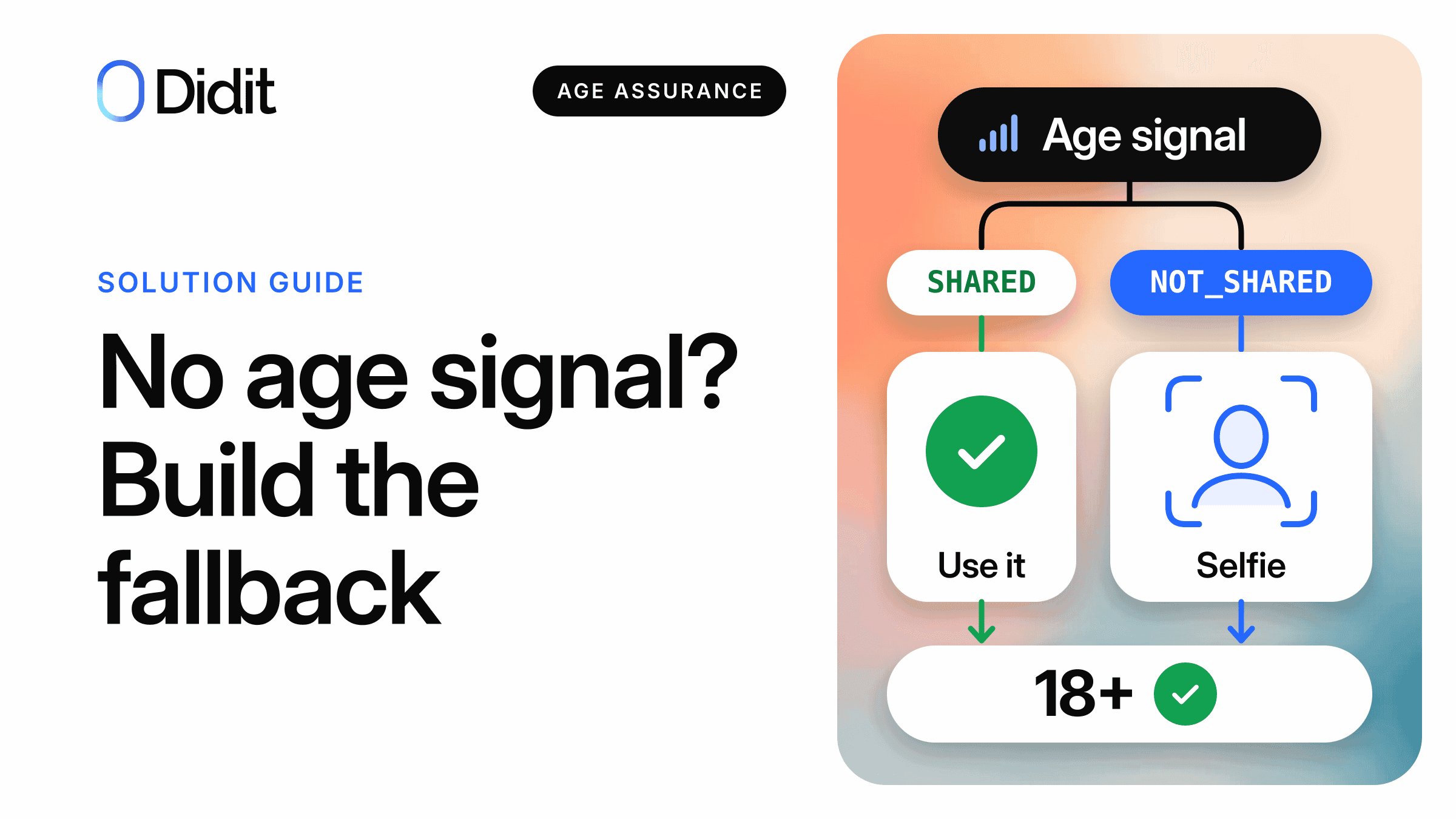
When Google Play gives your app no usable age, do not check everyone. Decide first if the feature needs an age at all. If it does not, give the age-appropriate default. If a restricted feature or a law needs more, run your own check: a selfie estimate with a buffer, and an ID document only inside it.
- Where the signal is enough, stop. A second check on every user is hard to square with data minimisation.
- In Alabama, Utah and Brazil your own check can only tighten: the lower age or the more protective option wins.[8][10][14]
- On Didit the selfie step lists at $0.10, and the document adds $0.15 only for people inside the band you set.[19]
Age verification for apps now starts with a store signal, and sometimes the signal is empty. The Play Age Signals API can answer NOT_SHARED, VERIFICATION_REQUIRED or an error, and where it does answer, the age may be one the user simply typed. This guide is for the product and trust and safety owners who decide what happens next.
It covers when to do nothing, how to set a buffer, which age wins in six jurisdictions and what each branch costs. Confirm the rules for your app with counsel.
Seven ways the signal can be missing
A missing signal is not evidence of a child or of an adult. Each cause has its own first move.
| Cause | What it means | First move |
|---|---|---|
| Not shared | NOT_SHARED: where sharing is a choice, the user or parent did not agree, and both age bounds are null.[1][2] | Keep the safe default and ask again only when a feature needs it |
| Verification required | VERIFICATION_REQUIRED: verification and sharing are mandatory there and the age is not verified yet.[1] | Ask the user to visit the Play Store, as Google says |
| Error | The call fails, for example with DEVICE_NOT_SUPPORTED.[25] | Retry, then treat it as no signal |
| Sideload | Google limits the API to apps updated by Google Play.[3] | Use your own gate in that build |
| Web | Google's terms let only the requesting app use the information.[3] | Use your own gate on the site |
| Another store or OS | A different signal or none. Apple has its own. | Read the local signal if there is one |
| Older Texas account | Google's v0.0.4 page says signals started for eligible Texas users whose accounts were created after 28 May 2026.[6] | Do not count on a verified signal |
The current SDK is v0.0.6. Google says it returns responses for all users by 11 December 2026.[3]
An eighth case looks like an answer: SHARED with source TIER_A, age information the user gave to Google, which Google "may or may not have confirmed".[2] Developers will find every value in the integration guide; iOS is in the Google and Apple comparison.
Get a demo of age estimation in your app
Bring your age gate and your markets. We show where the signal is enough and where a selfie step fits.
First question: do you need to know the age
The most private age check is the one you never run. Give the protective default to everyone with no usable age, and check only people who ask for a restricted feature.
- List the features that change with age: adult content, open chat, purchases, feeds, betting.
- Write the rule or policy that needs an age for each feature.
- Remove the gate where no rule or risk explains it.
- Place the check at the feature, not at sign-up.
Some laws reward this design. Brazil's decree waives age verification for a game with loot boxes that offers a version without them or restricts them fully by default.[14] What each app type usually needs is in age assurance by app category.
When a declared age is enough, and when it is not
A declared age can carry full legal weight. In California, from 1 January 2027, the developer treats the signal as "the primary indicator" of the user's age range, and the Act does not require collecting more personal information than its duties need.[7] If that is your only duty and nothing contradicts it, no extra check is needed.
Signal is enough
Stop, no extra check
- California's signal duty, with nothing clear and convincing against it[7]
- Low-risk features in Brazil, where ANPD's preliminary draft points to the store signal[15]
Data minimisation argues against more
Signal is not enough
Consider your own check
- Prohibited content in Brazil: verification regardless of the signal, in ANPD's preliminary draft[15]
- California feeds or autoplay under AB 1709, when the signal cannot verify the age[27]
- Features your own policy restricts
Check only at the restricted feature
In Texas, Alabama, Utah and Louisiana (dates below) the developer must verify age categories with the store's own data, and your check does not replace that duty.[8][10][11][12] See App Store Accountability Acts by state. In Brazil, receiving the signal does not exempt a supplier from responsibility for effective protection.[14]
1Read the signal on the device
It never goes to an age check vendor.
2The user asks for a restricted feature
Everyone else stays on the default.
Apply it and stop
No second check.
Keep the default
The feature stays off or limited.
Step up
Selfie estimate, document only in the band.
3Combine with the conflict rule
Where signal and result differ, see the table below.
California: do not prompt the user to change their age
California bars prompts such as "update your age in settings".
Section 1798.501(d)(1)(B)California Civil Code, as amended by AB 1856
"An entity subject to this title shall not prompt the user to change the user's age information."
Source: California Legislative Information, AB 1856[7]
Google's examples for a region with mandatory sharing show TIER_A for an adult user, so its docs indicate a declared age in California.[2]
A check for your own feature is a different act. AB 1709 can send a platform with addictive features to its own age determination.[27] See California age verification law 2027.
The step-up: selfie first, document only for the band
Facial age estimation predicts an age from a selfie. It does not say who the person is, and Didit's docs say to use it for age gates, not as legal proof of age.[20] So use an estimate for most people and a document for those close to the line.
1Selfie with liveness
Age and liveness always run together.
2Compare the estimate with your band
Pass
No document asked.
ID document
Portrait matched to the selfie, age limit applied to the date of birth.
Declined
The feature stays on the minor default. Offer a way to contest.
Didit's Adaptive Age Verification workflow with the document fallback on. If no age is read from the face, the person goes to the document too.[16][17]
For the wider choice of methods, read age estimation vs age verification, the adaptive flow explainer and eID vs age estimation.
Set the buffer: a worked example for an 18 gate
The buffer is the range of estimates you do not trust on their own. Didit's workflow compares the estimate cut to whole years with two settings: borderline_minimum_age_threshold and borderline_maximum_age_threshold.[17][18] This example sets them to 15 and 24.
| Estimate | Compared as | Result on the selfie |
|---|---|---|
| 14.6 | 14 | Declined, AGE_BELOW_MINIMUM |
| 19.8 | 19 | Goes to the document |
| 24.9 | 24 | Goes to the document |
| 25.0 | 25 | Passes |
| No age read | None | Goes to the document |
Band 15 to 24, fallback on.[17]
Watch out
The document limit is a second setting. Set a minimum age of 18 in the ID Verification step for every country you accept, or the band sends people to a document with no 18 rule behind it. These limits follow the country or region that issued the document, not where the user is.[16]
Now test the band against measured error.
| True age | Mean absolute error | Standard deviation | What a 15 to 24 band means |
|---|---|---|---|
| 13 to 15 | 1.70 years | 1.17 years | Even just before turning 16, passes only if the estimate is over nine years too high |
| 16 to 17 | 1.14 years | 1.37 years | Even just before turning 18, passes only if the estimate is over seven years too high, about six times the average error |
| 18 to 20 | 1.86 years | 1.74 years | Expect most to show a document. An 18-year-old is declined only if the estimate is under 15, over three years too low |
| 21 to 25 | 2.21 years | 1.78 years | Expect many documents |
| 26 to 40 | 2.77 years | 2.20 years | A 30-year-old shows a document only if the estimate is over five years too low |
Didit's own locked evaluation set of 2,399 selfies of people aged 13 and over, for the model in production since 4 November 2026.[16] Last column: our arithmetic, selfie step only. An average error is not a ceiling.
The set has nobody under 13, so it says nothing about younger children. It is not an independent benchmark.
The two edges trade different errors. A higher upper edge asks more adults for a document and lets fewer minors through on an estimate. A lower bottom edge gives young-looking adults a document route: with Didit's default of 18, an adult estimated at 17 is declined with no document offered.[17] Start wide and narrow only with evidence.
Set your band with us
See the pass, document and decline branches on your own gate.
If your result disagrees with the signal
The law may say which age counts. In Alabama, Utah and Brazil a check can only tighten. A higher result never opens what the signal keeps closed there.
| Place | Status, as of 22 November 2026 | Rule in the text | Your check says younger | Your check says older |
|---|---|---|---|---|
| California | From 1 January 2027 | Signal is the primary indicator, unless internal clear and convincing information shows a different age[7] | Ask counsel. No authority found on whether an estimate reaches that bar | Same open question. Do not assume an estimate overrides the signal |
| Alabama | From 1 January 2027. A lawsuit is pending, no injunction found[9] | Lowest age category, for developer-created restrictions, safety features and defaults[8] | Apply the younger category | Keep the store's category. Tighten only |
| Utah | From 6 May 2027 | Lowest age category, when first setting safety features or defaults[10] | Apply the younger category | Keep the store's category. Tighten only |
| Louisiana | From 1 July 2027 | May rely on the store, unless you actually know your own signal is more accurate, such as from proof of age[11] | Store's, or with that knowledge yours or the lower | Store's, or with that knowledge yours or the lower |
| Texas | Enforceable since the Fifth Circuit lifted the injunction (administrative stay 28 May, full stay 4 June 2026). Appeal pending[9][13] | No conflict rule. Good-faith reliance on store information is a defence[12] | Ask counsel before relying on the signal alone | Ask counsel. The required method is store data |
| Brazil | Lei 15.211 in force since 17 March 2026[24] | The alternative more protective of children and adolescents[14] | Apply the more protective result | Keep the protective treatment. Tighten only |
With no signal there is nothing to disagree with, but the store-data duties above remain.
In Brazil, estimation alone is not enough for prohibited content or betting: ANPD's preliminary draft wants it complemented by a verification mechanism.[15] See the guide to ECA Digital and Google Play.
Keep the data small
Google's policy prohibits "Selling, sharing, or transferring the data to any third party for any reason, except as strictly required by law".[4] Start the Didit session without it: your app decides that a check is needed, and Didit gets your threshold, not Google's or Apple's answer. Keep it out of metadata, vendor_data and logs.
| Goal | Didit setting | What to know |
|---|---|---|
| Get a yes or no only | A workflow created from an ISO/IEC 27566-1 template | Locked to the age decision with no personal data. Lowest minimum age is 13, and no biometric template is stored[16] |
| Return fewer fields | Returned data switches | A field switched off comes back as null and is hidden in the console and exports[21] |
| Keep no session | Delete call after the webhook | Process and purge. Otherwise data stays for your window, from 1 month to 10 years[21] |
| Keep no face template | face_search_enabled set to false | Face search is on by default[18] |
| Store nothing on the API | save_api_request set to false | The default stores the face images and adds the face to your index[20] |
The default decision carries the numeric age.
Brazil
Decreto 12.880 bars storing or keeping the document image, copy or information, which must be deleted immediately and irreversibly after capture.[14] A document step needs a purge design that your counsel has accepted before launch there.
Texas, Illinois and Colorado: the biometric consent step
Didit's docs say Illinois (BIPA), Texas (CUBI) and Colorado require a notice and an explicit release before a business collects face geometry.[22]
- Keep biometric consent in Auto, the default, or choose Always if you want every person asked.
- In a native app, use SDK 4.10.0 or later there. Older versions cannot show the step.
- Offer another way to anyone who refuses.
In Auto, the step appears for a person whose IP address is in a covered state, among other triggers. Didit shows the step and records the answer. Whether the journey meets the law stays your decision.[22]
What it costs
You pay for the checks that run. Amounts are in US dollars; plans are on the pricing page.
| Branch | What runs on Didit | List price |
|---|---|---|
| Signal enough, or safe default kept | Nothing | None |
| Estimate above or below the band | Age estimation with liveness | $0.10 |
| Estimate inside the band | Age estimation, then ID verification. The face match is not billed | $0.10 + $0.15 = $0.25 |
Didit list prices.[16][19]
Example
Your app has 10,000 users and 1,000 of them ask for a restricted feature with no usable age. Suppose 300 land in the band, an assumption for the arithmetic and not a measured rate. Selfies cost 1,000 x $0.10 = $100, documents 300 x $0.15 = $45, $145 in total. The other 9,000 users are not checked.
What to say to the user
Say why you ask, what is taken and what happens next. Do not promise that no data is processed.
| Moment | Copy to adapt |
|---|---|
| Not shared, default on | "You can use the app now. This feature needs an age check." |
| Verification required (not for California) | "Open the Play Store to finish confirming your age, then come back." |
| Before the selfie | "Take a selfie to estimate your age. Some people are then asked for an ID." |
| Declined | "This feature is not open to you right now. If you think this is wrong, ask for a review." |
Sample copy. Brazil's decree gives users a suitable way to contest the assessed age.[14]
How Didit helps when the signal is missing
Didit is the age check you run after the store signal. It does not read, receive or replace it. Age estimation is one step in a workflow that can add the document, part of a wider age verification solution.
A hosted session runs the Adaptive Age Verification workflow in your app or on the web, with the document fallback. The standalone POST /v3/age-estimation/ takes one selfie and returns an age and a liveness score in the same call, with no document fallback. A declined result still returns 200, so read the body.[20]
Signal missing, feature restricted
Applies the conflict rule, sets the feature
POST https://verification.didit.me/v3/session/
x-api-key: YOUR_API_KEY
Content-Type: application/json

{
  "workflow_id": "YOUR_ADAPTIVE_AGE_WORKFLOW_ID",
  "vendor_data": "your-internal-user-id",
  "callback": "https://example.com/age-check/done"
}
Start the native SDK with the returned session_token on iOS, Android, React Native or Flutter, or open the returned url on the web or in a WebView.[23][28] The webhook is the authoritative result: the status.updated event is signed with HMAC-SHA256.[26] By default the decision returns the estimate in liveness_checks[].age_estimation (in years, or null) and any warnings. If the document ran, it also lists the ID verification and the face match.[16][17] For coverage by surface, read which age verification API works where.
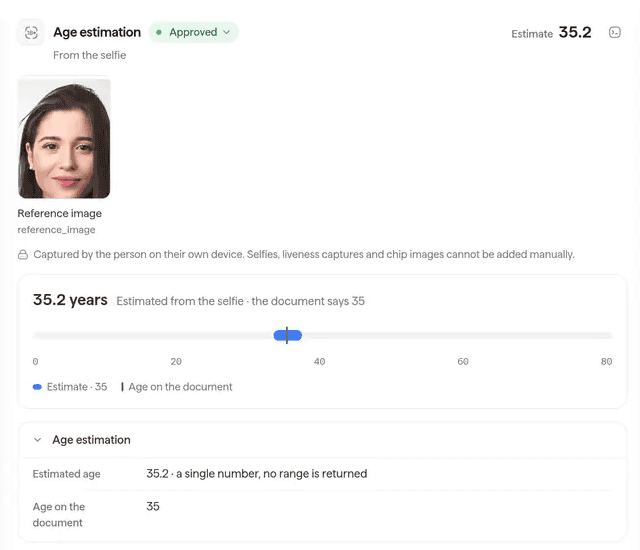
The age estimation result in the Didit console (sample data): the estimate from the selfie next to the age on the document.
Try the adaptive flow on demos.didit.me, or watch the age estimation academy video.
Didit provides
- Age estimation from a selfie, with liveness
- The document step for the band you set
- Consent, field, retention and deletion settings
Stays with you
- The store signal, kept in your app
- The decision to check, the band and the conflict rule
- The legal assessment and the user notices
Show us your age gate
We map it to the store signal, the band and the document step for your app and your markets.
Key takeaways
- Use the signal first and stop when it is enough. Missing means a safe default, not a check for everyone.
- Step up only at a restricted feature: selfie estimate with a buffer, document only inside the buffer.
- For an 18 gate, try a band of 15 to 24 and set the document limit to 18.
- In Alabama, Utah and Brazil your check can only tighten. In California, do not prompt users to change their age.
- Never send Google's or Apple's signal to Didit or any third party.
Frequently asked questions
Must I verify users who do not share?
No Google rule we read makes you. Google says it does not mandate the use of these features and leaves you to decide how the laws apply to your app.[5] Give them an age-appropriate default, and check only where a law or a feature's risk needs it.
Is TIER_A enough?
It depends on your duty. TIER_A means the user gave the age to Google, which may or may not have confirmed it.[2] California still makes the signal the primary indicator.[7] It falls short where a law asks for verification, such as prohibited content in Brazil.[14]
Can I block users who refuse?
Limiting the one feature that needs an age is easier to justify than closing the whole app. The Google pages we read do not settle the question. Ask counsel before you lock people out.
Can I ask the user to fix their age in Play?
Not in California, where the amended Act says an entity subject to it shall not prompt the user to change their age information.[7] VERIFICATION_REQUIRED is a different case: Google says to ask the user to visit the Play Store.[1]
How accurate is a selfie age estimate?
In Didit's own locked evaluation set of 2,399 selfies of people aged 13 and over, for the model in production since 4 November 2026, the mean absolute error is 1.14 years for ages 16 to 17 and 1.86 years for ages 18 to 20.[16] There is no figure for under 13.
What is a buffer zone?
It is the range of estimates around your age limit that you do not accept on the selfie alone. Inside it the person shows a document, below it the estimate is declined, above it the person passes.[17]
When is a document needed?
When the estimate falls inside your band, when no age could be read from the face (both with Didit's fallback on), or when the law asks for verification rather than estimation.[17]
Which age wins when they disagree?
It depends on the place. In Alabama and Utah the lowest category wins for the safety features and defaults you set, and in Brazil the more protective option.[8][10][14] California turns on clear and convincing information, Louisiana on actual knowledge, and the Texas statute has no conflict rule.[7][11][12]
Do you store the selfie?
By default, yes, until your retention window ends. You can delete the session as soon as the webhook arrives, and turn face search off so no face template is kept.[18][21] On the standalone API, set save_api_request to false and nothing is stored.[20]
How much does it cost per user?
The list price is $0.10 for the age estimation, which includes liveness, and $0.15 more only when the ID document step runs.[19] A user you do not check costs nothing on Didit.
Sources
- Request age signals, Android Developers, updated 18 November 2026.
- Understand age signals responses, Android Developers, updated 18 November 2026.
- Play Age Signals overview and terms, Android Developers, updated 18 November 2026.
- Age Signals API and User Data policy, Play Console Help, read 22 November 2026.
- Changes to Google Play for upcoming app store bills, Play Console Help, read 22 November 2026.
- Play Age Signals overview, v0.0.4, Android Developers, read 22 November 2026.
- AB 1856, Chapter 184, Statutes of 2026, California Legislative Information.
- Code of Alabama, Section 8-19K-9, Alabama Legislature.
- App store age verification laws: your questions answered, Squire Patton Boggs, November 2026 (secondary source for litigation status).
- Utah Code 13-76-202, Utah Legislature.
- Act 185 of 2026 (HB 977), Louisiana Legislature.
- SB 2420, enrolled text, Texas Legislature.
- Order of 4 June 2026 granting a stay pending appeal, No. 25-51073, US Court of Appeals for the Fifth Circuit.
- Decreto 12.880 of 18 March 2026, Presidência da República, Brazil.
- ECA Digital page, with the preliminary draft guide on age assurance mechanisms, ANPD, read 22 November 2026.
- Age estimation overview, Didit docs, read 22 November 2026.
- Age estimation warnings, Didit docs, read 22 November 2026.
- Workflow feature configs, Didit docs, read 22 November 2026.
- Pricing, Didit docs, read 22 November 2026.
- Standalone age estimation API, Didit docs, read 22 November 2026.
- Data retention and deletion, Didit docs, read 22 November 2026.
- Biometric consent for BIPA, CUBI and Colorado, Didit docs, read 22 November 2026.
- Create session, Didit docs, read 22 November 2026.
- Lei 15.211 of 17 September 2025 (ECA Digital), Presidência da República, Brazil.
- Play Age Signals release notes, Android Developers, read 22 November 2026.
- Webhooks, Didit docs, read 22 November 2026.
- AB 1709, Chapter 183, Statutes of 2026, California Legislative Information.
- Native SDKs overview, Didit docs, read 22 November 2026.
Signal first, safe default next, your own check for what is left. For that last branch, start with Didit age estimation.
Get a demo of the fallback flow
See the selfie, the band and the document step in one workflow, set for your age gate.
Похожие статьи
- Google Play Age Signals API: что изменится в январе 2027 года
- Age assurance for apps: games, social, dating, AI and more
- Age verification API: which one works on apps, web and stores
- Brazil's ECA Digital and Google Play: age signals in your app
- California age verification law 2027: the four rules for apps
- App Store Accountability Acts: Texas, Utah, Louisiana, Alabama