

免费
$0/ 月 · 无需信用卡
适用于构建、测试和您的首批用户。
开始所需的一切:
- 每月500次完整KYC验证
- 身份、活体、人脸匹配、设备和IP验证
- 200+欺诈信号、黑名单、重复项检测
- Didit网络内可复用KYC
- 工作流构建器、案件管理、SDK
- AI 支持 控制台内 AI 助手、文档和社区支持。






全球2,000多家组织信赖。
200+ 欺诈信号
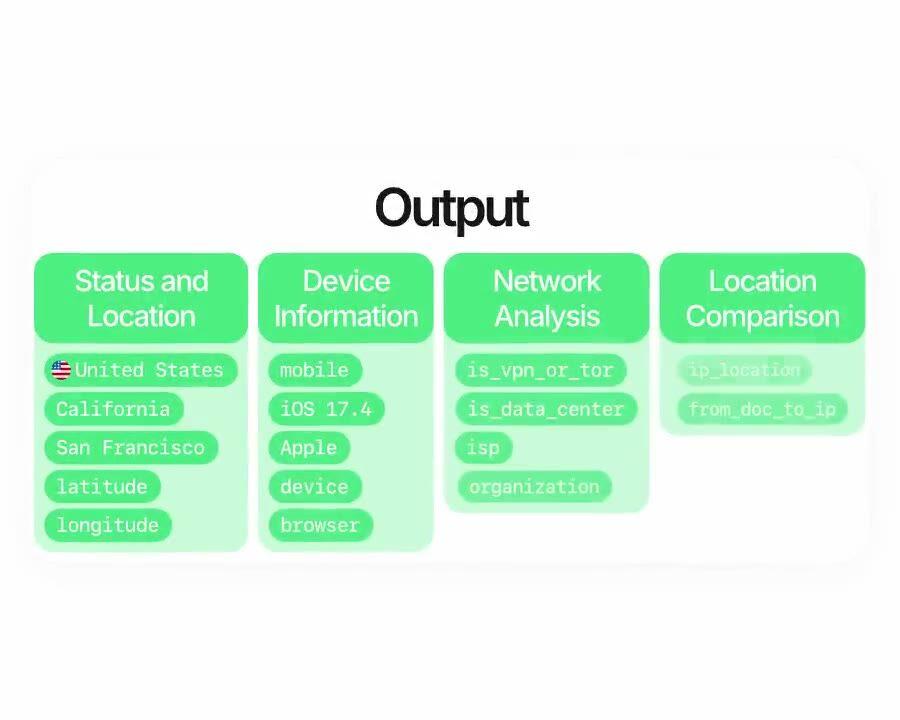
每次会话都会返回设备品牌、型号、浏览器家族、操作系统、平台和稳定的设备指纹, 与完整的 IP 地理位置、网络运营商、虚拟专用网络 (VPN) / 代理 / Tor 标记、 数据中心标记以及重复设备 + 重复 IP 规则配对。一次调用,200+ 信号,p99 小于 2 秒。
选择您需要的检查项, 身份、活体、人脸比对、制裁、地址、年龄、电话、电子邮件、自定义问题。在仪表板中将它们拖入工作流,或将相同的工作流发布到我们的 API。根据条件分支,运行 A/B 测试,无需代码。
国家 · 地区 · 城市 · 经度 · 纬度
国家
IP 国家
城市
与 ID 的距离
VPN · 代理 · Tor 出口节点
根据请求自动标记 is_data_center
按应用 · 按工作流
独立或捆绑 · 按会话付费
独立 IP 检查
完整 KYC · 包含 IP
{
  "ip_analysis": {
    "status": "已批准",
    "is_vpn_or_tor": false,
    "is_data_center": false,
    "price": "$0.03"
  }
}$ curl -X POST https://verification.didit.me/v3/session/ \
-H "x-api-key: $DIDIT_API_KEY" \
-H "Content-Type: application/json" \
-d '{
"workflow_id": "wf_ip_only",
"vendor_data": "user-42"
}'{ "url": "verify.didit.me/..." }// Your endpoint receives a signed payload
const crypto = require("node:crypto"); // ESM: import crypto from "node:crypto"
// X-Signature-V2 = HMAC over the canonical JSON, never the raw bytes. Match the sender byte for
// byte: keys sorted by code point, integers digit for digit, floats in Python's repr.
class Num { constructor(src) { this.src = src; } } // a number as written on the wire, not a double
const num = (s) => { if (/^-?\d+$/.test(s)) return BigInt(s).toString(); const n = +s; // ints stay exact
if (Number.isInteger(n)) return BigInt(n).toString(); const [m, e] = n.toExponential().split("e"); // 27.0 -> 27
return +e >= -4 ? String(n) : `${m}e-${String(-e).padStart(2, "0")}`; }; // 1e-05, not 0.00001
const byCodePoint = (a, b) => Buffer.compare(Buffer.from(a), Buffer.from(b)); // UTF-8 order = Python's
const canon = (v) => Array.isArray(v) ? `[${v.map(canon)}]` : v instanceof Num ? num(v.src)
: v && typeof v === "object" ? `{${Object.keys(v).sort(byCodePoint).map((k) => `${JSON.stringify(k)}:${canon(v[k])}`)}}`
: JSON.stringify(v);
// Read the body as text: express.json() would round 1000000000000000129 to a double first.
// Register this route ABOVE any global app.use(express.json()): the first parser to run
// consumes the stream, and a body it already parsed has lost the digits the signature covers.
app.post("/webhooks/didit", express.text({ type: "application/json" }), (req, res) => {
const exact = JSON.parse(req.body, (k, v, c) => typeof v === "number" ? new Num(c.source) : v); // Node 21+
const body = JSON.parse(req.body);
const mac = crypto.createHmac("sha256", SECRET).update(canon(exact), "utf8").digest("hex");
const sig = Buffer.from(String(req.headers["x-signature-v2"] ?? ""));
// Freshness comes from the signed body timestamp; the header alone is unsigned and replayable.
const ts = body.timestamp, fresh = String(ts) === req.headers["x-timestamp"]
&& Math.abs(Date.now() / 1000 - ts) <= 300;
if (!fresh || sig.length !== mac.length
|| !crypto.timingSafeEqual(sig, Buffer.from(mac))) return res.sendStatus(401);
const { status, decision, vendor_data } = body;
// status: Approved | Declined | In Review | ...
res.sendStatus(200);
});{ webhook_type: "status.updated", status: "Approved" }# Didit Device & IP Analysis — integrate in 5 minutes
You are integrating Didit's Device & IP Analysis (VPN, datacenter, Tor, geolocation,
device intelligence) module into <my_stack>. Follow these steps exactly.
Every URL, header, and enum value below is canonical — do not paraphrase
or "improve" them.
## 1. Provision an account
- Sign up: https://business.didit.me (no credit card required).
- Or provision programmatically: POST https://apx.didit.me/auth/v2/programmatic/register/
(returns an API key bound to the workspace + application).
## 2. Integration path — Workflow Builder (session-only)
Device & IP Analysis runs inside a Didit session — there is no standalone
POST /v3/ip-analysis/ endpoint. The IP and device fingerprint are
captured automatically when the user lands on the hosted UI, so you
do not collect or send them yourself.
1. Create a workflow that includes the IP_ANALYSIS feature:
POST https://verification.didit.me/v3/workflows/
Authorization header: x-api-key: <your-api-key>
Body: workflow_label, features array including
{ feature: "IP_ANALYSIS" } (UPPERCASE — strict enum)
Combine with OCR, LIVENESS, FACE_MATCH in the same
workflow for the full $0.33 Know Your Customer (KYC) bundle (Device & IP Analysis is included).
2. (Optional) Configure per-warning actions in the console for the
application — pick Decline, Review, or Approve for each of
PRIVATE_NETWORK_DETECTED, COUNTRY_FROM_DOCUMENT_DOES_NOT_MATCH_COUNTRY_FROM_IP,
EXPECTED_IP_ADDRESS_MISMATCH, DUPLICATED_IP_ADDRESS,
DUPLICATED_DEVICE_FINGERPRINT.
3. (Optional) Pin an expected IP per session: pass expected_ip_address
in the POST /v3/session/ body if you already know where the user
should be (for example: their last known login IP).
4. Create a verification session for an end user:
POST https://verification.didit.me/v3/session/
Body: workflow_id (from step 1), vendor_data (your own user id),
optional expected_ip_address.
Response: url (the hosted verification link) — redirect the user to it.
5. Listen for webhook callbacks (see "Webhooks" below).
## 3. Webhooks
- Register a webhook destination once via
POST https://verification.didit.me/v3/webhook/destinations/
Body: url, subscribed_events: ["session.verified", "session.review_started",
"session.declined"]
- Response includes secret_shared_key — store it.
- Every webhook delivery carries an X-Signature-V2 header you MUST verify
before trusting the payload. HMAC-SHA256 verification MUST run against the raw body bytes (the raw payload as Didit sent it) BEFORE any JSON parsing — re-serialising the parsed body changes whitespace and key order, which invalidates the signature.Algorithm:
1. sortKeys(payload) recursively
2. shortenFloats (truncate trailing zeros after the decimal point)
3. JSON.stringify the result
4. HMAC-SHA256 with the secret_shared_key
5. Hex-encode, compare to the X-Signature-V2 header.
## 4. Reading the report
The session decision payload contains an ip_analysis object with:
- status: "Approved" | "Declined" | "In Review" | "Not Finished"
- ip_address, ip_country, ip_country_code, ip_state, ip_city
- latitude, longitude, time_zone, time_zone_offset
- isp, organization
- is_vpn_or_tor (boolean) — fires the PRIVATE_NETWORK_DETECTED warning
- is_data_center (boolean) — hosting/datacenter origin
- device_brand, device_model, browser_family, os_family, platform
(mobile or desktop)
- locations_info with ip, id_document, poa_document blocks — each
carries a location object plus distance_from_* fields in kilometres
- matches array — cross-session matches on ip_address or
device_fingerprint when the same value appears under a different
vendor_data
- warnings array — each entry has risk, log_type,
short_description, long_description
Auto-decline risks (always enforced by Didit, not configurable):
- IP_ADDRESS_IN_BLOCKLIST
- DEVICE_FINGERPRINT_IN_BLOCKLIST
Configurable risks (action per workflow — Decline, Review, or Approve):
- PRIVATE_NETWORK_DETECTED (VPN, proxy, Tor)
- COUNTRY_FROM_DOCUMENT_DOES_NOT_MATCH_COUNTRY_FROM_IP
- EXPECTED_IP_ADDRESS_MISMATCH
- DUPLICATED_IP_ADDRESS (default: Approve)
- DUPLICATED_DEVICE_FINGERPRINT (default: Approve)
## 5. Hard rules — do not change
- Base URL for /v3/* endpoints is verification.didit.me (NOT apx.didit.me).
- Feature enum is UPPERCASE: IP_ANALYSIS, OCR, LIVENESS, FACE_MATCH, AML.
- Auth header is x-api-key (lowercase, hyphenated).
- Webhook signature header is X-Signature-V2 (NOT X-Signature).
- Always verify webhook signatures before trusting payload data.
- Status casing matches exactly: "Approved", "Declined", "In Review",
"Not Finished" (title-cased, space-separated).
- Always pass vendor_data (your own user id). Without it, every session
is treated as a unique user and DUPLICATED_IP_ADDRESS /
DUPLICATED_DEVICE_FINGERPRINT noise rises sharply.
## 6. Pricing reference (public)
- IP_ANALYSIS as a session add-on: $0.03 per check
- Bundled in a full KYC workflow (OCR + LIVENESS +
FACE_MATCH + IP_ANALYSIS): $0.33 per session — Device & IP Analysis is
already included at the bundle price.
- 500 free checks every month, forever, on every account.
## 7. Verify your integration
- Sandbox starts on signup at https://business.didit.me — no separate flag.
- Test IPs: deterministic synthetic responses returned in sandbox (Approved
by default; trigger PRIVATE_NETWORK_DETECTED by using a known VPN exit IP
on the verification device).
- Switch to live: flip the application's environment toggle in console.
When in doubt: https://docs.didit.me/core-technology/ip-analysis/overview













适用于构建、测试和您的首批用户。
25+ 模块,价格公开透明。自动享受批量折扣。
适用于大批量和受监管项目。
使用量增长时自动享受批量折扣——无需谈判,无需销售电话。
Didit 是身份和欺诈基础设施,是我们自己在构建产品时希望拥有的平台:开放、灵活且对开发者友好,因此它能真正融入您的技术栈,而不是一个需要您围绕其进行集成的黑盒。
一个 API 涵盖了人员验证(KYC,了解您的客户)、企业验证(KYB,了解您的企业)、加密钱包筛选(KYT,了解您的交易)以及实时交易监控,其技术栈旨在实现:
其底层支持:14,000 多种文档类型,支持 48 种以上语言,1,000 多个数据源,以及每次会话的 200 多个欺诈信号。Didit 基础设施通过每次会话动态学习,并日益完善。
device_brand、device_model、browser_family、os_family(操作系统)、platform(移动或桌面)和稳定的 device_fingerprint 的 Device & Session 块。该指纹在清除 cookie 和隐身会话后仍然存在,因此当同一设备以新身份返回时,会在 matches 数组中进行匹配,并显示为“重复设备”警告。完整参考请查阅 docs.didit.me/core-technology/ip-analysis/report-ip-analysis。ip_address、ip_country、ip_country_code(国际标准化组织 3166-1 alpha-2)、ip_state、ip_city、latitude、longitude、isp(互联网服务提供商)、organization、time_zone 和 time_zone_offset。原始 IP、解析出的位置和网络运营商都位于同一对象上,因此您可以从单一数据源构建地图、审计日志和风险仪表板。整个流程通常在 30 秒内完成, 拿起身份证,拍摄证件,自拍,完成。这是市场上最快的速度。传统的 KYC 提供商完成相同流程通常需要超过 90 秒。
在后端,Didit 在 p99 情况下两秒内返回结果,从用户完成自拍到您的 webhook 触发。移动端捕获针对慢速手机和慢速网络进行了优化:渐进式图像压缩、延迟加载 SDK,以及如果用户从网页端开始,可通过二维码一键从桌面端切换到手机端。
ip_address 和 device_fingerprint。当在属于不同 `vendor_data` 用户的会话中找到匹配项时,规则触发, IP 匹配为“重复 IP”,指纹匹配为“重复设备”。每个匹配项都会落在 ip_analysis.matches 数组中,包含匹配的 session_id、session_number、vendor_data、match_type、matched_value,以及 device_info 和 location_info 块。在创建会话时务必传递 vendor_data(您的用户标识符), 否则,每个会话都将被视为独立用户,重复噪音将急剧增加。每个会话都会进入七种明确状态之一,因此您的代码始终知道该怎么做:
Approved, 所有检查通过。让用户继续。Declined, 一个或多个检查失败。您可以允许用户重新提交特定的失败步骤(例如,重新自拍),而无需重新运行整个流程。In Review, 标记为合规审查。在控制台中打开案例,查看所有信号,决定批准或拒绝。In Progress, 用户正在进行中。Not Started, 链接已发送,用户尚未打开。如果长时间未打开,发送提醒。Abandoned, 用户打开了链接但未及时完成。重新激活或使其过期。Expired, 会话链接已过期。创建新会话。每次状态更改都会触发一个签名的 webhook,因此您的数据库始终保持同步。放弃和拒绝的会话是免费的。
生产数据默认在欧盟的 Amazon Web Services 上处理和存储。企业合同可根据监管机构要求,申请其他区域。
全面加密。 所有数据库、对象存储和备份均采用 AES-256 静态加密。所有 API 调用、Webhook 和业务控制台会话均采用传输层安全协议 1.3 进行传输加密。生物识别数据使用单独的客户主密钥进行加密。
保留策略由您掌控。 默认保留期限为无限期(无限制),除非您配置更短的期限,可在每个应用程序 30 天到 10 年之间选择,并且您可以随时通过仪表板或 API 删除任何单个会话。
认证:SOC 2 Type 1 & Type 2、ISO/IEC 27001:2022、iBeta Level 1 PAD,以及来自西班牙 Tesoro / SEPBLAC / CNMV 的公开证明,表明 Didit 的远程身份验证比亲自验证更安全。完整报告请访问 /security-compliance。
Didit 默认符合对身份基础设施至关重要的监管机构要求:
详细备忘录、所有证书、所有监管机构函件:/security-compliance。
三种集成路径, 选择最适合您技术栈的方式:
相同的仪表板、相同的计费、相同的按成功付费价格。分步指南请访问 docs.didit.me/integration/integration-prompt。