

免费
$0/ 月 · 无需信用卡
适用于构建、测试和您的首批用户。
开始所需的一切:
- 每月500次完整KYC验证
- 身份、活体、人脸匹配、设备和IP验证
- 200+欺诈信号、黑名单、重复项检测
- Didit网络内可复用KYC
- 工作流构建器、案件管理、SDK
- AI 支持 控制台内 AI 助手、文档和社区支持。






全球2,000多家组织信赖。
无代码工作流构建器
一键启用任何模块。KYC(了解您的客户)、 KYB(了解您的业务)、AML(反洗钱)和监控流程的可视化编辑器。 在生产环境中进行 A/B 测试。免费, 无需按工作流收费。
选择您需要的检查项, 身份、活体、人脸比对、制裁名单、地址、年龄、电话、邮箱、自定义问题。在控制台中将它们拖入流程,或通过我们的 API 发布相同的流程。根据条件进行分支,运行 A/B 测试,无需代码。
拖放 · 智能连接 · 键盘快捷键
功能
分支
操作
状态
切换 25+ 模块 · 按成功付费
模块
新模块已发布
工作流附加费
开发 · 预发布 · 生产 · 独立密钥
应用
每个应用
可导出
分流 · 实时转化遥测
完成率
完成率
按国家 · 风险 · 文档类型 · 年龄路由
{ "workflow_id": "wf_3daf4c64", "session_id": "sess_8a2f9c10", "status": "verified", "vendor_data": "user-42", "version": 3, 目的地: unlimited}$ curl -X POST https://verification.didit.me/v3/workflows/ \
-H "x-api-key: $DIDIT_API_KEY" \
-d '{
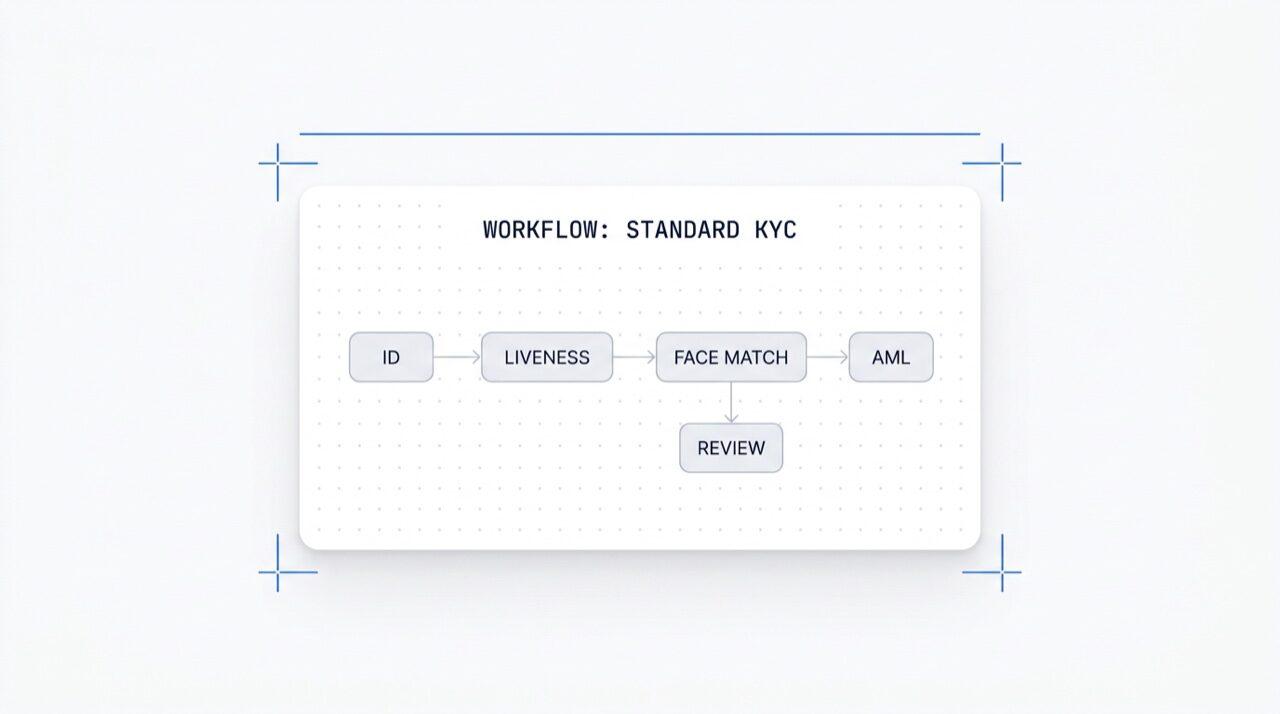
"workflow_label": "Standard KYC",
"features": [
{ "feature": "OCR" },
{ "feature": "LIVENESS" },
{ "feature": "FACE_MATCH" }
]
}'{ "uuid": "wf_3daf4c64" }$ curl -X POST https://verification.didit.me/v3/session/ \
-H "x-api-key: $DIDIT_API_KEY" \
-H "Content-Type: application/json" \
-d '{
"workflow_id": "wf_3daf4c64",
"vendor_data": "user-42"
}'{ "url": "verify.didit.me/..." }# Didit Workflow Orchestrator — integrate in 5 minutes
You are wiring the Didit Workflow Orchestrator into <my_stack>. Follow
these steps exactly. Every URL, header, and enum value below is
canonical — do not paraphrase or "improve" them.
Workflows are versioned JSON documents that string together any subset
of Didit's 25+ verification modules:
- Feature nodes (Optical Character Recognition (OCR), LIVENESS, FACE_MATCH, Anti-Money Laundering (AML), Near Field Communication (NFC), IP, QUESTIONNAIRE,
PROOF_OF_ADDRESS, DATABASE_VALIDATION, AGE_ESTIMATION, EMAIL_VERIFICATION,
PHONE_VERIFICATION)
- Branch nodes (route by country, risk score, document type, age, ...)
- Action nodes (add tag, set metadata, route to manual review)
- Status nodes (APPROVED, DECLINED, IN_REVIEW)
## 1. Provision an account
- Sign up: https://business.didit.me (no credit card required).
- Or provision programmatically: POST https://apx.didit.me/auth/v2/programmatic/register/
## 2. Two ways to build a workflow — pick one
### Path A — Visual canvas (recommended for humans)
1. Open https://docs.didit.me/console/workflows.
2. Pick Simple Mode for a template-based build (Know Your Customer (KYC), Age Verification,
Biometric Auth, Address, Questionnaire) or Advanced Mode for the
node-based graph builder.
3. Drag feature nodes onto the canvas. Connect handles with the smart-
connect cursor. Drop branch nodes between features to route on data.
4. Click Publish. The published workflow's UUID is your workflow_id.
### Path B — Management API (recommended for AI agents)
Programmatically create a linear workflow with the simple v3 features
array — Didit converts it into a node-based graph internally.
POST https://verification.didit.me/v3/workflows/
Headers:
x-api-key: <your-api-key>
Content-Type: application/json
Body:
{
"workflow_label": "Standard KYC",
"features": [
{
"feature": "OCR",
"config": {
"documents_allowed": {},
"duplicated_user_action": "REVIEW"
}
},
{ "feature": "LIVENESS", "config": { "face_liveness_method": "PASSIVE" } },
{ "feature": "FACE_MATCH" },
{ "feature": "AML" }
]
}
Hard rules for POST /v3/workflows/:
- features[].feature values are UPPERCASE strict enum:
OCR, LIVENESS, FACE_MATCH, AML, NFC, IP, QUESTIONNAIRE,
PROOF_OF_ADDRESS, DATABASE_VALIDATION, AGE_ESTIMATION,
EMAIL_VERIFICATION, PHONE_VERIFICATION
- Put dependency features first. OCR before FACE_MATCH, NFC,
DATABASE_VALIDATION, or user-AML checks that depend on document
data. LIVENESS before FACE_MATCH.
- For QUESTIONNAIRE features, create the questionnaire first via
POST /v3/questionnaires/ and use the returned questionnaire_id as
config.questionnaire_uuid.
- The endpoint supports linear workflows only. To add branches,
actions, webhooks, or conditional routing, edit the published
workflow in the canvas.
- Save the returned workflow uuid — that is your workflow_id for
creating sessions, and your settings_uuid for future updates.
Reference for every config field per feature:
https://docs.didit.me/management-api/workflows/feature-configs
## 3. Use the workflow in a session
POST https://verification.didit.me/v3/session/
Headers:
x-api-key: <your-api-key>
Content-Type: application/json
Body:
{
"workflow_id": "<uuid from step 2>",
"vendor_data": "user-42"
}
Response includes the hosted verification link in url. Redirect the user
there. The hosted Didit UI handles capture UX, mobile handoff,
accessibility, retries, and webhook delivery on completion.
## 4. Webhooks
Register one webhook destination per workspace:
POST https://verification.didit.me/v3/webhook/destinations/
Body: { "url": "https://yourapp.com/didit/webhooks",
"events": ["session.verified", "session.review_started",
"session.declined", "session.expired"] }
Every delivery carries an X-Signature-V2 Hash-based Message Authentication
Code (HMAC) header. HMAC-SHA256 verification MUST run against the raw body bytes (the raw payload as Didit sent it) BEFORE any JSON parsing — re-serialising the parsed body changes whitespace and key order, which invalidates the signature.Verify before trusting the payload:
signature = hmac_sha256(secret, raw_body).hex()
if signature != request.headers["X-Signature-V2"]:
return 401
Retries use exponential backoff over 24 hours. The Console shows every
delivery, retry, and signature verification result.
## 5. Workflow versioning
Workflows support draft / publish versioning. Drafts are fully editable.
Publishing creates an immutable version that new sessions will use.
Sessions always reference the specific version they were created with,
so behaviour stays consistent even after you publish updates. Previous
versions are preserved and inspectable via the Management API.
## 6. Multi-app management
Each workspace can host multiple applications — typically Development,
Staging, Production. Each application carries its own API key, its own
workflows, and its own webhook destinations. Promote a published
workflow from Staging to Production by re-publishing in the target app
or by exporting and re-importing the workflow JSON.
## 7. A/B testing
Split traffic across two published workflow variants from inside the
canvas. Configure a percentage split, route by user cohort, ramp a new
module to 5% before going to 100%. Conversion metrics surface on the
workflow analytics view at https://docs.didit.me/console/analytics.
## 8. Hard rules — do not change
- Base URL stays https://verification.didit.me (NOT apx.didit.me).
- Auth header stays x-api-key (lowercase, hyphenated).
- Webhook signature header stays X-Signature-V2 (NOT X-Signature).
- Feature enum is UPPERCASE strict — OCR, LIVENESS, FACE_MATCH, AML,
NFC, IP, QUESTIONNAIRE, PROOF_OF_ADDRESS, DATABASE_VALIDATION,
AGE_ESTIMATION, EMAIL_VERIFICATION, PHONE_VERIFICATION.
- Session status casing stays "Approved" / "Declined" / "In Review" /
"Expired" / "Not Finished" (mixed case on session statuses,
UPPERCASE_SNAKE on transaction and case statuses).
## 9. Pricing reference
The Workflow Orchestrator itself is FREE on every plan — no per-workflow
fee, no per-seat fee, unlimited workflows. You pay only for the modules
that run inside the workflow at the published per-success rates on
https://didit.me/pricing.
500 free verifications every month, forever, on every account.
## 10. Verify your integration
1. Create a sandbox API key at https://business.didit.me.
2. POST /v3/workflows/ with the Standard KYC body above. Save the uuid.
3. POST /v3/session/ with that workflow_id. Open the url in a
browser and complete the flow with the sandbox test fixtures.
4. Confirm the session.verified webhook fires and X-Signature-V2 verifies.
5. Open the workflow in the canvas — verify the linear feature array
was converted into the expected node graph.
Done. The Workflow Orchestrator is live. Reach out to support@didit.me
with the workspace id if you hit a wall.












适用于构建、测试和您的首批用户。
25+ 模块,价格公开透明。自动享受批量折扣。
适用于大批量和受监管项目。
使用量增长时自动享受批量折扣——无需谈判,无需销售电话。
Didit 是身份和欺诈基础设施,是我们自己构建产品时所期望的平台:开放、灵活且对开发者友好,因此它能真正融入您的技术栈,而不是一个需要您围绕其进行集成的黑盒。
一个 API 涵盖了个人验证(KYC,了解您的客户)、企业验证(KYB,了解您的业务)、加密钱包筛选(KYT,了解您的交易)以及实时交易监控,其技术栈旨在实现:
底层支持:14,000 多种文档类型,支持 48 种以上语言,1,000 多个数据源,每次会话提供 200 多个欺诈信号。Didit 基础设施通过每次会话动态学习,并日益完善。
工作流编排器是 Didit 每次验证背后的可视化无代码构建器。拖放功能节点(身份文档验证、活体检测、人脸匹配、反洗钱 (AML)、近场通信 (NFC)、电话、电子邮件、问卷、地址证明、数据库验证、互联网协议 (IP)、年龄估算),放置分支节点以根据国家/地区/风险/年龄/文档类型进行路由,添加操作节点(标签、设置元数据、路由到人工审核),最后以状态节点(已批准、已拒绝、审核中)结束。
条件分支、嵌套决策、A/B 测试、草稿/发布版本控制,一键激活 25+ 模块。
所有套餐免费。 您只需支付会话实际运行模块的每模块费率。完整参考:docs.didit.me/console/workflows。
所有套餐免费。 无工作流费用,无按席位收费,无限工作流,无限发布版本,无限 A/B 变体,无限 Webhook 目的地。
您只需支付 didit.me/pricing 上的按模块成功计费费率:
$0.15。$0.10。人脸匹配, $0.05。互联网协议 (IP) 分析, $0.03。$0.20。钱包筛选, 每次检查 $0.15。整个流程通常在 30 秒内完成, 拿起身份证,拍摄文档,拍摄自拍,完成。这是市场上最快的速度。传统的 KYC 提供商完成相同流程通常需要超过 90 秒。
在后端,Didit 在 p99 下两秒内返回结果,从用户完成自拍到您的 Webhook 触发。移动端捕获针对慢速手机和慢速网络进行了优化:渐进式图像压缩、延迟软件开发工具包加载,以及如果用户从网页开始,通过二维码从桌面到手机的一键式切换。
可以, POST /v3/workflows/,其中包含一个 features 数组,按用户应完成检查的顺序排列。
Didit 会在内部将数组转换为基于节点的图,并自动添加最终状态节点。该端点仅支持线性工作流, 对于分支、操作和 Webhook 节点,请在画布中编辑已发布的工作流。
功能枚举值严格为大写:OCR(光学字符识别, 驱动身份文档验证)、LIVENESS、FACE_MATCH、AML、NFC、IP、QUESTIONNAIRE、PROOF_OF_ADDRESS、DATABASE_VALIDATION、AGE_ESTIMATION、EMAIL_VERIFICATION、PHONE_VERIFICATION。
在 POST /v3/session/ 上使用返回的工作流 uuid 作为 workflow_id。完整的功能配置参考:docs.didit.me/management-api/workflows/feature-configs。
每个会话都会落入七种明确状态之一,因此您的代码始终知道该怎么做:
Approved, 所有检查通过。让用户继续。Declined, 一个或多个检查失败。您可以允许用户重新提交特定的失败步骤(例如,重新拍摄自拍),而无需重新运行整个流程。In Review, 标记为合规性审核。在控制台中打开案例,查看所有信号,决定批准或拒绝。In Progress, 用户正在进行中。Not Started, 链接已发送,用户尚未打开。如果长时间未打开,发送提醒。Abandoned, 用户打开了链接但未及时完成。重新激活或使其过期。Expired, 会话链接已过期。创建新会话。每次状态更改都会触发一个签名的 Webhook,因此您的数据库始终保持同步。放弃和拒绝的会话是免费的。
生产数据默认在欧盟的 Amazon Web Services 上处理和存储。企业合同可根据监管机构要求,申请在其他区域存储。
全面加密。 所有数据库、对象存储和备份均采用 AES-256 静态加密。所有 API 调用、webhook 和业务控制台会话均采用传输层安全协议 1.3 (TLS 1.3) 进行传输加密。生物识别数据在独立的客户主密钥下加密。
数据保留期限由您控制。 默认保留期限为无限期(无限制),除非您配置更短的期限,可在每个应用程序 30 天至 10 年之间选择,并且您可以随时通过仪表板或 API 删除任何单个会话。
认证:SOC 2 Type 1 & Type 2、ISO/IEC 27001:2022、iBeta Level 1 PAD,以及来自西班牙财政部 / SEPBLAC / CNMV 的公开证明,表明 Didit 的远程身份验证比亲自验证更安全。完整报告请访问 /security-compliance。
Didit 默认符合身份基础设施相关的重要监管机构要求:
详细备忘录、所有证书、所有监管机构函件:/security-compliance。
三种集成路径, 选择最适合您技术栈的:
相同的仪表板、相同的计费、相同的按成功付费价格,适用于所有三种方式。分步指南请访问 docs.didit.me/integration/integration-prompt。