Debugging Didit Integrations: Common Pitfalls and Fixes (2026)
Most Didit integration bugs come down to five things: a wrong or scoped API key, ignoring Retry-After on 429, over-polling the decision endpoint, unverified webhook signatures, or a status string your code does not handle.
 Alejandro RosasCo-founder and CTO
Contents
In this guide
Jump to the part you need.
Most Didit integration failures are one of five things: a wrong or scoped API key, a 429 you did not wait out, a session you polled too hard, a webhook signature you never verified, or a status string your code does not match. This guide is for developers. Debugging is free in the sandbox and the full KYC check costs $0.33 live. The caveat: error bodies differ by endpoint, so read the HTTP status first.
Last updated: November 26, 2026. Prices checked against the live Didit price feed on November 26, 2026.
| Symptom | Likely cause | Signal | Fix |
|---|---|---|---|
| Nothing runs | Wrong, malformed, revoked or expired key | 401 | Re-copy the key in Developers, API keys, or create a new one |
| Key looks right but is refused | Missing x-api-key header, scoped key, IP list, or low balance | 403 | Read detail, then send a key with that access |
| Check never runs | The check could not be paid for | 400, 402 or 403, depending on the API family | Top up, then retry |
| Session exists but returns 404 | The session is outside the key's workflow or status limits | 404 | Use a key whose limits include that session |
| Retry rejected | Reused Idempotency-Key or a step that already ran | 409 | Read code and reload the state |
| Traffic collapses under load | A per-scope request budget was exceeded | 429 with Retry-After | Wait Retry-After, then back off with jitter |
| Intermittent failures | An unexpected error on Didit's side or a dependency | 500, 502, 503 | Retry with backoff, contact support if it continues |
| Every webhook is rejected | The body was parsed before the signature check, or the timestamp is stale | Signature mismatch | Verify raw bytes or canonical JSON inside a 300 second window |
| Verification finishes, app does nothing | Status compared loosely or not handled at all | "In Review", "Kyc Expired" | Compare the exact, case-sensitive strings |
Start free in the sandbox at business.didit.me. There is no sales call, and sandbox sessions are never billed. If you debug with a coding assistant, connect it through the Didit MCP server so it can read workflows and sessions while you work. The same error contract applies across products, including Didit identity verification, AML screening and wallet screening. Every unit price is published on didit.me/pricing.
What a fixed integration looks like
Outcome: you can reproduce any failure on demand, name its cause from the status code, and confirm the fix with two checks instead of guessing. The recommended method is to reproduce in the sandbox with an armed scenario, fix against the documented error contract, then confirm with a webhook your endpoint accepted and a decision read that returns the status you expect.
Do not debug against live traffic when you can avoid it. Live checks are billed per completed check, and a runaway loop that keeps creating sessions also keeps spending credit.
Prerequisites
- A Didit organization and its application. The sandbox application comes with the organization, and a new sandbox key starts with
sk_test_; older keys may have no prefix. - The application's API key stored server-side as an environment variable. Never in a browser bundle or a mobile app.
- A workflow id from the Business Console.
- The hosted verification link open on a test device, or one of the SDKs.
- An HTTPS endpoint that accepts
POSTfor webhooks. curlandjqon the machine where you reproduce.
Ten steps from a failing call to a confirmed fix
-
Reproduce in the sandbox, not in live traffic. Sandbox mocks external providers; active liveness capture still runs as it does live, while its result is simulated. Sandbox sessions are never billed, and the application allows 500 session creates per application per 24 hours. Every sandbox application also ships with example data in each console section, including an approved, a declined and an in-review verification, so you can compare your failing case against a known one.
-
Send one request with the key you think you are using. There are two hosts and two auth schemes. The verification API on
verification.didit.metakesx-api-key. Account and organization management onapx.didit.metakes an OAuth bearer token. Mixing them up is the first pitfall.curl -X POST https://verification.didit.me/v3/session/ -H "x-api-key: $DIDIT_API_KEY" -H "Content-Type: application/json" -d '{"workflow_id":"<WORKFLOW_ID>","vendor_data":"user-42","callback":"https://myapp.com/return"}'If this request fails, the bug is configuration, not application code. If it succeeds, your key, host and header are correct and the problem is further down the flow.
-
Read the status code before the body. Error bodies do not share one envelope: some carry
detail, some addcode, some return field errors, and a500may have no JSON at all. Parse defensively.const raw = await response.text(); let body = {}; try { body = JSON.parse(raw); } catch { // A 5xx response may not be JSON: rely on response.status. } const code = body.code ?? null; const message = body.detail ?? body.error ?? (Array.isArray(body) ? body[0] : raw); -
Branch on
codewhen it is present, and on the detail text when it is not. The key failures are specific and each one has its own fix.Didit API key failures and what each one means What you sent Status detailNo x-api-keyheader403You do not have permission to perform this action. A wrong, malformed or revoked key 401Authentication credentials were not provided or are invalid. An expired key 401This API key has expired. A key used from outside its IP list 403This API key can't be used from this IP address. A scoped key without access to this endpoint 403This API key has no access to this endpoint. A key limited to some workflows, on a session outside them 404Session not found. A key whose application was just deleted 403This application was deleted. with "code": "application_deleted"Do not retry
application_deleted. For a few minutes after a deletion the API answers with that code, and after that it refuses the key like any invalid key. -
Fix rate limits with
Retry-After, not with guesswork. Limits are applied per identifier, which is yourx-api-keyor, if no key is sent, your client IP. Each scope keeps an independent counter with a 60 second fixed window. Session creation onPOST /v2/session/andPOST /v3/session/allows 600 requests per minute. The v1 and v2 decision paths allow 100 per minute.GET /v3/session/<id>/decision/is not in that decision scope and is governed only by the 600 per minute generic GET ceiling.HTTP/1.1 429 Too Many Requests Content-Type: application/json X-RateLimit-Scope: session-v2-create X-RateLimit-Limit: 600 X-RateLimit-Remaining: 0 X-RateLimit-Reset: 1794358860 Retry-After: 37 { "detail": "Session creation rate limit exceeded. You can make up to 600 requests per minute.", "reference": "RL-00000000000040008000000000000001", "limit": 600, "remaining": 0, "reset": 1794358860, "window_seconds": 60 }Use
Retry-Afteras the floor, then layer exponential backoff with jitter on top, for example 5s, 10s, 20s, 40s plus or minus a random amount. Stop after a small ceiling such as 5 attempts and alert your team. Sustained 429s usually mean a runaway loop, not a traffic spike.Correction to older advice:
X-RateLimit-*headers are only emitted on the429response. Successful responses do not include them today, so a proactive throttler that reads those headers on every call is reading nothing. Plan against the published per-scope budgets instead. -
Match session status strings exactly. The status enum is the single source of truth for both
GET /v3/session/<id>/decision/and every webhook. The values are case-sensitive and include spaces:"Not Started","In Progress","Approved","Declined","In Review","Awaiting User","Resubmitted","Expired","Abandoned","Kyc Expired".The last one uses a single capital K. Code that compares against
"KYC Expired"or lowercases the string will silently drop previously approved users whose document passed its expiry date. Use strict comparison, and cover every status in your switch, including"Awaiting User"for KYB parent sessions. -
Verify the webhook signature before you parse the body. Read the raw request body, reject anything where the
X-Timestampis more than 300 seconds away from now, then recompute the HMAC-SHA256 with your destination secret. UseX-Signature-V2, which signs the sorted, Unicode-preserved canonical JSON. Compare in constant time and also accept a match on the-Previousheader when it is present, so a secret rotation does not reject live traffic. -
Re-fetch the decision when the signature is the weak one.
X-Signature-Simpleis deprecated and authenticates only the envelope, not the decision body. If you verify with it, do not trust the payload: callGET /v3/session/<id>/decision/and use that response. The same rule applies if your stack re-encodes JSON, becauseX-Signaturesigns exact raw bytes. -
Read the plural arrays, not a single object. The v3 decision mirrors the retrieve endpoint and puts per-feature data in arrays so a workflow can contain more than one instance of the same step:
id_verifications[],nfc_verifications[],liveness_checks[],face_matches[],aml_screenings[],poa_verifications[],phone_verifications[],email_verifications[],ip_analyses[],database_validations[],questionnaire_responsesandbank_verifications[]. Code written against a singular field can make an approved verification look empty in your database. -
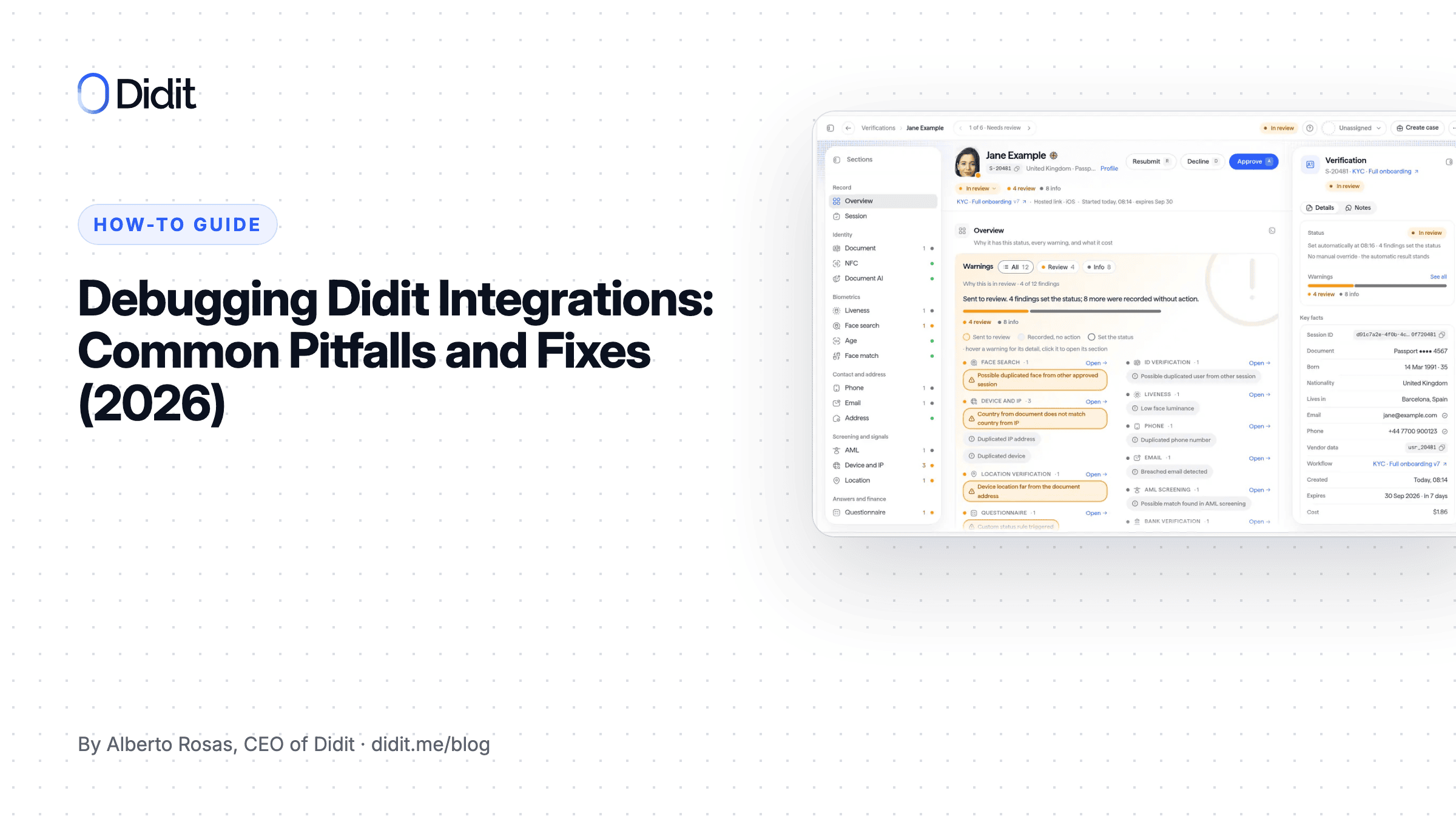
Open the session in the Console and read the warnings. The decision arrays tell you what ran. The Console shows the session with its warnings, and the warnings explain the failure. This is faster than adding log lines to your own code.

A session overview with its warnings in the Didit Business Console. Start here when a status is In Review or Declined.
Expected output
A correct first call returns a success response carrying the session id you will use for every later call, plus the hosted verification link to open on the test device. The user opens the link and the session moves from "Not Started" to "In Progress". When the checks finish, your webhook receives a status.updated event whose envelope carries event_id, session_id, status, webhook_type, environment, workflow_id, workflow_version, vendor_data and a decision object, and the decision object contains the per-feature arrays listed above. The same status is returned by GET /v3/session/<id>/decision/.

Failure cases and recovery
| Failure | How you detect it | Recovery |
|---|---|---|
| Session never created | 400 with a field error such as {"workflow_id": ["This field is required."]} | Fix the named field, resend. Nothing was billed. |
| Request body rejected | 415 | Send Content-Type: application/json. |
| Balance too low | 400 on session create, 402 on bank account check, 403 with "code": "insufficient_credits" on several standalone APIs | Top up at business.didit.me, then retry. The check did not run. |
| Session expired before use | 410 | Create a new session. Do not retry the old one. |
| Ambiguous wallet address | 422, nothing screened and nothing billed | Resend with blockchain set to one of the values in candidate_chains. |
| Scenario armed too late | JSON array body: ["Scenario can only be armed before the verification starts."] | Arm the scenario, then create and start the session. |
| Repeated 5xx | 500, 502 or 503, possibly with a body that is not JSON | Retry with backoff. If it continues, contact support with the time, endpoint and any code. |
Inputs and outputs
| Field | Direction | Notes |
|---|---|---|
x-api-key | Input | Server-side only. New keys start with sk_test_ or sk_live_; never validate a key by its prefix, because older keys have none. |
Content-Type: application/json | Input | Missing or wrong, you get 415. |
workflow_id | Input | From the Business Console. A missing or invalid id stops the session from starting. |
vendor_data | Input | Your internal user id. It comes back on the webhook envelope, which is what lets you reconcile a verification to your own record. |
callback | Input | Where the hosted flow returns the user. |
Idempotency-Key | Input | Reusing one conflicts with the current state and returns 409. |
| session id | Output | Store it on creation. It is the key to every later read, and the only handle that ties logs to a user. |
status | Output | One of the ten exact strings. Appears in webhooks and in the decision response. |
decision arrays | Output | Per-feature results. One entry per step instance in the workflow. |
detail, code, error | Output | Error bodies. Shapes differ by endpoint family, so handle a missing or non-JSON body. |
Retry-After | Output | Present only on 429 responses. Use it as the backoff floor. |
What is free, what is billed, and where a human decides
Sandbox testing is free: sessions are never billed, the balance check is bypassed, and you get 500 session creates per application per 24 hours. The workflow orchestrator, the MCP server, the SDKs and reusable KYC carry no fee. Live checks are billed per completed check from prepaid credit.
- Full ID check (KYC: ID document, biometrics and device and IP analysis together): $0.33.
- ID document verification alone: $0.15. Passive liveness: $0.10. Face match 1:1: $0.05. Device and IP analysis: $0.03.
- AML screening: $0.20 per check. Wallet screening: $0.15 per screening.
- Business verification (KYB): registry retrieval priced by country and data tier, from $2.00 per company.
The review boundary matters for debugging. A session in "In Review" has warnings that need a person, and a compliance reviewer makes the final call in the Console or through the API. Your integration does not auto-approve it, and no amount of retrying changes that status. Build the waiting state into your UI before you ship.

insufficient_credits appears mid test.Worked cost example
A realistic debug cycle: 200 sandbox sessions to cover every status, then a small live smoke test on the same workflow.
- Sandbox: 200 session creates. This is inside the 500 per 24 hours quota and never billed, so 200 x $0.00 = $0.00.
- Live smoke test, 20 full KYC checks at list: 20 x $0.33 = $6.60.
- Live smoke test, 5 AML screenings at list: 5 x $0.20 = $1.00.
- Total at list price: $6.60 + $1.00 = $7.60.
- Same run on the Scale plan, where every Didit price is 10% lower: 20 x $0.297 = $5.94, and 5 x $0.18 = $0.90, so $5.94 + $0.90 = $6.84.
- If the workflow also screens 40 addresses: 40 x $0.15 = $6.00 at list, 40 x $0.135 = $5.40 on Scale.
The $0.297, $0.18 and $0.135 figures are discounted unit prices derived from the published 10% Scale discount, not separate list prices: $0.33 x 0.9 = $0.297, $0.20 x 0.9 = $0.18, and $0.15 x 0.9 = $0.135.
Add up only the calls that actually ran. A request refused with 402 or insufficient_credits did not run a check and is not a completed check.
Sources
- Didit API errors: status codes, bodies and fixes
- Didit API rate limiting: limits, headers and 429 backoff
- Didit webhooks: events, HMAC signing and retries
- Didit verification statuses and session lifecycle
- Didit sandbox test data: scenarios, magic values and documents
- Didit API authentication
- Didit retrieve session decision API
- Didit pricing and pricing in the docs
- Didit MCP server and the integration prompt
- Didit identity verification
You can run this loop yourself. Create a free sandbox application at business.didit.me, reproduce the failure there first, and only move to live traffic once the sandbox returns the status you expect. No sales call.
Try it
Try this in the sandbox
Run the check this guide describes, free.
The product this post is about, taken from its topic. Run it free in the sandbox.
Author
Alejandro Rosas
Co-founder and CTO

Keep reading
Other guides in the same topic.
 What Is the Purpose of FICA in South Africa? 2026 Guide
FICA is South Africa's anti-money laundering law. It creates the Financial Intelligence Centre and requires accountable institutions to identify and verify clients, screen for PEP and sanctions risk and report suspicious.
Alberto RosasNov 26, 2026 Sixth Money Laundering Directive (6AMLD): What Changed and Which Rules Apply
6AMLD is Directive (EU) 2018/1673: Member States must criminalise laundering, widen predicate offences and set a four-year penalty floor. It adds no new due diligence duties for firms.
Alberto RosasNov 26, 2026 Automated Sanctions Screening: Canada, the Entity List and Embargoes
Automated sanctions screening matches people and companies against lists such as Canada's autonomous sanctions made under SEMA and JVCFOA and the OFAC SDN List, and returns candidate hits scored for identity confidence and.
Alberto RosasNov 26, 2026Questions
Frequently asked questions
Why does my Didit API call return 401?
A 401 from verification.didit.me means the key itself is wrong, malformed, revoked or expired. The detail string distinguishes the two: the invalid-credentials message points at the key value, and the expired-key message points at rotation. A missing x-api-key header returns 403, not 401, so the two are easy to tell apart.
What is the difference between 401 and 403 on the Didit API?
401 means the key you sent cannot authenticate. 403 means no key was sent, the key has no access to that resource or action, the call came from outside the key's IP list, or the balance cannot cover the call. Read the detail field before changing anything, because each of those has a different fix.
How should I handle a 429 from the Didit API?
Wait for the number of seconds in Retry-After, then retry, adding exponential backoff with jitter on top: 5s, 10s, 20s, 40s with a random offset. Stop after about 5 attempts and surface the error, because sustained 429s usually mean a runaway loop rather than a spike. Save the reference field if you report the throttle to support.
Does Didit send X-RateLimit headers on successful responses?
No. X-RateLimit-Scope, X-RateLimit-Limit, X-RateLimit-Remaining, X-RateLimit-Reset and Retry-After are only emitted on the 429 response today. Proactive throttling has to come from your own counters against the published per-scope budgets, not from headers that are not sent.
What are the exact Didit session status strings?
They are "Not Started", "In Progress", "Approved", "Declined", "In Review", "Awaiting User", "Resubmitted", "Expired", "Abandoned" and "Kyc Expired". They are case-sensitive and include spaces, and "Kyc Expired" uses a single capital K. Use strict string comparison in your code.
Why is my Didit session stuck at Not Started?
"Not Started" means the session was created but the user has not opened the verification link yet. If too much time passes, the session TTL runs out and it moves to "Expired". Send a reminder, or create a fresh session if it has already expired.
How do I verify a Didit webhook signature?
Use X-Signature-V2: read the raw body, check X-Timestamp is within 300 seconds, compute HMAC-SHA256 over the canonical JSON with your destination secret, and compare in constant time. Accept a match on the -Previous header during a secret rotation. The webhook docs describe the canonicalization.
Why does my Didit webhook signature check keep failing?
The common causes are parsing or re-encoding the body before verification, a timestamp outside the 300 second window, or the wrong destination secret. X-Signature signs exact raw bytes, so switch to X-Signature-V2 when your stack re-encodes JSON.
How do I find out why a Didit verification was declined?
Read the decision object in the status.updated webhook or call GET /v3/session/<id>/decision/. The warnings explain the failure per step. The Business Console shows the same session with its warnings, which is usually faster to read during debugging.
Why is there no single id_verification field in the Didit decision?
Per-feature results are returned in plural arrays such as id_verifications[], liveness_checks[] and face_matches[], because a workflow can include more than one instance of the same step. Iterate the array and handle zero, one or many entries, because reading only the first element can discard valid results. Code written against a singular field can make an approved session look empty in your own database.
Does debugging cost money on Didit?
Not in the sandbox, where sessions are never billed. Sandbox mocks external providers; active liveness capture still runs as it does live, while its result is simulated. Live smoke tests do cost money, because live checks are billed per completed check: $0.33 for a full KYC check, $0.20 for AML screening, $0.15 for wallet screening. Build the workflow in the sandbox first, then run a small live batch to confirm.
Can I force a decline in the Didit sandbox?
Yes. Sandbox outcomes come from armed scenarios and magic values rather than real provider results, so you can produce an approved, declined or in-review session on demand. Arm the scenario before the verification starts; arming afterwards returns a JSON array error saying the scenario can only be armed before the verification starts. The live catalog at GET /v1/sandbox/scenarios/ is the source of truth for the available values.
Compliance built in
Audited, certified and attested.
We hold the certifications and build each country's rules into your flows, so you can launch anywhere without worrying. Security and Compliance center
- Regulation encoded into your flows
Tell us what you do and where. Didit lists the rules that apply to you, with sources, and builds the checks each country needs into one workflow.
- Ready for AMLR
Every requirement of the new EU anti-money laundering rules, from checking customers to human review, is already covered by a Didit check.
- Tested in Spain's Treasury sandbox
Spain's Treasury published its supervised sandbox report on Didit's NFC plus active liveness onboarding; SEPBLAC took part and valued the added measures positively.
- Audited, not self-declared
iBeta Level 1 and Level 2. Liveness tested under ISO/IEC 30107-3.
Your obligations · 3 regions
 SOC 2 Type 2
 ISO 27001
 iBeta Level 1 and Level 2
 EU regulator attestation
 FSM youth protection
 GDPR
 EBA remote onboarding
 MiCA compatible
 FIDO Alliance member
- AMLREU AML Regulation ready
Integration · Didit MCP
Run Didit from your own AI agent
Connect Didit to Claude, Cursor, VS Code or ChatGPT and just ask in plain words. Your agent can do anything you can do in the console, with the same permissions you have.
 Add to Claude
 ChatGPT
 Cursor
- Build workflowsDescribe the checks you need. The agent creates and publishes the flow.
- Run investigationsAsk why a session was declined, review cases, search people and companies.
- Change rulesCreate payment rules, test them on past data and switch them on.
- Pull reportsAsk for numbers, exports or the audit log.
Didit Academy