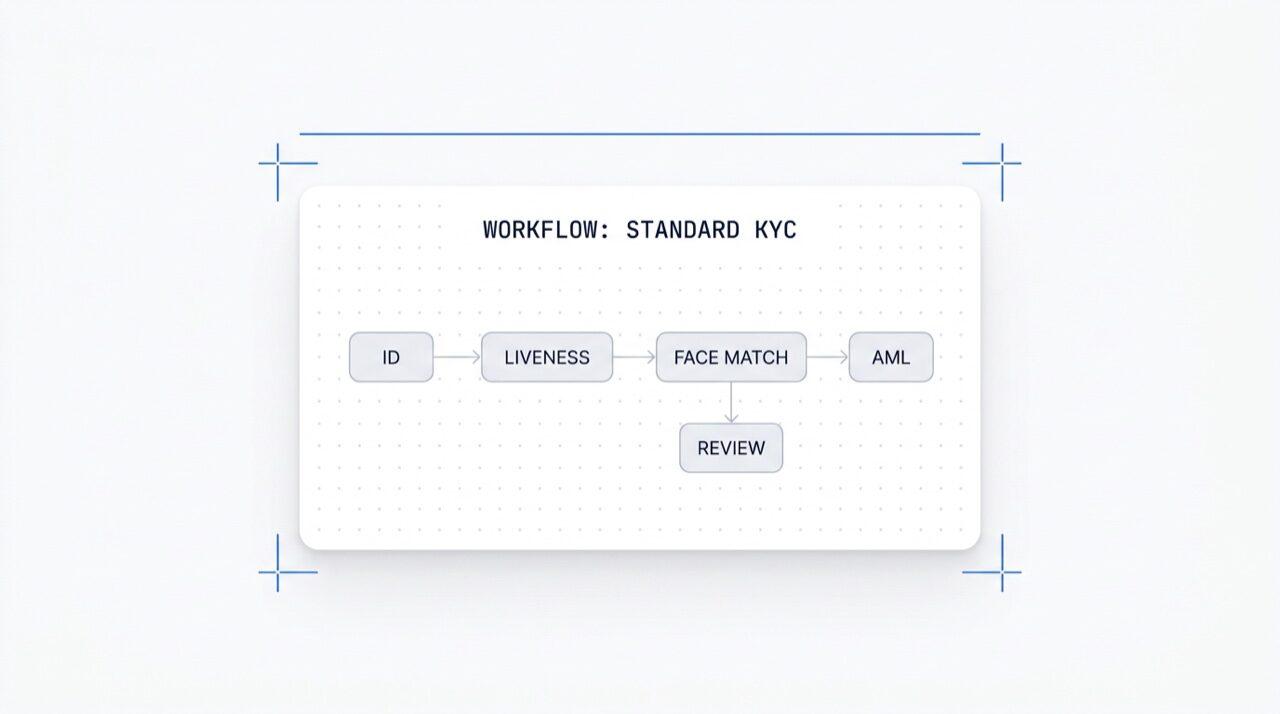
Desenhe qualquer fluxo de verificação em uma tela. Arraste, solte, crie ramificações, faça testes A/B e ative qualquer um dos mais de 25 módulos com um clique. Gratuito em todos os planos.
Confiado por mais de 2.000 organizações em todo o mundo.
Construtor de fluxos no-code
Arraste, solte, teste A/B. Ramificação condicional.
Ative qualquer módulo com um clique. Editor visual para KYC (conheça seu cliente),
KYB (conheça sua empresa), AML (anti-lavagem de dinheiro) e fluxos de monitoramento.
Faça testes A/B em produção. Gratuito, sem cobrança por fluxo.
Como funciona
Do cadastro ao usuário verificado em quatro passos.
Passo 01 / 04
01
Crie o fluxo
Escolha as verificações que você quer, ID, prova de vida, reconhecimento facial, sanções, endereço, idade, telefone, e-mail, perguntas personalizadas. Arraste-as para um fluxo no painel ou publique o mesmo fluxo em nossa API. Crie ramificações com base em condições, execute testes A/B, sem necessidade de código.
Integre
Incorpore nativamente com nossos SDKs para Web, iOS, Android, React Native ou Flutter. Redirecione para uma página hospedada. Ou simplesmente envie um link ao seu usuário, por e-mail, SMS, WhatsApp, onde quiser. Escolha o que melhor se adapta à sua stack.
O usuário passa pelo fluxo
A Didit hospeda a câmera, as dicas de iluminação, a transição para dispositivos móveis e a acessibilidade. Enquanto o usuário está no fluxo, pontuamos mais de 200 sinais de fraude em tempo real e verificamos cada campo em relação a fontes de dados confiáveis. Resultado em menos de dois segundos.
Você recebe os resultados
Webhooks assinados em tempo real mantêm seu banco de dados sincronizado no momento em que um usuário é aprovado, recusado ou enviado para revisão. Consulte a API sob demanda. Ou abra o console para inspecionar cada sessão, cada sinal e gerenciar casos do seu jeito.
Feito para desenvolvedores · Contra fraudes · Aberto por design
Seis funcionalidades. Uma tela. $0 por fluxo.
O Orquestrador de Fluxos é a tela por trás de toda verificação Didit. Construa-o no console ou crie-o a partir do seu código. Todas as funcionalidades abaixo vêm com cada workspace sem custo adicional.
Arraste e solte nós. Conexão inteligente. Sem código.
Um canvas infinito com nós de módulo (ID, Liveness, Face Match, AML, NFC, IP, Questionário, Comprovante de Endereço, Validação de Banco de Dados, Estimativa de Idade, E-mail, Telefone), nós de ramificação que roteiam dados de sessão em tempo real, nós de ação (tag, definir metadados, rotear para revisão manual) e nós de veredito (aprovado, recusado, em revisão).
Canvas de fluxo de trabalho
Arrastar e soltar · conexão inteligente · atalhos de teclado
Modo avançado
12
Funcionalidade
6
Ramificação
4
Ação
3
Status
RecursoOCR
RecursoLIVENESS
Ramificaçãorisk > 80
Açãotag:hi-risk
StatusIN REVIEW
OCRFACE_MATCHAMLNFCIPPHONEEMAILAGE_EST
Sem código · smart-connect · zoom e panCanvas infinito
02 · Ativação de módulos
Ative qualquer um dos mais de 25 módulos por fluxo de trabalho.
Cada fluxo de trabalho tem uma lista de módulos que você pode ativar ou desativar. Basta ligar uma chave e o nó é ativado, sem precisar mudar o código ou fazer um novo deploy. Novos módulos que lançamos todo mês aparecem nessa mesma lista. Você paga apenas por verificação, conforme as taxas publicadas por módulo; o fluxo de trabalho em si não tem custo.
Ativação de módulo
Ative qualquer um dos mais de 25 módulos · pague por sucesso
Mais de 25 módulos
25+
Módulos
1 /mo
Novo módulo lançado
$0
Sobretaxa de workflow
Verificação de ID$0.15Ligado
Prova de Vida Passiva$0.10Ligado
Face Match 1:1$0.05Ligado
AML Screening$0.20Desligado
Wallet Screening (KYT)$0.15Desligado
03 · Multi-aplicativo
Dev, staging, produção. Um workspace.
Cada workspace hospeda múltiplos apps, geralmente Desenvolvimento, Staging e Produção. Cada app tem sua própria chave de API, fluxos de trabalho publicados e destinos de webhook. Para promover um fluxo de trabalho, basta republicá-lo no app de destino ou exportar o JSON da versão.
Aplicativos
Dev · Staging · Produção · chaves isoladas
3 apps
3
Aplicações
1 chave
Por aplicação
JSON
Exportável
Desenvolvimentosk_dev_4f8adraft v4Rascunho
Homologaçãosk_stg_9c12v3Homologação
Produçãosk_prd_b201v3Ativo
Promover · republicar ou exportar JSON do fluxo de trabalho
04 · Testes A/B
Divida o tráfego entre variantes em tempo real, sem novos deploys.
Publique duas variantes, defina uma porcentagem de divisão e o Orchestrator roteia o tráfego de entrada entre elas. Acompanhe a taxa de conclusão, taxa de recusa, abandono e tempo até o veredito por variante nos seus analytics. Aumente o tráfego do vencedor para 100% com um clique; reverta com outro clique.
Experimento A/B · onboarding_v5
Tráfego dividido · telemetria de conversão ao vivo
Variante B vencedora
Variante A50%
87.4%
Taxa de conclusão
Variante B50%
91.2%
Taxa de conclusão
Taxa de recusa6.1%4.3%
Abandono6.5%4.5%
Tempo para veredito38s32s
Rampa B · 5% → 100% · rollback em um clique+3.8 pp
05 · Ramificação
Lógica condicional em cada campo.
Nós de ramificação roteiam usuários com base em dados de sessão em tempo real, país, pontuação de risco, tipo de documento, idade, tempo desde a emissão ou qualquer regra personalizada. Recorra à Verificação de ID para idades limítrofes. Pule o AML para regiões de baixo risco. Avance para NFC em fluxos apenas com passaporte. Sem código.
Nó de ramificação
Rotas por país · risco · tipo de documento · idade
5 condições
Condição 'se'Rota
country in {DE, FR, ES, IT}
Aprovar
risk_score > 80
AML + Revisão
doc.type == PASSPORT
Leitura NFC
age < 18
Estimativa de Idade
default
Revisão manual
7 campos · país · risco · doc · idadeSem código
06 · Gratuito + aberto
Grátis em todos os planos. Webhooks, Zapier, MCP.
Sem taxa por fluxo de trabalho, sem taxa por usuário. Fluxos de trabalho, versões e destinos de webhook ilimitados. Cada fluxo de trabalho se integra com Zapier, Shopify, Salesforce e o servidor MCP (Model Context Protocol) para que agentes de IA possam gerenciar sessões com o mesmo ID de fluxo de trabalho. Webhooks são enviados assinados.
POST /webhooks/destinations
Incluído
workflow.session.verified200 OK
{
"workflow_id": "wf_3daf4c64",
"session_id": "sess_8a2f9c10",
"status": "verified",
"vendor_data": "user-42",
"version": 3,
Destinos: unlimited
}
CabeçalhoX-Signature-V2: hmac-sha256
Destinos
WebhookZapierShopifySalesforceMCP
$0 / workflow
Integre
Dois endpoints. Um workflow_id.
Construa um fluxo uma vez, na tela visual ou a partir do seu código. Referencie seu ID em cada sessão que você iniciar. O mesmo ID de fluxo alimenta os SDKs para Web, iOS, Android, React Native, Flutter e o servidor MCP.
Conecte qualquer fluxo de verificação com um único prompt.
Cole o bloco abaixo no Claude Code, Cursor, Codex, Devin, Aider ou Replit Agent. Preencha seu framework, linguagem e caso de uso. O agente provisiona o Didit, constrói o fluxo de trabalho, conecta o webhook e envia um link de verificação para seu usuário, mesma tela, mesmas primitivas, amigável para agentes de IA.
didit-integration-prompt.md
# Didit Workflow Orchestrator — integrate in 5 minutes

You are wiring the Didit Workflow Orchestrator into <my_stack>. Follow
these steps exactly. Every URL, header, and enum value below is
canonical — do not paraphrase or "improve" them.

Workflows are versioned JSON documents that string together any subset
of Didit's 25+ verification modules:
  - Feature nodes (Optical Character Recognition (OCR), LIVENESS, FACE_MATCH, Anti-Money Laundering (AML), Near Field Communication (NFC), IP, QUESTIONNAIRE,
    PROOF_OF_ADDRESS, DATABASE_VALIDATION, AGE_ESTIMATION, EMAIL_VERIFICATION,
    PHONE_VERIFICATION)
  - Branch nodes (route by country, risk score, document type, age, ...)
  - Action nodes (add tag, set metadata, route to manual review)
  - Status nodes (APPROVED, DECLINED, IN_REVIEW)

## 1. Provision an account
- Sign up: https://business.didit.me (no credit card required).
- Or provision programmatically: POST https://apx.didit.me/auth/v2/programmatic/register/

## 2. Two ways to build a workflow — pick one

### Path A — Visual canvas (recommended for humans)
1. Open https://docs.didit.me/console/workflows.
2. Pick Simple Mode for a template-based build (Know Your Customer (KYC), Age Verification,
   Biometric Auth, Address, Questionnaire) or Advanced Mode for the
   node-based graph builder.
3. Drag feature nodes onto the canvas. Connect handles with the smart-
   connect cursor. Drop branch nodes between features to route on data.
4. Click Publish. The published workflow's UUID is your workflow_id.

### Path B — Management API (recommended for AI agents)
Programmatically create a linear workflow with the simple v3 features
array — Didit converts it into a node-based graph internally.

POST https://verification.didit.me/v3/workflows/
Headers:
  x-api-key: <your-api-key>
  Content-Type: application/json
Body:
  {
    "workflow_label": "Standard KYC",
    "features": [
      {
        "feature": "OCR",
        "config": {
          "documents_allowed": {},
          "duplicated_user_action": "REVIEW"
        }
      },
      { "feature": "LIVENESS", "config": { "face_liveness_method": "PASSIVE" } },
      { "feature": "FACE_MATCH" },
      { "feature": "AML" }
    ]
  }

Hard rules for POST /v3/workflows/:
  - features[].feature values are UPPERCASE strict enum:
    OCR, LIVENESS, FACE_MATCH, AML, NFC, IP, QUESTIONNAIRE,
    PROOF_OF_ADDRESS, DATABASE_VALIDATION, AGE_ESTIMATION,
    EMAIL_VERIFICATION, PHONE_VERIFICATION
  - Put dependency features first. OCR before FACE_MATCH, NFC,
    DATABASE_VALIDATION, or user-AML checks that depend on document
    data. LIVENESS before FACE_MATCH.
  - For QUESTIONNAIRE features, create the questionnaire first via
    POST /v3/questionnaires/ and use the returned questionnaire_id as
    config.questionnaire_uuid.
  - The endpoint supports linear workflows only. To add branches,
    actions, webhooks, or conditional routing, edit the published
    workflow in the canvas.
  - Save the returned workflow uuid — that is your workflow_id for
    creating sessions, and your settings_uuid for future updates.

Reference for every config field per feature:
  https://docs.didit.me/management-api/workflows/feature-configs

## 3. Use the workflow in a session
POST https://verification.didit.me/v3/session/
Headers:
  x-api-key: <your-api-key>
  Content-Type: application/json
Body:
  {
    "workflow_id": "<uuid from step 2>",
    "vendor_data": "user-42"
  }

Response includes the hosted verification link in url. Redirect the user
there. The hosted Didit UI handles capture UX, mobile handoff,
accessibility, retries, and webhook delivery on completion.

## 4. Webhooks
Register one webhook destination per workspace:

POST https://verification.didit.me/v3/webhook/destinations/
Body: { "url": "https://yourapp.com/didit/webhooks",
        "events": ["session.verified", "session.review_started",
                   "session.declined", "session.expired"] }

Every delivery carries an X-Signature-V2 Hash-based Message Authentication
Code (HMAC) header.  HMAC-SHA256 verification MUST run against the raw body bytes (the raw payload as Didit sent it) BEFORE any JSON parsing — re-serialising the parsed body changes whitespace and key order, which invalidates the signature.Verify before trusting the payload:

  signature = hmac_sha256(secret, raw_body).hex()
  if signature != request.headers["X-Signature-V2"]:
      return 401

Retries use exponential backoff over 24 hours. The Console shows every
delivery, retry, and signature verification result.

## 5. Workflow versioning
Workflows support draft / publish versioning. Drafts are fully editable.
Publishing creates an immutable version that new sessions will use.
Sessions always reference the specific version they were created with,
so behaviour stays consistent even after you publish updates. Previous
versions are preserved and inspectable via the Management API.

## 6. Multi-app management
Each workspace can host multiple applications — typically Development,
Staging, Production. Each application carries its own API key, its own
workflows, and its own webhook destinations. Promote a published
workflow from Staging to Production by re-publishing in the target app
or by exporting and re-importing the workflow JSON.

## 7. A/B testing
Split traffic across two published workflow variants from inside the
canvas. Configure a percentage split, route by user cohort, ramp a new
module to 5% before going to 100%. Conversion metrics surface on the
workflow analytics view at https://docs.didit.me/console/analytics.

## 8. Hard rules — do not change
- Base URL stays  https://verification.didit.me  (NOT apx.didit.me).
- Auth header stays  x-api-key  (lowercase, hyphenated).
- Webhook signature header stays  X-Signature-V2  (NOT X-Signature).
- Feature enum is UPPERCASE strict — OCR, LIVENESS, FACE_MATCH, AML,
  NFC, IP, QUESTIONNAIRE, PROOF_OF_ADDRESS, DATABASE_VALIDATION,
  AGE_ESTIMATION, EMAIL_VERIFICATION, PHONE_VERIFICATION.
- Session status casing stays  "Approved" / "Declined" / "In Review" /
  "Expired" / "Not Finished"  (mixed case on session statuses,
  UPPERCASE_SNAKE on transaction and case statuses).

## 9. Pricing reference
The Workflow Orchestrator itself is FREE on every plan — no per-workflow
fee, no per-seat fee, unlimited workflows. You pay only for the modules
that run inside the workflow at the published per-success rates on
https://didit.me/pricing.

500 free verifications every month, forever, on every account.

## 10. Verify your integration
1. Create a sandbox API key at https://business.didit.me.
2. POST /v3/workflows/ with the Standard KYC body above. Save the uuid.
3. POST /v3/session/ with that workflow_id. Open the url in a
   browser and complete the flow with the sandbox test fixtures.
4. Confirm the session.verified webhook fires and X-Signature-V2 verifies.
5. Open the workflow in the canvas — verify the linear feature array
   was converted into the expected node graph.

Done. The Workflow Orchestrator is live. Reach out to support@didit.me
with the workspace id if you hit a wall.
Conformidade por design
Abra um novo país com um clique. Nós fazemos o trabalho pesado.
Nós abrimos as subsidiárias locais, garantimos as licenças, realizamos os testes de penetração, obtemos as certificações e nos alinhamos a cada nova regulamentação. Para lançar verificações em um novo país, basta ativar uma chave. Mais de 220 países ativos, auditados e testados trimestralmente, o único provedor de identidade que um governo de um estado membro da UE formalmente considerou mais seguro do que a verificação presencial.
Do cadastro a um fluxo de trabalho ativo rodando em uma sessão real.
Três planos, uma tabela de preços
Comece grátis. Pague pelo uso. Escale para Enterprise.
500 verificações gratuitas todo mês, para sempre. Depois, pague apenas quando um módulo for executado. Contratos personalizados, residência de dados e acordos de nível de serviço (SLAs) no plano Enterprise.
Grátis
$0/ mês · sem cartão
Para construir, testar e para seus primeiros usuários.
Tudo o que você precisa para começar:
500 verificações KYC completas todo mês
ID, prova de vida, face match, dispositivo e IP
Mais de 200 sinais de fraude, blocklist, duplicatas
KYC reutilizável em toda a rede Didit
Construtor de fluxo de trabalho, gerenciamento de casos, SDKs
Suporte de IAAgente de IA no console, documentação e comunidade.