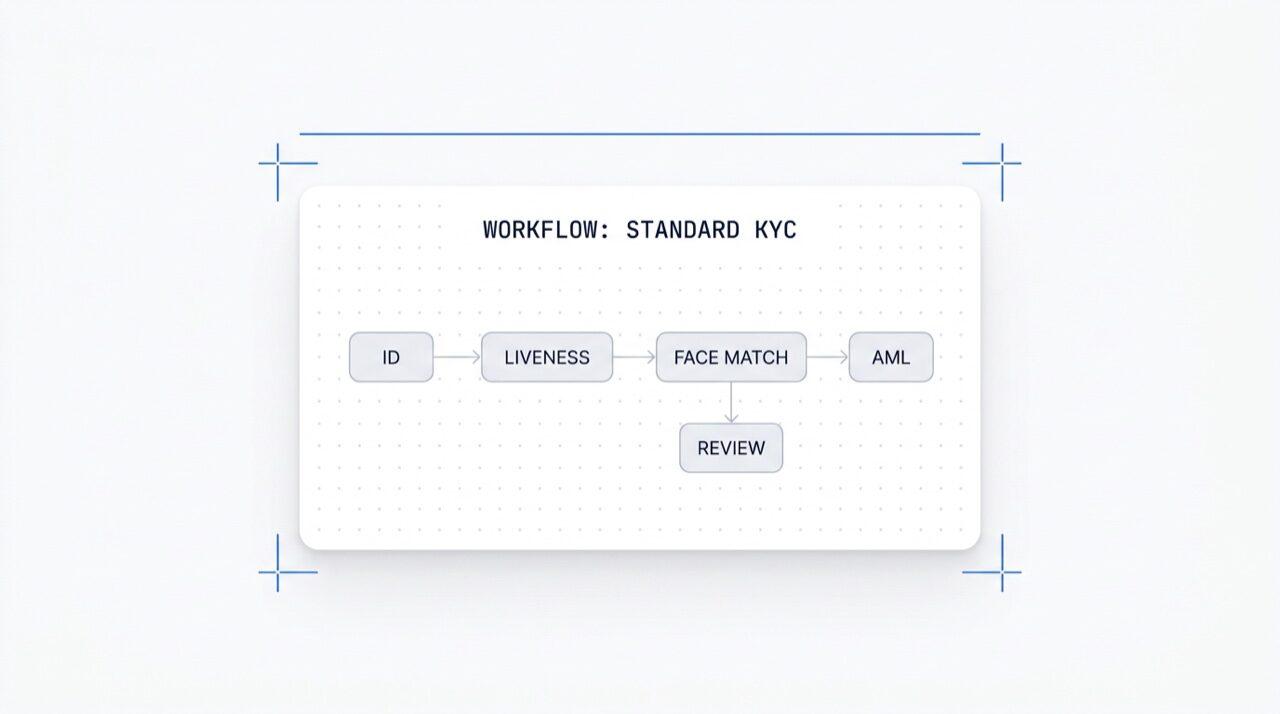
فعّل أي وحدة بنقرة واحدة. محرر مرئي لـ KYC (اعرف عميلك)،
KYB (اعرف عملك)، AML (مكافحة غسيل الأموال)، وسير عمل المراقبة.
اختبر A/B في الإنتاج. مجاني, لا توجد رسوم لكل سير عمل.
كيف يعمل
من التسجيل إلى مستخدم موثق في أربع خطوات.
الخطوة 01 / 04
01
أنشئ سير العمل
اختر الفحوصات التي تريدها, الهوية، التحقق من الحياة، مطابقة الوجه، العقوبات، العنوان، العمر، الهاتف، البريد الإلكتروني، الأسئلة المخصصة. اسحبها إلى سير عمل في لوحة التحكم، أو انشر نفس سير العمل إلى API الخاص بنا. تفرّع بناءً على الشروط، أجرِ اختبارات A/B، لا يتطلب كود.
ادمج
ادمج بشكل أصلي مع SDK الخاص بنا للويب، iOS، Android، React Native، أو Flutter. أعد التوجيه إلى صفحة مستضافة. أو ببساطة أرسل لمستخدمك رابطًا, عبر البريد الإلكتروني، الرسائل القصيرة، واتساب، أي مكان. اختر ما يناسب نظامك.
يمر المستخدم بسير العمل
تستضيف Didit الكاميرا، إشارات الإضاءة، التسليم عبر الهاتف المحمول، وإمكانية الوصول. بينما يكون المستخدم في سير العمل، نقوم بتقييم أكثر من 200 إشارة احتيال في الوقت الفعلي والتحقق من كل حقل مقابل مصادر البيانات الموثوقة. النتيجة في أقل من ثانيتين.
تتلقى النتائج
تحافظ الـ webhooks الموقعة في الوقت الفعلي على مزامنة قاعدة بياناتك لحظة الموافقة على المستخدم، أو رفضه، أو إرساله للمراجعة. استعلم الـ API عند الطلب. أو افتح وحدة التحكم لفحص كل جلسة، كل إشارة، وإدارة الحالات بطريقتك.
مُصمم للمطورين · مُصمم لمكافحة الاحتيال · مفتوح التصميم
ست قدرات. لوحة واحدة. $0 لكل سير عمل.
منسق سير العمل هو اللوحة الخلفية لكل عملية تحقق من Didit. ابنِه في وحدة التحكم أو أنشئه من الكود الخاص بك. كل قدرة أدناه تأتي مع كل مساحة عمل بدون تكلفة إضافية.
لوحة لا نهائية بعُقد وحدات (الهوية، التحقق من الحياة، مطابقة الوجه، مكافحة غسل الأموال، NFC، IP، الاستبيان، إثبات العنوان، التحقق من قاعدة البيانات، تقدير العمر، البريد الإلكتروني، الهاتف)، وعُقد تفرع توجه بناءً على بيانات الجلسة الحية، وعُقد إجراءات (وضع علامة، تعيين بيانات وصفية، توجيه للمراجعة اليدوية)، وعُقد أحكام (موافق عليه، مرفوض، قيد المراجعة).
لوحة سير العمل
سحب وإفلات · اتصال ذكي · اختصارات لوحة المفاتيح
وضع متقدم
12
ميزة
6
فرع
4
إجراء
3
الحالة
ميزةOCR
ميزةLIVENESS
فرعrisk > 80
إجراءtag:hi-risk
الحالةIN REVIEW
OCRFACE_MATCHAMLNFCIPPHONEEMAILAGE_EST
بدون كود · اتصال ذكي · تكبير وتحريكلوحة لا نهائية
02 · تفعيل الوحدة
فعّل أيًا من أكثر من 25 وحدة لكل سير عمل.
كل سير عمل لديه قائمة تبديل الوحدات. قم بتشغيل مفتاح وتنشط العقدة, لا تغيير في الكود، ولا إعادة نشر من جانبك. الوحدات الجديدة التي نصدرها كل شهر تظهر في نفس القائمة. ادفع فقط لكل فحص بالأسعار المنشورة لكل وحدة؛ سير العمل نفسه لا يكلف شيئًا.
تفعيل الوحدة
تبديل أي من 25+ وحدة · الدفع حسب النجاح
25+ وحدة
25+
الوحدات
1 /mo
وحدة جديدة جاهزة للاستخدام
$0
رسوم إضافية لسير العمل
التحقق من الهوية$0.15تشغيل
التحقق السلبي من الحيوية$0.10تشغيل
مطابقة الوجه 1:1$0.05تشغيل
فحص AML$0.20إيقاف
فحص المحفظة (KYT)$0.15إيقاف
03 · تطبيقات متعددة
تطوير، اختبار مرحلي، إنتاج. مساحة عمل واحدة.
تستضيف كل مساحة عمل تطبيقات متعددة, عادةً ما تكون للتطوير، الاختبار المرحلي، والإنتاج. يحمل كل تطبيق مفتاح API الخاص به، وسير العمل المنشور، ووجهات الويب هوك. قم بترقية سير عمل عن طريق إعادة النشر في التطبيق المستهدف أو تصدير إصدار JSON.
التطبيقات
تطوير · اختبار · إنتاج · مفاتيح معزولة
3 تطبيقات
3
التطبيقات
مفتاح واحد
لكل تطبيق
JSON
قابلة للتصدير
تطويرsk_dev_4f8adraft v4مسودة
اختبارsk_stg_9c12v3قيد الاختبار
إنتاجsk_prd_b201v3مباشر
ترويج · إعادة نشر أو تصدير JSON لسير العمل
04 · اختبار A/B
تقسيم مباشر لمتغيرات حركة المرور بدون إعادة نشر.
انشر نسختين، حدد نسبة تقسيم، وسيقوم Orchestrator بتوجيه حركة المرور الواردة عبر كليهما. راقب معدل الإكمال، معدل الرفض، التخلي، والوقت اللازم للحكم لكل نسخة في التحليلات. ارفع النسخة الفائزة إلى 100% بنقرة واحدة؛ تراجع بنقرة واحدة.
تجربة A/B · onboarding_v5
تقسيم حركة المرور · قياس التحويل المباشر
النسخة B هي الرابحة
الخيار أ50%
87.4%
معدل الإكمال
الخيار ب50%
91.2%
معدل الإكمال
معدل الرفض6.1%4.3%
معدل التخلي6.5%4.5%
وقت اتخاذ القرار38s32s
Ramp B · 5% → 100% · تراجع بنقرة واحدة+3.8 pp
05 · التفرّع
منطق شرطي على كل حقل.
توجه عُقد التفرع المستخدمين بناءً على بيانات الجلسة الحية, البلد، درجة المخاطرة، نوع المستند، العمر، الوقت منذ الإصدار، أو أي قاعدة مخصصة. ارجع إلى التحقق من الهوية عند الأعمار الحدية. تخطى مكافحة غسل الأموال للمناطق منخفضة المخاطر. انتقل إلى NFC في التدفقات التي تتطلب جواز السفر فقط. لا حاجة للكود.
لا توجد رسوم لكل سير عمل، ولا رسوم لكل مقعد. سير عمل وإصدارات ووجهات ويب هوك غير محدودة. يتكامل كل سير عمل مع Zapier وShopify وSalesforce وخادم MCP (Model Context Protocol) بحيث يمكن لوكلاء الذكاء الاصطناعي إدارة الجلسات بنفس معرف سير العمل. يتم شحن الويب هوك موقعة.
POST /webhooks/destinations
مشمول
workflow.session.verified200 OK
{
"workflow_id": "wf_3daf4c64",
"session_id": "sess_8a2f9c10",
"status": "verified",
"vendor_data": "user-42",
"version": 3,
الوجهات: unlimited
}
الرأسX-Signature-V2: hmac-sha256
الوجهات
WebhookZapierShopifySalesforceMCP
$0 / workflow
ادمج
نقطتا نهاية. معرف سير عمل واحد.
ابنِ سير عمل مرة واحدة, في اللوحة المرئية، أو من الكود الخاص بك. ارجع إلى معرفه في كل جلسة تبدأها. نفس معرف سير العمل يدعم SDKs للويب، iOS، Android، React Native، Flutter، وخادم MCP.
الصق الكتلة أدناه في Claude Code، Cursor، Codex، Devin، Aider، أو Replit Agent. املأ إطار العمل، اللغة، وحالة الاستخدام الخاصة بك. يقوم الوكيل بتوفير Didit، وبناء سير العمل، وربط الويب هوك، وإرسال رابط التحقق إلى المستخدم الخاص بك, نفس اللوحة، نفس الأساسيات، سهل الاستخدام مع وكلاء الذكاء الاصطناعي.
didit-integration-prompt.md
# Didit Workflow Orchestrator — integrate in 5 minutes

You are wiring the Didit Workflow Orchestrator into <my_stack>. Follow
these steps exactly. Every URL, header, and enum value below is
canonical — do not paraphrase or "improve" them.

Workflows are versioned JSON documents that string together any subset
of Didit's 25+ verification modules:
  - Feature nodes (Optical Character Recognition (OCR), LIVENESS, FACE_MATCH, Anti-Money Laundering (AML), Near Field Communication (NFC), IP, QUESTIONNAIRE,
    PROOF_OF_ADDRESS, DATABASE_VALIDATION, AGE_ESTIMATION, EMAIL_VERIFICATION,
    PHONE_VERIFICATION)
  - Branch nodes (route by country, risk score, document type, age, ...)
  - Action nodes (add tag, set metadata, route to manual review)
  - Status nodes (APPROVED, DECLINED, IN_REVIEW)

## 1. Provision an account
- Sign up: https://business.didit.me (no credit card required).
- Or provision programmatically: POST https://apx.didit.me/auth/v2/programmatic/register/

## 2. Two ways to build a workflow — pick one

### Path A — Visual canvas (recommended for humans)
1. Open https://docs.didit.me/console/workflows.
2. Pick Simple Mode for a template-based build (Know Your Customer (KYC), Age Verification,
   Biometric Auth, Address, Questionnaire) or Advanced Mode for the
   node-based graph builder.
3. Drag feature nodes onto the canvas. Connect handles with the smart-
   connect cursor. Drop branch nodes between features to route on data.
4. Click Publish. The published workflow's UUID is your workflow_id.

### Path B — Management API (recommended for AI agents)
Programmatically create a linear workflow with the simple v3 features
array — Didit converts it into a node-based graph internally.

POST https://verification.didit.me/v3/workflows/
Headers:
  x-api-key: <your-api-key>
  Content-Type: application/json
Body:
  {
    "workflow_label": "Standard KYC",
    "features": [
      {
        "feature": "OCR",
        "config": {
          "documents_allowed": {},
          "duplicated_user_action": "REVIEW"
        }
      },
      { "feature": "LIVENESS", "config": { "face_liveness_method": "PASSIVE" } },
      { "feature": "FACE_MATCH" },
      { "feature": "AML" }
    ]
  }

Hard rules for POST /v3/workflows/:
  - features[].feature values are UPPERCASE strict enum:
    OCR, LIVENESS, FACE_MATCH, AML, NFC, IP, QUESTIONNAIRE,
    PROOF_OF_ADDRESS, DATABASE_VALIDATION, AGE_ESTIMATION,
    EMAIL_VERIFICATION, PHONE_VERIFICATION
  - Put dependency features first. OCR before FACE_MATCH, NFC,
    DATABASE_VALIDATION, or user-AML checks that depend on document
    data. LIVENESS before FACE_MATCH.
  - For QUESTIONNAIRE features, create the questionnaire first via
    POST /v3/questionnaires/ and use the returned questionnaire_id as
    config.questionnaire_uuid.
  - The endpoint supports linear workflows only. To add branches,
    actions, webhooks, or conditional routing, edit the published
    workflow in the canvas.
  - Save the returned workflow uuid — that is your workflow_id for
    creating sessions, and your settings_uuid for future updates.

Reference for every config field per feature:
  https://docs.didit.me/management-api/workflows/feature-configs

## 3. Use the workflow in a session
POST https://verification.didit.me/v3/session/
Headers:
  x-api-key: <your-api-key>
  Content-Type: application/json
Body:
  {
    "workflow_id": "<uuid from step 2>",
    "vendor_data": "user-42"
  }

Response includes the hosted verification link in url. Redirect the user
there. The hosted Didit UI handles capture UX, mobile handoff,
accessibility, retries, and webhook delivery on completion.

## 4. Webhooks
Register one webhook destination per workspace:

POST https://verification.didit.me/v3/webhook/destinations/
Body: { "url": "https://yourapp.com/didit/webhooks",
        "events": ["session.verified", "session.review_started",
                   "session.declined", "session.expired"] }

Every delivery carries an X-Signature-V2 Hash-based Message Authentication
Code (HMAC) header.  HMAC-SHA256 verification MUST run against the raw body bytes (the raw payload as Didit sent it) BEFORE any JSON parsing — re-serialising the parsed body changes whitespace and key order, which invalidates the signature.Verify before trusting the payload:

  signature = hmac_sha256(secret, raw_body).hex()
  if signature != request.headers["X-Signature-V2"]:
      return 401

Retries use exponential backoff over 24 hours. The Console shows every
delivery, retry, and signature verification result.

## 5. Workflow versioning
Workflows support draft / publish versioning. Drafts are fully editable.
Publishing creates an immutable version that new sessions will use.
Sessions always reference the specific version they were created with,
so behaviour stays consistent even after you publish updates. Previous
versions are preserved and inspectable via the Management API.

## 6. Multi-app management
Each workspace can host multiple applications — typically Development,
Staging, Production. Each application carries its own API key, its own
workflows, and its own webhook destinations. Promote a published
workflow from Staging to Production by re-publishing in the target app
or by exporting and re-importing the workflow JSON.

## 7. A/B testing
Split traffic across two published workflow variants from inside the
canvas. Configure a percentage split, route by user cohort, ramp a new
module to 5% before going to 100%. Conversion metrics surface on the
workflow analytics view at https://docs.didit.me/console/analytics.

## 8. Hard rules — do not change
- Base URL stays  https://verification.didit.me  (NOT apx.didit.me).
- Auth header stays  x-api-key  (lowercase, hyphenated).
- Webhook signature header stays  X-Signature-V2  (NOT X-Signature).
- Feature enum is UPPERCASE strict — OCR, LIVENESS, FACE_MATCH, AML,
  NFC, IP, QUESTIONNAIRE, PROOF_OF_ADDRESS, DATABASE_VALIDATION,
  AGE_ESTIMATION, EMAIL_VERIFICATION, PHONE_VERIFICATION.
- Session status casing stays  "Approved" / "Declined" / "In Review" /
  "Expired" / "Not Finished"  (mixed case on session statuses,
  UPPERCASE_SNAKE on transaction and case statuses).

## 9. Pricing reference
The Workflow Orchestrator itself is FREE on every plan — no per-workflow
fee, no per-seat fee, unlimited workflows. You pay only for the modules
that run inside the workflow at the published per-success rates on
https://didit.me/pricing.

500 free verifications every month, forever, on every account.

## 10. Verify your integration
1. Create a sandbox API key at https://business.didit.me.
2. POST /v3/workflows/ with the Standard KYC body above. Save the uuid.
3. POST /v3/session/ with that workflow_id. Open the url in a
   browser and complete the flow with the sandbox test fixtures.
4. Confirm the session.verified webhook fires and X-Signature-V2 verifies.
5. Open the workflow in the canvas — verify the linear feature array
   was converted into the expected node graph.

Done. The Workflow Orchestrator is live. Reach out to support@didit.me
with the workspace id if you hit a wall.
متوافق حسب التصميم
افتح دولة جديدة بنقرة واحدة. نحن نقوم بالعمل الشاق.
نحن نفتح الشركات التابعة المحلية، ونؤمن التراخيص، ونجري اختبارات الاختراق، ونحصل على الشهادات، ونتوافق مع كل لائحة جديدة. لنشر عمليات التحقق في بلد جديد، ما عليك سوى تفعيل مفتاح. أكثر من 220 دولة تعمل، يتم تدقيقها واختبار اختراقها كل ربع سنة, المزود الوحيد للهوية الذي وصفته حكومة دولة عضو في الاتحاد الأوروبي رسميًا بأنه أكثر أمانًا من التحقق الشخصي.