AML sanctions, PEP and adverse media screening explained
AML screening flags potential sanctions, PEP, watchlist and adverse media matches for review. We charge $0.20 per check and $0.07 per person per year for ongoing monitoring.
 Alberto RosasCo-founder and CEO
Contents
In this guide
Jump to the part you need.
AML screening checks customers against sanctions, politically exposed person (PEP) and enforcement watchlists, with adverse media available as an additional check. It fits compliance and engineering teams at banks, payment firms, crypto-asset service providers and other regulated businesses. We charge $0.20 per completed check. A hit needs to be assessed before your team uses it to make an onboarding decision.
Last updated: November 26, 2026. Prices checked against the live Didit price feed on November 26, 2026.
AML sanctions, PEP and adverse media screening at a glance
| Check | Question it answers | Sources | Our list price |
|---|---|---|---|
| Sanctions screening | Is this person or company named on a government or international sanctions list? | UN Security Council consolidated list, EU consolidated financial sanctions, OFAC, other national regimes, development bank debarment lists | $0.20 per check |
| PEP screening | Does this person hold, or has this person held, a prominent public function, or is this person a specified family member or close associate? | Global PEP databases that can include specified family member and close associate records | Included in the same $0.20 check |
| Adverse media screening | Has this person been named in published news reports about financial crime, corruption or fraud? | Published news reports | Included in the same $0.20 check when requested with include_adverse_media |
| Ongoing monitoring | Has a watchlist entry changed? | Watchlist updates for the company and identified individuals | $0.07 per person per year, person monitoring |
What AML sanctions, PEP and adverse media screening means
AML screening compares a customer identity with sanctions, PEP, enforcement watchlist and adverse media data, then scores each possible match so a compliance team can decide what to do.
The checks answer different questions. A confirmed sanctions match can trigger asset-freeze or transaction restrictions under the applicable regime. Check the identities, ownership or control, the activity involved and any applicable licence or exception before deciding how to proceed. PEP status is a risk category that can require enhanced due diligence. Adverse media is a risk-based input, not an official designation.
The legal anchors differ by regime. The FATF Recommendations set the international standard, with Recommendation 10 on customer due diligence and Recommendation 12 on politically exposed persons. In the EU, Regulation (EU) 2024/1624 (AMLR) puts the customer due diligence rules into one directly applicable text. Article 20(1)(d) and (g) cover sanctions and PEP checks, Article 42 sets PEP measures, Article 77 requires five-year records, and Article 76(5) sets safeguards for covered automated decisions, including meaningful human intervention. AMLR entered into force on 9 July 2024 and applies from 10 July 2027; until then national laws transposing the current directive continue to apply. The UK Money Laundering Regulations 2017 set customer due diligence and PEP obligations. UK sanctions restrictions arise under separate sanctions legislation. Screening supports customer due diligence. Check which sanctions and PEP obligations apply to your business and use adverse media as a risk-based input under the applicable rules and your policy.
Where it is used
Regulated businesses use screening as part of customer due diligence. Examples of obliged entities under Article 3 of AMLR include credit institutions, financial institutions including crypto-asset service providers, gambling service providers, auditors, accountants, tax advisers, notaries, lawyers in defined circumstances, trust and company service providers, estate agents and art dealers. Check Article 3 for the full list and the conditions that apply to each activity. Other businesses can use the same checks for fraud and reputational risk, but the legal duties differ.
Article 19 sets the triggers. Due diligence applies when you establish a business relationship, for an occasional transaction of at least EUR 10,000 in one operation or in linked transactions, when there is a suspicion of money laundering or terrorist financing whatever the amount, and when you doubt identification data you already hold. Lower triggers apply in some sectors: EUR 1,000 for occasional transfers of funds and for crypto-asset service providers, and EUR 3,000 for occasional cash transactions, which require at least identification and verification. A crypto-asset service provider must at least identify and verify the customer for an occasional transaction below EUR 1,000. EUR 2,000 applies in gambling. Screen when a trigger fires, and set re-screening according to the applicable obligations, risk and relevant changes.
Sanctions screening
Sanctions screening compares a name, and usually a date of birth, nationality and document number, against lists published by governments and international bodies. Major sanctions lists include the UN Security Council consolidated list, the EU consolidated financial sanctions list, the OFAC lists maintained by the US Treasury, and the UK Sanctions List. We also screen entity-level sources such as World Bank, ADB, AIIB, IDB, AfDB, EBRD and EIB debarment registers, plus national regimes including Swiss SECO, the Australian DFAT consolidated list and the Dutch National Sanction List. A debarment register records a procurement exclusion, which is a different restriction from a sanctions designation that can impose an asset freeze.
A name hit is not a finding by itself. A confirmed match can trigger asset-freeze or transaction restrictions under the applicable regime. Check the identities, ownership or control, the activity involved and any applicable licence or exception before deciding how to proceed. Name matching quality matters because sanctions lists contain transliterations, aliases and spelling variants. List freshness matters because designations change.
PEP screening
PEP screening identifies people who hold or have held prominent public functions. Applicable rules can extend measures to specified family members and known close associates. Definitions vary by jurisdiction. Categories often split into foreign, domestic and international organisation PEPs.
For example, the EU AMLR sets enhanced measures for PEPs under Article 42. Where that regime or your applicable rules require enhanced due diligence, the common measures are senior management approval to establish or continue the relationship, reasonable measures to establish source of wealth and source of funds, and enhanced ongoing monitoring. Under FATF Recommendation 12, foreign PEPs and higher-risk domestic or international-organisation PEP relationships are treated differently, so apply the measures your regime requires.
Adverse media screening
Adverse media screening searches published news reports for mentions of the customer in connection with financial crime, corruption, fraud, trafficking or sanctions evasion. It complements the list checks rather than replacing them: a person investigated for bribery may never appear on a sanctions list, and a PEP record tells you about a role, not about behaviour. Set when to run adverse media checks according to your obligations and risk policy. Set a client timeout of at least 60 seconds. If the screening completes and enrichment is known to be incomplete, record adverse media as incomplete, route it for review, or deliberately run a new check with a fresh key.
Worked example: one customer, three lists
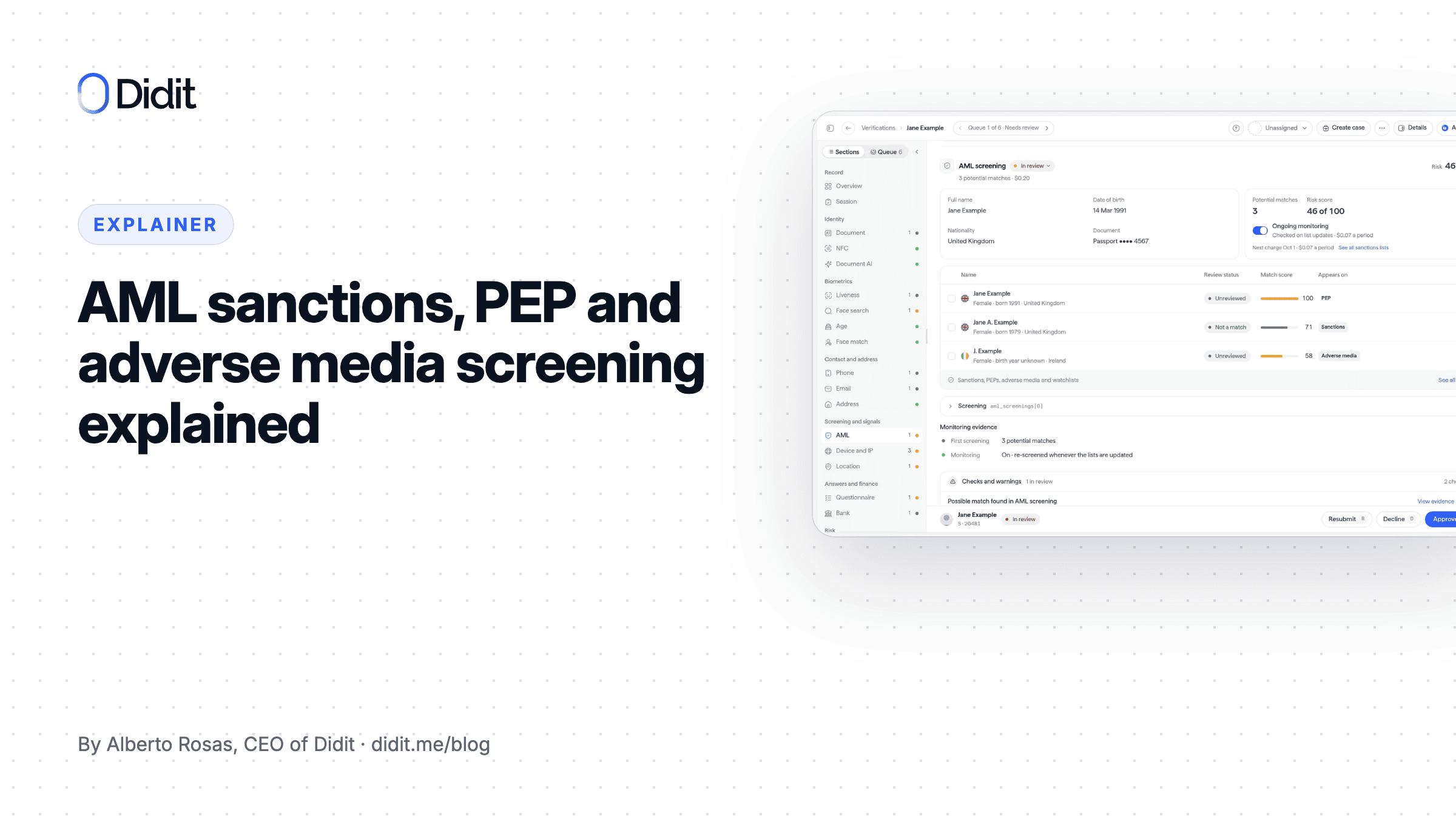
Take a customer opening a payments account. The customer passes the document, passive liveness and face-match checks. Screening then returns three potential matches. The first hit is a sanctions record with a similar name, the same date of birth and a different country. The match score is 82, below the default match threshold of 93, so the hit is tagged as a false positive and excluded from the risk calculation. The second hit is a PEP record with a name variant, the same date of birth and the same nationality. Match score 96, risk score 62. The third hit is adverse media connecting the same person to a public procurement investigation. Match score 94, risk score 88.
The highest included risk score is 88, so the screening returns In Review and POSSIBLE_MATCH_FOUND under the default settings. Your application can route that status to an analyst to check the records and document the disposition. Didit excludes the hit from its automated risk score because it falls below 93. The analyst checks aliases, independent identifiers and the original listing before closing or escalating it. They corroborate the PEP record through the name variant, date of birth and nationality, then document senior management approval. For adverse media, they check the publisher, publication date and the allegation before recording it as relevant or not.
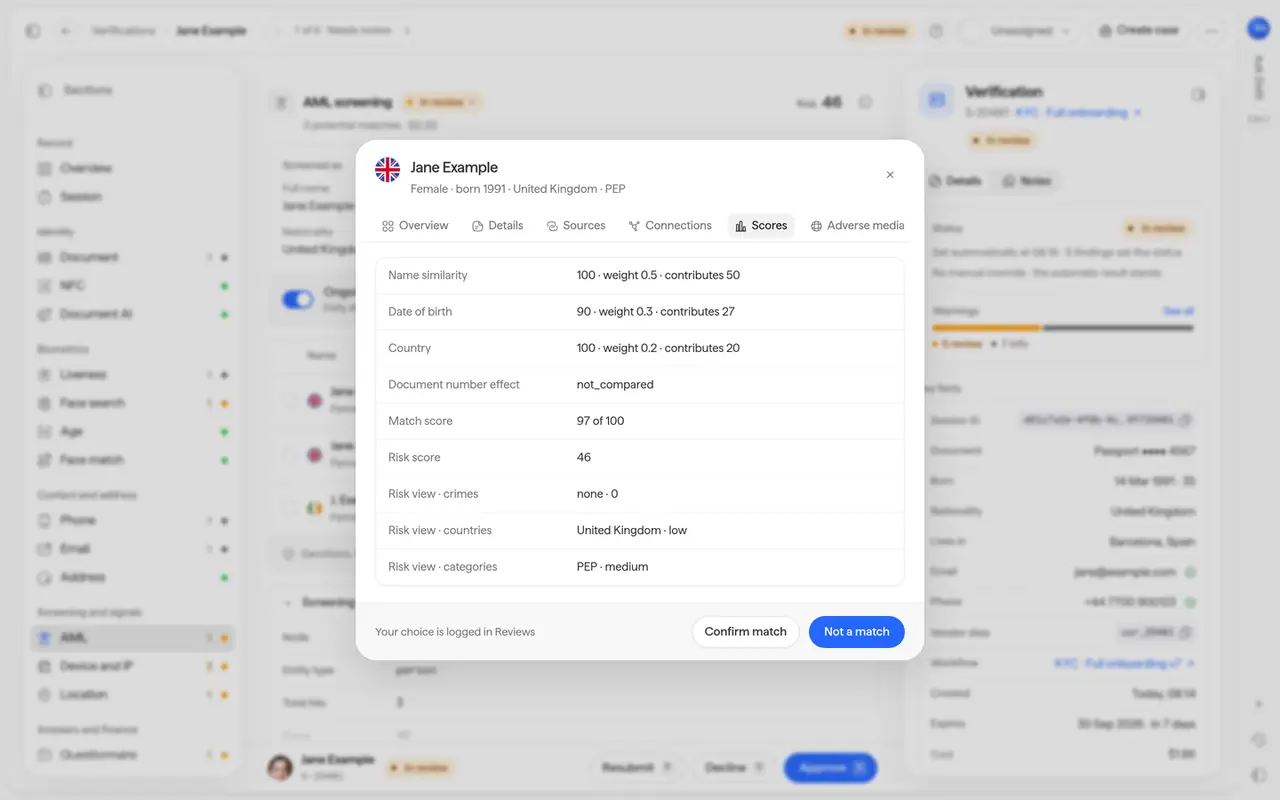
The match score estimates whether the record refers to the customer. The highest risk score among hits above or equal to the match threshold drives the AML status. Your team verifies the match and decides what action to take.

The fields and terms you will see
| Field or term | Where it lives | What it does |
|---|---|---|
full_name | Request, required | The person or company to screen. Minimum two characters. |
entity_type | Request | Whether the subject is a person or a company. |
date_of_birth, nationality, document_number | Request | Identity signals used in matching. A matching document number acts as a golden key and overrides the match score to 100. |
include_adverse_media | Request | Adds the published news reports check. It increases latency, so set a client timeout of at least 60 seconds. |
save_api_request | Request | Stores the screening as a session so it is retrievable, appears in the console, and hit review statuses can be updated later. Defaults to true. |
include_ongoing_monitoring | Request | Keeps the profile under daily re-screening. Requires save_api_request to be true, otherwise the call returns HTTP 400. |
aml_name_weight, aml_dob_weight, aml_country_weight | Workflow configuration or standalone request parameter | Weights used to compute the match score. They must sum to exactly 100. Defaults are 60, 25 and 15. |
aml_match_score_threshold | Workflow configuration or standalone request parameter | Default 93. A hit below it is classified as a false positive and ignored for risk purposes. |
aml_score_approve_threshold and aml_score_review_threshold | Workflow configuration or standalone request parameter | Defaults 80 and 100. At or below the approve threshold is Approved. Above the approve threshold and at or below the review threshold is In Review. Above the review threshold is Declined. |
match_score | Response, 0 to 100 | Identity confidence: how likely this hit is the same person you are screening. |
risk_score | Response, 0 to 100 | Entity risk: how risky the listed entity is, based on category, country and severity. |
review_status | Response | Initial review status: False Positive or Unreviewed, derived from the match score threshold. |
status | Response | Not Started, In Progress, Approved, In Review, Declined, Abandoned or Kyc Expired. |
warnings[] | Response | Possible risk codes such as POSSIBLE_MATCH_FOUND, MATCH_FOUND, HIGH_RISK_COUNTRY, ADVERSE_MEDIA_HIT, SANCTIONED_ENTITY, PEP_MATCH and ONGOING_MONITORING_ENABLED. |
How we implement it
We screen against 1,300+ global sanctions, PEP and watchlist sources plus adverse media, and we return every potential match with both scores. There are two integration modes: the hosted verification workflow and a server-to-server call. In the hosted workflow, you add AML as a step and configure the thresholds and weights; the decision is bound to the session. In the standalone call, you send one request to POST https://verification.didit.me/v3/aml/. A standalone result is also saved as a session by default because save_api_request defaults to true.
POST https://verification.didit.me/v3/aml/
x-api-key: YOUR_API_KEY
Content-Type: application/json

{"full_name":"Javier Ejemplo Modelo","entity_type":"person","date_of_birth":"1974-01-01","nationality":"ES","include_adverse_media":true}
The standalone response carries aml.status, aml.score, aml.hits[] and aml.warnings[]. Each hit includes match_score, risk_score and review_status. A workflow caller reads the corresponding item in aml_screenings[] on the session decision.
With include_adverse_media=true the API waits for adverse media enrichment, so configure a client timeout of at least 60 seconds. If the client times out before it receives a result, retry with the same application, idempotency key and exact request body. A completed replay returns the stored result without another charge, and reusing the key with a different body returns HTTP 409. If the screening completed and enrichment is known to be incomplete, route it for review or deliberately run a new check with a fresh key. A new successful check is billable.
Business verification uses the same model at two levels. Screen the company and the identified beneficial owners and officers. Each can produce separate AML findings. The business session's overall AML status reflects the highest-risk result across those screenings. The details are in Business AML screening and Business AML coverage.
We charge $0.07 per person per year for daily AML re-screening. Business monitoring can watch the company and identified individuals for watchlist updates. Check business monitoring billing before enabling it. We provide the checks and the evidence. If your business is an obliged entity under AMLR, you remain responsible for the tasks you outsource under Article 18. Your team sets the customer's risk profile and decides whether to onboard. The mapping from AMLR articles to endpoints is in our AMLR compliance guide.

Worked cost example
Assume a payment firm onboards 5,000 new customers a month and runs a full identity check plus AML on each one. At list prices that is $0.15 for the ID document, $0.10 for passive liveness, $0.05 for face match 1:1 and $0.03 for device and IP analysis, which is $0.33 for the full KYC check, plus $0.20 for AML screening. The combined cost per customer is $0.53, which is the published compliance bundle price.
- Monthly screening cost: 5,000 × $0.53 = $2,650.
- Annual screening cost: $2,650 × 12 = $31,800.
- Monitoring one cohort of 5,000 people for one year costs 5,000 × $0.07 = $350 at list price. If all 12 cohorts remain monitored, the year-end book has 60,000 people and an annualised monitoring cost of 60,000 × $0.07 = $4,200.
Now add one business customer. The example assumes one registry retrieval at $2.00, one company AML check and two people who each receive person AML and a linked full KYC check, so these checks total $2.00 + $0.20 + 2 × ($0.20 + $0.33) = $3.26. Registry pricing varies by country and data tier. Any additional steps are outside this example.
Plans change the numbers rather than the method. Growth is $99 a month with $115 of credit a month and 4% off these screening list prices, so the $2,650 monthly screening line becomes $2,650 × 0.96 = $2,544 before plan fees and credits. Scale is $299 a month with $350 of credit a month and 10% off these screening list prices, so the same line becomes $2,650 × 0.90 = $2,385 before plan fees and credits. Monthly credit is applied before top-ups, and unused credit does not roll over, so the credit offsets spend in the month it lands. The unit prices and plan terms are from the November 26, 2026 live price feed. See the pricing page and pricing as JSON.
Common mistakes
- Treating every hit as a real match. A hit at match score 82 and a hit at match score 96 are not the same event. The match score estimates identity confidence; below the default 93 threshold Didit tags the hit as a false positive for scoring purposes.
- Tuning the weights until they do not sum to 100. The name, date of birth and country weights must total exactly 100, and the API rejects the request with HTTP 400 when they do not. Validate the sum before submitting the request.
- Running adverse media without a plan for incomplete enrichment. Set when to run adverse media checks according to your obligations and risk policy. Set a client timeout of at least 60 seconds. If the client times out, retry with the same application, idempotency key and exact request body. If the screening completed and enrichment is incomplete, route it for review or run a new check with a fresh key.
- No disposition record. Record who reviewed the hit, the evidence they assessed and why they closed or escalated it. Retain that record under your applicable policy and obligations.
- One threshold for every flow. A retail signup and a high-risk corporate relationship can need different approve and review thresholds. Thresholds are configurable per workflow.
- Screening the company and forgetting the owners. Screen the company and the identified beneficial owners and officers. Each can produce separate AML findings. Reconcile the owners and officers you identified against the person screenings that completed before you close the file.
- Assuming the screening result is the compliance decision. It is an input. The onboarding decision, and the liability that comes with it, stay with you.
Sources
- Didit docs: AML screening overview, sanctions and PEP
- Didit docs: AML screening API reference
- Didit docs: business AML screening for entities and people
- Didit docs: business AML coverage and publisher list
- Didit docs: person-level watchlist database
- Didit docs: AMLR compliance guide
- Didit docs: pricing and billing rules
- Didit docs: data models and AML schema
- Didit pricing page and pricing as JSON, read November 26, 2026
- Regulation (EU) 2024/1624 on the prevention of the use of the financial system for money laundering
- FATF Recommendations, including Recommendation 10 and Recommendation 12
- UK Money Laundering, Terrorist Financing and Transfer of Funds Regulations 2017
- UK Sanctions List
Open a free sandbox at business.didit.me. Run a mocked AML scenario to test how your application reads the response and handles review. No sales call required.
Try it
Try this in the sandbox
Run the check this guide describes, free.
The product this post is about, taken from its topic. Run it free in the sandbox.
Author
Alberto Rosas
Co-founder and CEO

Keep reading
Other guides in the same topic.
 What Is the Purpose of FICA in South Africa? 2026 Guide
FICA is South Africa's anti-money laundering law. It creates the Financial Intelligence Centre and requires accountable institutions to identify and verify clients, screen for PEP and sanctions risk and report suspicious.
Alberto RosasNov 26, 2026 Sixth Money Laundering Directive (6AMLD): What Changed and Which Rules Apply
6AMLD is Directive (EU) 2018/1673: Member States must criminalise laundering, widen predicate offences and set a four-year penalty floor. It adds no new due diligence duties for firms.
Alberto RosasNov 26, 2026 Automated Sanctions Screening: Canada, the Entity List and Embargoes
Automated sanctions screening matches people and companies against lists such as Canada's autonomous sanctions made under SEMA and JVCFOA and the OFAC SDN List, and returns candidate hits scored for identity confidence and.
Alberto RosasNov 26, 2026Questions
Frequently asked questions
What is the difference between sanctions screening, PEP screening and adverse media screening?
Sanctions screening checks official designation lists. A confirmed match can trigger asset-freeze or transaction restrictions under the applicable regime, so check identities, ownership or control, the activity and any licence or exception. PEP screening checks whether the customer holds or has held a prominent public function, or is a specified family member or close associate, which can require enhanced due diligence. Adverse media checks published news reports for reported financial crime and is a risk-based input, not an official designation.
What counts as a PEP in AML?
A PEP holds or has held a prominent public function: heads of state and government, senior politicians, senior judicial and military officials, senior executives of state-owned corporations, and senior figures at international organisations. Applicable rules can extend measures to specified family members and known close associates. Definitions vary by jurisdiction, so apply the definition in your regime and policy.
How many sanctions and PEP sources should screening cover?
There is no universal minimum list count. Identify the sanctions regimes that apply to your business and transactions, then verify that your screening covers their official lists. Choose PEP and enforcement sources based on the jurisdictions and risks relevant to your customers. We screen against 1,300+ global sanctions, PEP and watchlist sources. The person-level watchlist catalogue lists the full sanctions and PEP catalogue; business AML coverage lists the legal-entity publishers.
How often should you re-screen a customer for sanctions and PEP changes?
Screen at onboarding and set re-screening triggers and frequency according to the applicable rules and customer risk. Our ongoing AML monitoring runs daily for enrolled people at $0.07 per person per year. A match or change raises a webhook so your team can act.
Can a customer stop being a PEP?
Former officeholders can remain subject to PEP measures. Follow the applicable minimum period and reassess the remaining risk before reducing enhanced due diligence or monitoring.
What is a false positive in AML name screening?
A false positive is a hit that the system raised but which is not your customer. Two people sharing a common name, with different dates of birth and different nationalities, is the classic case. In our two-score model, hits below the match score threshold, 93 by default, are tagged as false positives and excluded from the risk calculation.
What are the AML implications of onboarding a PEP?
Onboarding a PEP is allowed where your regime permits it and your risk assessment supports it. Where the applicable regime requires enhanced due diligence, document senior management approval, source of wealth and source of funds, and enhanced ongoing monitoring. Record the measures on the customer file.
How long does an AML screening check take?
A plain screening typically completes in a few seconds. Adverse media adds an external enrichment step, so set a client timeout of at least 60 seconds. If the client times out, retry with the same application, idempotency key and exact request body. If the screening completed and enrichment is known to be incomplete, route it for review or run a new check with a fresh key. A new successful check is billable.
Is AML and PEP screening required for every business?
No. Obligations depend on your business, jurisdiction and the rules that apply to you. Screening supports customer due diligence; check which sanctions and PEP obligations apply to your business and use adverse media as a risk-based input under the applicable rules and your policy. Businesses outside the obliged-entity list can still use the checks for fraud and reputational risk.
Can I screen a company and its owners in the same workflow?
Yes. Screen the company and the identified beneficial owners and officers. Each can produce separate AML findings. The business session's overall AML status reflects the highest-risk result across those screenings.
What is the difference between customer AML screening, ongoing watchlist re-screening and transaction monitoring?
Customer AML screening evaluates a person or company against sanctions, PEP, watchlist and optional adverse media data at a point in time. Ongoing watchlist re-screening repeats that watchlist check for enrolled people, daily in our monitoring, and raises a webhook on a match or change. Transaction monitoring evaluates transactions, not a customer profile, against rules and lists for fraud and financial-crime risk.
Can an AI assistant or coding agent read an AML screening result for me?
Yes, because the result is structured JSON rather than a document. The session decision carries an aml_screenings[] array with status, score, total hits, each hit with its match score and risk score, and the warnings array. The schema is in the data models reference, and agents can work from the integration prompt or the Didit MCP server.
Compliance built in
Audited, certified and attested.
We hold the certifications and build each country's rules into your flows, so you can launch anywhere without worrying. Security and Compliance center
- Regulation encoded into your flows
Tell us what you do and where. Didit lists the rules that apply to you, with sources, and builds the checks each country needs into one workflow.
- Ready for AMLR
Every requirement of the new EU anti-money laundering rules, from checking customers to human review, is already covered by a Didit check.
- Tested in Spain's Treasury sandbox
Spain's Treasury published its supervised sandbox report on Didit's NFC plus active liveness onboarding; SEPBLAC took part and valued the added measures positively.
- Audited, not self-declared
iBeta Level 1 and Level 2. Liveness tested under ISO/IEC 30107-3.
Your obligations · 3 regions
 SOC 2 Type 2
 ISO 27001
 iBeta Level 1 and Level 2
 EU regulator attestation
 FSM youth protection
 GDPR
 EBA remote onboarding
 MiCA compatible
 FIDO Alliance member
- AMLREU AML Regulation ready
Integration · Didit MCP
Run Didit from your own AI agent
Connect Didit to Claude, Cursor, VS Code or ChatGPT and just ask in plain words. Your agent can do anything you can do in the console, with the same permissions you have.
 Add to Claude
 ChatGPT
 Cursor
- Build workflowsDescribe the checks you need. The agent creates and publishes the flow.
- Run investigationsAsk why a session was declined, review cases, search people and companies.
- Change rulesCreate payment rules, test them on past data and switch them on.
- Pull reportsAsk for numbers, exports or the audit log.
Didit Academy