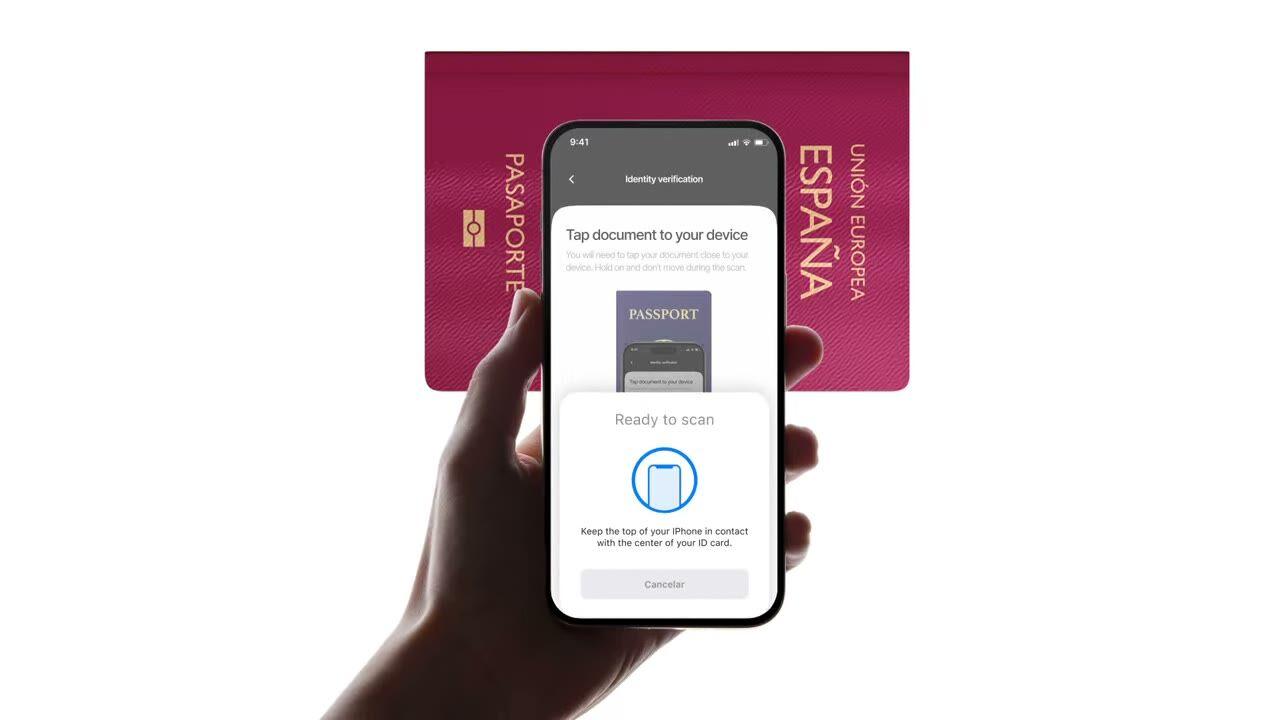
Acerca un pasaporte o e-ID al teléfono. Lee el chip, valida la firma gubernamental y detecta falsificaciones que las verificaciones fotográficas simples no ven. $0.15 por lectura, 500 gratis/mes.
Acerca el pasaporte. El chip devuelve los mismos datos que la foto, pero esta
vez están firmados por el país emisor. $0.15, en menos de 2 segundos.
Cómo funciona
Del registro al usuario verificado en cuatro pasos.
Paso 01 / 04
01
Crea el flujo de trabajo
Elige las verificaciones que necesites: ID, liveness, coincidencia facial, sanciones, dirección, edad, teléfono, email, preguntas personalizadas. Arrástralas a un flujo en el panel de control, o publica el mismo flujo en nuestra API. Crea ramificaciones condicionales, haz pruebas A/B, sin código.
Integra
Intégralo de forma nativa con nuestros SDKs para Web, iOS, Android, React Native o Flutter. Redirige a una página alojada. O simplemente envía a tu usuario un enlace, por email, SMS, WhatsApp, donde quieras. Elige lo que mejor se adapte a tu stack.
El usuario completa el flujo
Didit aloja la cámara, las indicaciones de iluminación, la transferencia móvil y la accesibilidad. Mientras el usuario está en el flujo, puntuamos más de 200 señales de fraude en tiempo real y verificamos cada campo contra fuentes de datos autorizadas. Resultado en menos de dos segundos.
Recibes los resultados
Los webhooks firmados en tiempo real mantienen tu base de datos sincronizada en el momento en que un usuario es aprobado, rechazado o enviado a revisión. Consulta la API bajo demanda. O abre la consola para inspeccionar cada sesión, cada señal y gestionar los casos a tu manera.
Diseñado para desarrolladores · Creado contra el fraude · Abierto por diseño
Seis funcionalidades. Un "feature flag". NFC.
Todas las funcionalidades que ves aquí son un "toggle" en el mismo módulo. Sin niveles de pago, sin SKUs separados, sin llamadas adicionales. Actívalas por flujo de trabajo o incluye el módulo NFC al crear un flujo de trabajo a través de la API.
Verifica la firma en cada chip, no la impresión en la página.
Todos los pasaportes electrónicos e identificaciones electrónicas modernas llevan un chip sin contacto firmado por el gobierno emisor. Lo leemos a través de NFC (comunicación de campo cercano), validamos la firma digital y devolvemos un veredicto a prueba de manipulaciones. Detecta ataques de morfología, sustituciones de fotos y falsificaciones que pasan la inspección visual.
SPAINe-Passport
P<ESPROY<<OLIVIA<<<<<<<
Chip readICAO 9303
Passive AuthenticationSOD signature valid
Active AuthenticationChip challenge OK
Chip AuthenticationSession key derived
Signed by issuerAuthentic
02 · Grupos de datos ICAO 9303
Contenido completo del chip extraído, estructurado y firmado.
Se lee cada grupo de datos ICAO 9303 del chip: objeto de seguridad firmado, datos personales, MRZ (zona de lectura mecánica), imagen facial de alta resolución, imagen de firma, además de cualquier biometría adicional que almacene el país emisor. Obtienes un JSON `chip_data` limpio más URLs firmadas para el retrato y la firma.
Document chipSOD · signed data groups
Signed
First nameDG1
Olivia
Last nameDG1
Roy
Date of birthDG1
12 Mar 1992
Document numberDG1
XAB204731
Facial imageDG2
High-res portrait
Signed at issuance · not OCR5 fields verified
03 · Confianza ICAO PKD
Confianza anclada en el Directorio de Claves Públicas de la OACI.
Cada lectura de chip rastrea la cadena completa de certificados,firmante del documento → autoridad de firma del país → raíz del Directorio de Claves Públicas de la OACI, y verifica la lista de revocación del país en tiempo real. Los certificados revocados y caducados aparecen como advertencias configurables; el resto pasa como booleanos de autenticidad en el informe.
Document SignerDSC · eID Spain
Country Signing CACSCA · CRL current
ICAO PKD RootPublic Key Directory
Root
Integrity
SOD integrity
DG integrity
DSC not revoked
DSC not expired
Verified · ICAO PKDChain valid
04 · Foto vs. chip
Comprueba cada campo. Rechazo automático en caso de no coincidencia.
Los datos de la foto deben coincidir con los datos del chip. Cuando divergen, la sesión se rechaza automáticamente; ese disparador no se puede desactivar. Es la señal más clara de una zona de foto manipulada, un chip intercambiado o un documento falso con una impresión de aspecto real.
Data source
Camera OCRChip read
Document number
XAB2O4731XAB204731≈ 91.4%Signed
First name
0LIVIAOLIVIA≈ 96.7%Signed
Expiry date
03 / 203103 / 2031≈ 99.1%Signed
Best-effort read · fonts, glare, wearExact values · signed by the issuer2 mismatchesSource of truth
05 · Mobile SDK primero
iOS, Android, React Native, Flutter: lectura de chip integrada.
Los SDK nativos configuran por ti el lector NFC del dispositivo, los permisos y la interfaz de usuario de lectura de chips. iOS usa Core NFC; Android usa IsoDep en NfcAdapter; React Native y Flutter envuelven ambos. Los navegadores sin NFC recurren automáticamente a la identificación estándar + selfie; se activa una advertencia de omisión y la sesión continúa.
React Native · FlutterBridges the native SDKsBridgedidit.nfc.read()One call · native under the hood
Web browserNo NFC · falls back to OCRFallbackdidit.ocr.scan()Camera capture · OCR fields
One call · NFC when the device supports itAuto-fallback · session continues with OCR
06 · Cobertura mundial
Todos los países emisores de ICAO, creciendo cada trimestre.
La mayoría de los pasaportes emitidos después de 2006 incluyen un chip, además de una lista creciente de identificaciones electrónicas nacionales: DNIe español, Personalausweis alemán, CIE italiano, tarjeta de identificación estonia, Cartão de Cidadão portugués, eID belga, eID holandés. Los certificados de país se actualizan automáticamente; los nuevos países se pueden leer el día que los incorporamos.
DNIeSpain
PersonalausweisGermany
Carta CIEItaly
Cartão de CidadãoPortugal
ID-kaartEstonia
2006e-Passports since
30+National e-IDs
9303ICAO standard
CSCA certificates refreshed automaticallyReadable via NFC
Integra
Un flujo de trabajo. Dos formas de iniciar la lectura del chip.
NFC no tiene un endpoint independiente de servidor a servidor; el chip necesita un dispositivo con hardware NFC. Ambos caminos comparten la misma llamada de creación de sesión; solo se diferencian en si el usuario lee el chip en nuestra interfaz de usuario alojada o dentro de tu propia aplicación a través del SDK nativo.
// iOS · Swift
import DiditSdk
let result = try await DiditSdk.shared.startVerification(
con: sessionId,
configuración: config)
donein-app{ "status": "Approved" }
Integración lista para agentes
Implementa la verificación NFC con una sola instrucción.
Pega el siguiente bloque en Claude Code, Cursor, Codex, Devin, Aider o Replit Agent. Rellena el marcador de posición `my_stack` con tu framework, lenguaje y caso de uso. El agente provisiona Didit, construye el flujo de trabajo con NFC activado, conecta el webhook y lo implementa.
didit-integration-prompt.md
# Didit NFC Verification — integrate in 5 minutes

You are integrating Didit's NFC Verification (cryptographic e-passport
and e-ID chip reading) module into <my_stack>. Follow these steps exactly.
Every URL, header, and enum value below is canonical — do not paraphrase
or "improve" them.

## 1. Provision an account
- Sign up: https://business.didit.me (no credit card required).
- Or provision programmatically: POST https://apx.didit.me/auth/v2/programmatic/register/
  (returns an API key bound to the workspace + application).

## 2. What NFC Verification actually does
NFC Verification reads the secure contact-less chip embedded in modern
e-passports and e-IDs (the small chip-and-antenna sticker symbol on the
cover) and runs four cryptographic checks against the data it extracts:

1. Passive Authentication — every Data Group (DG1 personal data, DG2
   facial image, etc.) is hashed and compared against the signed hash
   stored in the Document Security Object (SOD). Catches any single-bit
   tampering of the chip contents.
2. Certificate chain validation — Document Signer Certificate (DSC) →
   Country Signing Certificate Authority (CSCA) → ICAO Public Key
   Directory (PKD) root. Proves the chip was signed by the issuing
   government, not a clone.
3. Certificate Revocation List (CRL) check — DSCs revoked by the issuing
   country are caught and flagged.
4. Chip Authentication — where the document supports it, prevents chip
   cloning by challenging the chip with a key-pair handshake.

PACE (Password Authenticated Connection Establishment) or BAC (Basic
Access Control) is used to derive the session key from the Machine-Readable Zone (MRZ); Didit
handles that automatically. All of this is ICAO 9303 standard.

## 3. Two integration paths — pick one

### Path A — Workflow Builder (hosted UI, REQUIRED for NFC)
NFC Verification has no server-to-server standalone endpoint. The chip
has to be read by a device with NFC hardware, so you always integrate
through the Workflow + native SDK (or hosted mobile web that falls back).

1. Create a workflow that contains the NFC feature:
   POST https://verification.didit.me/v3/workflows/
   Authorization header:  x-api-key: <your-api-key>
   Body: workflow_label, features array with the entries
         { feature: "OCR" }
         { feature: "NFC" }
         (UPPERCASE — strict enum)
   You should always pair NFC with OCR (ID Verification) so the MRZ is captured
   for the chip handshake AND so an OCR cross-validation is available.

2. Create a verification session for an end user:
   POST https://verification.didit.me/v3/session/
   Body: workflow_id (from step 1), vendor_data (your own user id).
   Response: url (the hosted verification link) — redirect the user to
   it (or open it in the native SDK with
   shared.startVerification(with: sessionId)).

3. Listen for webhook callbacks (see "Webhooks" below).

### Path B — Native SDKs (drop-in, recommended for mobile apps)
Same workflow + session above, but launch the verification flow in your
own iOS or Android app via the Didit SDK. The SDK wires the NFC reader,
the entitlements, and the chip-reading UI for you.

- iOS: DiditSdk.shared.startVerification(with: sessionId, configuration:)
  Required entitlements (handled by the SDK):
    - com.apple.developer.nfc.readersession.formats = ["TAG"]
    - ISO7816 application identifiers for ePassports
- Android: DiditSdk.startVerification(sessionId, config) — uses
  IsoDep (android.nfc.tech.IsoDep) under the hood.
- React Native / Flutter: the same SDK, exposed through the cross-
  platform module — see docs.didit.me/integration/native-sdks/.

### Web browsers — NFC is unavailable
Web NFC API is not generally available. Chrome on Android has an
experimental Web NFC that is unstable and requires explicit permissions;
Safari on iOS has no support. For web integrations, NFC is automatically
skipped and the user proceeds with standard ID + selfie. If you require
NFC, deep-link the user into the Didit App or your own native app.

## 4. Webhooks
- Register a webhook destination once via
  POST https://verification.didit.me/v3/webhook/destinations/
  Body: url, subscribed_events: ["session.verified", "session.review_started",
                                  "session.declined"]
- Response includes secret_shared_key — store it.
- Every webhook delivery carries an X-Signature-V2 header you MUST verify
  before trusting the payload.  HMAC-SHA256 verification MUST run against the raw body bytes (the raw payload as Didit sent it) BEFORE any JSON parsing — re-serialising the parsed body changes whitespace and key order, which invalidates the signature.Algorithm:
    1. sortKeys(payload) recursively
    2. shortenFloats (truncate trailing zeros after the decimal point)
    3. JSON.stringify the result
    4. HMAC-SHA256 with the secret_shared_key
    5. Hex-encode, compare to the X-Signature-V2 header.

## 5. Reading the report
The session decision includes an nfc_verifications[] array alongside
id_verifications[] — one entry per workflow node, each with its own node_id.
Fields on each nfc_verifications entry:

- status: "Approved" | "Declined" | "In Review" | "Not Finished"
- portrait_image: signed URL to the chip-extracted DG2 facial image
- signature_image: signed URL to the chip-extracted DG7 signature
- chip_data:
    document_type, issuing_country (ISO 3166-1 alpha-3),
    document_number, expiration_date (YYYY-MM-DD),
    first_name, last_name, birth_date, gender ("M" | "F" | "U"),
    nationality (ISO 3166-1 alpha-3), address, place_of_birth.
- authenticity:
    sod_integrity (boolean — every Data Group hash matched the SOD)
    dg_integrity (boolean — Data Group binary integrity check passed)
- certificate_summary:
    issuer (CSCA Common Name + serial + organization + country)
    subject (DSC Common Name)
    serial_number
    not_valid_after (YYYY-MM-DD HH:MM:SS)
    not_valid_before (YYYY-MM-DD HH:MM:SS)
- warnings: Array of { risk, additional_data, log_type,
                       short_description, long_description }

### Auto-decline (always enforced, never configurable)
- NFC_AND_OCR_DATA_NOT_SAME — Optical Character Recognition (OCR) data
  and chip data differ. Indicates document tampering or fake chip.

### Configurable warnings (per-workflow action: Decline / Review / Approve)
- SKIPPED_NFC_VALIDATION       — chip not read (no NFC hardware, no
                                  permissions, document has no chip)
- NFC_CHIP_NOT_VERIFIED        — chip read but signature could not be
                                  verified (missing CSCA, older document)
- DSC_CERTIFICATE_REVOKED      — Document Signer Certificate listed on
                                  the issuing country's CRL
- DSC_CERTIFICATE_EXPIRED      — Document Signer Certificate past its
                                  validity period

## 6. Hard rules — do not change
- Base URL for /v3/* endpoints is verification.didit.me (NOT apx.didit.me).
- Feature enum is UPPERCASE: NFC, OCR, LIVENESS, FACE_MATCH.
- Auth header is x-api-key (lowercase, hyphenated).
- Webhook signature header is X-Signature-V2 (NOT X-Signature).
- Always verify webhook signatures before trusting payload data.
- Always pair NFC with OCR (ID Verification) in the workflow — NFC alone
  cannot derive the chip key without the MRZ from the document photo.
- Status casing matches exactly: "Approved", "Declined", "In Review",
  "Not Finished" (title-cased, space-separated).
- Treat NFC as an additive confidence boost, not a hard gate, unless
  your risk policy explicitly requires it (regulated remote
  onboarding under PSD3, AMLD6 high-risk customer flows, etc.).

## 7. Pricing reference (public)
- NFC Verification: $0.15 per chip read (standalone module).
- Bundled inside a full Know Your Customer (KYC) workflow (ID + Liveness + Face Match + NFC):
  priced as the underlying KYC bundle ($0.33) + $0.15 NFC if enabled.
- 500 free checks every month, forever, on every account.

## 8. Verify your integration
- Sandbox starts on signup at https://business.didit.me — no separate flag.
- Test documents: use the Didit App on a real iOS or Android device with
  any ICAO 9303 e-passport issued after 2006 (most modern passports).
- Sandbox webhook events fire the same shape as production; verify the
  X-Signature-V2 header in dev too.
- Switch to live: flip the application's environment toggle in console.

When in doubt: https://docs.didit.me/core-technology/nfc-verification/overview
Cumplimiento por diseño
Abre un nuevo país en un clic. Nosotros hacemos el trabajo duro.
Abrimos las filiales locales, aseguramos las licencias, realizamos las pruebas de penetración, obtenemos las certificaciones y nos alineamos con cada nueva regulación. Para lanzar verificaciones en un nuevo país, activa un interruptor. Más de 220 países en vivo, auditados y probados trimestralmente, el único proveedor de identidad que un gobierno de un estado miembro de la UE ha calificado formalmente como más seguro que la verificación presencial.
Cada chip se lee según el estándar canónico de pasaporte electrónico.
PKD
Confianza anclada en la raíz del Directorio de Claves Públicas de la ICAO.
<2s
Lectura de chip de extremo a extremo en un smartphone moderno.
$0.15
Por lectura de chip NFC. 500 gratis cada mes.
Tres niveles, una lista de precios
Empieza gratis. Paga por uso. Escala a Enterprise.
500 verificaciones gratis cada mes, para siempre. Después, paga solo cuando se ejecute un módulo. Contratos personalizados, residencia de datos y acuerdos de nivel de servicio (SLA) en Enterprise.
Gratis
$0/ mes · sin tarjeta
Para construir, probar y tus primeros usuarios.
Todo lo que necesitas para empezar:
500 verificaciones KYC completas cada mes
ID, prueba de vida, coincidencia facial, dispositivo e IP
Más de 200 señales de fraude, lista de bloqueo, duplicados
KYC reutilizable en toda la red Didit
Constructor de flujos de trabajo, gestión de casos, SDKs
Soporte con IAAgente de IA en consola, documentación y comunidad.