

免费
$0/ 月 · 无需信用卡
适用于构建、测试和您的首批用户。
开始所需的一切:
- 每月500次完整KYC验证
- 身份、活体、人脸匹配、设备和IP验证
- 200+欺诈信号、黑名单、重复项检测
- Didit网络内可复用KYC
- 工作流构建器、案件管理、SDK
- AI 支持 控制台内 AI 助手、文档和社区支持。






全球3,000多家组织信赖。
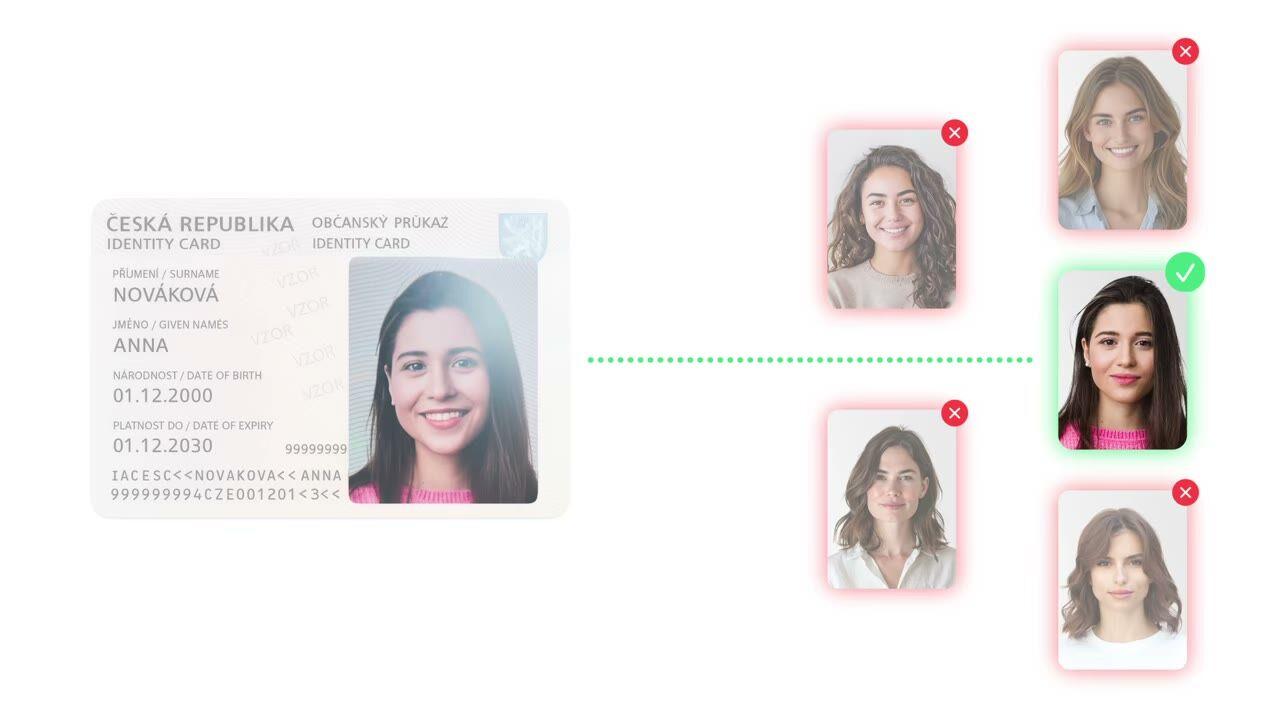
重复检测
在您的用户群中捕获重复欺诈者。作为 KYC 套件的一部分免费提供。 生物识别模板的向量索引,数百万次比对在 2 秒内完成。
选择您需要的验证项, 身份、活体、人脸匹配、制裁名单、地址、年龄、电话、邮箱、自定义问题。在控制面板中拖拽构建流程,或通过我们的 API 发布。支持条件分支、A/B 测试,无需代码。
$ curl -X POST https://verification.didit.me/v3/session/ \
  -H "x-api-key: $DIDIT_API_KEY" \
  -H "Content-Type: application/json" \
  -d '{
    "workflow_id": "wf_liveness_dedupe",
    "vendor_data": "user-42"
}'{ "url": "verify.didit.me/..." }$ curl -X POST https://verification.didit.me/v3/face-search/ \
-H "x-api-key: $DIDIT_API_KEY" \
-F "image=@reference.jpg" \
-F "similarity_threshold=80"{ "total_matches": 3, "status": "已批准" }# Didit Face Search 1:N — integrate in 5 minutes
You are integrating Didit's Face Search 1:N (one-to-many biometric search)
module into my_stack. Follow these steps exactly. Every URL, header, and
enum value below is canonical — do not paraphrase or "improve" them.
Face Search 1:N searches a reference face against your entire database of
previously verified users to detect duplicate accounts, blocklisted faces,
and fraud rings. Free forever on every plan — no per-call fee, no minimum.
## 1. Provision an account
- Sign up: https://business.didit.me (no credit card required).
- Or provision programmatically: POST https://apx.didit.me/auth/v2/programmatic/register/
(returns an API key bound to the workspace + application).
## 2. Two integration paths — pick one
### Path A — Workflow Builder (automatic, inside every liveness check)
Best when you want Face Search to run automatically every time a user
verifies. Face Search 1:N is automatically performed during liveness
checks in verification sessions to detect duplicate users and check
against blocklisted faces. No extra wiring needed.
1. Create a workflow that contains the LIVENESS feature:
POST https://verification.didit.me/v3/workflows/
Authorization header: x-api-key: your-api-key
Body: workflow_label, features array with the single entry
the JSON object containing feature equal to "LIVENESS"
(UPPERCASE — strict enum). Face Search runs automatically.
2. Create a verification session for an end user:
POST https://verification.didit.me/v3/session/
Body: workflow_id (from step 1), vendor_data (your own user id).
Response: url (the hosted verification link) — redirect the user to it.
3. Listen for the session webhook (see "Webhooks" below). Face Search has no
block of its own in V3: its hits are decision.liveness_checks[].matches,
each flagged is_blocklisted / is_allowlisted.
### Path B — Standalone server-to-server API
Best when you want to search a face on demand — fraud investigation,
manual review tooling, watchlist scan, identity re-auth.
POST https://verification.didit.me/v3/face-search/
Content-Type: multipart/form-data
Body fields:
- image (required, file — single reference face)
- vendor_data (optional string, your search id)
- similarity_threshold (optional int 0-100, default 70)
- allow_multiple_faces (optional bool, default false)
Response: JSON report with matches array, similarity percentages,
blocklist flags, and the standard warnings array.
## 3. Webhooks (Path A only — Path B returns synchronously)
- Register a webhook destination once via
POST https://verification.didit.me/v3/webhook/destinations/
Body: url, subscribed_events: ["session.verified", "session.review_started",
"session.declined"]
- Response includes secret_shared_key — store it.
- Every webhook delivery carries an X-Signature-V2 header you MUST verify
before trusting the payload. HMAC-SHA256 verification MUST run against the raw body bytes (the raw payload as Didit sent it) BEFORE any JSON parsing — re-serialising the parsed body changes whitespace and key order, which invalidates the signature.Algorithm:
1. sortKeys(payload) recursively
2. shortenFloats (truncate trailing zeros after the decimal point)
3. JSON.stringify the result
4. HMAC-SHA256 with the secret_shared_key
5. Hex-encode, compare to the X-Signature-V2 header.
## 4. Reading the report (both paths return the same shape)
The face_search object includes:
- status: "Approved" | "Declined" | "In Review"
- total_matches: integer (0 when no match crossed the threshold)
- matches: array of match objects, each with:
- session_id UUID of the matching session
- session_number integer
- similarity_percentage number 0-100
- vendor_data your reference data from the original verification
- verification_date ISO 8601 timestamp
- user_details name, document_type, document_number (masked)
- match_image_url signed URL, expires in 60 minutes
- status "Approved" | "Declined" | "In Review"
- is_blocklisted boolean
- user_image:
- entities array (bbox, confidence, age, gender per detected face)
- best_angle (0 | 90 | 180 | 270) if rotate_image enabled
- warnings: Array of risk, log_type, short_description, long_description
Similarity bands documented:
90+ Strong match — very likely the same person
70 – 89 Possible match — may require manual review
Below 70 Likely different individuals
Auto-decline risks (always enforced by Didit, not configurable):
- NO_FACE_DETECTED no face in the reference image
- FACE_IN_BLOCKLIST the reference face matches your face blocklist
Configurable warning:
- MULTIPLE_FACES_DETECTED tune allow_multiple_faces per application
## 5. Hard rules — do not change
- Base URL for /v3/* endpoints is verification.didit.me (NOT apx.didit.me).
- Feature enum is UPPERCASE: FACE_SEARCH, LIVENESS, OCR, FACE_MATCH.
- Auth header is x-api-key (lowercase, hyphenated).
- Webhook signature header is X-Signature-V2 (NOT X-Signature).
- Always verify webhook signatures before trusting payload data.
- Status casing matches exactly: "Approved", "Declined", "In Review"
(title-cased, space-separated).
- match_image_url is signed and expires after 60 minutes — do not cache it,
re-fetch from the session if you need it again.
## 6. Pricing reference (public)
- Face Search 1:N is FREE FOREVER on every Didit plan.
- No per-call fee for the standalone POST /v3/face-search/ endpoint.
- No surcharge when bundled inside a LIVENESS workflow.
- 500 free Didit verifications every month on top of that.
- Templates only — your biometric index stores hashed embeddings, never raw
photos. Encrypted at rest in EU-region AWS.
## 7. Verify your integration
- Sandbox starts on signup at https://business.didit.me — no separate flag.
- Test images: deterministic synthetic faces returned in sandbox (Approved
by default; trigger Declined by sending a known-blocklisted test face).
- Switch to live: flip the application's environment toggle in console.
When in doubt: https://docs.didit.me/core-technology/face-search/overview













适用于构建、测试和您的首批用户。
25+ 模块,价格公开透明。自动享受批量折扣。
适用于大批量和受监管项目。
使用量增长时自动享受批量折扣——无需谈判,无需销售电话。
Didit 是身份和欺诈基础设施,是我们自己在构建产品时希望拥有的平台:开放、灵活且对开发者友好,因此它能真正融入您的技术栈,而不是一个需要您围绕其进行集成的黑盒。
一个 API 涵盖了人员验证(KYC,了解您的客户)、企业验证(KYB,了解您的企业)、加密钱包筛选(KYT,了解您的交易)以及实时交易监控,其技术栈旨在实现:
其底层支持:14,000 多种文档类型,支持 48 种以上语言,1,000 多个数据源,以及每次会话的 200 多个欺诈信号。Didit 基础设施通过每次会话动态学习,并日益完善。
image 多部分字段,以及可选的 vendor_data、similarity_threshold(0-100,默认 70)和 allow_multiple_faces(默认 false)。在活体检测工作流中,完全不需要任何输入, 用户的自拍照片会自动与您已验证的用户索引进行搜索,因此重复项和黑名单匹配项会与活体检测结果在同一会话中显示。face_search 对象返回 status(Approved、Declined、In Review)、total_matches 和一个 matches 数组。每个匹配项包含 session_id、session_number、similarity_percentage(0-100)、vendor_data、verification_date、user_details(姓名、document_type、document_number, 已屏蔽)、一个在60 分钟后过期的签名 match_image_url、匹配会话自身的 status 和 is_blocklisted。user_image 块报告检测到的人脸实体(bbox、置信度、年龄、性别)和应用的旋转。warnings 数组显示触发的任何风险。整个流程通常在 30 秒内完成, 拿起身份证,拍摄证件,拍摄自拍,完成。这是市场上最快的速度。传统的 KYC 提供商完成相同流程通常需要超过 90 秒。
在后端,Didit 在 p99 情况下两秒内返回结果,时间从用户完成自拍到您的 webhook 触发计算。移动端捕获针对慢速手机和慢速网络进行了优化:渐进式图像压缩、延迟加载 SDK,以及如果用户从网页端开始,通过二维码实现桌面到手机的一键切换。
similarity_threshold,以便注册可以严格,而审核队列保持宽松。工作流编排器分支, 将 1:N 结果与设备智能、设备和 IP 分析以及活体检测相结合,即使单个信号可能允许通过,使用被盗照片、重复 SIM 卡或共享设备指纹的欺诈团伙也无法通过综合检查。每个会话都会落入七种明确状态之一,因此您的代码始终知道该怎么做:
Approved, 所有检查通过。让用户继续。Declined, 一个或多个检查失败。您可以允许用户重新提交特定的失败步骤(例如,重新拍摄自拍),而无需重新运行整个流程。In Review, 标记为合规性审查。在控制台中打开案例,查看所有信号,决定批准或拒绝。In Progress, 用户正在进行中。Not Started, 链接已发送,用户尚未打开。如果长时间未打开,发送提醒。Abandoned, 用户打开了链接但未及时完成。重新激活或使其过期。Expired, 会话链接已过期。创建新会话。每次状态更改都会触发一个签名的 webhook,因此您的数据库始终保持同步。放弃和拒绝的会话是免费的。
生产数据默认在欧盟的 Amazon Web Services 上处理和存储。企业合同可根据监管机构要求,申请其他区域。
全面加密。 所有数据库、对象存储和备份均采用 AES-256 静态加密。所有 API 调用、Webhook 和业务控制台会话均采用传输层安全协议 1.3 进行传输加密。生物识别数据使用单独的客户主密钥进行加密。
保留策略由您掌控。 默认保留期限为无限期(无限制),除非您配置更短的期限,可在每个应用程序 30 天到 10 年之间选择,并且您可以随时通过仪表板或 API 删除任何单个会话。
认证:SOC 2 Type 1 & Type 2、ISO/IEC 27001:2022、iBeta Level 1 PAD,以及来自西班牙 Tesoro / SEPBLAC / CNMV 的公开证明,表明 Didit 的远程身份验证比亲自验证更安全。完整报告请访问 /security-compliance。
Didit 默认符合身份基础设施相关监管机构的要求:
详细备忘录、所有证书、所有监管机构函件:/security-compliance。
三种集成路径, 选择最适合您技术栈的:
相同的仪表板、相同的计费、相同的按成功付费价格。分步指南请访问 docs.didit.me/integration/integration-prompt。