Didit erhält 7,5 Mio. $ für die Infrastruktur für Identität und Betrug
Didit
Biometrische Authentifizierung

Ersetze SMS 2FA.
Mit einem Gesicht. In einer Sekunde.

Drop-in passwortlose Re-Authentifizierung für wiederkehrende Nutzer. Keine SMS-Kosten, kein SIM-Swap-Risiko, keine Abhängigkeit vom Mobilfunkanbieter. Dieselbe iBeta Level 1 PAD (Presentation Attack Detection) Engine wie bei der Registrierung. $0.10 pro Authentifizierung, 500 kostenlos/Monat.

Unterstützt von
Y CombinatorRobinhood Ventures
GBTC Finance
Bondex
Crnogorski Telekom
UCSF Neuroscape
Shiply
Adelantos

Über 2.000 Organisationen weltweit vertrauen uns.

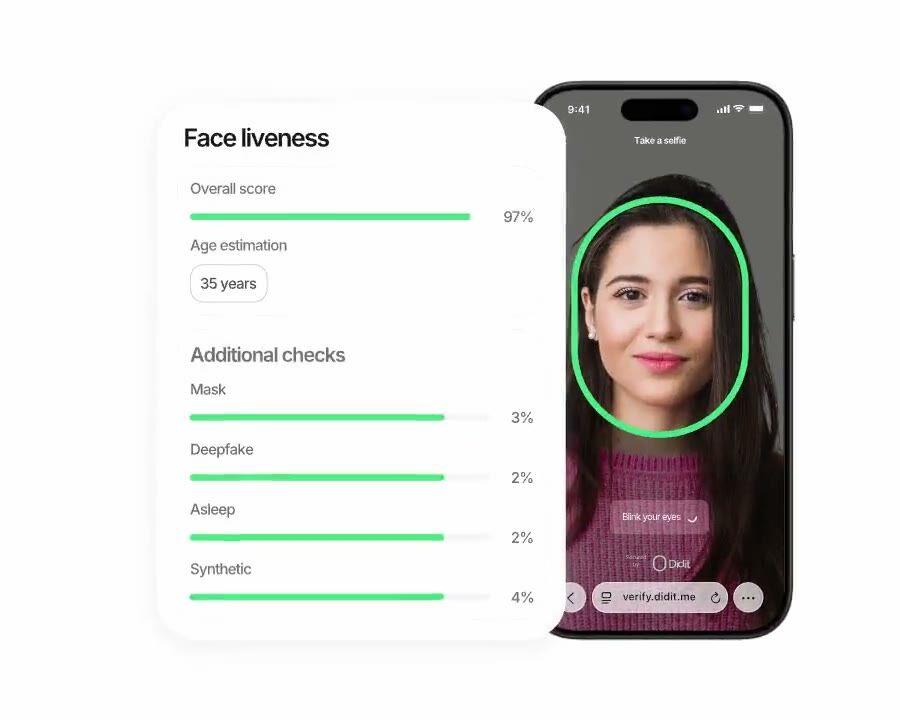
Didit Biometrische Authentifizierung, passive Liveness-Re-Authentifizierung in unter zwei Sekunden.

Phishing-sicherer Login

Inhärenz-Faktor.
Unter 1 Sekunde auf Android.

Nutze die verifizierte Identität vom Sign-up, um wiederkehrende Nutzer zu authentifizieren. SIM-Swap-sicher, Phishing-sicher, $0.10 pro Aufruf, günstiger als ein typischer SMS-Roundtrip in jedem Markt.

So funktioniert's

Vom Sign-up zum verifizierten Nutzer in vier Schritten.

  1. Schritt 01

    Workflow erstellen

    Wähle die gewünschten Checks aus, ID, Liveness, Face Match, Sanktionen, Adresse, Alter, Telefon, E-Mail, benutzerdefinierte Fragen. Ziehe sie im Dashboard in einen Flow oder poste denselben Flow an unsere API. Verzweige nach Bedingungen, führe A/B-Tests durch, kein Code erforderlich.

  2. Schritt 02

    Integrieren

    Bette nativ mit unserem Web-, iOS-, Android-, React Native- oder Flutter-SDK ein. Leite zu einer gehosteten Seite weiter. Oder sende deinem Nutzer einfach einen Link, per E-Mail, SMS, WhatsApp, überall. Wähle, was zu deinem Stack passt.

  3. Schritt 03

    Nutzer durchläuft den Flow

    Didit hostet die Kamera, die Beleuchtungshinweise, die mobile Übergabe und die Barrierefreiheit. Während der Nutzer den Flow durchläuft, bewerten wir über 200 Betrugssignale in Echtzeit und verifizieren jedes Feld anhand autoritativer Datenquellen. Ergebnis in unter zwei Sekunden.

  4. Schritt 04

    Du erhältst die Ergebnisse

    Echtzeit-signierte Webhooks halten deine Datenbank synchron, sobald ein Nutzer genehmigt, abgelehnt oder zur Überprüfung gesendet wird. Frage die API bei Bedarf ab. Oder öffne die Konsole, um jede Session, jedes Signal zu prüfen und Fälle nach deinen Wünschen zu verwalten.

Für Entwickler gemacht · Gegen Betrug gebaut · Offen im Design

Sechs Funktionen. Ein Workflow. biometric_authentication.

Jede der unten genannten Funktionen ist ein Toggle auf demselben Workflow-Typ. Keine Upsell-Stufen, keine separaten SKUs, keine zusätzlichen Aufrufe. Aktiviere sie pro Workflow und erstelle dann eine Session mit einem einzigen Aufruf.
01 · Step-up 2FA

Drop-in-Ersatz für SMS-basierte Zwei-Faktor-Authentifizierung.

Löse die Biometric Authentication bei jeder sensiblen Aktion aus, hochvolumige Überweisung, Passwort-Reset, große Auszahlung, Login auf neuem Gerät. Keine Carrier-Rechnung, keine SIM-Swap-Exposition, kein OTP-Phishing. Dieselbe gehostete UI wie dein Sign-up-Flow, Nutzer lernen keine neue Steuerung. $0.10 pro Authentifizierung, günstiger als SMS und immun gegen alle SMS-Angriffsvektoren.
Step-up-AuthentifizierungPOST /v3/session/
SMS 2FA
6-stelliger Code
  • SIM-Tausch
  • Mobilfunkanbieter-Rechnung
  • Phishing
Biometrische Authentifizierung
Gesichtsprüfung
  • Keine SIM-Exposition
  • $0.10 pro Authentifizierung
  • Phishing-sicher
Drop-in-Ersatz. Dieselbe iBeta-zertifizierte Engine, die du schon bei der Registrierung genutzt hast.
02 · Zwei Modi

Nur Liveness oder Liveness plus Face Match. Wähle pro Workflow.

Nur Liveness für eine reibungsarme Anwesenheitsprüfung, oder Liveness plus Face Match für eine vollständige Identitätsbindung gegen das gespeicherte Sign-up-Porträt. Beide liefern dasselbe JSON. Wechsle die Modi durch Bearbeiten des Workflows, keine Client-Änderung, kein neuer Endpunkt, dieselben $0.10 pro Authentifizierung.
Zwei Modi · Ein Workflowbiometric_authentication
  • Nur LebenderkennungAnwesenheitsprüfung
    Features: [LIVENESS]
    Bestätigt die Anwesenheit eines echten Menschen. Geringste Reibung.
  • Lebenderkennung + GesichtsabgleichIdentitätsbindung
    Features: [LIVENESS, FACE_MATCH]
    Fügt portrait_image-Bindung zur Registrierung hinzu. Höchste Sicherheit.
Pro Workflow umschaltbar. Gleiche workflow_id. Gleiche $0.10 pro Authentifizierung.
03 · Unter 2 Sekunden Ergebnis

Unter einer Sekunde wahrgenommene Latenz beim Login.

Edge-served Inference, kein Modell-Download, keine Annahme von On-Device-Beschleunigung, keine verschlechterte Erfahrung auf günstigen Android-Geräten. Erfassung ~0.3s, Liveness unter einer Sekunde, Face Match ~0.5s, Webhook-Ausgabe unter 2s End-to-End. Schneller als ein SMS-Code, und der Nutzer verlässt deine App nie.
Login-LatenzEnd-to-End < 2 s
  • Capture · auto-frame0.32 s
  • Liveness · passive0.81 s
  • Face match · 1:10.42 s
  • Approved · webhook out1.65 s
Edge-basierte Inferenz. Kein Modell-Download. Keine Carrier-Roundtrip.
04 · Schutz vor Account-Übernahme

iBeta Level 1 gegen den vollständigen Angriffskatalog.

Unabhängig zertifiziert auf PAD (Presentation Attack Detection) Level 1 von iBeta, dem Standard, den NIST und die Open Identity Exchange zitieren. Besiegt gestohlene Selfie-Replays, Deepfakes, Papiermasken, Silikon- und Latexmasken, Morph-Angriffe. Harte Ablehnungs-Trigger (gesperrtes Gesicht, kein Gesicht erkannt, Angriffssignatur, kein Referenzbild) bleiben unabhängig von deinen Einstellungen erzwungen.
Schutz vor KontoübernahmeiBeta L1 PAD
  • Deepfake des KontoinhabersBlockiert
  • Silikon- oder PapiermaskeBlockiert
  • Gestohlenes Selfie · Replay-AngriffBlockiert
  • Gesicht auf der BlocklistAutomatische Ablehnung
05 · Porträt-Wiederverwendung

Das Sign-up-Porträt wiederverwenden. Nichts Neues zu speichern.

Du hast bereits das Referenzfoto des Nutzers vom Sign-up-KYC, übergebe es bei jeder Biometric Authentication Session und wir bewerten die Ähnlichkeit. Derselbe Template-Store, dieselbe EU-Standardinfrastruktur (regionale Residenz bei Enterprise), derselbe Datenschutzbeauftragte. Kein erneutes Onboarding, keine zusätzliche Speicherentscheidung.
KYC-Portrait wiederverwendenPorträtbild
sign-up
KYC-Portrait
jeder Login
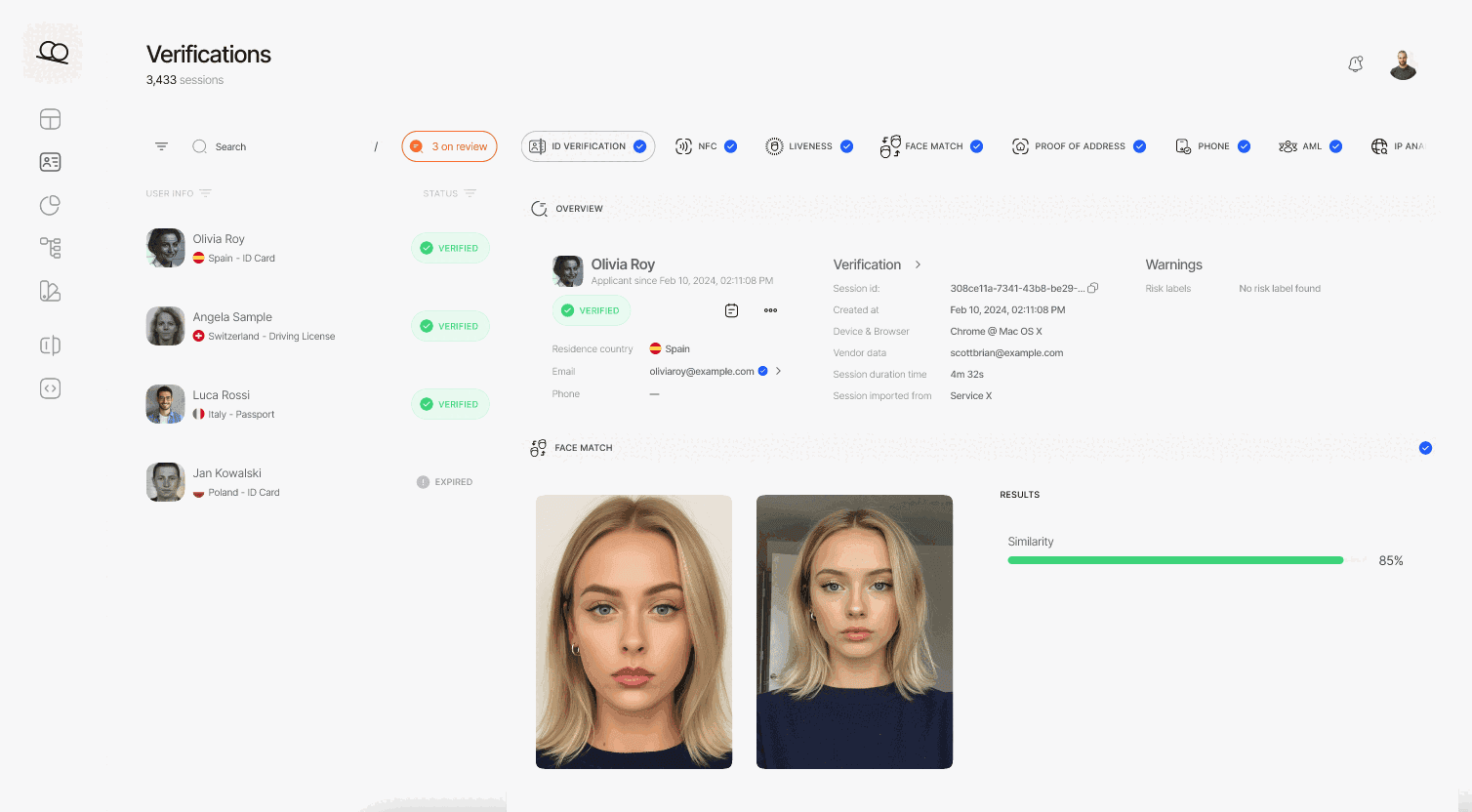
Face Match 1:1
  • Ähnlichkeits-Score96.2
  • gleicher Template-Speicher wie KYCEU AWS
06 · Anpassbare Schwellenwerte

Konfigurierbare Ähnlichkeits- und Liveness-Schwellenwerte pro Workflow.

Niedrige Liveness- und niedrige Face-Match-Warnungen haben jeweils einen Review-Schwellenwert und einen Ablehnungs-Schwellenwert, die du pro Anwendung anpassen kannst. Streng für hochvolumige Überweisungen, nachsichtig für Logins auf neuen Geräten, alles aus demselben Workflow-Editor in der Konsole. Der vollständige Warnkatalog ist in der Dokumentation zu finden.
Didit Business Console Biometric Authentication Workflow-Editor zeigt konfigurierbare Liveness- und Face-Match-Schwellenwerte.
Integrieren

Zwei Konfigurationen. Dieselbe Session. Derselbe Preis.

Beide Konfigurationen erstellen eine Session im selben Biometric Authentication Workflow. Liveness-only ist nur Anwesenheitsprüfung, geringste Reibung. Liveness plus Face Match bindet die Authentifizierung an das gespeicherte Sign-up-Porträt des Nutzers. Wechsle durch Bearbeiten des Workflows, keine Client-Änderung.
POST /v3/session/Liveness + Face Match
$ curl -X POST https://verification.didit.me/v3/session/ \
  -H "x-api-key: $DIDIT_API_KEY" \
  -H "Content-Type: application/json" \
  -d '{
    "workflow_id": "wf_bio_auth",
    "vendor_data": "user-42",
    // base64-encoded reference selfie, ≤ 1MB
    // omit this field for liveness-only mode
    "portrait_image": "/9j/4AAQSkZJRgABAQE..."
  }'
201Erstellt{ "session_url": "verify.didit.me/..." }
Gib portrait_image für den Gesichtsabgleich an; lass es weg, wenn du nur Liveness-Erkennung nutzen willst.Doku →
POST /webhooks/diditSchritt 2 · Empfangen
// Your endpoint receives a signed payload
app.post("/webhooks/didit", (req, res) => {
  const sig = req.headers["x-signature-v2"];
  const expected = crypto.createHmac("sha256", SECRET)
    .update(req.rawBody).digest("hex");
  if (sig !== expected) return res.sendStatus(401);
  const { status, decision, vendor_data } = req.body;
  // status: Approved | Declined | In Review | ...
  res.sendStatus(200);
});
200OKwebhook_type: "status.updated", status: "Approved"
Echtzeit-Webhook mit HMAC-Signatur. Verifizieren, parsen, Datenbank aktualisieren.Doku →
Agenten-fertige Integration

Biometrische Authentifizierung in einem Prompt implementieren.

Füge den folgenden Block in Claude Code, Cursor, Codex, Devin, Aider oder Replit Agent ein. Ersetze den Platzhalter `my_stack` durch dein Framework, deine Sprache und deinen Anwendungsfall. Der Agent richtet Didit ein, erstellt den Workflow, verbindet Session und Webhook und liefert das Ergebnis.
didit-integration-prompt.md
# Didit Biometric Authentication — integrate in 5 minutes

You are integrating Didit's Biometric Authentication module into <my_stack>.
This is a returning-user passwordless re-verification flow — a drop-in
replacement for SMS or email 2FA at high-value actions (large transfers,
password reset, large withdrawals, sensitive setting changes). It is NOT
the first-time KYC sign-up flow — for that, see Didit Liveness at
docs.didit.me/core-technology/liveness/overview.

Every URL, header, and enum value below is canonical — do not paraphrase
or "improve" them.

## 1. Provision an account
- Sign up: https://business.didit.me (no credit card required).
- Or provision programmatically: POST https://apx.didit.me/auth/v2/programmatic/register/
  (returns an API key bound to the workspace + application).

## 2. Create the biometric_authentication workflow (one time)
Biometric Authentication is a workflow_type, not a feature flag. Create
the workflow once, reuse the workflow_id for every authentication.

POST https://verification.didit.me/v3/workflows/
Header: x-api-key: <your-api-key>
Body:
  - workflow_label   (your label, e.g. "step-up-2fa")
  - workflow_type    "biometric_authentication"  (snake_case enum)
  - features         the array
                       [{ feature: "LIVENESS" }]                    (liveness-only mode)
                     OR
                       [{ feature: "LIVENESS" }, { feature: "FACE_MATCH" }]  (face-match mode)
  - liveness_method  "PASSIVE" | "FLASHING" | "ACTIVE_3D"   (PASSIVE recommended for low-friction step-up)

Store the returned workflow_id — you will reuse it on every auth.

## 3. Authenticate a returning user

POST https://verification.didit.me/v3/session/
Header: x-api-key: <your-api-key>
Header: Content-Type: application/json
Body:
  - workflow_id     (from step 2)
  - vendor_data     (your own user id, e.g. "user-42")
  - callback        (optional URL we redirect the user to after capture)
  - metadata        (optional JSON, surfaced back on the webhook)
  - portrait_image  (Base64 JPEG, REQUIRED when the workflow has FACE_MATCH;
                     OMIT for liveness-only mode)

The portrait_image is the stored reference photo from the user's original
KYC verification (you already have it as id_verification.portrait_image in
the original session response). Send it as a Base64-encoded JPEG, max 1 MB.

Response: session_url — redirect the user to it. Didit hosts the capture
(camera, motion prompts, low-light fallback, accessibility) and posts the
verdict back via webhook.

## 4. Webhooks
- Register a webhook destination once via
  POST https://verification.didit.me/v3/webhook/destinations/
  Body: url, subscribed_events: ["session.verified", "session.declined",
                                  "session.review_started"]
- Response includes secret_shared_key — store it.
- Every webhook delivery carries an X-Signature-V2 header you MUST verify
  before trusting the payload.  HMAC-SHA256 verification MUST run against the raw body bytes (the raw payload as Didit sent it) BEFORE any JSON parsing — re-serialising the parsed body changes whitespace and key order, which invalidates the signature.Algorithm:
    1. sortKeys(payload) recursively
    2. shortenFloats (truncate trailing zeros after the decimal point)
    3. JSON.stringify the result
    4. HMAC-SHA256 with the secret_shared_key
    5. Hex-encode, compare to the X-Signature-V2 header.

## 5. Reading the report
The webhook payload (and the GET /v3/session/{id}/decision/ response)
returns the combined biometric_authentication shape:

  status               "Approved" | "Declined" | "Not Finished"
  workflow_id          string
  session_id           uuid
  session_number       integer
  vendor_data          your user id
  liveness:
    status             "Approved" | "Declined" | "Not Finished"
    method             "PASSIVE" | "FLASHING" | "ACTIVE_3D"
    score              number 0-100
    reference_image    signed URL to the captured selfie (expires in 1 hour)
    video_url          signed URL (FLASHING and ACTIVE_3D only, expires in 1 hour)
    warnings           array
  face_match:                     (only present in face-match mode)
    status             "Approved" | "Declined" | "Not Finished"
    score              number 0-100 (similarity %)
    source_image       signed URL to the captured selfie
    target_image       signed URL to the supplied portrait_image
    warnings           array

Overall status is "Approved" only when liveness.status == "Approved" AND
(face_match is absent OR face_match.status == "Approved").

Auto-decline triggers (always enforced by Didit, not configurable):
  FACE_IN_BLOCKLIST, NO_FACE_DETECTED, LIVENESS_FACE_ATTACK, NO_REFERENCE_IMAGE

Configurable risks (action per workflow — Decline, Review, or Approve):
  LOW_LIVENESS_SCORE, LOW_FACE_MATCH_SIMILARITY

## 6. Hard rules — do not change
- Base URL for /v3/* endpoints is verification.didit.me (NOT apx.didit.me).
- workflow_type is snake_case: biometric_authentication.
- Feature enums inside the workflow are UPPERCASE: LIVENESS, FACE_MATCH.
- Liveness method enum is UPPERCASE: PASSIVE, FLASHING, ACTIVE_3D.
- Auth header is x-api-key (lowercase, hyphenated).
- Webhook signature header is X-Signature-V2 (NOT X-Signature).
- Always verify webhook signatures before trusting payload data.
- Status casing matches exactly: "Approved", "Declined", "In Review",
  "Not Finished" (title-cased, space-separated).
- portrait_image is Base64 JPEG, max 1 MB, required only in face-match mode.

## 7. Pricing reference (public)
- Biometric Authentication: $0.10 per authentication (passwordless re-auth).
- 500 free authentications every month, forever, on every account.
- For the original sign-up KYC, see https://didit.me/pricing (full KYC
  bundle is $0.33 per onboarded user, which includes Liveness + Face Match +
  ID Verification + Device & IP Analysis).

## 8. When to use this versus Liveness directly
- First-time KYC sign-up: use Liveness (the feature) inside an ID
  Verification workflow. See docs.didit.me/core-technology/liveness/overview.
- Step-up at sensitive actions (transfer, password reset, large
  withdrawal): use this Biometric Authentication workflow.
- High-volume passive monitoring (any login): use this workflow with
  liveness-only mode (no portrait_image) — fastest, lowest friction.

## 9. Verify your integration
- Sandbox starts on signup at https://business.didit.me — no separate flag.
- Test images: deterministic synthetic faces returned in sandbox
  (Approved by default; trigger Declined by sending the canonical "spoof"
  test image).
- Switch to live: flip the application's environment toggle in console.

When in doubt: https://docs.didit.me/core-technology/biometric-auth/overview
Brauchst du mehr Kontext? Siehe die vollständige Moduldokumentation.docs.didit.me →
Compliant by Design

Ein neues Land mit einem Klick erschließen. Wir machen die Arbeit.

Wir gründen lokale Tochtergesellschaften, sichern Lizenzen, führen Penetrationstests durch, erhalten Zertifizierungen und passen uns jeder neuen Regulierung an. Um Verifizierungen in einem neuen Land zu starten, legst du einfach einen Schalter um. Über 220 Länder live, vierteljährlich auditiert und Pen-getestet, der einzige Identitätsanbieter, den eine EU-Mitgliedsregierung offiziell als sicherer als die persönliche Verifizierung eingestuft hat.
Sicherheits- & Compliance-Dossier lesen
EU Financial Sandbox
Tesoro · SEPBLAC · BdE
ISO/IEC 27001
Informationssicherheit · 2026
SOC 2 · Type I
AICPA · 2026
iBeta Level 1 PAD
NIST / NIAP · 2026
GDPR
EU 2016/679
DORA
EU 2022/2554
MiCA
EU 2023/1114
AMLD6 · eIDAS 2.0
EU-konform by Design

Zahlen lügen nicht

Zahlen lügen nicht
  • iBeta L1
    Unabhängig zertifizierte Erkennung von Präsentationsangriffen.
  • <0s
    End-to-End-Authentifizierungsurteil pro Session, Edge-served.
  • $0.00
    Pro Authentifizierung, günstiger als SMS und immun gegen alle SMS-Angriffsvektoren.
  • 0
    Jeden Monat kostenlose Authentifizierungen, für immer, auf jedem Konto.
Drei Stufen, eine Preisliste

Kostenlos starten. Nach Nutzung zahlen. Bis zum Enterprise-Level skalieren.

500 kostenlose Verifizierungen jeden Monat, für immer. Pay-as-you-go für die Produktion. Individuelle Verträge, Datenresidenz und SLAs (Service Level Agreements) für Enterprise.
Kostenlos

Kostenlos

$0 / Monat. Keine Kreditkarte erforderlich.

  • Kostenloses KYC-Paket (ID-Verifizierung + passive Lebenderkennung + Gesichtsabgleich + Geräte- & IP-Analyse), 500 / Monat, jeden Monat
  • Blockierte Nutzer
  • Duplikaterkennung
  • Über 200 Betrugssignale pro Session
  • Wiederverwendbares KYC im Didit-Netzwerk
  • Case Management Plattform
  • Workflow Builder
  • Öffentliche Docs, Sandbox, SDKs, MCP (Model Context Protocol) Server
  • Community Support
Am beliebtesten
Zahlung nach Nutzung

Nutzungsbasiert

Zahle nur, was du nutzt. Über 25 Module. Öffentliche Preise pro Modul, keine monatliche Mindestgebühr.

  • Full KYC für $0.33 (ID + Biometrie + IP / Gerät)
  • Über 10.000 AML-Datensätze, Sanktionen, PEPs, Adverse Media
  • Über 1.000 staatliche Datenquellen für Datenbankvalidierung
  • Transaktionsüberwachung für $0.02 pro Transaktion
  • Live KYB für $2.00 pro Unternehmen
  • Wallet Screening für $0.15 pro Prüfung
  • Whitelabel-Verifizierungsflow, deine Marke, unsere Infrastruktur
Enterprise

Enterprise

Individuelle MSA & SLA. Für große Volumina und regulierte Programme.

  • Jahresverträge
  • Individuelle MSA, DPA und SLA
  • Dedizierter Slack- und WhatsApp-Kanal
  • Manuelle Prüfer auf Abruf
  • Reseller- und White-Label-Konditionen
  • Exklusive Features und Partnerintegrationen
  • Benannter CSM, Sicherheitsprüfung, Compliance-Support

Kostenlos starten → nur zahlen, wenn eine Prüfung läuft → Enterprise für einen individuellen Vertrag, SLA oder Datenresidenz freischalten.

FAQ

Häufige Fragen

What is Didit?

Didit is infrastructure for identity and fraud, the platform we wished existed when we were building products ourselves: open, flexible, and developer-friendly, so it works as a real part of your stack instead of a black box you integrate around.

One API covers verifying people (KYC, know your customer), verifying businesses (KYB, know your business), screening crypto wallets (KYT, know your transaction), and monitoring transactions in real time, on a stack built to be:

  • Fast, sub-2-second p99 on every session
  • Reliable, in production with 1,500+ companies across 220+ countries
  • Secure, SOC 2 Type 1, ISO 27001, GDPR-native, and formally attested by Spain's financial regulator as safer than verifying someone in person

The footprint underneath: 14,000+ document types in 48+ languages, 1,000+ data sources, and 200+ fraud signals on every session. The Didit infrastructure dynamically learns from every session and gets better every day.

What is Biometric Authentication and how is it different from Liveness?
Biometric Authentication is the returning-user re-auth surface, a drop-in replacement for SMS or email two-factor authentication (2FA) at sensitive actions (high-value transfer, password reset, large withdrawal, new-device login). It is a workflow_type (snake-case: biometric_authentication) that composes the LIVENESS feature with an optional FACE_MATCH feature. Liveness on its own is the sign-up capability, see /products/liveness for the first-time know-your-customer (KYC) flow. Both use the same iBeta Level 1 Presentation Attack Detection (PAD)-certified engine, so the model your user passed at onboarding is the same model checking them at every login.
What is the response shape?
The combined report returns status (Approved, Declined, Not Finished), a liveness block with status, method (PASSIVE, FLASHING, or ACTIVE_3D), score 0-100, reference_image, video_url, and warnings, plus a face_match block (only present when the workflow has FACE_MATCH) with status, score 0-100, source_image, target_image, and warnings. The signed image and video URLs expire after 60 minutes. Overall status is Approved only when liveness is approved AND (face match is absent OR face match is approved).
How fast is the verification for my end user?

The full flow normally takes under 30 seconds end-to-end, pick up the ID, snap the document, snap the selfie, done. That is the fastest in the market. Legacy KYC providers usually take more than 90 seconds for the same flow.

On the back end, Didit returns the result in under two seconds at p99, measured from the moment the user finishes the selfie to the moment your webhook fires. Mobile capture is tuned for slow phones and slow networks: progressive image compression, lazy software development kit load, and a one-tap hand-off from desktop to phone via QR code if the user starts on web.

What account-takeover attacks does it block?
Didit Biometric Authentication is iBeta Level 1 PAD certified against the full ISO/IEC 30107-3 attack catalog, printed photos, screen replays, paper masks, silicone masks, latex masks, morph attacks, AI-generated deepfakes of the account owner, and stolen-selfie replays. Four risks are auto-decline regardless of your settings: FACE_IN_BLOCKLIST, NO_FACE_DETECTED, LIVENESS_FACE_ATTACK, and NO_REFERENCE_IMAGE. Configurable warnings, LOW_LIVENESS_SCORE and LOW_FACE_MATCH_SIMILARITY, let you tune the review and decline thresholds per application.
What happens if a user fails, abandons, or expires?

Every session lands on one of seven clear statuses, so your code always knows what to do:

  • Approved, every check passed. Move the user forward.
  • Declined, one or more checks failed. You can allow the user to resubmit the specific failed step (for example, re-take the selfie) without re-running the whole flow.
  • In Review, flagged for compliance review. Open the case in the console, see every signal, decide approve or decline.
  • In Progress, user is mid-flow.
  • Not Started, link sent, user has not opened it yet. Send a reminder if it sits too long.
  • Abandoned, user opened the link but did not finish in time. Re-engage or expire.
  • Expired, the session link aged out. Create a new session.

A signed webhook fires on every status change, so your database always stays in sync. Abandoned and declined sessions are free.

Where does my customer data live and how is it protected?

Production data is processed and stored in the European Union by default, on Amazon Web Services. Enterprise contracts can request alternative regions for jurisdictions whose regulators require it.

Encryption everywhere. AES-256 at rest across every database, object store, and backup. Transport Layer Security 1.3 in transit on every API call, webhook, and Business Console session. Biometric data is encrypted under a separate Customer Master Key.

Retention is yours to control. Default retention is indefinite (unlimited) unless you configure shorter, between 30 days and 10 years per application, and you can delete any individual session at any time from the dashboard or the API.

Certifications: SOC 2 Type 1 (Type 2 audit in progress), ISO/IEC 27001:2022, iBeta Level 1 PAD, and a public attestation from Spain''s Tesoro / SEPBLAC / CNMV that Didit''s remote identity verification is safer than verifying someone in person. Full report at /security-compliance.

Is Didit compliant for my industry?

Didit ships compliant by default for the regulators that matter to identity infrastructure:

  • GDPR + UK GDPR, controller / processor split, full Data Processing Agreement published, lead supervisory authority named (Spain''s AEPD).
  • AMLD6 + EU AML Single Rulebook, 1,300+ sanctions, politically exposed person, and adverse-media lists screened in real time.
  • eIDAS 2.0, EU Digital Identity Wallet aligned; reusable-identity ready.
  • MiCA (Markets in Crypto-Assets), ready for crypto on-ramps, exchanges, and custodians.
  • DORA, Digital Operational Resilience Act, EU financial-services operational resilience.
  • BIPA, CUBI, Washington HB 1493, CCPA / CPRA, US biometric privacy (Illinois, Texas, Washington) and California consumer privacy.
  • UK Online Safety Act, age-gating and child-safety obligations.
  • FATF Travel Rule, originator and beneficiary data on crypto transfers, IVMS-101 interoperable.

Detailed memo, every certificate, every regulator letter: /security-compliance.

How fast can I integrate and start verifying users?
  • 60 seconds to a sandbox account at business.didit.me, no credit card.
  • 5 minutes to a working verification through Claude Code, Cursor, or any coding agent via our Model Context Protocol (MCP) server.
  • A weekend to a production-ready integration with signed-webhook verification, retries, and a remediation flow when a user is declined.

Three integration paths, pick whichever fits your stack:

  • Embed natively with our Web, iOS, Android, React Native, or Flutter SDK.
  • Redirect the user to the hosted verification page, zero SDK.
  • Send a link by email, SMS, WhatsApp, or any channel, zero front-end work.

Same dashboard, same billing, same pay-per-success price for all three. Step-by-step guide at docs.didit.me/integration/integration-prompt.

Infrastruktur für Identität und Betrugsprävention.

Eine API für KYC, KYB, Transaktionsüberwachung und Wallet-Screening. In 5 Minuten integriert.

Lass dir diese Seite von einer KI zusammenfassen