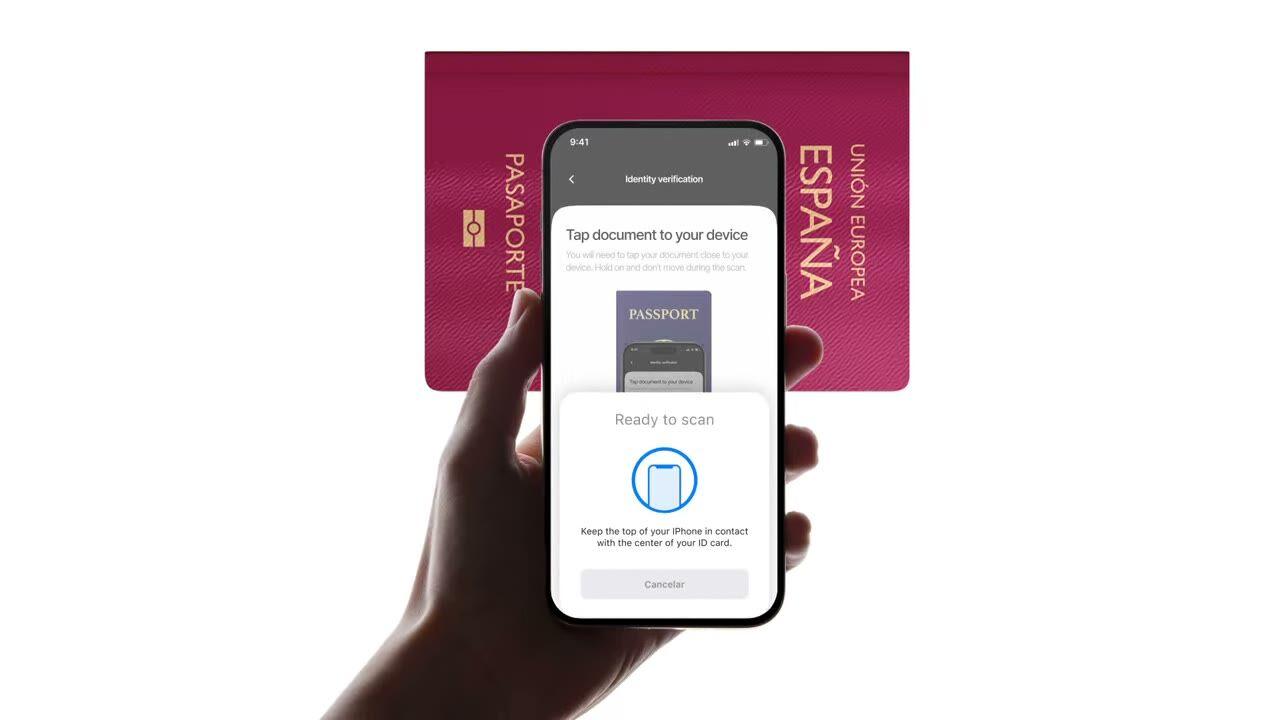
E-Pass oder E-ID ans Telefon halten. Liest den Chip aus, validiert die staatliche Signatur, erkennt Fälschungen, die reine Foto-Checks übersehen. $0.15 pro Lesevorgang, 500 kostenlos/Monat.
Pass anlegen. Der Chip liefert dieselben Daten wie das Foto, nur sind sie diesmal
vom ausstellenden Land signiert. $0.15, unter 2 Sekunden.
So funktioniert's
Vom Sign-up zum verifizierten Nutzer in vier Schritten.
Schritt 01 / 04
01
Workflow erstellen
Wähle die gewünschten Checks aus, ID, Liveness, Face Match, Sanktionen, Adresse, Alter, Telefon, E-Mail, benutzerdefinierte Fragen. Ziehe sie im Dashboard in einen Flow oder poste denselben Flow an unsere API. Verzweige nach Bedingungen, führe A/B-Tests durch, kein Code erforderlich.
Integrieren
Bette nativ mit unseren Web-, iOS-, Android-, React Native- oder Flutter-SDKs ein. Leite auf eine gehostete Seite weiter. Oder sende deinem Nutzer einfach einen Link, per E-Mail, SMS, WhatsApp, überall. Wähle, was zu deinem Stack passt.
Nutzer durchläuft den Flow
Didit hostet die Kamera, die Beleuchtungshinweise, die mobile Übergabe und die Barrierefreiheit. Während der Nutzer den Flow durchläuft, bewerten wir über 200 Betrugssignale in Echtzeit und verifizieren jedes Feld anhand autoritativer Datenquellen. Ergebnis in unter zwei Sekunden.
Du erhältst die Ergebnisse
Echtzeit-signierte Webhooks halten deine Datenbank synchron, sobald ein Nutzer genehmigt, abgelehnt oder zur Überprüfung gesendet wird. Frage die API bei Bedarf ab. Oder öffne die Konsole, um jede Session, jedes Signal zu inspizieren und Fälle nach deinen Wünschen zu verwalten.
Für Entwickler gemacht · Gegen Betrug gebaut · Offen im Design
Sechs Funktionen. Ein Feature-Flag. NFC.
Jede der folgenden Funktionen ist ein Toggle im selben Modul. Keine Upsell-Stufen, keine separaten SKUs, keine Add-on-Anrufe. Schalte sie pro Workflow ein oder inkludiere das NFC-Modul, wenn du einen Workflow über die API erstellst.
Verifiziere die Signatur auf jedem Chip, nicht den Druck auf der Seite.
Jeder moderne E-Pass und jede E-ID enthält einen kontaktlosen Chip, der von der ausstellenden Regierung signiert ist. Wir lesen ihn über NFC (Near-Field Communication) aus, validieren die digitale Signatur und liefern ein manipulationssicheres Ergebnis. Das erkennt Morphing-Angriffe, Fotoaustausch und Fälschungen, die eine visuelle Prüfung bestehen würden.
SPAINe-Passport
P<ESPROY<<OLIVIA<<<<<<<
Chip readICAO 9303
Passive AuthenticationSOD signature valid
Active AuthenticationChip challenge OK
Chip AuthenticationSession key derived
Signed by issuerAuthentic
02 · ICAO 9303 Datengruppen
Vollständiger Chip-Inhalt extrahiert, strukturiert und signiert.
Jede ICAO 9303 Datengruppe auf dem Chip wird ausgelesen, signiertes Sicherheitsobjekt, persönliche Daten, MRZ (maschinenlesbare Zone), hochauflösendes Gesichtsbild, Unterschriftbild sowie alle zusätzlichen biometrischen Daten, die das ausstellende Land speichert. Du erhältst ein sauberes `chip_data` JSON plus signierte URLs für Porträt und Unterschrift.
Document chipSOD · signed data groups
Signed
First nameDG1
Olivia
Last nameDG1
Roy
Date of birthDG1
12 Mar 1992
Document numberDG1
XAB204731
Facial imageDG2
High-res portrait
Signed at issuance · not OCR5 fields verified
03 · ICAO PKD Vertrauen
Vertrauen verankert im ICAO Public Key Directory.
Jeder Chip-Scan verfolgt die gesamte Zertifikatskette, Dokumentenunterzeichner → Länder-Signaturbehörde → ICAO Public Key Directory Root, und prüft die Sperrliste des Landes in Echtzeit. Widerrufene und abgelaufene Zertifikate werden als konfigurierbare Warnungen angezeigt; der Rest wird als Authentizitäts-Booleans im Bericht ausgegeben.
Document SignerDSC · eID Spain
Country Signing CACSCA · CRL current
ICAO PKD RootPublic Key Directory
Root
Integrity
SOD integrity
DG integrity
DSC not revoked
DSC not expired
Verified · ICAO PKDChain valid
04 · Foto vs. Chip
Jedes Feld abgleichen. Bei Nichtübereinstimmung automatisch ablehnen.
Fotodaten müssen mit Chipdaten übereinstimmen. Bei Abweichungen wird die Session automatisch abgelehnt, dieser Trigger kann nicht deaktiviert werden. Es ist das klarste Signal für eine manipulierte Fotozone, einen ausgetauschten Chip oder ein gefälschtes Dokument mit echt aussehendem Druck.
Data source
Camera OCRChip read
Document number
XAB2O4731XAB204731≈ 91.4%Signed
First name
0LIVIAOLIVIA≈ 96.7%Signed
Expiry date
03 / 203103 / 2031≈ 99.1%Signed
Best-effort read · fonts, glare, wearExact values · signed by the issuer2 mismatchesSource of truth
Native SDKs verbinden den NFC-Leser des Geräts, Berechtigungen und die Chip-Lese-UI für dich. iOS verwendet Core NFC; Android verwendet IsoDep auf NfcAdapter; React Native und Flutter wrappen beides. Browser ohne NFC fallen automatisch auf Standard-ID + Selfie zurück, eine Überspringwarnung wird ausgelöst und die Session wird fortgesetzt.
React Native · FlutterBridges the native SDKsBridgedidit.nfc.read()One call · native under the hood
Web browserNo NFC · falls back to OCRFallbackdidit.ocr.scan()Camera capture · OCR fields
One call · NFC when the device supports itAuto-fallback · session continues with OCR
06 · Weltweite Abdeckung
Alle ICAO-ausstellenden Länder, vierteljährlich wachsend.
Die meisten Pässe, die nach 2006 ausgestellt wurden, enthalten einen Chip, plus eine wachsende Liste nationaler E-IDs, spanischer DNIe, deutscher Personalausweis, italienischer CIE, estnische ID-Karte, portugiesischer Cartão de Cidadão, belgische eID, niederländische eID. Länderzertifikate werden automatisch aktualisiert; neue Länder werden lesbar, sobald wir sie integrieren.
DNIeSpain
PersonalausweisGermany
Carta CIEItaly
Cartão de CidadãoPortugal
ID-kaartEstonia
2006e-Passports since
30+National e-IDs
9303ICAO standard
CSCA certificates refreshed automaticallyReadable via NFC
Integrieren
Ein Workflow. Zwei Wege, den Chip-Scan zu starten.
NFC hat keinen eigenständigen Server-zu-Server-Endpunkt, der Chip benötigt ein Gerät mit NFC-Hardware. Beide Wege unten nutzen denselben `create-session`-Aufruf; sie unterscheiden sich nur darin, ob der Nutzer den Chip in unserer gehosteten UI oder in deiner eigenen App über das native SDK ausliest.
// iOS · Swift
import DiditSdk
let result = try await DiditSdk.shared.startVerification(
mit: sessionId,
Konfiguration: config)
donein-app{ "status": "Approved" }
Agenten-fertige Integration
NFC-Verifizierung in einem Prompt live schalten.
Füge den folgenden Block in Claude Code, Cursor, Codex, Devin, Aider oder Replit Agent ein. Ersetze den Platzhalter `my_stack` durch dein Framework, deine Sprache und deinen Anwendungsfall. Der Agent provisioniert Didit, erstellt den Workflow mit aktivierter NFC-Funktion, verbindet den Webhook und stellt alles bereit.
didit-integration-prompt.md
# Didit NFC Verification — integrate in 5 minutes

You are integrating Didit's NFC Verification (cryptographic e-passport
and e-ID chip reading) module into <my_stack>. Follow these steps exactly.
Every URL, header, and enum value below is canonical — do not paraphrase
or "improve" them.

## 1. Provision an account
- Sign up: https://business.didit.me (no credit card required).
- Or provision programmatically: POST https://apx.didit.me/auth/v2/programmatic/register/
  (returns an API key bound to the workspace + application).

## 2. What NFC Verification actually does
NFC Verification reads the secure contact-less chip embedded in modern
e-passports and e-IDs (the small chip-and-antenna sticker symbol on the
cover) and runs four cryptographic checks against the data it extracts:

1. Passive Authentication — every Data Group (DG1 personal data, DG2
   facial image, etc.) is hashed and compared against the signed hash
   stored in the Document Security Object (SOD). Catches any single-bit
   tampering of the chip contents.
2. Certificate chain validation — Document Signer Certificate (DSC) →
   Country Signing Certificate Authority (CSCA) → ICAO Public Key
   Directory (PKD) root. Proves the chip was signed by the issuing
   government, not a clone.
3. Certificate Revocation List (CRL) check — DSCs revoked by the issuing
   country are caught and flagged.
4. Chip Authentication — where the document supports it, prevents chip
   cloning by challenging the chip with a key-pair handshake.

PACE (Password Authenticated Connection Establishment) or BAC (Basic
Access Control) is used to derive the session key from the Machine-Readable Zone (MRZ); Didit
handles that automatically. All of this is ICAO 9303 standard.

## 3. Two integration paths — pick one

### Path A — Workflow Builder (hosted UI, REQUIRED for NFC)
NFC Verification has no server-to-server standalone endpoint. The chip
has to be read by a device with NFC hardware, so you always integrate
through the Workflow + native SDK (or hosted mobile web that falls back).

1. Create a workflow that contains the NFC feature:
   POST https://verification.didit.me/v3/workflows/
   Authorization header:  x-api-key: <your-api-key>
   Body: workflow_label, features array with the entries
         { feature: "OCR" }
         { feature: "NFC" }
         (UPPERCASE — strict enum)
   You should always pair NFC with OCR (ID Verification) so the MRZ is captured
   for the chip handshake AND so an OCR cross-validation is available.

2. Create a verification session for an end user:
   POST https://verification.didit.me/v3/session/
   Body: workflow_id (from step 1), vendor_data (your own user id).
   Response: url (the hosted verification link) — redirect the user to
   it (or open it in the native SDK with
   shared.startVerification(with: sessionId)).

3. Listen for webhook callbacks (see "Webhooks" below).

### Path B — Native SDKs (drop-in, recommended for mobile apps)
Same workflow + session above, but launch the verification flow in your
own iOS or Android app via the Didit SDK. The SDK wires the NFC reader,
the entitlements, and the chip-reading UI for you.

- iOS: DiditSdk.shared.startVerification(with: sessionId, configuration:)
  Required entitlements (handled by the SDK):
    - com.apple.developer.nfc.readersession.formats = ["TAG"]
    - ISO7816 application identifiers for ePassports
- Android: DiditSdk.startVerification(sessionId, config) — uses
  IsoDep (android.nfc.tech.IsoDep) under the hood.
- React Native / Flutter: the same SDK, exposed through the cross-
  platform module — see docs.didit.me/integration/native-sdks/.

### Web browsers — NFC is unavailable
Web NFC API is not generally available. Chrome on Android has an
experimental Web NFC that is unstable and requires explicit permissions;
Safari on iOS has no support. For web integrations, NFC is automatically
skipped and the user proceeds with standard ID + selfie. If you require
NFC, deep-link the user into the Didit App or your own native app.

## 4. Webhooks
- Register a webhook destination once via
  POST https://verification.didit.me/v3/webhook/destinations/
  Body: url, subscribed_events: ["session.verified", "session.review_started",
                                  "session.declined"]
- Response includes secret_shared_key — store it.
- Every webhook delivery carries an X-Signature-V2 header you MUST verify
  before trusting the payload.  HMAC-SHA256 verification MUST run against the raw body bytes (the raw payload as Didit sent it) BEFORE any JSON parsing — re-serialising the parsed body changes whitespace and key order, which invalidates the signature.Algorithm:
    1. sortKeys(payload) recursively
    2. shortenFloats (truncate trailing zeros after the decimal point)
    3. JSON.stringify the result
    4. HMAC-SHA256 with the secret_shared_key
    5. Hex-encode, compare to the X-Signature-V2 header.

## 5. Reading the report
The session decision includes an nfc_verifications[] array alongside
id_verifications[] — one entry per workflow node, each with its own node_id.
Fields on each nfc_verifications entry:

- status: "Approved" | "Declined" | "In Review" | "Not Finished"
- portrait_image: signed URL to the chip-extracted DG2 facial image
- signature_image: signed URL to the chip-extracted DG7 signature
- chip_data:
    document_type, issuing_country (ISO 3166-1 alpha-3),
    document_number, expiration_date (YYYY-MM-DD),
    first_name, last_name, birth_date, gender ("M" | "F" | "U"),
    nationality (ISO 3166-1 alpha-3), address, place_of_birth.
- authenticity:
    sod_integrity (boolean — every Data Group hash matched the SOD)
    dg_integrity (boolean — Data Group binary integrity check passed)
- certificate_summary:
    issuer (CSCA Common Name + serial + organization + country)
    subject (DSC Common Name)
    serial_number
    not_valid_after (YYYY-MM-DD HH:MM:SS)
    not_valid_before (YYYY-MM-DD HH:MM:SS)
- warnings: Array of { risk, additional_data, log_type,
                       short_description, long_description }

### Auto-decline (always enforced, never configurable)
- NFC_AND_OCR_DATA_NOT_SAME — Optical Character Recognition (OCR) data
  and chip data differ. Indicates document tampering or fake chip.

### Configurable warnings (per-workflow action: Decline / Review / Approve)
- SKIPPED_NFC_VALIDATION       — chip not read (no NFC hardware, no
                                  permissions, document has no chip)
- NFC_CHIP_NOT_VERIFIED        — chip read but signature could not be
                                  verified (missing CSCA, older document)
- DSC_CERTIFICATE_REVOKED      — Document Signer Certificate listed on
                                  the issuing country's CRL
- DSC_CERTIFICATE_EXPIRED      — Document Signer Certificate past its
                                  validity period

## 6. Hard rules — do not change
- Base URL for /v3/* endpoints is verification.didit.me (NOT apx.didit.me).
- Feature enum is UPPERCASE: NFC, OCR, LIVENESS, FACE_MATCH.
- Auth header is x-api-key (lowercase, hyphenated).
- Webhook signature header is X-Signature-V2 (NOT X-Signature).
- Always verify webhook signatures before trusting payload data.
- Always pair NFC with OCR (ID Verification) in the workflow — NFC alone
  cannot derive the chip key without the MRZ from the document photo.
- Status casing matches exactly: "Approved", "Declined", "In Review",
  "Not Finished" (title-cased, space-separated).
- Treat NFC as an additive confidence boost, not a hard gate, unless
  your risk policy explicitly requires it (regulated remote
  onboarding under PSD3, AMLD6 high-risk customer flows, etc.).

## 7. Pricing reference (public)
- NFC Verification: $0.15 per chip read (standalone module).
- Bundled inside a full Know Your Customer (KYC) workflow (ID + Liveness + Face Match + NFC):
  priced as the underlying KYC bundle ($0.33) + $0.15 NFC if enabled.
- 500 free checks every month, forever, on every account.

## 8. Verify your integration
- Sandbox starts on signup at https://business.didit.me — no separate flag.
- Test documents: use the Didit App on a real iOS or Android device with
  any ICAO 9303 e-passport issued after 2006 (most modern passports).
- Sandbox webhook events fire the same shape as production; verify the
  X-Signature-V2 header in dev too.
- Switch to live: flip the application's environment toggle in console.

When in doubt: https://docs.didit.me/core-technology/nfc-verification/overview
Compliant by Design
Ein neues Land mit einem Klick erschließen. Wir machen die Arbeit.
Wir gründen lokale Tochtergesellschaften, sichern Lizenzen, führen Penetrationstests durch, erhalten Zertifizierungen und passen uns jeder neuen Regulierung an. Um Verifizierungen in einem neuen Land zu starten, legst du einfach einen Schalter um. Über 220 Länder live, vierteljährlich auditiert und Pen-getestet, der einzige Identitätsanbieter, den eine EU-Mitgliedsregierung offiziell als sicherer als die persönliche Verifizierung eingestuft hat.
Jeder Chip wird gegen den kanonischen E-Pass-Standard gelesen.
PKD
Vertrauen verankert in der ICAO Public Key Directory Root.
<2s
End-to-End-Chip-Lesung auf einem modernen Smartphone.
$0.15
Pro NFC-Chip-Lesung. 500 gratis jeden Monat.
Drei Stufen, eine Preisliste
Kostenlos starten. Nach Verbrauch zahlen. Bis zum Enterprise-Level skalieren.
500 kostenlose Verifizierungen jeden Monat, für immer. Danach zahlst du nur, wenn ein Modul läuft. Individuelle Verträge, Datenresidenz und Service Level Agreements (SLAs) für Enterprise-Kunden.
Kostenlos
$0/ Monat · keine Kreditkarte nötig
Zum Entwickeln, Testen und für deine ersten Nutzer.
Alles, was du für den Start brauchst:
500 vollständige KYC-Verifizierungen pro Monat
ID, Liveness, Face Match, Gerät & IP
Über 200 Betrugssignale, Blocklist, Duplikate
Wiederverwendbares KYC im Didit-Netzwerk
Workflow Builder, Case Management, SDKs
KI-SupportKI-Agent in der Konsole, Docs und Community.