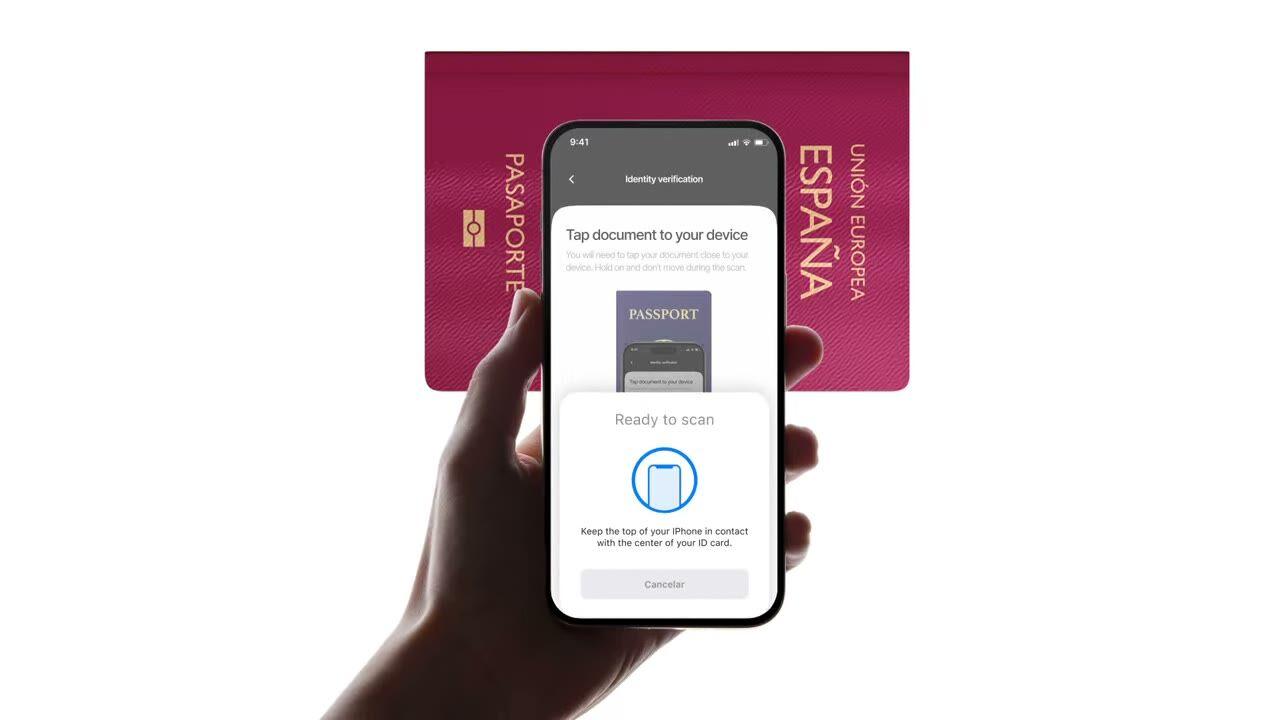
Aproxime um e-passaporte ou e-ID do telemóvel. Lê o chip, valida a assinatura governamental, deteta falsificações que as verificações de foto simples não conseguem. $0.15 por leitura, 500 grátis/mês.
Aproxime o passaporte. O chip devolve os mesmos dados que a foto, exceto que desta
vez está assinado pelo país emissor. $0.15, em menos de 2 segundos.
Como funciona
Do registo ao utilizador verificado em quatro passos.
Passo 01 / 04
01
Crie o fluxo de trabalho
Escolha as verificações que pretende, ID, liveness, correspondência facial, sanções, morada, idade, telefone, e-mail, perguntas personalizadas. Arraste-as para um fluxo no dashboard, ou publique o mesmo fluxo na nossa API. Crie ramificações com base em condições, execute testes A/B, sem necessidade de código.
Integre
Incorpore nativamente com os nossos SDKs Web, iOS, Android, React Native ou Flutter. Redirecione para uma página alojada. Ou simplesmente envie um link ao seu utilizador, por e-mail, SMS, WhatsApp, em qualquer lugar. Escolha o que melhor se adapta à sua stack.
O utilizador passa pelo fluxo
A Didit aloja a câmara, as indicações de iluminação, a transição móvel e a acessibilidade. Enquanto o utilizador está no fluxo, pontuamos mais de 200 sinais de fraude em tempo real e verificamos cada campo contra fontes de dados autorizadas. Resultado em menos de dois segundos.
Recebe os resultados
Webhooks assinados em tempo real mantêm a sua base de dados sincronizada no momento em que um utilizador é aprovado, recusado ou enviado para revisão. Consulte a API sob demanda. Ou abra a consola para inspecionar cada sessão, cada sinal e gerir os casos à sua maneira.
Criado para developers · Criado contra fraude · Aberto por design
Seis funcionalidades. Uma feature flag. NFC.
Todas as funcionalidades abaixo são ativadas no mesmo módulo. Sem escalões de upsell, sem SKUs separados, sem chamadas de add-on. Ative-as por fluxo de trabalho, ou inclua o módulo NFC ao criar um fluxo de trabalho através da API.
Verifique a assinatura em cada chip, não a impressão na página.
Todos os e-passaportes e e-IDs modernos possuem um chip sem contacto assinado pelo governo emissor. Lemo-lo via NFC (comunicação de campo próximo), validamos a assinatura digital e devolvemos um veredito à prova de adulteração. Deteta ataques de morfagem, substituições de fotos e falsificações que passam na inspeção visual.
SPAINe-Passport
P<ESPROY<<OLIVIA<<<<<<<
Chip readICAO 9303
Passive AuthenticationSOD signature valid
Active AuthenticationChip challenge OK
Chip AuthenticationSession key derived
Signed by issuerAuthentic
02 · Grupos de dados ICAO 9303
Conteúdo completo do chip extraído, estruturado e assinado.
Todos os grupos de dados ICAO 9303 no chip são lidos, objeto de segurança assinado, dados pessoais, MRZ (zona de leitura ótica), imagem facial de alta resolução, imagem de assinatura, além de quaisquer biometrias adicionais que o país emissor armazene. Recebe um JSON `chip_data` limpo, mais URLs assinados para o retrato e a assinatura.
Document chipSOD · signed data groups
Signed
First nameDG1
Olivia
Last nameDG1
Roy
Date of birthDG1
12 Mar 1992
Document numberDG1
XAB204731
Facial imageDG2
High-res portrait
Signed at issuance · not OCR5 fields verified
03 · Confiança ICAO PKD
Confiança ancorada no ICAO Public Key Directory.
Cada leitura de chip rastreia a cadeia de certificados completa, signatário do documento → autoridade de assinatura do país → raiz do ICAO Public Key Directory, e verifica a lista de revogação do país em tempo real. Certificados revogados e expirados aparecem como avisos configuráveis; o resto passa como booleanos de autenticidade no relatório.
Document SignerDSC · eID Spain
Country Signing CACSCA · CRL current
ICAO PKD RootPublic Key Directory
Root
Integrity
SOD integrity
DG integrity
DSC not revoked
DSC not expired
Verified · ICAO PKDChain valid
04 · Foto vs chip
Verifique todos os campos. Recusa automática em caso de incompatibilidade.
Os dados da foto devem corresponder aos dados do chip. Quando divergem, a sessão é automaticamente recusada, esse gatilho não pode ser desativado. É o sinal mais claro de uma zona de foto adulterada, um chip trocado ou um documento falso com impressão de aspeto real.
Data source
Camera OCRChip read
Document number
XAB2O4731XAB204731≈ 91.4%Signed
First name
0LIVIAOLIVIA≈ 96.7%Signed
Expiry date
03 / 203103 / 2031≈ 99.1%Signed
Best-effort read · fonts, glare, wearExact values · signed by the issuer2 mismatchesSource of truth
05 · Mobile SDK primeiro
iOS, Android, React Native, Flutter, leitura de chip integrada.
Os SDKs nativos configuram o leitor NFC do dispositivo, as permissões e a UI de leitura de chip para si. O iOS usa Core NFC; o Android usa IsoDep no NfcAdapter; o React Native e o Flutter encapsulam ambos. Os browsers sem NFC voltam automaticamente para o ID padrão + selfie, um aviso de salto é acionado e a sessão continua.
React Native · FlutterBridges the native SDKsBridgedidit.nfc.read()One call · native under the hood
Web browserNo NFC · falls back to OCRFallbackdidit.ocr.scan()Camera capture · OCR fields
One call · NFC when the device supports itAuto-fallback · session continues with OCR
06 · Cobertura mundial
Todos os países emissores ICAO, a crescer a cada trimestre.
A maioria dos passaportes emitidos após 2006 inclui um chip, além de uma lista crescente de e-IDs nacionais, DNIe espanhol, Personalausweis alemão, CIE italiano, cartão de identificação estónio, Cartão de Cidadão português, eID belga, eID holandês. Os certificados de país são atualizados automaticamente; novos países tornam-se legíveis no dia em que os integramos.
DNIeSpain
PersonalausweisGermany
Carta CIEItaly
Cartão de CidadãoPortugal
ID-kaartEstonia
2006e-Passports since
30+National e-IDs
9303ICAO standard
CSCA certificates refreshed automaticallyReadable via NFC
Integrar
Um fluxo de trabalho. Duas formas de iniciar a leitura do chip.
O NFC não tem um endpoint autónomo server-to-server, o chip precisa de um dispositivo com hardware NFC. Ambos os caminhos abaixo partilham a mesma chamada de criação de sessão; diferem apenas se o utilizador lê o chip na nossa UI alojada ou dentro da sua própria aplicação via SDK nativo.
// iOS · Swift
import DiditSdk
let result = try await DiditSdk.shared.startVerification(
com: sessionId,
configuração: config)
donein-app{ "status": "Aprovado" }
Integração pronta para agente
Implemente a Verificação NFC com um único prompt.
Cole o bloco abaixo no Claude Code, Cursor, Codex, Devin, Aider ou Replit Agent. Preencha o placeholder my_stack com o seu framework, linguagem e caso de uso. O agente irá provisionar o Didit, construir o fluxo de trabalho com NFC ativado, configurar o webhook e implementar.
didit-integration-prompt.md
# Didit NFC Verification — integrate in 5 minutes

You are integrating Didit's NFC Verification (cryptographic e-passport
and e-ID chip reading) module into <my_stack>. Follow these steps exactly.
Every URL, header, and enum value below is canonical — do not paraphrase
or "improve" them.

## 1. Provision an account
- Sign up: https://business.didit.me (no credit card required).
- Or provision programmatically: POST https://apx.didit.me/auth/v2/programmatic/register/
  (returns an API key bound to the workspace + application).

## 2. What NFC Verification actually does
NFC Verification reads the secure contact-less chip embedded in modern
e-passports and e-IDs (the small chip-and-antenna sticker symbol on the
cover) and runs four cryptographic checks against the data it extracts:

1. Passive Authentication — every Data Group (DG1 personal data, DG2
   facial image, etc.) is hashed and compared against the signed hash
   stored in the Document Security Object (SOD). Catches any single-bit
   tampering of the chip contents.
2. Certificate chain validation — Document Signer Certificate (DSC) →
   Country Signing Certificate Authority (CSCA) → ICAO Public Key
   Directory (PKD) root. Proves the chip was signed by the issuing
   government, not a clone.
3. Certificate Revocation List (CRL) check — DSCs revoked by the issuing
   country are caught and flagged.
4. Chip Authentication — where the document supports it, prevents chip
   cloning by challenging the chip with a key-pair handshake.

PACE (Password Authenticated Connection Establishment) or BAC (Basic
Access Control) is used to derive the session key from the Machine-Readable Zone (MRZ); Didit
handles that automatically. All of this is ICAO 9303 standard.

## 3. Two integration paths — pick one

### Path A — Workflow Builder (hosted UI, REQUIRED for NFC)
NFC Verification has no server-to-server standalone endpoint. The chip
has to be read by a device with NFC hardware, so you always integrate
through the Workflow + native SDK (or hosted mobile web that falls back).

1. Create a workflow that contains the NFC feature:
   POST https://verification.didit.me/v3/workflows/
   Authorization header:  x-api-key: <your-api-key>
   Body: workflow_label, features array with the entries
         { feature: "OCR" }
         { feature: "NFC" }
         (UPPERCASE — strict enum)
   You should always pair NFC with OCR (ID Verification) so the MRZ is captured
   for the chip handshake AND so an OCR cross-validation is available.

2. Create a verification session for an end user:
   POST https://verification.didit.me/v3/session/
   Body: workflow_id (from step 1), vendor_data (your own user id).
   Response: url (the hosted verification link) — redirect the user to
   it (or open it in the native SDK with
   shared.startVerification(with: sessionId)).

3. Listen for webhook callbacks (see "Webhooks" below).

### Path B — Native SDKs (drop-in, recommended for mobile apps)
Same workflow + session above, but launch the verification flow in your
own iOS or Android app via the Didit SDK. The SDK wires the NFC reader,
the entitlements, and the chip-reading UI for you.

- iOS: DiditSdk.shared.startVerification(with: sessionId, configuration:)
  Required entitlements (handled by the SDK):
    - com.apple.developer.nfc.readersession.formats = ["TAG"]
    - ISO7816 application identifiers for ePassports
- Android: DiditSdk.startVerification(sessionId, config) — uses
  IsoDep (android.nfc.tech.IsoDep) under the hood.
- React Native / Flutter: the same SDK, exposed through the cross-
  platform module — see docs.didit.me/integration/native-sdks/.

### Web browsers — NFC is unavailable
Web NFC API is not generally available. Chrome on Android has an
experimental Web NFC that is unstable and requires explicit permissions;
Safari on iOS has no support. For web integrations, NFC is automatically
skipped and the user proceeds with standard ID + selfie. If you require
NFC, deep-link the user into the Didit App or your own native app.

## 4. Webhooks
- Register a webhook destination once via
  POST https://verification.didit.me/v3/webhook/destinations/
  Body: url, subscribed_events: ["session.verified", "session.review_started",
                                  "session.declined"]
- Response includes secret_shared_key — store it.
- Every webhook delivery carries an X-Signature-V2 header you MUST verify
  before trusting the payload.  HMAC-SHA256 verification MUST run against the raw body bytes (the raw payload as Didit sent it) BEFORE any JSON parsing — re-serialising the parsed body changes whitespace and key order, which invalidates the signature.Algorithm:
    1. sortKeys(payload) recursively
    2. shortenFloats (truncate trailing zeros after the decimal point)
    3. JSON.stringify the result
    4. HMAC-SHA256 with the secret_shared_key
    5. Hex-encode, compare to the X-Signature-V2 header.

## 5. Reading the report
The session decision includes an nfc_verifications[] array alongside
id_verifications[] — one entry per workflow node, each with its own node_id.
Fields on each nfc_verifications entry:

- status: "Approved" | "Declined" | "In Review" | "Not Finished"
- portrait_image: signed URL to the chip-extracted DG2 facial image
- signature_image: signed URL to the chip-extracted DG7 signature
- chip_data:
    document_type, issuing_country (ISO 3166-1 alpha-3),
    document_number, expiration_date (YYYY-MM-DD),
    first_name, last_name, birth_date, gender ("M" | "F" | "U"),
    nationality (ISO 3166-1 alpha-3), address, place_of_birth.
- authenticity:
    sod_integrity (boolean — every Data Group hash matched the SOD)
    dg_integrity (boolean — Data Group binary integrity check passed)
- certificate_summary:
    issuer (CSCA Common Name + serial + organization + country)
    subject (DSC Common Name)
    serial_number
    not_valid_after (YYYY-MM-DD HH:MM:SS)
    not_valid_before (YYYY-MM-DD HH:MM:SS)
- warnings: Array of { risk, additional_data, log_type,
                       short_description, long_description }

### Auto-decline (always enforced, never configurable)
- NFC_AND_OCR_DATA_NOT_SAME — Optical Character Recognition (OCR) data
  and chip data differ. Indicates document tampering or fake chip.

### Configurable warnings (per-workflow action: Decline / Review / Approve)
- SKIPPED_NFC_VALIDATION       — chip not read (no NFC hardware, no
                                  permissions, document has no chip)
- NFC_CHIP_NOT_VERIFIED        — chip read but signature could not be
                                  verified (missing CSCA, older document)
- DSC_CERTIFICATE_REVOKED      — Document Signer Certificate listed on
                                  the issuing country's CRL
- DSC_CERTIFICATE_EXPIRED      — Document Signer Certificate past its
                                  validity period

## 6. Hard rules — do not change
- Base URL for /v3/* endpoints is verification.didit.me (NOT apx.didit.me).
- Feature enum is UPPERCASE: NFC, OCR, LIVENESS, FACE_MATCH.
- Auth header is x-api-key (lowercase, hyphenated).
- Webhook signature header is X-Signature-V2 (NOT X-Signature).
- Always verify webhook signatures before trusting payload data.
- Always pair NFC with OCR (ID Verification) in the workflow — NFC alone
  cannot derive the chip key without the MRZ from the document photo.
- Status casing matches exactly: "Approved", "Declined", "In Review",
  "Not Finished" (title-cased, space-separated).
- Treat NFC as an additive confidence boost, not a hard gate, unless
  your risk policy explicitly requires it (regulated remote
  onboarding under PSD3, AMLD6 high-risk customer flows, etc.).

## 7. Pricing reference (public)
- NFC Verification: $0.15 per chip read (standalone module).
- Bundled inside a full Know Your Customer (KYC) workflow (ID + Liveness + Face Match + NFC):
  priced as the underlying KYC bundle ($0.33) + $0.15 NFC if enabled.
- 500 free checks every month, forever, on every account.

## 8. Verify your integration
- Sandbox starts on signup at https://business.didit.me — no separate flag.
- Test documents: use the Didit App on a real iOS or Android device with
  any ICAO 9303 e-passport issued after 2006 (most modern passports).
- Sandbox webhook events fire the same shape as production; verify the
  X-Signature-V2 header in dev too.
- Switch to live: flip the application's environment toggle in console.

When in doubt: https://docs.didit.me/core-technology/nfc-verification/overview
Conformidade desde a conceção
Abra um novo país com um clique. Nós fazemos o trabalho difícil.
Abrimos as subsidiárias locais, garantimos as licenças, realizamos os testes de penetração, obtemos as certificações e alinhamos com cada nova regulamentação. Para lançar verificações num novo país, basta ativar um botão. Mais de 220 países ativos, auditados e testados trimestralmente, o único fornecedor de identidade que um governo de um estado-membro da UE formalmente considerou mais seguro do que a verificação presencial.
Cada chip lido de acordo com o padrão canónico de e-passaporte.
PKD
Confiança ancorada na raiz do ICAO Public Key Directory.
<2s
Leitura de chip de ponta a ponta num smartphone moderno.
$0.15
Por leitura de chip NFC. 500 gratuitas todos os meses.
Três níveis, uma tabela de preços
Comece grátis. Pague à medida que usa. Escale para Enterprise.
500 verificações gratuitas todos os meses, para sempre. Depois, pague apenas quando um módulo for executado. Contratos personalizados, residência de dados e acordos de nível de serviço (SLAs) no plano Enterprise.
Grátis
$0/ mês · sem cartão
Para construir, testar e para os seus primeiros utilizadores.
Tudo o que precisa para começar:
500 verificações KYC completas por mês
ID, prova de vida, correspondência facial, dispositivo e IP
Mais de 200 sinais de fraude, blocklist, duplicados
KYC reutilizável em toda a rede Didit
Construtor de fluxos de trabalho, gestão de casos, SDKs
Apoio de IAAgente de IA na consola, documentação e comunidade.