

無料
$0/月・カード情報不要
開発、テスト、そして最初のユーザー向け。
スタートに必要なすべて:
- 毎月500件のフルKYC認証
- 本人確認、生体認証、顔照合、デバイス&IP
- 200以上の不正検知シグナル、ブロックリスト、重複チェック
- Diditネットワーク全体でKYCを再利用可能
- ワークフロービルダー、ケース管理、SDK
- AIサポート コンソール内AIエージェント、ドキュメント、コミュニティ。






世界中の3,000以上の組織から信頼されています。
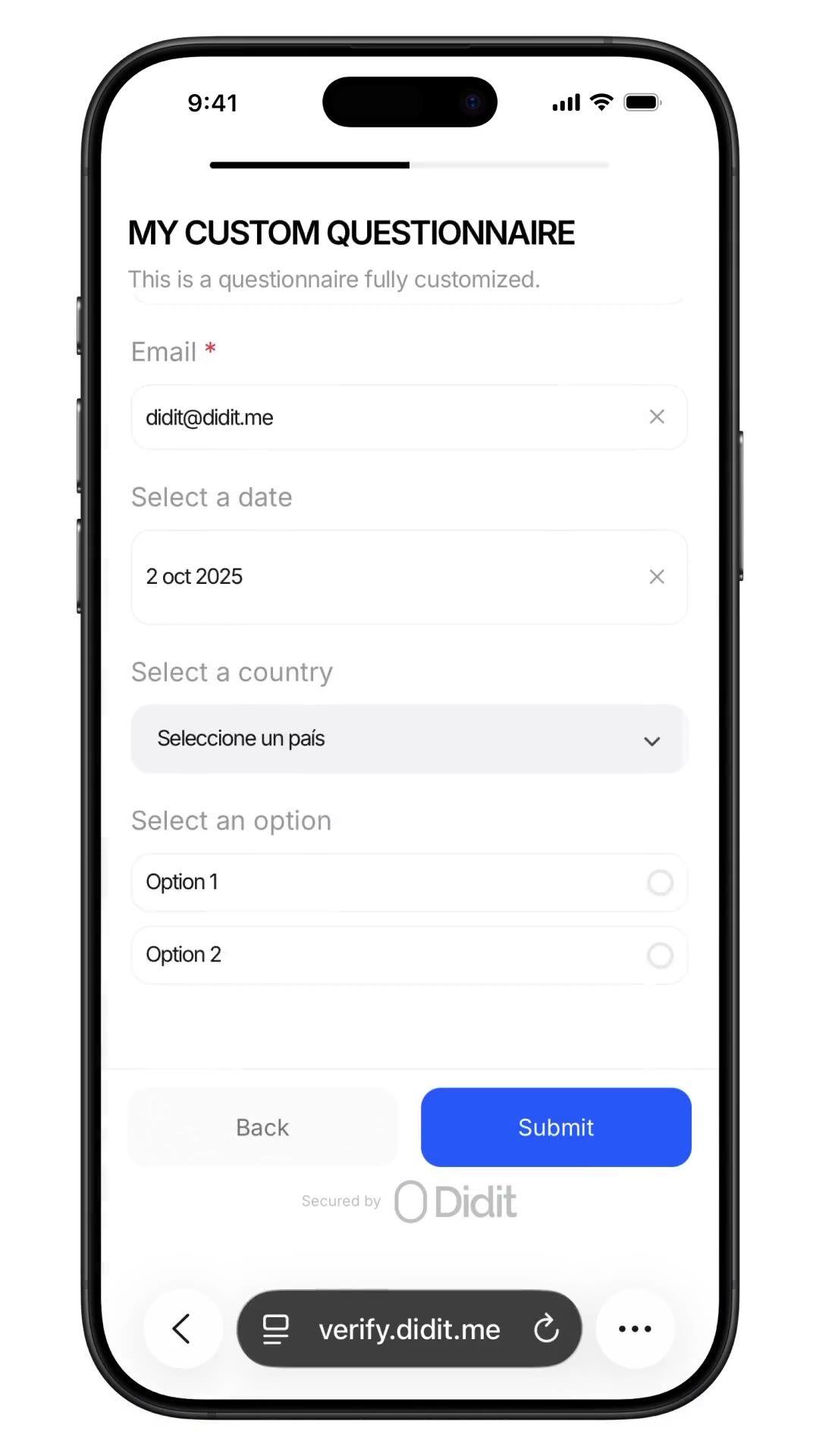
資金源、PEP自己申告
資金源、PEP自己申告、職業、予想取引量など、カスタムアンケートをワークフローに組み込めます。 回答はセッションレポートに記録されます。1件あたり$0.10です。
ID、ライブネス、顔照合、制裁リスト、住所、年齢、電話番号、メールアドレス、カスタム質問など、必要なチェック項目を選択します。ダッシュボードでフローにドラッグ&ドロップするか、同じフローをAPIにPOSTします。条件分岐やA/Bテストもノーコードで実行できます。
$ curl -X POST https://verification.didit.me/v3/session/ \
  -H "x-api-key: $DIDIT_API_KEY" \
  -H "Content-Type: application/json" \
  -d '{
    "workflow_id": "wf_kyc_sof",
    "vendor_data": "user-42"
}'{ "url": "verify.didit.me/..." }$ curl -X POST https://verification.didit.me/v3/questionnaires/ \
-H "x-api-key: $DIDIT_API_KEY" \
-H "Content-Type: application/json" \
-d '{
"title": "Customer Onboarding",
"languages": ["en"],
"default_language": "en",
"form_elements": [
{ "id": "occupation", "element_type": "short_text", "label": { "en": "ご職業は何ですか?" } }
]
}'{ "questionnaire_id": "q_…" }# Didit Custom Questionnaires — integrate in 5 minutes
You are integrating Didit's Custom Questionnaires module into <my_stack>.
Follow these steps exactly. Every URL, header, and enum value below is
canonical — do not paraphrase or "improve" them.
## 1. Provision an account
- Sign up: https://business.didit.me (no credit card required).
- Or provision programmatically: POST https://apx.didit.me/auth/v2/programmatic/register/
(returns an API key bound to the workspace + application).
## 2. Build the questionnaire — Console OR API
### 2a. Visual builder in the Console (no code)
Questionnaires are authored visually — no schema upload, no SDK required.
1. Open https://business.didit.me, go to Questionnaires, click New.
2. Pick a mode:
- Simple Mode — single-language drag-and-drop builder. Best for fast
forms, internal surveys, single-locale flows.
- Advanced Mode — visual node-based graph editor. Required for
conditional branching, multi-language translations, choice-driven
follow-up text, and forced manual review.
3. Drag elements onto the canvas (input, choice, upload, layout — full
element catalog in section 5 below).
4. Optionally start from a pre-built template (Source of Funds,
Employment Details, Purpose of Account, Beneficial Ownership, Tax
Residency, Risk Assessment).
5. Localize titles, descriptions, placeholders, and choice labels for
every supported language; set a default_language.
6. Publish — the questionnaire is now addressable by its questionnaire_id.
### 2b. Create the questionnaire programmatically (Management API)
Use this path when you want the form to live in code, ship via CI, or be
authored by an LLM. Endpoint:
POST https://verification.didit.me/v3/questionnaires/
Headers: x-api-key: <your-api-key>
Content-Type: application/json
Required body:
- title — internal questionnaire name (string).
- languages — array of locale codes; MUST include "en".
- default_language — the default locale (string, e.g. "en").
- form_elements — ordered array of questions (≥1 entry).
Each form element requires id, element_type (lowercase OR uppercase enum
— "short_text", "multiple_choice", "email", "file_upload", "date_picker",
etc.), and a translated label keyed by locale. For dropdown,
single_choice, and multiple_choice add options: [{ value, label }].
Hard constraints:
- This endpoint supports SIMPLE LINEAR questionnaires only. Do NOT send
graph, branches, next, required_if, or conditional rules — use the
Console (section 2a) for those.
Example body:
{
"title": "Customer Onboarding",
"languages": ["en"],
"default_language": "en",
"form_elements": [
{
"id": "occupation",
"element_type": "short_text",
"label": { "en": "What is your occupation?" },
"is_required": true
},
{
"id": "source_of_funds",
"element_type": "multiple_choice",
"label": { "en": "Source of funds" },
"is_required": true,
"options": [
{ "value": "employment", "label": { "en": "Employment" } },
{ "value": "business", "label": { "en": "Business" } },
{ "value": "investments", "label": { "en": "Investments" } }
]
}
]
}
Response includes questionnaire_id — store it; you'll use it as
questionnaire_uuid when you wire the questionnaire into a workflow in
section 3 below. Full reference:
https://docs.didit.me/management-api/questionnaires/create
## 3. Two integration paths — pick one
### Path A — Workflow Builder (hosted UI, recommended)
Best when you want Didit to host the form, the file-upload UX, the
multi-language routing, the keyboard handling, and the mobile responsive
layout.
1. Create a workflow that contains the QUESTIONNAIRE feature:
POST https://verification.didit.me/v3/workflows/
Authorization header: x-api-key: <your-api-key>
Body: workflow_label, features array with the entry
{ feature: "QUESTIONNAIRE", questionnaire_id: "<id>" }
(UPPERCASE — strict enum)
Optional: chain QUESTIONNAIRE after OCR + LIVENESS in the
same workflow to collect Source of Funds as part of a full Know Your Customer (KYC).
2. Create a verification session for an end user:
POST https://verification.didit.me/v3/session/
Body: workflow_id (from step 1), vendor_data (your own user id).
Response: url (the hosted verification link) — redirect the user to it.
3. Listen for webhook callbacks (see "Webhooks" below).
### Path B — Standalone Questionnaire Verification
Run a questionnaire as its own verification — no KYC required.
Use a workflow whose only feature is QUESTIONNAIRE. Everything else is
identical to Path A. Useful for ongoing-due-diligence pulses,
post-onboarding declarations, periodic re-attestations.
## 4. Webhooks
- Register a webhook destination once via
POST https://verification.didit.me/v3/webhook/destinations/
Body: url, subscribed_events: ["session.verified", "session.review_started",
"session.declined"]
- Response includes secret_shared_key — store it.
- Every webhook delivery carries an X-Signature-V2 header you MUST verify
before trusting the payload. HMAC-SHA256 verification MUST run against the raw body bytes (the raw payload as Didit sent it) BEFORE any JSON parsing — re-serialising the parsed body changes whitespace and key order, which invalidates the signature.Algorithm:
1. sortKeys(payload) recursively
2. shortenFloats (truncate trailing zeros after the decimal point)
3. JSON.stringify the result
4. HMAC-SHA256 with the secret_shared_key
5. Hex-encode, compare to the X-Signature-V2 header.
## 5. Element catalog (use these in the builder)
Input elements:
SHORT_TEXT, LONG_TEXT, NUMBER, EMAIL, PHONE, ADDRESS, DATE_PICKER, TIME
Choice elements:
DROPDOWN, SINGLE_CHOICE, MULTIPLE_CHOICE, COUNTRY, CONSENT
- DROPDOWN and SINGLE_CHOICE support per-option requires_text_input —
selecting "Other" can demand a free-text follow-up.
Upload elements:
IMAGE, FILE_UPLOAD
- max_files (1-5) per element.
Layout elements:
PARAGRAPH, SECTION_HEADER, SEPARATOR (read-only, not answerable).
## 6. Reading the report
The session report contains a questionnaire_responses array (one entry
per questionnaire step in the workflow graph). Each entry has:
- node_id: identifies the questionnaire step in the workflow graph
- questionnaire_id: which questionnaire this response is for
- title, description, languages, default_language, is_active
- sections: array of { title, description, items[] }
- each item: { uuid, order, element_type, is_required, title,
description, placeholder, choices, max_files, answer }
- answer: { value, text, files[] } — only the fields relevant to the
element_type are present.
- status: "Approved" | "In Review" | "Not Finished"
Status semantics:
- Not Finished — user has not completed the questionnaire yet.
- In Review — submitted, pending manual review. The Console flag
"force manual review" pins every response to this state until a human
approves it.
- Approved — reviewed and accepted.
Note: questionnaires do NOT emit risk warnings. Governance is achieved
through required fields, validation, manual review, and the workflow
graph (branching nodes route compliance-sensitive answers to In Review).
## 7. Hard rules — do not change
- Base URL for /v3/* endpoints is verification.didit.me (NOT apx.didit.me).
- Feature enum is UPPERCASE: QUESTIONNAIRE, OCR, LIVENESS,
FACE_MATCH, AML, IP_ANALYSIS.
- Element type enums are UPPERCASE + underscored: SHORT_TEXT, LONG_TEXT,
FILE_UPLOAD, SINGLE_CHOICE, etc.
- Auth header is x-api-key (lowercase, hyphenated).
- Webhook signature header is X-Signature-V2 (NOT X-Signature).
- Always verify webhook signatures before trusting payload data.
- Status casing matches exactly: "Approved", "In Review", "Not Finished"
(title-cased, space-separated).
## 8. Pricing reference (public)
- $0.10 per questionnaire submission (Path A or Path B).
- No minimums. No per-language surcharge. No per-element surcharge.
Conditional branching, file uploads, manual review — all included at
the same per-submission price.
## 9. Verify your integration
- Sandbox starts on signup at https://business.didit.me — no separate flag.
- Use one of the pre-built templates (Source of Funds, Employment
Details, Purpose of Account, Beneficial Ownership, Tax Residency, Risk
Assessment) to ship a draft in under a minute, then customise.
- Switch to live: flip the application's environment toggle in console.
When in doubt: https://docs.didit.me/core-technology/questionnaires/overview













開発、テスト、そして最初のユーザー向け。
25以上のモジュールを公開価格で提供。自動ボリュームディスカウントあり。
大量利用や規制対象プログラム向け。
利用量の増加に応じて割引が自動適用されます。交渉や営業担当とのやり取りは不要です。
Diditは本人確認と不正対策のためのインフラです。私たちが自社でプロダクトを開発していた時に「こんなプラットフォームがあれば」と願った、オープンで柔軟、そして開発者に優しいプラットフォームです。そのため、単なるブラックボックスとしてではなく、お客様のスタックの真の構成要素として機能します。
単一のAPIで、個人の確認(KYC、顧客確認)、企業の確認(KYB、企業確認)、暗号資産ウォレットのスクリーニング(KYT、取引確認)、およびリアルタイムでの取引監視をカバーします。このスタックは、以下の特徴を持つように構築されています。
基盤となるフットプリントは、48以上の言語に対応した14,000以上のドキュメントタイプ、1,000以上のデータソース、そして全セッションで200以上の不正シグナルです。Diditのインフラは、すべてのセッションから動的に学習し、日々改善されています。
カスタムアンケートは、本人確認書類の検証やセルフィーと同じ認証セッション内で収集するスキーマ駆動型のフォームです。資金源、職業、予想取引量、政治的要人(PEP)自己申告、税務上の居住地、実質的支配者などの情報を収集できます。
ノーコードのビジュアルビルダーを使用すれば、コンプライアンス担当者が条件分岐、多言語翻訳、ファイルアップロード、強制手動レビュー機能を備えた新しいアンケートを5分以内に作成できます。すべての回答は、顧客確認(KYC)データと同じ監査証跡に記録されます。
1回の提出につき$0.10。詳細なリファレンスはdocs.didit.me/core-technology/questionnaires/overviewをご覧ください。
アンケートの提出1回につき$0.10です(ワークフロー内またはスタンドアロンのどちらの連携パスでも)。
最低料金、言語ごとの追加料金、要素ごとの追加料金、条件分岐、ファイルアップロード、強制手動レビューに対する追加料金は一切ありません。すべての機能が同じ提出ごとの料金に含まれています。公開料金はdidit.me/pricingをご覧ください。
通常、エンドツーエンドの全フローは30秒未満で完了します, IDを手に取り、書類を撮影し、セルフィーを撮影すれば完了です。これは市場で最速です。従来のKYCプロバイダーでは、同じフローに90秒以上かかることがよくあります。
バックエンドでは、Diditはユーザーがセルフィーを完了した瞬間からウェブフックが発火するまでのp99で2秒未満で結果を返します。モバイルキャプチャは、低速な電話やネットワーク向けに調整されています。プログレッシブ画像圧縮、遅延SDKロード、ユーザーがウェブで開始した場合のQRコードによるデスクトップから電話へのワンタップハンドオフなどです。
セッションレポートにはquestionnaire_responses配列が含まれており、ワークフローグラフ内のアンケートステップごとに1つのエントリがあります。各エントリには、questionnaire_id、title、languages、default_language、is_active、sections配列、およびトップレベルのstatus(Approved、In Review、またはNot Finished)が含まれます。
各items[]行には、uuid、order、element_type、is_required、title、description、placeholder、choices、max_files、および要素タイプに応じてvalue、text、またはfilesを含むanswerオブジェクトが含まれます。
セッションApplication Programming Interface (API) とすべてのウェブフック配信で同じ形式です。
すべてのセッションは7つの明確なステータスのいずれかに分類されるため、あなたのコードは常に何をすべきかを知っています。
Approved, すべてのチェックに合格しました。ユーザーを次のステップに進めます。Declined, 1つ以上のチェックに失敗しました。ユーザーに特定の失敗したステップ(例:セルフィーの再撮影)を再提出させることができます。フロー全体を再実行する必要はありません。In Review, コンプライアンスレビューのためにフラグが立てられました。コンソールでケースを開き、すべてのシグナルを確認し、承認または拒否を決定します。In Progress, ユーザーはフローの途中にいます。Not Started, リンクは送信されましたが、ユーザーはまだ開いていません。長期間放置されている場合はリマインダーを送信します。Abandoned, ユーザーはリンクを開きましたが、時間内に完了しませんでした。再エンゲージするか、期限切れにします。Expired, セッションリンクの有効期限が切れました。新しいセッションを作成します。ステータスが変更されるたびに署名付きウェブフックが発火するため、データベースは常に同期されます。中断および拒否されたセッションは無料です。
本番データは、デフォルトでAmazon Web Services上の欧州連合内で処理および保存されます。 規制当局が要求する管轄区域については、エンタープライズ契約で代替リージョンをリクエストできます。
あらゆる場所で暗号化。 すべてのデータベース、オブジェクトストレージ、バックアップにおいて、保存時にはAES-256で暗号化されます。すべてのAPIコール、Webhook、ビジネスコンソールセッションにおいて、転送時にはTransport Layer Security 1.3が使用されます。生体認証データは、個別のカスタマーマスターキーで暗号化されます。
データ保持期間はお客様が管理できます。 デフォルトの保持期間は無期限(unlimited)ですが、アプリケーションごとに30日から10年の間で短縮設定が可能です。また、ダッシュボードまたはAPIからいつでも個々のセッションを削除できます。
認証: SOC 2 Type 1 & Type 2、ISO/IEC 27001:2022、iBeta Level 1 PAD、およびスペインのTesoro / SEPBLAC / CNMVによる、Diditのリモート本人確認が対面での本人確認よりも安全であるという公式認定。完全なレポートは/security-complianceでご覧いただけます。
Diditは、本人確認インフラにとって重要な規制当局の要件にデフォルトで準拠しています。
詳細なメモ、すべての証明書、すべての規制当局からの書簡は/security-complianceをご覧ください。
3つの連携パス, あなたのスタックに合うものをお選びください。
3つのパスすべてで、同じダッシュボード、同じ請求、成功ごとの同じ料金体系です。ステップバイステップガイドはdocs.didit.me/integration/integration-promptをご覧ください。