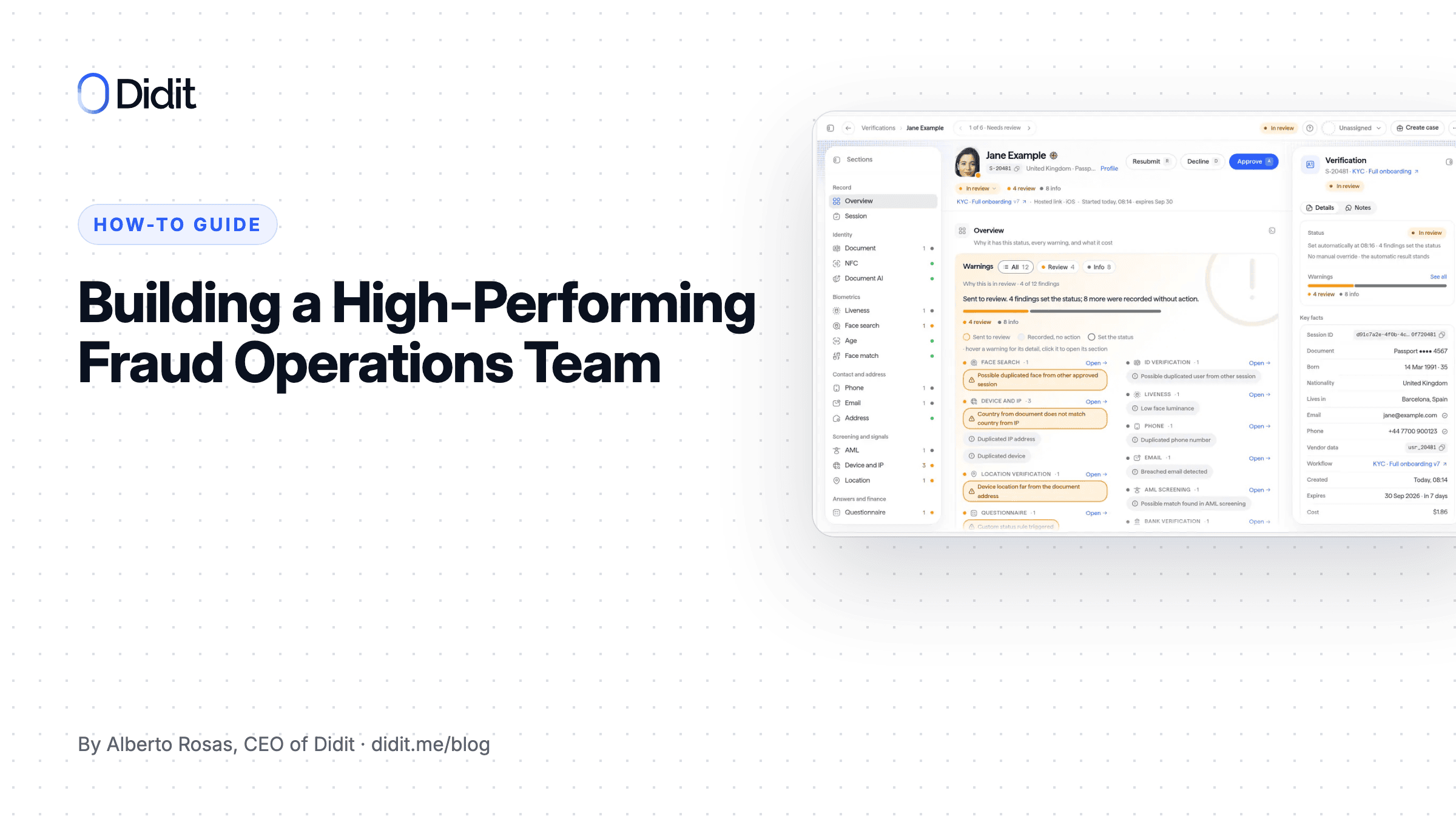
Building a High-Performing Fraud Operations Team
A fraud operations team performs when a written decision policy, tiered reviewers with scoped console roles and one held-transaction queue come first.
 Alberto RosasCo-founder and CEO
Contents
In this guide
Jump to the part you need.
This guide is for the person who has to staff and run fraud review: a head of risk at a payments or crypto business, a compliance lead who now owns a queue of held transactions, an ops manager hiring the first analysts. It covers structure, roles, the exact console steps and the published prices, starting at $0.33 per full KYC check. The caveat first: no tool makes a team. A written decision policy does.
Last updated: November 26, 2026. Prices checked against the live Didit price feed on November 26, 2026.
The build at a glance
| Part of the team | What it decides | Where it runs in Didit | Published price |
|---|---|---|---|
| Tier 1 analysts, alert triage | Which held transactions need a person today | Transactions list in the Business Console | Monitored transactions: 1,000 (Free), 10,000 (Growth) or 100,000 (Scale) a month included, then $0.001 per transaction |
| Tier 2 reviewers, manual review | Whether a flagged session is approved, declined or resubmitted | Verification dashboard, sessions in IN_REVIEW | $0.33 per full KYC check |
| AML hit review | Whether a match score is a true or a false positive | AML screening section of the session | $0.20 per AML screening check |
| Case handlers | Whether an investigation ends as a false positive or a valid threat | Cases module | Cases: 1,000 a month included, then $0.001 each |
| Automated first pass | Approve, decline or ask for a resubmission before a person looks | The Investigator | Review rate listed in the public price book; see the pricing page |
| Team lead and auditor | Who did what, when, and with which key | Settings, Organization, Audit log | Included, retention set by plan |
Start free in the sandbox at https://business.didit.me/, with no sales call. If your team already works inside an AI assistant, connect Didit through the MCP server. Prices and plans are on the pricing page. A published price does not establish production availability: check the product page and the docs for the countries and methods you need before you promise a check to a customer.
What a fraud operations team is for
A fraud operations team makes three decisions over and over, fast: let the customer through, stop the customer, or ask for one more thing. Everything else, the tooling, the dashboards, the case notes, exists to make those three decisions consistent and defensible. If your team cannot answer "what evidence justifies a decline" in one sentence, more analysts will not fix it.
The work splits into two queues that most businesses run side by side. Identity review decides whether the person is who they claim to be. Transaction review decides whether the money movement fits the account. On Didit both queues sit in one console, and one case can pull evidence from either. Didit runs identity and fraud checks for 4,000+ companies.
Prerequisites
- A decision policy in writing, with three outcomes defined: approve, decline, request resubmission. State what evidence justifies each one.
- A named owner for the queue, and an escalation path with a different person for the second pair of eyes.
- Console roles decided before the first analyst logs in, so nobody has more access than the job needs.
- A sandbox application to rehearse the flow. Sandbox testing is free and unlimited on every plan.
- A transaction rule set with a stated review threshold, so the queue has a documented reason for every hold. See transaction rules.
- An AML screening source: 1,300+ sanctions, PEP and watchlist lists at $0.20 per check. See AML screening.
- A retention target you can defend, because audit log history and verification data history both follow the plan.
How to build the team, step by step
Step 1: Write the decision policy before you hire
As an optional internal exercise, take your last fifty declined customers and your last fifty manual approvals and write one paragraph per case explaining the evidence. That paragraph becomes the policy. It is editorial guidance for your own calibration, not a Didit requirement. A session on Didit ends in one of four states: Approved, Declined, In Review or Resubmitted. Your policy has to say what pushes a session out of the automatic verdict and into In Review, and which reviewer level may overrule it.
Step 2: Choose the structure, then the tiers
Pick the ownership model from evidence, not from fashion. Centralize when your products share one customer base and one risk appetite, because a single queue keeps thresholds identical across them. Decentralize when each product has its own regulator, its own license or its own fraud pattern, because the local team holds context a central team would have to relearn. Choose a hybrid only when you can name which decisions stay central: usually the rule set, the decline policy and the review standard, with local reviewers covering product-specific patterns. Write the split down, including who breaks a tie between a central threshold and a local exception. Whatever the model, keep three tiers and a written escalation trigger:
- Tier 1 triage: works the queue, reads warnings, approves, declines or requests resubmission.
- Tier 2 investigation: handles escalations, tunes rules and thresholds, mentors Tier 1.
- Tier 3: high-value or pattern cases, with legal or law enforcement contact.
- Alongside them: a fraud data scientist who owns model and rule performance, and a compliance officer who owns sanctions lists and filings.
Step 3: Set roles and permissions in the console
Didit uses role-based access control. There are five built-in roles: Owner, Admin, Compliance Officer, Developer and Reader. A member holds one role at a time, and every role needs read on the organization plus read and list on applications to open the console at all. Custom roles are built from action:resource permissions, so a Tier 1 analyst can hold read and list on sessions and read, list and write on cases without touching billing. Build the roles before the hiring, or you will hand out Admin because it is the fastest option. Full detail in roles and permissions.
Step 4: Run manual review from one dashboard
Manual review is where a team is made or broken. When automated checks flag a session with warnings, it moves to In Review, and the dashboard shows the count of sessions waiting. A reviewer opens the session and works in a fixed order: the warnings that triggered the review, the session events timeline, the document images and extracted fields, the face match and liveness scores, then the AML, device and IP sections. The system has already run security feature detection, MRZ validation and expiry checks, so the reviewer evaluates the flags rather than re-doing the scan.

Teach one habit: when a warning is ambiguous, request a resubmission rather than declining. Poor lighting or a weak camera can lower a liveness score for a genuine customer, and a decline costs more than a second capture. The documented review order is in manual review.
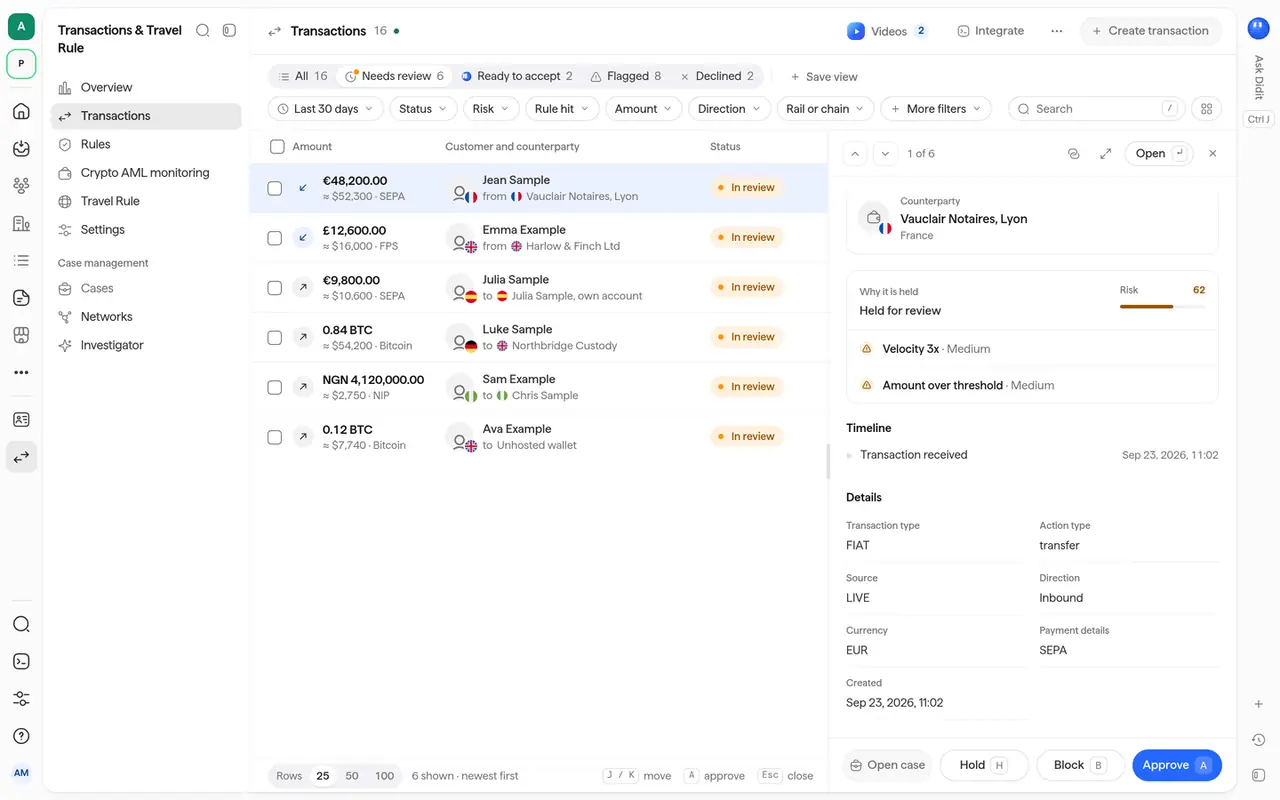
Step 5: Triage held transactions in one alert queue
On the transaction side there is no separate alert object to manage. An alert is a transaction that a rule or a reviewer put on hold and nobody has decided yet: a transaction in IN_REVIEW or in AWAITING_USER while it waits on the customer. Everything else is decided. A case is a different container: it groups transactions, users, businesses and evidence under one subject when a single hold turns into an investigation. From the transaction, an analyst can assign it to a named reviewer, add a note for the next person, approve or decline it, or attach it to a case. Bulk assignment is recorded on the transaction timeline, which is what you show an auditor.
Step 6: Open cases from rules, not from memory
A single held transaction is usually small enough to resolve on its own. Pattern work belongs in a case, which groups transactions, users, businesses and evidence under one subject. Add the Create case effect to a transaction rule and the case opens whenever the rule matches, routed to a blueprint that sets assignment, escalation and 4-eyes review. Grouping by applicant reuses the subject's open case across rules; grouping by rule and applicant opens one case per rule per applicant. Cases opened this way carry source TRANSACTION_RULE and follow the one-subject-per-case rule, the same lifecycle and the same API as a case opened from an AML hit. See KYT cases and case blueprints.

Step 7: Measure the queue every week
Four numbers belong on the wall: alerts per analyst, time from held to decided, override rate against the automatic verdict, and the share of closed cases that end as false positive. The analytics dashboard gives you the raw material: the automatic verdict breakdown (how many completed sessions the system originally classified as approved, in review or declined before any manual override), resubmission insights, top rules triggered, analyst performance and score histograms. Compare each range against the previous period and change one rule at a time. See analytics.
Step 8: Keep the audit trail and hand filings to compliance
Every console and API action is logged with the timestamp, actor, path, status and IP. Decisions the Investigator takes on its own appear under The Investigator; when a person accepts or overrides that recommendation, the entry is recorded under the person. That distinction is what makes an automated first pass defensible. For jurisdictions that require a Suspicious Activity Report or a Currency Transaction Report, generate the filing from the resolved case in the console. Didit does not submit reports to regulators: filing stays your compliance team's responsibility. See FIU reports and audit logs.
The documented calls your team needs
There is no separate alert endpoint. Your queue is the transactions list filtered by status, and the transaction detail is the record an analyst reads. These are the two documented reads:
GET https://verification.didit.me/v3/transactions/

GET https://verification.didit.me/v3/transactions/{transaction_id}/
Expected output: the first call returns the transactions for your application, each with an identifier and a status. Read status, not the alerts array, which the documentation states is always empty today. A transaction is a live alert when its status is IN_REVIEW or AWAITING_USER. The second call returns that one transaction with its status and score, which is what you hand an analyst together with the rules that fired.
For event-driven handoff, a held transaction is announced by the transaction.created webhook when it is held on creation and by transaction.status.updated when its status changes. Rule changes, thresholds and workflow versions are documented in the workflow builder and the transaction monitoring product page.
Inputs and outputs
| Input | Where it comes from | Output the team produces |
|---|---|---|
| A session with warnings | KYC, KYB or authentication flow in the console | Approve, decline or resubmission request, with a note |
| An AML hit | AML screening section of a session, 1,300+ lists | True or false positive call, backed by the match and risk scores |
| A held transaction, which is the alert | Rule, provider result or analyst action | Approve, decline, note, assign, or attach to a case |
| A case | Create case rule effect, Add to case, or a manual click | Resolved case with resolution false positive or valid threat |
| A resolved investigation | Case Management | SAR, STR or CTR prepared in the console, filed by your team |
| Reviewer activity | Every console and API call | Audit log entry per action, exportable on qualifying plans |
Worked cost example: 2,000 onboardings a month
Assume 2,000 new customers a month, an AML screen on each, 800 wallet screenings, 40,000 monitored transactions and 120 cases opened. At list prices:
- Full KYC: 2,000 x $0.33 = $660.00
- AML screening: 2,000 x $0.20 = $400.00
- Wallet screening: 800 x $0.15 = $120.00
- Transaction monitoring: 40,000 transactions, 10,000 included on Growth, so 30,000 x $0.001 = $30.00
- Cases: 120 opened, inside the documented 1,000 a month case allowance, so $0.00
Monthly usage at list prices: 660.00 + 400.00 + 120.00 + 30.00 = $1,210.00. On Growth the 4% discount applies to Didit prices: 633.60 + 384.00 + 115.20 + 30.00 = $1,162.80. Transaction monitoring stays at $0.001 per transaction on every plan. Growth costs $99.00 a month and carries $115.00 of monthly credit, which comes off usage before top-ups, so the cash for the month is $99.00 + (1,162.80 minus 115.00) = $1,146.80. Ongoing AML monitoring on an existing base of 24,000 customers is billed separately: 24,000 x $0.07 = $1,680.00 a year.
We left the Investigator out of this arithmetic on purpose. Its review rate is listed in the public price book and set out on the pricing page, so add that line yourself if you route clear cases to it. The point of the exercise is not the total. It is that each line maps to a step your team owns, so when the queue grows you can see which check grew with it.
Paid steps and review boundaries
| Step | Billed? | Price | Who signs off |
|---|---|---|---|
| Sandbox test session | No | Free. Sandbox testing is free and unlimited on every plan | Nobody |
| Workflow orchestration, SDKs, MCP server | No | Included | Developer owns the workflow |
| Full KYC check that returns a result | Yes | $0.33 | Automatic verdict, a person only when it lands in In Review |
| AML screening | Yes | $0.20 per check | Compliance Officer reviews the hits |
| Wallet screening | Yes | $0.15 per screening | Analyst decides on the hold |
| Investigator review | Yes | Rate listed in the public price book, not included in this example | A person accepts or overrides, and the audit log records them by name |
| Case work | 1,000 cases a month included | $0.001 each after that | 4-eyes review where the blueprint requires it |
| SAR, STR or CTR filing | Prepared inside case work | No separate line in the price book | Your compliance team submits to the regulator |
Two billing rules to write into your runbook. You pay for a check only when it finishes with a result, so format errors and provider failures that return no answer are not charged. And some no-match database lookups and retries are billable, which is why the database validation line is variable by country.
Failure cases and recovery
| Failure | What you see | Recovery |
|---|---|---|
| The reviewer queue grows without bound | The pending count at the top of the verification dashboard climbs week over week | Set an SLA per tier, assign in bulk from the transactions list, and route clear cases through the Investigator first |
| False positives spike after a rule change | The in-review share rises in the automatic verdict breakdown | Publish workflow versions, compare the current range to the previous period, roll back to the prior version and retune one threshold |
| Analysts override the model with no reason on record | Audit log shows a decision under a person with no note | Require a note on every override and read sample notes in the weekly meeting |
| Two open cases on one customer | Duplicate investigations and two sets of evidence | Group by applicant so the subject's open case is reused, and keep the one-subject-per-case rule |
| A filing is late | A case sits resolved with no report attached | Generate the filing from the resolved case, then hand it to compliance. Didit does not submit it for you |
| Evidence is missing for an old period | The audit log stops before the date you need | Retention is plan-bound: 30 days on Free, 1 year on Growth, 3 years on Scale with export. An export on a plan without it returns 403 with code plan_limit_exceeded |
| A new analyst cannot log in | The invite says invitation unavailable | Invitations expire after 30 days. Send a fresh one from Settings, Organization, Members |
Sources
- Didit pricing page and the live price feed, read November 26, 2026.
- Didit docs: pricing and billing rules.
- Didit docs: manual KYC review and the reviewer dashboard.
- Didit docs: roles and permissions.
- Didit docs: audit logs.
- Didit docs: analytics dashboard.
- Didit docs: KYT alerts, held transactions, triage and resolution.
- Didit docs: KYT cases and SAR investigations.
- Didit docs: FIU reports and templates.
- Didit docs: workflow builder and versioning.
- Didit transaction monitoring and wallet screening product pages.
- Didit MCP server setup.
- FATF, for the international standards your AML program is measured against.
Next step: open a sandbox at https://business.didit.me/, no sales call, and run one of your own declined sessions through the review flow before you hire the next analyst.
Try it
Try this in the sandbox
Run the check this guide describes, free.
The product this post is about, taken from its topic. Run it free in the sandbox.
Author
Alberto Rosas
Co-founder and CEO

Keep reading
Other guides in the same topic.
 What Is the Purpose of FICA in South Africa? 2026 Guide
FICA is South Africa's anti-money laundering law. It creates the Financial Intelligence Centre and requires accountable institutions to identify and verify clients, screen for PEP and sanctions risk and report suspicious.
Alberto RosasNov 26, 2026 Sixth Money Laundering Directive (6AMLD): What Changed and Which Rules Apply
6AMLD is Directive (EU) 2018/1673: Member States must criminalise laundering, widen predicate offences and set a four-year penalty floor. It adds no new due diligence duties for firms.
Alberto RosasNov 26, 2026 Automated Sanctions Screening: Canada, the Entity List and Embargoes
Automated sanctions screening matches people and companies against lists such as Canada's autonomous sanctions made under SEMA and JVCFOA and the OFAC SDN List, and returns candidate hits scored for identity confidence and.
Alberto RosasNov 26, 2026Questions
Frequently asked questions
What is case management in AML?
Case management is the module where an AML or fraud team turns an alert into a structured investigation. A case groups the related transactions, users, businesses and evidence under one subject, tracks the checklist and review stages, and closes with a resolution of false positive or valid threat. In Didit, a case opened by a transaction rule uses the same module and the same API as a case opened from an AML hit or by hand.
How does case management work for a fraud team day to day?
Analysts triage held transactions first, because a single transaction is often small enough to resolve with a note and a decision. When the transaction looks like part of a pattern, add it to a case, or let the rule open the case automatically with the Create case effect and a blueprint that sets assignment, escalation and 4-eyes review. The case carries the evidence, the timeline and the resolution into the filing step.
What roles does a fraud operations team need?
A workable minimum is a queue owner, two Tier 1 analysts, a Tier 2 reviewer who handles escalations and tunes rules, a compliance officer for AML hits and filings, and a developer who owns workflows and webhooks. Didit ships five built-in console roles, Owner, Admin, Compliance Officer, Developer and Reader, plus custom roles built from permissions such as read and write on cases. A member holds one role at a time.
How many tiers should a fraud operations team have?
Three tiers cover most businesses: Tier 1 triage, Tier 2 investigation and rule tuning, Tier 3 complex cases with legal or law enforcement involvement. Small teams merge Tier 2 and Tier 3 and keep the escalation trigger. What matters is that each tier has a written escalation rule and a different person for the second pair of eyes.
What should a Tier 1 fraud analyst do first?
Open the queue and work by the stated SLA, usually oldest first or highest score first. Read the warnings that moved the session to In Review, then the events timeline, then the document and biometric detail, then the AML section if a hit exists. Decide approve, decline or request resubmission, and write a note every time, because the note is the evidence an auditor reads later.
What is the difference between an alert, a held transaction and a case in Didit?
An alert is not a separate record: it is a transaction that a rule or a reviewer has put on hold, meaning a transaction in IN_REVIEW or in AWAITING_USER. A case is a container for a wider investigation, grouping transactions, users, businesses and evidence under one subject, and it closes as false positive or valid threat. So you triage held transactions, escalate the pattern ones to cases, and read status rather than an alert list, because the alerts array on a transaction detail is always empty today.
How do you reduce false positives in a fraud operations team?
Measure before you change anything. The automatic verdict breakdown shows how many completed sessions the system originally put in approved, in review or declined before any human override, and resubmission insights show where genuine users got stuck. Change one rule or threshold, publish a new workflow version, and compare the in-review share against the previous period. Keep resubmission available: low light can lower a liveness score for a real customer.
How do you measure fraud operations team performance?
Four numbers: alerts per analyst, time from held to decided, override rate against the automated verdict, and the share of closed cases that end as false positive. Didit analytics provides analyst performance, top rules triggered and score histograms, and the audit log shows who took each decision. Track them weekly, not quarterly, because rule drift shows up in weeks.
Should fraud and AML sit in the same team?
Usually yes for a small or mid-size business, with one queue and one escalation path, because the same transaction can be a fraud signal and a sanctions concern at once. Keep the AML officer role distinct inside the team: someone has to own the lists, the risk assessment and the filing decision. On Didit, AML screening runs inside the session, so a hit is reviewed next to the other warnings.
Can an automated agent close a case on its own?
The Investigator can approve or decline a session, request a resubmission, set a transaction status, and resolve, escalate or request information on a case. Each of those decisions is recorded in the audit log under The Investigator with a link to the report behind it. When a person accepts or overrides the recommendation, the entry is recorded under that person. Its review rate is listed in the public price book, so check the pricing page before you route volume to it.
How long should you keep fraud review evidence?
Long enough to survive your regulator's lookback and your own disputes, which is a decision for your compliance team. On Didit the audit log retention follows the plan: 30 days on Free, 1 year on Growth, 3 years on Scale with export, and set by contract on Enterprise. Verification data retention follows the plan as well, up to 10 years on Scale.
What does a fraud operations team cost on Didit?
You pay per completed check from prepaid credit: $0.33 for a full KYC check, $0.20 per AML screening and $0.15 per wallet screening. Monitored transactions include 1,000 a month on Free, 10,000 on Growth and 100,000 on Scale, then $0.001 per transaction; cases carry a documented allowance of 1,000 a month, then $0.001 each, and an alert is billed as the transaction it holds rather than as its own object. Plans start at $0 on Free with $10 of monthly credit and $99 a month on Growth, with an annual contract from $15,000 a year on Enterprise.
Compliance built in
Audited, certified and attested.
We hold the certifications and build each country's rules into your flows, so you can launch anywhere without worrying. Security and Compliance center
- Regulation encoded into your flows
Tell us what you do and where. Didit lists the rules that apply to you, with sources, and builds the checks each country needs into one workflow.
- Ready for AMLR
Every requirement of the new EU anti-money laundering rules, from checking customers to human review, is already covered by a Didit check.
- Tested in Spain's Treasury sandbox
Spain's Treasury published its supervised sandbox report on Didit's NFC plus active liveness onboarding; SEPBLAC took part and valued the added measures positively.
- Audited, not self-declared
iBeta Level 1 and Level 2. Liveness tested under ISO/IEC 30107-3.
Your obligations · 3 regions
 SOC 2 Type 2
 ISO 27001
 iBeta Level 1 and Level 2
 EU regulator attestation
 FSM youth protection
 GDPR
 EBA remote onboarding
 MiCA compatible
 FIDO Alliance member
- AMLREU AML Regulation ready
Integration · Didit MCP
Run Didit from your own AI agent
Connect Didit to Claude, Cursor, VS Code or ChatGPT and just ask in plain words. Your agent can do anything you can do in the console, with the same permissions you have.
 Add to Claude
 ChatGPT
 Cursor
- Build workflowsDescribe the checks you need. The agent creates and publishes the flow.
- Run investigationsAsk why a session was declined, review cases, search people and companies.
- Change rulesCreate payment rules, test them on past data and switch them on.
- Pull reportsAsk for numbers, exports or the audit log.
Didit Academy