Didit Yakusanya $7.5M Kujenga Miundombinu ya Utambulisho na Udanganyifu
Didit
Uthibitishaji wa Kibayometriki

Badilisha SMS 2FA.
Kwa uso. Ndani ya sekunde moja.

Uthibitishaji upya wa kibayometriki bila nenosiri kwa watumiaji wanaorudi. Hakuna bili ya SMS, hakuna hatari ya SIM-swap, hakuna safari ya mtoa huduma. Injini sawa ya iBeta Level 1 PAD (utambuzi wa mashambulizi ya uwasilishaji) kama usajili. $0.10 kwa kila uthibitishaji, 500 bila malipo/mwezi.

Inaungwa mkono na
Y CombinatorRobinhood Ventures
GBTC Finance
Bondex
Crnogorski Telekom
UCSF Neuroscape
Shiply
Adelantos

Inaaminika na mashirika 2,000+ duniani kote.

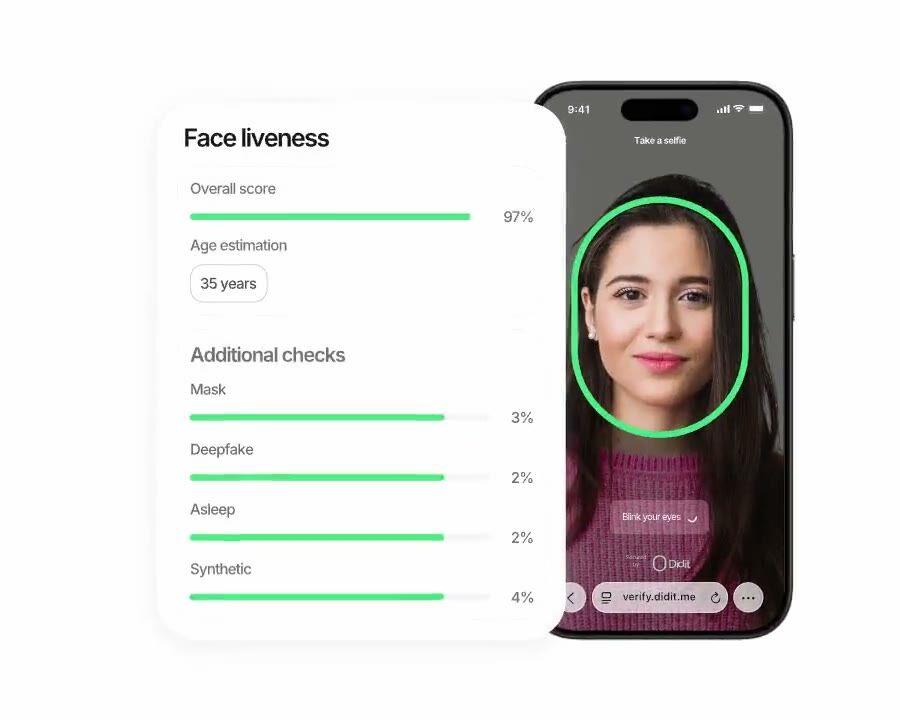
Didit Biometric Authentication, uthibitishaji upya wa uhai usio na nguvu chini ya sekunde mbili.

Kuingia salama dhidi ya hadaa

Kipengele cha urithi.
Chini ya sekunde 1 kwenye Android.

Tumia tena utambulisho uliothibitishwa kutoka usajili ili kuthibitisha watumiaji wanaorudi. Haiathiriwi na SIM-swap, haiathiriwi na phishing, $0.10 kwa kila simu, nafuu kuliko SMS ya kawaida ya kwenda na kurudi katika kila soko.

Jinsi inavyofanya kazi

Kutoka usajili hadi mtumiaji aliyethibitishwa kwa hatua nne.

  1. Hatua 01

    Unda mtiririko wa kazi (workflow)

    Chagua ukaguzi unaotaka, kitambulisho, uhai (liveness), kulinganisha uso, vikwazo, anwani, umri, simu, barua pepe, maswali maalum. Ziburute kwenye mtiririko wa kazi (flow) kwenye dashibodi, au tuma mtiririko huo huo kwenye API yetu. Gawanya kulingana na masharti, fanya majaribio ya A/B, hakuna code inayohitajika.

  2. Hatua 02

    Unganisha

    Pachika moja kwa moja na SDK yetu ya Web, iOS, Android, React Native, au Flutter. Elekeza kwenye ukurasa uliopangishwa. Au tuma tu mtumiaji wako kiungo, kwa barua pepe, SMS, WhatsApp, popote. Chagua kinachofaa stack yako.

  3. Hatua 03

    Mtumiaji anapitia mchakato

    Didit inasimamia kamera, ishara za mwanga, uhamishaji wa simu, na ufikiaji. Wakati mtumiaji yuko kwenye mchakato, tunapima ishara 200+ za udanganyifu kwa wakati halisi na kuthibitisha kila sehemu dhidi ya vyanzo vya data vya kuaminika. Matokeo yanapatikana chini ya sekunde mbili.

  4. Hatua 04

    Unapokea matokeo

    Webhooks zilizosainiwa kwa wakati halisi huweka database yako sawa mara tu mtumiaji anapoidhinishwa, kukataliwa, au kutumwa kwa ukaguzi. Uliza API inapohitajika. Au fungua console kukagua kila session, kila ishara, na kudhibiti kesi kwa njia yako.

Imejengwa kwa ajili ya waendelezaji · Imejengwa dhidi ya udanganyifu · Wazi kwa muundo

Uwezo sita. Mtiririko wa kazi mmoja. biometric_authentication.

Kila uwezo hapa chini ni swichi kwenye aina moja ya mtiririko wa kazi. Hakuna viwango vya kuongeza mauzo, hakuna SKU tofauti, hakuna simu za nyongeza. Ziwashe kwa kila mtiririko wa kazi, kisha unda session kwa simu moja.
01 · Step-up 2FA

Mbadala rahisi wa uthibitishaji wa hatua mbili unaotegemea SMS.

Washa Biometric Authentication kwa kila hatua nyeti, uhamisho wa thamani kubwa, kuweka upya nenosiri, uondoaji mkubwa, kuingia kwa kifaa kipya. Hakuna bili ya mtoa huduma, hakuna hatari ya SIM-swap, hakuna phishing ya OTP. UI iliyopangishwa sawa na mtiririko wako wa usajili, watumiaji hawajifunzi udhibiti mpya. $0.10 kwa kila uthibitisho, nafuu kuliko SMS na kinga dhidi ya kila vector ya mashambulizi ya SMS.
Uthibitishaji wa hatua-juuPOST /v3/session/
SMS 2FA
Nambari ya tarakimu 6
  • Kubadilisha SIM
  • Bili ya mtoa huduma
  • Phishing
Biometric Auth
Uthibitishaji wa uso
  • Hakuna udhaifu wa SIM
  • $0.10 kwa uthibitisho
  • Haiwezi kudukuliwa (phishing-proof)
Mbadala rahisi. Injini ileile iliyothibitishwa na iBeta uliyotumia wakati wa kujisajili.
02 · Njia Mbili

Liveness-only au liveness pamoja na kulinganisha uso. Chagua kwa kila mtiririko wa kazi.

Liveness-only kwa ukaguzi wa uwepo wenye msuguano mdogo, au liveness pamoja na kulinganisha uso kwa kuunganisha utambulisho kamili dhidi ya picha iliyohifadhiwa wakati wa usajili. Zote mbili hurejesha JSON sawa. Badilisha njia kwa kuhariri mtiririko wa kazi, hakuna mabadiliko ya mteja, hakuna endpoint mpya, $0.10 sawa kwa kila uthibitisho.
Njia mbili · Mtiririko mmoja wa kazibiometric_authentication
  • Liveness-pekeeukaguzi wa uwepo
    vipengele: [LIVENESS]
    Inathibitisha uwepo wa binadamu halisi. Msuguano mdogo zaidi.
  • Liveness + Face Matchkufunga utambulisho
    vipengele: [LIVENESS, FACE_MATCH]
    Inaongeza kufunga kwa portrait_image kwenye usajili. Usalama wa juu zaidi.
Washa/zima kwa kila mtiririko wa kazi. workflow_id ileile. $0.10 ileile kwa kila uthibitishaji.
03 · Uamuzi chini ya sekunde 2

Chini ya sekunde moja ya kuchelewa kunakoonekana wakati wa kuingia.

Uamuzi unaotolewa na edge, hakuna upakuaji wa modeli, hakuna dhana ya kuongeza kasi kwenye kifaa, hakuna uzoefu uliopungua kwenye Android za bei nafuu. Kunasa ~0.3s, liveness chini ya sekunde, kulinganisha uso ~0.5s, webhook nje chini ya 2s mwisho hadi mwisho. Haraka kuliko code ya SMS, na mtumiaji haondoki kamwe kwenye programu yako.
Muda wa kuingiamwisho-hadi-mwisho < 2 s
  • Capture · auto-frame0.32 s
  • Liveness · passive0.81 s
  • Face match · 1:10.42 s
  • Approved · webhook out1.65 s
Inference inayotolewa na edge. Hakuna upakuaji wa model. Hakuna safari ya kurudi na kurudi ya carrier.
04 · Ulinzi dhidi ya udhibiti wa akaunti

iBeta Level 1 dhidi ya katalogi kamili ya mashambulizi.

Imethibitishwa kwa kujitegemea katika PAD (presentation attack detection) Level 1 na iBeta, kiwango ambacho NIST na Open Identity Exchange wanataja. Inashinda uchezaji tena wa selfie zilizoibiwa, deepfakes, barakoa za karatasi, barakoa za silicone na latex, mashambulizi ya morph. Vizingiti vya kukataa vikali (uso uliozuiliwa, hakuna uso uliogunduliwa, saini ya shambulio, hakuna picha ya rejea) hubaki kutekelezwa bila kujali mipangilio yako.
Ulinzi dhidi ya kuchukua akauntiiBeta L1 PAD
  • Deepfake ya mmiliki wa akauntiImefungwa
  • Mask ya silicone au karatasiImefungwa
  • Selfie iliyoibiwa · shambulio la kurudiaImefungwa
  • Uso kwenye orodha nyeusiKukataa kiotomatiki
05 · Kutumia tena picha

Tumia tena picha ya usajili. Hakuna kipya cha kuhifadhi.

Tayari unayo picha ya rejea ya mtumiaji kutoka KYC ya usajili, ipitishe kwenye kila session ya Biometric Authentication na tunapima kufanana. Hifadhi ya template sawa, miundombinu sawa ya EU-default (makazi ya mkoa maalum kwenye Enterprise), afisa mmoja wa ulinzi wa data. Hakuna usajili upya, hakuna uamuzi wa ziada wa kuhifadhi.
Tumia tena picha ya KYCportrait_image
sign-up
Picha ya KYC
kila unapoingia
Face Match 1:1
  • alama ya kufanana96.2
  • hifadhi ya template sawa na KYCEU AWS
06 · Vizingiti vinavyoweza kurekebishwa

Vizingiti vinavyoweza kurekebishwa vya kufanana na liveness kwa kila mtiririko wa kazi.

Onyo la liveness ya chini na kulinganisha uso wa chini kila moja hubeba kizingiti cha Ukaguzi na kizingiti cha Kukataa unachorekebisha kwa kila programu. Kali kwa uhamisho wa thamani kubwa, laini kwa kuingia kwa kifaa kipya, yote kutoka kwa mhariri mmoja wa mtiririko wa kazi kwenye console. Katalogi kamili ya maonyo iko kwenye nyaraka.
Didit Business Console Mhariri wa mtiririko wa kazi wa Biometric Authentication unaoonyesha vizingiti vinavyoweza kurekebishwa vya liveness na kulinganisha uso.
Unganisha

Mipangilio miwili. Session moja. Bei moja.

Mipangilio yote miwili huunda session kwenye mtiririko wa kazi wa Biometric Authentication. Liveness-only ni uwepo-tu, msuguano mdogo zaidi. Liveness pamoja na kulinganisha uso huunganisha uthibitisho na picha ya mtumiaji iliyohifadhiwa wakati wa usajili. Badilisha kwa kuhariri mtiririko wa kazi, hakuna mabadiliko ya mteja.
POST /v3/session/Liveness + Kulinganisha Uso
$ curl -X POST https://verification.didit.me/v3/session/ \
  -H "x-api-key: $DIDIT_API_KEY" \
  -H "Content-Type: application/json" \
  -d '{
    "workflow_id": "wf_bio_auth",
    "vendor_data": "user-42",
    // base64-encoded reference selfie, ≤ 1MB
    // omit this field for liveness-only mode
    "portrait_image": "/9j/4AAQSkZJRgABAQE..."
  }'
201Imeundwa{ "session_url": "verify.didit.me/..." }
Peleka portrait_image kwa ajili ya kulinganisha uso; iache ikiwa ni kwa ajili ya liveness-only.nyaraka →
POST /webhooks/diditHatua ya 2 · Pokea
// Your endpoint receives a signed payload
app.post("/webhooks/didit", (req, res) => {
  const sig = req.headers["x-signature-v2"];
  const expected = crypto.createHmac("sha256", SECRET)
    .update(req.rawBody).digest("hex");
  if (sig !== expected) return res.sendStatus(401);
  const { status, decision, vendor_data } = req.body;
  // status: Approved | Declined | In Review | ...
  res.sendStatus(200);
});
200OKwebhook_type: "status.updated", status: "Approved"
Webhook ya HMAC-signed ya muda halisi. Thibitisha, chambua, sasisha database yako.nyaraka →
Ujumuishaji tayari kwa agent

Weka Uthibitishaji wa Biometric kwa amri moja.

Bandika kizuizi hapa chini kwenye Claude Code, Cursor, Codex, Devin, Aider, au Replit Agent. Jaza kishika nafasi cha my_stack na framework, lugha, na matumizi yako. Agent huandaa Didit, huunda workflow, huunganisha session na webhook, na kuweka sokoni.
didit-integration-prompt.md
# Didit Biometric Authentication — integrate in 5 minutes

You are integrating Didit's Biometric Authentication module into <my_stack>.
This is a returning-user passwordless re-verification flow — a drop-in
replacement for SMS or email 2FA at high-value actions (large transfers,
password reset, large withdrawals, sensitive setting changes). It is NOT
the first-time KYC sign-up flow — for that, see Didit Liveness at
docs.didit.me/core-technology/liveness/overview.

Every URL, header, and enum value below is canonical — do not paraphrase
or "improve" them.

## 1. Provision an account
- Sign up: https://business.didit.me (no credit card required).
- Or provision programmatically: POST https://apx.didit.me/auth/v2/programmatic/register/
  (returns an API key bound to the workspace + application).

## 2. Create the biometric_authentication workflow (one time)
Biometric Authentication is a workflow_type, not a feature flag. Create
the workflow once, reuse the workflow_id for every authentication.

POST https://verification.didit.me/v3/workflows/
Header: x-api-key: <your-api-key>
Body:
  - workflow_label   (your label, e.g. "step-up-2fa")
  - workflow_type    "biometric_authentication"  (snake_case enum)
  - features         the array
                       [{ feature: "LIVENESS" }]                    (liveness-only mode)
                     OR
                       [{ feature: "LIVENESS" }, { feature: "FACE_MATCH" }]  (face-match mode)
  - liveness_method  "PASSIVE" | "FLASHING" | "ACTIVE_3D"   (PASSIVE recommended for low-friction step-up)

Store the returned workflow_id — you will reuse it on every auth.

## 3. Authenticate a returning user

POST https://verification.didit.me/v3/session/
Header: x-api-key: <your-api-key>
Header: Content-Type: application/json
Body:
  - workflow_id     (from step 2)
  - vendor_data     (your own user id, e.g. "user-42")
  - callback        (optional URL we redirect the user to after capture)
  - metadata        (optional JSON, surfaced back on the webhook)
  - portrait_image  (Base64 JPEG, REQUIRED when the workflow has FACE_MATCH;
                     OMIT for liveness-only mode)

The portrait_image is the stored reference photo from the user's original
KYC verification (you already have it as id_verification.portrait_image in
the original session response). Send it as a Base64-encoded JPEG, max 1 MB.

Response: session_url — redirect the user to it. Didit hosts the capture
(camera, motion prompts, low-light fallback, accessibility) and posts the
verdict back via webhook.

## 4. Webhooks
- Register a webhook destination once via
  POST https://verification.didit.me/v3/webhook/destinations/
  Body: url, subscribed_events: ["session.verified", "session.declined",
                                  "session.review_started"]
- Response includes secret_shared_key — store it.
- Every webhook delivery carries an X-Signature-V2 header you MUST verify
  before trusting the payload.  HMAC-SHA256 verification MUST run against the raw body bytes (the raw payload as Didit sent it) BEFORE any JSON parsing — re-serialising the parsed body changes whitespace and key order, which invalidates the signature.Algorithm:
    1. sortKeys(payload) recursively
    2. shortenFloats (truncate trailing zeros after the decimal point)
    3. JSON.stringify the result
    4. HMAC-SHA256 with the secret_shared_key
    5. Hex-encode, compare to the X-Signature-V2 header.

## 5. Reading the report
The webhook payload (and the GET /v3/session/{id}/decision/ response)
returns the combined biometric_authentication shape:

  status               "Approved" | "Declined" | "Not Finished"
  workflow_id          string
  session_id           uuid
  session_number       integer
  vendor_data          your user id
  liveness:
    status             "Approved" | "Declined" | "Not Finished"
    method             "PASSIVE" | "FLASHING" | "ACTIVE_3D"
    score              number 0-100
    reference_image    signed URL to the captured selfie (expires in 1 hour)
    video_url          signed URL (FLASHING and ACTIVE_3D only, expires in 1 hour)
    warnings           array
  face_match:                     (only present in face-match mode)
    status             "Approved" | "Declined" | "Not Finished"
    score              number 0-100 (similarity %)
    source_image       signed URL to the captured selfie
    target_image       signed URL to the supplied portrait_image
    warnings           array

Overall status is "Approved" only when liveness.status == "Approved" AND
(face_match is absent OR face_match.status == "Approved").

Auto-decline triggers (always enforced by Didit, not configurable):
  FACE_IN_BLOCKLIST, NO_FACE_DETECTED, LIVENESS_FACE_ATTACK, NO_REFERENCE_IMAGE

Configurable risks (action per workflow — Decline, Review, or Approve):
  LOW_LIVENESS_SCORE, LOW_FACE_MATCH_SIMILARITY

## 6. Hard rules — do not change
- Base URL for /v3/* endpoints is verification.didit.me (NOT apx.didit.me).
- workflow_type is snake_case: biometric_authentication.
- Feature enums inside the workflow are UPPERCASE: LIVENESS, FACE_MATCH.
- Liveness method enum is UPPERCASE: PASSIVE, FLASHING, ACTIVE_3D.
- Auth header is x-api-key (lowercase, hyphenated).
- Webhook signature header is X-Signature-V2 (NOT X-Signature).
- Always verify webhook signatures before trusting payload data.
- Status casing matches exactly: "Approved", "Declined", "In Review",
  "Not Finished" (title-cased, space-separated).
- portrait_image is Base64 JPEG, max 1 MB, required only in face-match mode.

## 7. Pricing reference (public)
- Biometric Authentication: $0.10 per authentication (passwordless re-auth).
- 500 free authentications every month, forever, on every account.
- For the original sign-up KYC, see https://didit.me/pricing (full KYC
  bundle is $0.33 per onboarded user, which includes Liveness + Face Match +
  ID Verification + Device & IP Analysis).

## 8. When to use this versus Liveness directly
- First-time KYC sign-up: use Liveness (the feature) inside an ID
  Verification workflow. See docs.didit.me/core-technology/liveness/overview.
- Step-up at sensitive actions (transfer, password reset, large
  withdrawal): use this Biometric Authentication workflow.
- High-volume passive monitoring (any login): use this workflow with
  liveness-only mode (no portrait_image) — fastest, lowest friction.

## 9. Verify your integration
- Sandbox starts on signup at https://business.didit.me — no separate flag.
- Test images: deterministic synthetic faces returned in sandbox
  (Approved by default; trigger Declined by sending the canonical "spoof"
  test image).
- Switch to live: flip the application's environment toggle in console.

When in doubt: https://docs.didit.me/core-technology/biometric-auth/overview
Unahitaji maelezo zaidi? Tazama nyaraka kamili za moduli.docs.didit.me →
Inatii kwa muundo

Fungua nchi mpya kwa kubofya mara moja. Tunafanya kazi ngumu.

Tunafungua kampuni tanzu za ndani, tunapata leseni, tunafanya majaribio ya kupenya, tunapata vyeti, na tunalingana na kila kanuni mpya. Ili kusafirisha uthibitishaji katika nchi mpya, geuza swichi. Nchi 220+ ziko hewani, zinakaguliwa na kupimwa kila robo mwaka, mtoa huduma pekee wa utambulisho ambaye serikali ya nchi mwanachama wa EU imemwita rasmi kuwa salama zaidi kuliko uthibitishaji wa ana kwa ana.
Soma faili ya usalama na utiifu
EU financial sandbox
Tesoro · SEPBLAC · BdE
ISO/IEC 27001
Usalama wa habari · 2026
SOC 2 · Type I
AICPA · 2026
iBeta Level 1 PAD
NIST / NIAP · 2026
GDPR
EU 2016/679
DORA
EU 2022/2554
MiCA
EU 2023/1114
AMLD6 · eIDAS 2.0
EU-aligned kwa muundo

Namba za uthibitisho

Namba za uthibitisho
  • iBeta L1
    Utambuzi wa shambulio la uwasilishaji uliothibitishwa kwa uhuru.
  • <0s
    Uamuzi wa uthibitishaji kamili kwa kila session, unaotolewa kwenye edge.
  • $0.00
    Kwa kila uthibitishaji, bei nafuu kuliko SMS na kinga dhidi ya kila aina ya mashambulizi ya SMS.
  • 0
    Uthibitishaji wa bure kila mwezi, milele, kwenye kila akaunti.
Ngazi tatu, orodha moja ya bei

Anza bure. Lipa kulingana na matumizi. Panua hadi Enterprise.

Uthibitishaji 500 bila malipo kila mwezi, milele. Lipa kadri unavyotumia kwa uzalishaji. Mikataba maalum, uhifadhi wa data, na SLA (Service Level Agreements) kwenye Enterprise.
Bure

Bure

$0 / mwezi. Hakuna kadi ya mkopo inayohitajika.

  • Kifurushi cha bure cha KYC (Uthibitishaji wa Kitambulisho + Passive Liveness + Face Match + Uchambuzi wa Kifaa & IP), 500 / mwezi, kila mwezi
  • Watumiaji Waliozuiwa
  • Utambuzi wa Marudio
  • Ishara 200+ za udanganyifu kwenye kila session
  • KYC inayoweza kutumika tena kwenye mtandao wa Didit
  • Jukwaa la Usimamizi wa Kesi
  • Workflow Builder
  • Nyaraka za umma, sandbox, SDKs, server ya MCP (Model Context Protocol)
  • Usaidizi wa jamii
Maarufu zaidi
Lipa kulingana na matumizi

Kulingana na Matumizi

Lipa tu kwa unachotumia. Moduli 25+. Bei za umma kwa kila moduli, hakuna ada ya chini ya kila mwezi.

  • KYC kamili kwa $0.33 (Kitambulisho + Biometric + IP / Kifaa)
  • Data za AML 10,000+, vikwazo, PEPs, habari hasi
  • Vyanzo vya data vya serikali 1,000+ kwa Uthibitishaji wa Database
  • Ufuatiliaji wa Miamala kwa $0.02 kwa kila muamala
  • KYB ya moja kwa moja kwa $2.00 kwa kila biashara
  • Uchunguzi wa Wallet kwa $0.15 kwa kila ukaguzi
  • Mtiririko wa uthibitishaji wa Whitelabel, brand yako, miundombinu yetu
Biashara Kubwa

Biashara Kubwa

MSA & SLA maalum. Kwa idadi kubwa na programu zilizodhibitiwa.

  • Mikataba ya kila mwaka
  • MSA, DPA, na SLA maalum
  • Kituo maalum cha Slack na WhatsApp
  • Wakaguzi wa mikono wanapohitajika
  • Masharti ya muuzaji na white-label
  • Vipengele vya kipekee na ushirikiano wa washirika
  • CSM aliyetajwa, ukaguzi wa usalama, usaidizi wa kufuata

Anza bure → lipa tu wakati ukaguzi unafanyika → fungua Enterprise kwa mkataba maalum, SLA, au uhifadhi wa data.

FAQ

Maswali ya kawaida

What is Didit?

Didit is infrastructure for identity and fraud, the platform we wished existed when we were building products ourselves: open, flexible, and developer-friendly, so it works as a real part of your stack instead of a black box you integrate around.

One API covers verifying people (KYC, know your customer), verifying businesses (KYB, know your business), screening crypto wallets (KYT, know your transaction), and monitoring transactions in real time, on a stack built to be:

  • Fast, sub-2-second p99 on every session
  • Reliable, in production with 1,500+ companies across 220+ countries
  • Secure, SOC 2 Type 1, ISO 27001, GDPR-native, and formally attested by Spain's financial regulator as safer than verifying someone in person

The footprint underneath: 14,000+ document types in 48+ languages, 1,000+ data sources, and 200+ fraud signals on every session. The Didit infrastructure dynamically learns from every session and gets better every day.

What is Biometric Authentication and how is it different from Liveness?
Biometric Authentication is the returning-user re-auth surface, a drop-in replacement for SMS or email two-factor authentication (2FA) at sensitive actions (high-value transfer, password reset, large withdrawal, new-device login). It is a workflow_type (snake-case: biometric_authentication) that composes the LIVENESS feature with an optional FACE_MATCH feature. Liveness on its own is the sign-up capability, see /products/liveness for the first-time know-your-customer (KYC) flow. Both use the same iBeta Level 1 Presentation Attack Detection (PAD)-certified engine, so the model your user passed at onboarding is the same model checking them at every login.
What is the response shape?
The combined report returns status (Approved, Declined, Not Finished), a liveness block with status, method (PASSIVE, FLASHING, or ACTIVE_3D), score 0-100, reference_image, video_url, and warnings, plus a face_match block (only present when the workflow has FACE_MATCH) with status, score 0-100, source_image, target_image, and warnings. The signed image and video URLs expire after 60 minutes. Overall status is Approved only when liveness is approved AND (face match is absent OR face match is approved).
How fast is the verification for my end user?

The full flow normally takes under 30 seconds end-to-end, pick up the ID, snap the document, snap the selfie, done. That is the fastest in the market. Legacy KYC providers usually take more than 90 seconds for the same flow.

On the back end, Didit returns the result in under two seconds at p99, measured from the moment the user finishes the selfie to the moment your webhook fires. Mobile capture is tuned for slow phones and slow networks: progressive image compression, lazy software development kit load, and a one-tap hand-off from desktop to phone via QR code if the user starts on web.

What account-takeover attacks does it block?
Didit Biometric Authentication is iBeta Level 1 PAD certified against the full ISO/IEC 30107-3 attack catalog, printed photos, screen replays, paper masks, silicone masks, latex masks, morph attacks, AI-generated deepfakes of the account owner, and stolen-selfie replays. Four risks are auto-decline regardless of your settings: FACE_IN_BLOCKLIST, NO_FACE_DETECTED, LIVENESS_FACE_ATTACK, and NO_REFERENCE_IMAGE. Configurable warnings, LOW_LIVENESS_SCORE and LOW_FACE_MATCH_SIMILARITY, let you tune the review and decline thresholds per application.
What happens if a user fails, abandons, or expires?

Every session lands on one of seven clear statuses, so your code always knows what to do:

  • Approved, every check passed. Move the user forward.
  • Declined, one or more checks failed. You can allow the user to resubmit the specific failed step (for example, re-take the selfie) without re-running the whole flow.
  • In Review, flagged for compliance review. Open the case in the console, see every signal, decide approve or decline.
  • In Progress, user is mid-flow.
  • Not Started, link sent, user has not opened it yet. Send a reminder if it sits too long.
  • Abandoned, user opened the link but did not finish in time. Re-engage or expire.
  • Expired, the session link aged out. Create a new session.

A signed webhook fires on every status change, so your database always stays in sync. Abandoned and declined sessions are free.

Where does my customer data live and how is it protected?

Production data is processed and stored in the European Union by default, on Amazon Web Services. Enterprise contracts can request alternative regions for jurisdictions whose regulators require it.

Encryption everywhere. AES-256 at rest across every database, object store, and backup. Transport Layer Security 1.3 in transit on every API call, webhook, and Business Console session. Biometric data is encrypted under a separate Customer Master Key.

Retention is yours to control. Default retention is indefinite (unlimited) unless you configure shorter, between 30 days and 10 years per application, and you can delete any individual session at any time from the dashboard or the API.

Certifications: SOC 2 Type 1 (Type 2 audit in progress), ISO/IEC 27001:2022, iBeta Level 1 PAD, and a public attestation from Spain''s Tesoro / SEPBLAC / CNMV that Didit''s remote identity verification is safer than verifying someone in person. Full report at /security-compliance.

Is Didit compliant for my industry?

Didit ships compliant by default for the regulators that matter to identity infrastructure:

  • GDPR + UK GDPR, controller / processor split, full Data Processing Agreement published, lead supervisory authority named (Spain''s AEPD).
  • AMLD6 + EU AML Single Rulebook, 1,300+ sanctions, politically exposed person, and adverse-media lists screened in real time.
  • eIDAS 2.0, EU Digital Identity Wallet aligned; reusable-identity ready.
  • MiCA (Markets in Crypto-Assets), ready for crypto on-ramps, exchanges, and custodians.
  • DORA, Digital Operational Resilience Act, EU financial-services operational resilience.
  • BIPA, CUBI, Washington HB 1493, CCPA / CPRA, US biometric privacy (Illinois, Texas, Washington) and California consumer privacy.
  • UK Online Safety Act, age-gating and child-safety obligations.
  • FATF Travel Rule, originator and beneficiary data on crypto transfers, IVMS-101 interoperable.

Detailed memo, every certificate, every regulator letter: /security-compliance.

How fast can I integrate and start verifying users?
  • 60 seconds to a sandbox account at business.didit.me, no credit card.
  • 5 minutes to a working verification through Claude Code, Cursor, or any coding agent via our Model Context Protocol (MCP) server.
  • A weekend to a production-ready integration with signed-webhook verification, retries, and a remediation flow when a user is declined.

Three integration paths, pick whichever fits your stack:

  • Embed natively with our Web, iOS, Android, React Native, or Flutter SDK.
  • Redirect the user to the hosted verification page, zero SDK.
  • Send a link by email, SMS, WhatsApp, or any channel, zero front-end work.

Same dashboard, same billing, same pay-per-success price for all three. Step-by-step guide at docs.didit.me/integration/integration-prompt.

Miundombinu ya utambulisho na udanganyifu.

API moja kwa KYC, KYB, Ufuatiliaji wa Miamala, na Uchunguzi wa Wallet. Unganisha ndani ya dakika 5.

Uliza AI ifupishe ukurasa huu