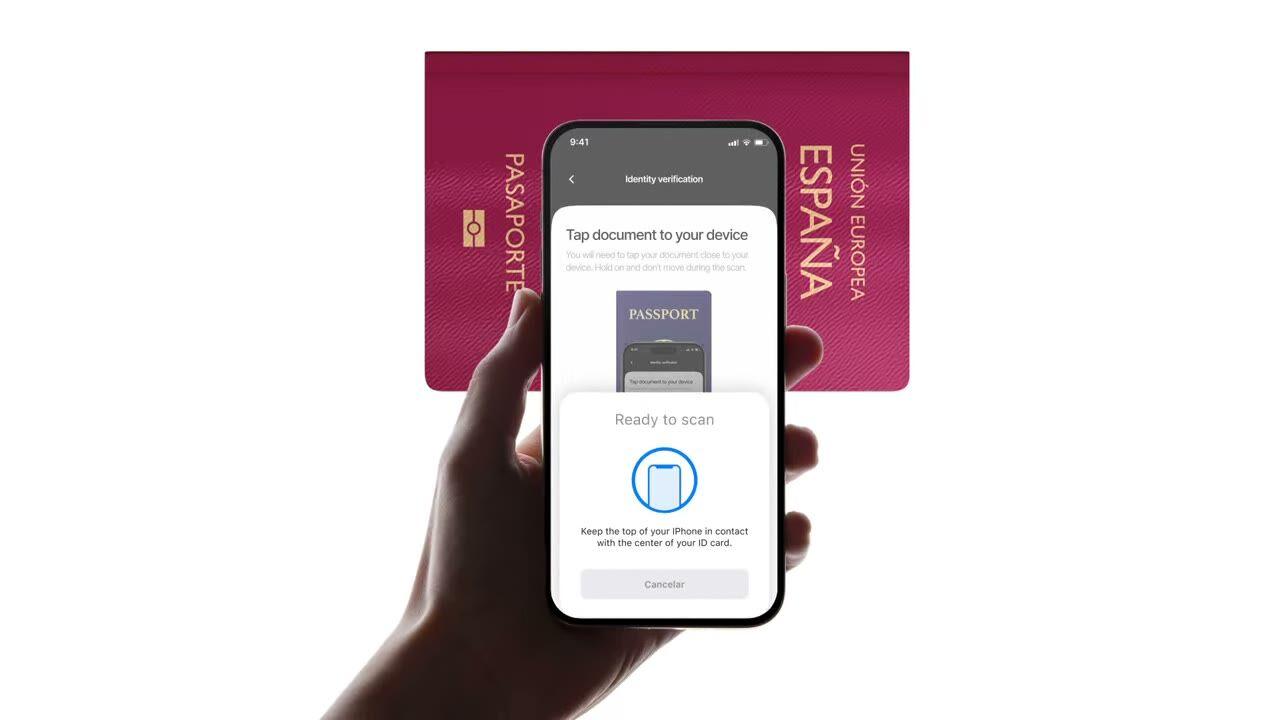
Gonga e-pasipoti au e-ID kwenye simu. Inasoma chip, inathibitisha saini ya serikali, inagundua udanganyifu ambao ukaguzi wa picha wa kawaida hukosa. $0.15 kwa usomaji, 500 bila malipo/mwezi.
Soma chip. Imetiwa saini kwa njia ya kriptografia.
Gonga pasipoti. Chip inarudisha data sawa na picha, isipokuwa
wakati huu imesainiwa na nchi iliyotoa. $0.15, chini ya sekunde 2.
Jinsi inavyofanya kazi
Kutoka kujisajili hadi mtumiaji aliyethibitishwa kwa hatua nne.
Hatua 01 / 04
01
Unda mtiririko wa kazi
Chagua ukaguzi unaotaka, Kitambulisho, liveness, ulinganishaji wa uso, vikwazo, anwani, umri, simu, barua pepe, maswali maalum. Ziburute kwenye mtiririko kwenye dashibodi, au tuma mtiririko huo huo kwenye API yetu. Panga masharti, fanya majaribio ya A/B, hakuna msimbo unaohitajika.
Unganisha
Pachika asili na SDK yetu ya Web, iOS, Android, React Native, au Flutter. Elekeza kwenye ukurasa uliopangishwa. Au tuma tu mtumiaji wako kiungo, kwa barua pepe, SMS, WhatsApp, popote. Chagua kinachofaa stack yako.
Mtumiaji anapitia mtiririko
Didit inakaribisha kamera, vidokezo vya mwanga, uhamishaji wa simu, na ufikiaji. Wakati mtumiaji yuko kwenye mtiririko, tunapata alama za ishara 200+ za udanganyifu kwa wakati halisi na kuthibitisha kila sehemu dhidi ya vyanzo vya data vya mamlaka. Matokeo chini ya sekunde mbili.
Unapokea matokeo
Webhooks zilizosainiwa kwa wakati halisi huweka database yako sawa mara tu mtumiaji anapoidhinishwa, kukataliwa, au kutumwa kwa ukaguzi. Piga API inapohitajika. Au fungua console kukagua kila kikao, kila ishara, na kudhibiti kesi kwa njia yako.
Imejengwa kwa ajili ya watengenezaji · Imejengwa dhidi ya udanganyifu · Wazi kwa muundo
Uwezo sita. Feature flag moja. NFC.
Kila uwezo hapa chini ni swichi kwenye moduli moja. Hakuna ngazi za upsell, hakuna SKUs tofauti, hakuna simu za nyongeza. Ziwashe kwa kila workflow, au jumuisha moduli ya NFC unapotengeneza workflow kupitia API.
Thibitisha saini kwenye kila chip, sio uchapishaji kwenye ukurasa.
Kila e-passport na e-ID ya kisasa hubeba chip isiyo na mawasiliano iliyosainiwa na serikali iliyotoa. Tunasoma kupitia NFC (mawasiliano ya karibu), tunathibitisha saini ya kidijitali, na kurejesha uamuzi usiobadilika. Inakamata mashambulizi ya morph, ubadilishaji wa picha, na nyaraka bandia zinazopita ukaguzi wa kuona.
SPAINe-Passport
P<ESPROY<<OLIVIA<<<<<<<
Chip readICAO 9303
Passive AuthenticationSOD signature valid
Active AuthenticationChip challenge OK
Chip AuthenticationSession key derived
Signed by issuerAuthentic
02 · Data groups za ICAO 9303
Yaliyomo kamili ya chip yametolewa, yamepangwa, na kusainiwa.
Kila data group ya ICAO 9303 kwenye chip inasomwa, kitu cha usalama kilichosainiwa, data binafsi, MRZ (eneo linaloweza kusomwa na mashine), picha ya uso yenye ubora wa juu, picha ya saini, pamoja na biometriska yoyote ya ziada ambayo nchi inayotoa inahifadhi. Unapata JSON safi ya `chip_data` pamoja na URL zilizosainiwa kwa picha na saini.
Document chipSOD · signed data groups
Signed
First nameDG1
Olivia
Last nameDG1
Roy
Date of birthDG1
12 Mar 1992
Document numberDG1
XAB204731
Facial imageDG2
High-res portrait
Signed at issuance · not OCR5 fields verified
03 · Uaminifu wa ICAO PKD
Uaminifu umetiwa nanga kwenye ICAO Public Key Directory.
Kila usomaji wa chip hufuatilia mnyororo kamili wa cheti, msaini wa hati → mamlaka ya kusaini ya nchi → ICAO Public Key Directory root, na huangalia orodha ya kufuta ya nchi kwa wakati halisi. Vyeti vilivyofutwa na vilivyoisha muda huonekana kama maonyo yanayoweza kusanidiwa; vingine hupita kama booleans za uhalisi kwenye ripoti.
Document SignerDSC · eID Spain
Country Signing CACSCA · CRL current
ICAO PKD RootPublic Key Directory
Root
Integrity
SOD integrity
DG integrity
DSC not revoked
DSC not expired
Verified · ICAO PKDChain valid
04 · Picha dhidi ya chip
Linganisha kila sehemu. Kataa kiotomatiki ikiwa kuna kutolingana.
Data ya picha lazima ilingane na data ya chip. Zinapotofautiana, session inakataliwa kiotomatiki, kichochezi hicho hakiwezi kuzimwa. Ni ishara safi zaidi ya eneo la picha lililobadilishwa, chip iliyobadilishwa, au hati bandia yenye uchapishaji unaoonekana halisi.
Data source
Camera OCRChip read
Document number
XAB2O4731XAB204731≈ 91.4%Signed
First name
0LIVIAOLIVIA≈ 96.7%Signed
Expiry date
03 / 203103 / 2031≈ 99.1%Signed
Best-effort read · fonts, glare, wearExact values · signed by the issuer2 mismatchesSource of truth
05 · Mobile SDK kwanza
iOS, Android, React Native, Flutter, usomaji wa chip umejengwa ndani.
SDKs asili huunganisha kisoma NFC cha kifaa, haki, na UI ya kusoma chip kwa ajili yako. iOS inatumia Core NFC; Android inatumia IsoDep kwenye NfcAdapter; React Native na Flutter zote mbili. Vivinjari visivyo na NFC hurudi kiotomatiki kwenye ID ya kawaida + selfie, onyo la kuruka huwashwa na session inaendelea.
React Native · FlutterBridges the native SDKsBridgedidit.nfc.read()One call · native under the hood
Web browserNo NFC · falls back to OCRFallbackdidit.ocr.scan()Camera capture · OCR fields
One call · NFC when the device supports itAuto-fallback · session continues with OCR
06 · Upatikanaji duniani kote
Kila nchi inayotoa ICAO, inakua kila robo mwaka.
Pasipoti nyingi zilizotolewa baada ya 2006 zina chip, pamoja na orodha inayokua ya e-IDs za kitaifa, DNIe ya Uhispania, Personalausweis ya Ujerumani, CIE ya Italia, ID-card ya Estonia, Cartão de Cidadão ya Ureno, eID ya Ubelgiji, eID ya Uholanzi. Vyeti vya nchi huburudishwa kiotomatiki; nchi mpya zinaweza kusomwa siku tunapoziingiza.
DNIeSpain
PersonalausweisGermany
Carta CIEItaly
Cartão de CidadãoPortugal
ID-kaartEstonia
2006e-Passports since
30+National e-IDs
9303ICAO standard
CSCA certificates refreshed automaticallyReadable via NFC
Unganisha
Workflow moja. Njia mbili za kuanzisha usomaji wa chip.
NFC haina endpoint ya pekee ya server-to-server, chip inahitaji kifaa chenye vifaa vya NFC. Njia zote mbili hapa chini zinatumia simu moja ya kuunda session; zinatofautiana tu kama mtumiaji anasoma chip kwenye UI yetu iliyopangishwa au ndani ya programu yako mwenyewe kupitia SDK asili.
// iOS · Swift
import DiditSdk
let result = jaribu kusubiri DiditSdk.shared.startVerification(
na: sessionId,
usanidi: config)
donein-app{ "hali": "Imeidhinishwa" }
Ujumuishaji tayari kwa agent
Weka NFC Verification kwa prompt moja.
Bandika kizuizi hapa chini kwenye Claude Code, Cursor, Codex, Devin, Aider, au Replit Agent. Jaza kishika nafasi cha my_stack na framework yako, lugha, na matumizi. Agent itaweka Didit, itajenga workflow na NFC ikiwa imewezeshwa, itaunganisha webhook, na kuweka sokoni.
didit-integration-prompt.md
# Didit NFC Verification — integrate in 5 minutes

You are integrating Didit's NFC Verification (cryptographic e-passport
and e-ID chip reading) module into <my_stack>. Follow these steps exactly.
Every URL, header, and enum value below is canonical — do not paraphrase
or "improve" them.

## 1. Provision an account
- Sign up: https://business.didit.me (no credit card required).
- Or provision programmatically: POST https://apx.didit.me/auth/v2/programmatic/register/
  (returns an API key bound to the workspace + application).

## 2. What NFC Verification actually does
NFC Verification reads the secure contact-less chip embedded in modern
e-passports and e-IDs (the small chip-and-antenna sticker symbol on the
cover) and runs four cryptographic checks against the data it extracts:

1. Passive Authentication — every Data Group (DG1 personal data, DG2
   facial image, etc.) is hashed and compared against the signed hash
   stored in the Document Security Object (SOD). Catches any single-bit
   tampering of the chip contents.
2. Certificate chain validation — Document Signer Certificate (DSC) →
   Country Signing Certificate Authority (CSCA) → ICAO Public Key
   Directory (PKD) root. Proves the chip was signed by the issuing
   government, not a clone.
3. Certificate Revocation List (CRL) check — DSCs revoked by the issuing
   country are caught and flagged.
4. Chip Authentication — where the document supports it, prevents chip
   cloning by challenging the chip with a key-pair handshake.

PACE (Password Authenticated Connection Establishment) or BAC (Basic
Access Control) is used to derive the session key from the Machine-Readable Zone (MRZ); Didit
handles that automatically. All of this is ICAO 9303 standard.

## 3. Two integration paths — pick one

### Path A — Workflow Builder (hosted UI, REQUIRED for NFC)
NFC Verification has no server-to-server standalone endpoint. The chip
has to be read by a device with NFC hardware, so you always integrate
through the Workflow + native SDK (or hosted mobile web that falls back).

1. Create a workflow that contains the NFC feature:
   POST https://verification.didit.me/v3/workflows/
   Authorization header:  x-api-key: <your-api-key>
   Body: workflow_label, features array with the entries
         { feature: "OCR" }
         { feature: "NFC" }
         (UPPERCASE — strict enum)
   You should always pair NFC with OCR (ID Verification) so the MRZ is captured
   for the chip handshake AND so an OCR cross-validation is available.

2. Create a verification session for an end user:
   POST https://verification.didit.me/v3/session/
   Body: workflow_id (from step 1), vendor_data (your own user id).
   Response: url (the hosted verification link) — redirect the user to
   it (or open it in the native SDK with
   shared.startVerification(with: sessionId)).

3. Listen for webhook callbacks (see "Webhooks" below).

### Path B — Native SDKs (drop-in, recommended for mobile apps)
Same workflow + session above, but launch the verification flow in your
own iOS or Android app via the Didit SDK. The SDK wires the NFC reader,
the entitlements, and the chip-reading UI for you.

- iOS: DiditSdk.shared.startVerification(with: sessionId, configuration:)
  Required entitlements (handled by the SDK):
    - com.apple.developer.nfc.readersession.formats = ["TAG"]
    - ISO7816 application identifiers for ePassports
- Android: DiditSdk.startVerification(sessionId, config) — uses
  IsoDep (android.nfc.tech.IsoDep) under the hood.
- React Native / Flutter: the same SDK, exposed through the cross-
  platform module — see docs.didit.me/integration/native-sdks/.

### Web browsers — NFC is unavailable
Web NFC API is not generally available. Chrome on Android has an
experimental Web NFC that is unstable and requires explicit permissions;
Safari on iOS has no support. For web integrations, NFC is automatically
skipped and the user proceeds with standard ID + selfie. If you require
NFC, deep-link the user into the Didit App or your own native app.

## 4. Webhooks
- Register a webhook destination once via
  POST https://verification.didit.me/v3/webhook/destinations/
  Body: url, subscribed_events: ["session.verified", "session.review_started",
                                  "session.declined"]
- Response includes secret_shared_key — store it.
- Every webhook delivery carries an X-Signature-V2 header you MUST verify
  before trusting the payload.  HMAC-SHA256 verification MUST run against the raw body bytes (the raw payload as Didit sent it) BEFORE any JSON parsing — re-serialising the parsed body changes whitespace and key order, which invalidates the signature.Algorithm:
    1. sortKeys(payload) recursively
    2. shortenFloats (truncate trailing zeros after the decimal point)
    3. JSON.stringify the result
    4. HMAC-SHA256 with the secret_shared_key
    5. Hex-encode, compare to the X-Signature-V2 header.

## 5. Reading the report
The session decision includes an nfc_verifications[] array alongside
id_verifications[] — one entry per workflow node, each with its own node_id.
Fields on each nfc_verifications entry:

- status: "Approved" | "Declined" | "In Review" | "Not Finished"
- portrait_image: signed URL to the chip-extracted DG2 facial image
- signature_image: signed URL to the chip-extracted DG7 signature
- chip_data:
    document_type, issuing_country (ISO 3166-1 alpha-3),
    document_number, expiration_date (YYYY-MM-DD),
    first_name, last_name, birth_date, gender ("M" | "F" | "U"),
    nationality (ISO 3166-1 alpha-3), address, place_of_birth.
- authenticity:
    sod_integrity (boolean — every Data Group hash matched the SOD)
    dg_integrity (boolean — Data Group binary integrity check passed)
- certificate_summary:
    issuer (CSCA Common Name + serial + organization + country)
    subject (DSC Common Name)
    serial_number
    not_valid_after (YYYY-MM-DD HH:MM:SS)
    not_valid_before (YYYY-MM-DD HH:MM:SS)
- warnings: Array of { risk, additional_data, log_type,
                       short_description, long_description }

### Auto-decline (always enforced, never configurable)
- NFC_AND_OCR_DATA_NOT_SAME — Optical Character Recognition (OCR) data
  and chip data differ. Indicates document tampering or fake chip.

### Configurable warnings (per-workflow action: Decline / Review / Approve)
- SKIPPED_NFC_VALIDATION       — chip not read (no NFC hardware, no
                                  permissions, document has no chip)
- NFC_CHIP_NOT_VERIFIED        — chip read but signature could not be
                                  verified (missing CSCA, older document)
- DSC_CERTIFICATE_REVOKED      — Document Signer Certificate listed on
                                  the issuing country's CRL
- DSC_CERTIFICATE_EXPIRED      — Document Signer Certificate past its
                                  validity period

## 6. Hard rules — do not change
- Base URL for /v3/* endpoints is verification.didit.me (NOT apx.didit.me).
- Feature enum is UPPERCASE: NFC, OCR, LIVENESS, FACE_MATCH.
- Auth header is x-api-key (lowercase, hyphenated).
- Webhook signature header is X-Signature-V2 (NOT X-Signature).
- Always verify webhook signatures before trusting payload data.
- Always pair NFC with OCR (ID Verification) in the workflow — NFC alone
  cannot derive the chip key without the MRZ from the document photo.
- Status casing matches exactly: "Approved", "Declined", "In Review",
  "Not Finished" (title-cased, space-separated).
- Treat NFC as an additive confidence boost, not a hard gate, unless
  your risk policy explicitly requires it (regulated remote
  onboarding under PSD3, AMLD6 high-risk customer flows, etc.).

## 7. Pricing reference (public)
- NFC Verification: $0.15 per chip read (standalone module).
- Bundled inside a full Know Your Customer (KYC) workflow (ID + Liveness + Face Match + NFC):
  priced as the underlying KYC bundle ($0.33) + $0.15 NFC if enabled.
- 500 free checks every month, forever, on every account.

## 8. Verify your integration
- Sandbox starts on signup at https://business.didit.me — no separate flag.
- Test documents: use the Didit App on a real iOS or Android device with
  any ICAO 9303 e-passport issued after 2006 (most modern passports).
- Sandbox webhook events fire the same shape as production; verify the
  X-Signature-V2 header in dev too.
- Switch to live: flip the application's environment toggle in console.

When in doubt: https://docs.didit.me/core-technology/nfc-verification/overview
Inatii kwa muundo
Fungua nchi mpya kwa kubofya mara moja. Tunafanya kazi ngumu.
Tunafungua kampuni tanzu za ndani, tunapata leseni, tunafanya majaribio ya kupenya, tunapata vyeti, na tunalingana na kila kanuni mpya. Ili kusafirisha uthibitishaji katika nchi mpya, geuza swichi. Nchi 220+ ziko hewani, zinakaguliwa na kupimwa kila robo mwaka, mtoa huduma pekee wa utambulisho ambaye serikali ya nchi mwanachama wa EU imemwita rasmi kuwa salama zaidi kuliko uthibitishaji wa ana kwa ana.
Kila chip inasomwa kulingana na kiwango cha e-passport cha ICAO.
PKD
Uaminifu umewekwa kwenye ICAO Public Key Directory root.
<2s
Usomaji wa chip kutoka mwanzo hadi mwisho kwenye smartphone ya kisasa.
$0.15
Kwa kila usomaji wa chip ya NFC. 500 bure kila mwezi.
Ngazi tatu, orodha moja ya bei
Anza bure. Lipa kadri unavyotumia. Kuza hadi Enterprise.
Uthibitishaji 500 bila malipo kila mwezi, milele. Kisha lipa tu moduli inapofanya kazi. Mikataba maalum, uhifadhi wa data, na makubaliano ya kiwango cha huduma (SLAs) kwenye Enterprise.
Bure
$0/ mwezi · hakuna kadi
Kwa ajili ya kuunda, kujaribu, na watumiaji wako wa kwanza.
Kila kitu unachohitaji kuanzia:
Uthibitishaji kamili wa KYC 500 kila mwezi
Kitambulisho, uhai, kulinganisha uso, kifaa & IP
Ishara za udanganyifu 200+, orodha nyeusi, marudio
KYC inayoweza kutumika tena kwenye mtandao wa Didit
Mjenzi wa mtiririko wa kazi, usimamizi wa kesi, SDKs
Usaidizi wa AIAI agent ndani ya console, docs, na jumuiya.