

무료
$0/월 · 카드 정보 불필요
개발, 테스트 및 초기 사용자 확보에 적합합니다.
시작하는 데 필요한 모든 것:
- 매월 500건의 전체 KYC 인증
- 신분증, 라이브니스, 얼굴 매칭, 기기 및 IP 확인
- 200개 이상의 사기 신호, 차단 목록, 중복 확인
- Didit 네트워크 전반에서 KYC 재사용 가능
- 워크플로우 빌더, 케이스 관리, SDK
- AI 지원 콘솔 내 AI 에이전트, 문서, 커뮤니티.






전 세계 3,000개 이상의 기관에서 신뢰합니다.
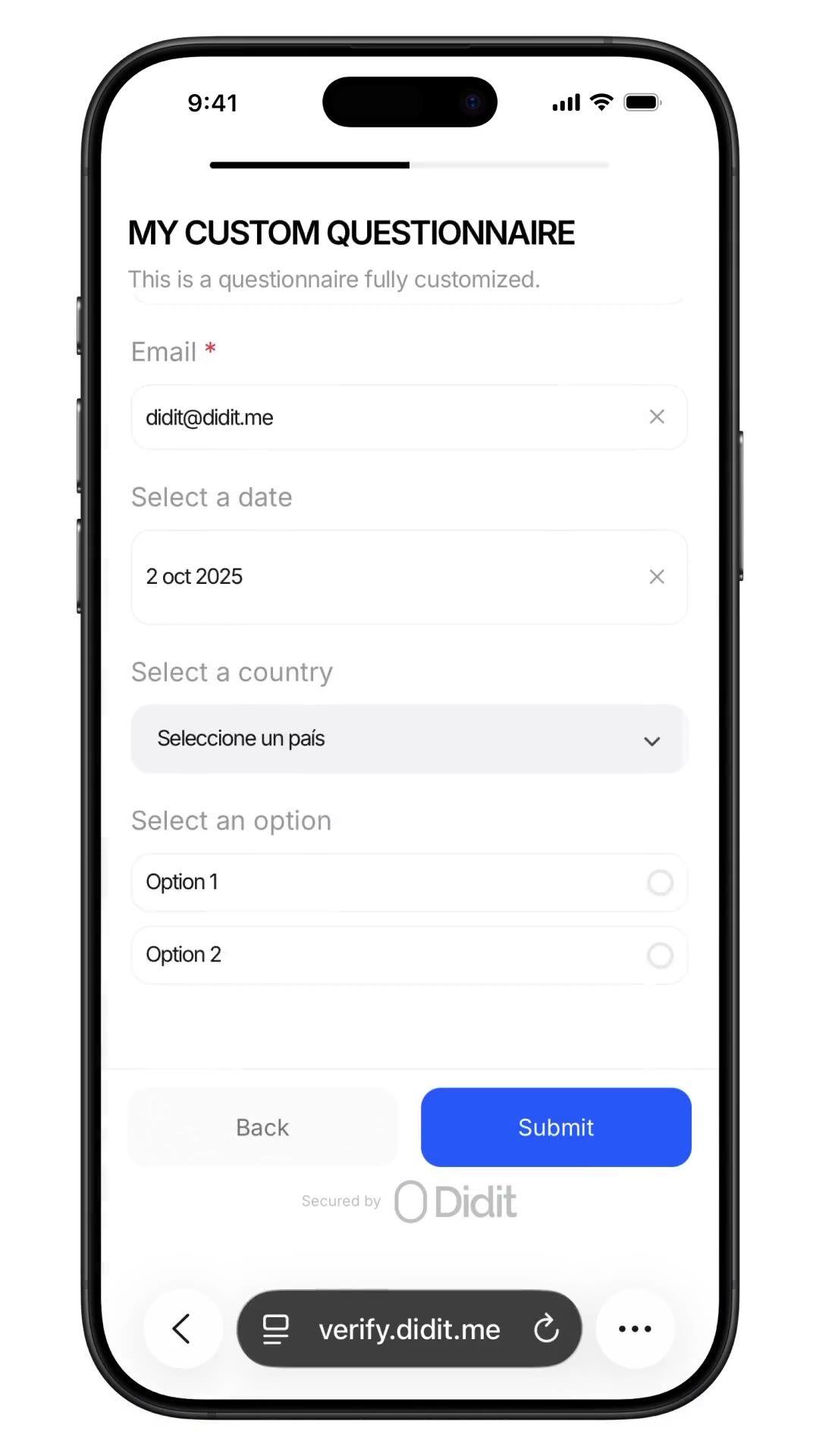
자금 출처, PEP 자가 신고
워크플로우에 맞춤형 설문지를 추가하세요. 자금 출처, PEP 자가 신고, 직업, 예상 거래량 등을 포함할 수 있습니다. 답변은 세션 보고서에 기록됩니다. 제출당 $0.10입니다.
원하는 검사 항목(신분증, 라이브니스, 얼굴 매칭, 제재, 주소, 연령, 전화, 이메일, 맞춤 질문)을 선택하세요. 대시보드에서 플로우로 드래그하거나, 동일한 플로우를 API에 게시할 수 있습니다. 조건에 따라 분기하고, A/B 테스트를 실행하며, 코드가 필요 없습니다.
$ curl -X POST https://verification.didit.me/v3/session/ \
  -H "x-api-key: $DIDIT_API_KEY" \
  -H "Content-Type: application/json" \
  -d '{
    "workflow_id": "wf_kyc_sof",
    "vendor_data": "user-42"
}'{ "url": "verify.didit.me/..." }$ curl -X POST https://verification.didit.me/v3/questionnaires/ \
-H "x-api-key: $DIDIT_API_KEY" \
-H "Content-Type: application/json" \
-d '{
"title": "Customer Onboarding",
"languages": ["en"],
"default_language": "en",
"form_elements": [
{ "id": "occupation", "element_type": "short_text", "label": { "en": "귀하의 직업은 무엇입니까?" } }
]
}'{ "questionnaire_id": "q_…" }# Didit Custom Questionnaires — integrate in 5 minutes
You are integrating Didit's Custom Questionnaires module into <my_stack>.
Follow these steps exactly. Every URL, header, and enum value below is
canonical — do not paraphrase or "improve" them.
## 1. Provision an account
- Sign up: https://business.didit.me (no credit card required).
- Or provision programmatically: POST https://apx.didit.me/auth/v2/programmatic/register/
(returns an API key bound to the workspace + application).
## 2. Build the questionnaire — Console OR API
### 2a. Visual builder in the Console (no code)
Questionnaires are authored visually — no schema upload, no SDK required.
1. Open https://business.didit.me, go to Questionnaires, click New.
2. Pick a mode:
- Simple Mode — single-language drag-and-drop builder. Best for fast
forms, internal surveys, single-locale flows.
- Advanced Mode — visual node-based graph editor. Required for
conditional branching, multi-language translations, choice-driven
follow-up text, and forced manual review.
3. Drag elements onto the canvas (input, choice, upload, layout — full
element catalog in section 5 below).
4. Optionally start from a pre-built template (Source of Funds,
Employment Details, Purpose of Account, Beneficial Ownership, Tax
Residency, Risk Assessment).
5. Localize titles, descriptions, placeholders, and choice labels for
every supported language; set a default_language.
6. Publish — the questionnaire is now addressable by its questionnaire_id.
### 2b. Create the questionnaire programmatically (Management API)
Use this path when you want the form to live in code, ship via CI, or be
authored by an LLM. Endpoint:
POST https://verification.didit.me/v3/questionnaires/
Headers: x-api-key: <your-api-key>
Content-Type: application/json
Required body:
- title — internal questionnaire name (string).
- languages — array of locale codes; MUST include "en".
- default_language — the default locale (string, e.g. "en").
- form_elements — ordered array of questions (≥1 entry).
Each form element requires id, element_type (lowercase OR uppercase enum
— "short_text", "multiple_choice", "email", "file_upload", "date_picker",
etc.), and a translated label keyed by locale. For dropdown,
single_choice, and multiple_choice add options: [{ value, label }].
Hard constraints:
- This endpoint supports SIMPLE LINEAR questionnaires only. Do NOT send
graph, branches, next, required_if, or conditional rules — use the
Console (section 2a) for those.
Example body:
{
"title": "Customer Onboarding",
"languages": ["en"],
"default_language": "en",
"form_elements": [
{
"id": "occupation",
"element_type": "short_text",
"label": { "en": "What is your occupation?" },
"is_required": true
},
{
"id": "source_of_funds",
"element_type": "multiple_choice",
"label": { "en": "Source of funds" },
"is_required": true,
"options": [
{ "value": "employment", "label": { "en": "Employment" } },
{ "value": "business", "label": { "en": "Business" } },
{ "value": "investments", "label": { "en": "Investments" } }
]
}
]
}
Response includes questionnaire_id — store it; you'll use it as
questionnaire_uuid when you wire the questionnaire into a workflow in
section 3 below. Full reference:
https://docs.didit.me/management-api/questionnaires/create
## 3. Two integration paths — pick one
### Path A — Workflow Builder (hosted UI, recommended)
Best when you want Didit to host the form, the file-upload UX, the
multi-language routing, the keyboard handling, and the mobile responsive
layout.
1. Create a workflow that contains the QUESTIONNAIRE feature:
POST https://verification.didit.me/v3/workflows/
Authorization header: x-api-key: <your-api-key>
Body: workflow_label, features array with the entry
{ feature: "QUESTIONNAIRE", questionnaire_id: "<id>" }
(UPPERCASE — strict enum)
Optional: chain QUESTIONNAIRE after OCR + LIVENESS in the
same workflow to collect Source of Funds as part of a full Know Your Customer (KYC).
2. Create a verification session for an end user:
POST https://verification.didit.me/v3/session/
Body: workflow_id (from step 1), vendor_data (your own user id).
Response: url (the hosted verification link) — redirect the user to it.
3. Listen for webhook callbacks (see "Webhooks" below).
### Path B — Standalone Questionnaire Verification
Run a questionnaire as its own verification — no KYC required.
Use a workflow whose only feature is QUESTIONNAIRE. Everything else is
identical to Path A. Useful for ongoing-due-diligence pulses,
post-onboarding declarations, periodic re-attestations.
## 4. Webhooks
- Register a webhook destination once via
POST https://verification.didit.me/v3/webhook/destinations/
Body: url, subscribed_events: ["session.verified", "session.review_started",
"session.declined"]
- Response includes secret_shared_key — store it.
- Every webhook delivery carries an X-Signature-V2 header you MUST verify
before trusting the payload. HMAC-SHA256 verification MUST run against the raw body bytes (the raw payload as Didit sent it) BEFORE any JSON parsing — re-serialising the parsed body changes whitespace and key order, which invalidates the signature.Algorithm:
1. sortKeys(payload) recursively
2. shortenFloats (truncate trailing zeros after the decimal point)
3. JSON.stringify the result
4. HMAC-SHA256 with the secret_shared_key
5. Hex-encode, compare to the X-Signature-V2 header.
## 5. Element catalog (use these in the builder)
Input elements:
SHORT_TEXT, LONG_TEXT, NUMBER, EMAIL, PHONE, ADDRESS, DATE_PICKER, TIME
Choice elements:
DROPDOWN, SINGLE_CHOICE, MULTIPLE_CHOICE, COUNTRY, CONSENT
- DROPDOWN and SINGLE_CHOICE support per-option requires_text_input —
selecting "Other" can demand a free-text follow-up.
Upload elements:
IMAGE, FILE_UPLOAD
- max_files (1-5) per element.
Layout elements:
PARAGRAPH, SECTION_HEADER, SEPARATOR (read-only, not answerable).
## 6. Reading the report
The session report contains a questionnaire_responses array (one entry
per questionnaire step in the workflow graph). Each entry has:
- node_id: identifies the questionnaire step in the workflow graph
- questionnaire_id: which questionnaire this response is for
- title, description, languages, default_language, is_active
- sections: array of { title, description, items[] }
- each item: { uuid, order, element_type, is_required, title,
description, placeholder, choices, max_files, answer }
- answer: { value, text, files[] } — only the fields relevant to the
element_type are present.
- status: "Approved" | "In Review" | "Not Finished"
Status semantics:
- Not Finished — user has not completed the questionnaire yet.
- In Review — submitted, pending manual review. The Console flag
"force manual review" pins every response to this state until a human
approves it.
- Approved — reviewed and accepted.
Note: questionnaires do NOT emit risk warnings. Governance is achieved
through required fields, validation, manual review, and the workflow
graph (branching nodes route compliance-sensitive answers to In Review).
## 7. Hard rules — do not change
- Base URL for /v3/* endpoints is verification.didit.me (NOT apx.didit.me).
- Feature enum is UPPERCASE: QUESTIONNAIRE, OCR, LIVENESS,
FACE_MATCH, AML, IP_ANALYSIS.
- Element type enums are UPPERCASE + underscored: SHORT_TEXT, LONG_TEXT,
FILE_UPLOAD, SINGLE_CHOICE, etc.
- Auth header is x-api-key (lowercase, hyphenated).
- Webhook signature header is X-Signature-V2 (NOT X-Signature).
- Always verify webhook signatures before trusting payload data.
- Status casing matches exactly: "Approved", "In Review", "Not Finished"
(title-cased, space-separated).
## 8. Pricing reference (public)
- $0.10 per questionnaire submission (Path A or Path B).
- No minimums. No per-language surcharge. No per-element surcharge.
Conditional branching, file uploads, manual review — all included at
the same per-submission price.
## 9. Verify your integration
- Sandbox starts on signup at https://business.didit.me — no separate flag.
- Use one of the pre-built templates (Source of Funds, Employment
Details, Purpose of Account, Beneficial Ownership, Tax Residency, Risk
Assessment) to ship a draft in under a minute, then customise.
- Switch to live: flip the application's environment toggle in console.
When in doubt: https://docs.didit.me/core-technology/questionnaires/overview













개발, 테스트 및 초기 사용자 확보에 적합합니다.
25개 이상의 모듈, 투명한 가격 정책. 자동 볼륨 할인.
대규모 볼륨 및 규제 프로그램에 적합합니다.
사용량이 증가하면 볼륨 할인이 자동으로 적용됩니다. 협상이나 영업팀과의 통화가 필요 없습니다.
Didit은 신원 및 사기 방지 인프라입니다. 저희가 직접 제품을 개발할 때 있었으면 하고 바랐던 플랫폼이죠. 개방적이고 유연하며 개발자 친화적이어서, 단순히 통합해야 하는 블랙박스가 아니라 스택의 실제 구성 요소처럼 작동합니다.
하나의 API로 개인 확인(KYC, 고객 알기), 기업 확인(KYB, 사업체 알기), 암호화폐 지갑 심사(KYT, 거래 알기), 실시간 거래 모니터링을 모두 처리하며, 다음과 같은 스택을 기반으로 구축되었습니다:
기반 기술: 48개 이상의 언어로 된 14,000개 이상의 문서 유형, 1,000개 이상의 데이터 소스, 모든 세션에서 200개 이상의 사기 신호를 분석합니다. Didit 인프라는 모든 세션에서 동적으로 학습하며 매일 발전합니다.
맞춤형 설문지는 신분증 확인 및 셀카와 동일한 인증 세션 내에서 수집하는 스키마 기반 양식입니다. 자금 출처, 직업, 예상 거래량, 정치적 주요 인물 (PEP) 자가 선언, 세금 거주지, 실소유주 정보 등을 수집할 수 있습니다.
노코드 시각 빌더를 통해 규정 준수 책임자는 조건부 분기, 다국어 번역, 파일 업로드, 강제 수동 검토 기능을 사용하여 5분 이내에 새로운 설문지를 배포할 수 있습니다. 모든 응답은 고객 알기 (KYC) 데이터와 동일한 감사 추적에 기록됩니다.
제출당 $0.10입니다. 전체 참조: docs.didit.me/core-technology/questionnaires/overview.
설문지 제출당 $0.10이며, 통합 경로 (워크플로 내 또는 독립형)에 관계없이 동일합니다.
최소 요금, 언어별 추가 요금, 요소별 추가 요금, 조건부 분기, 파일 업로드 또는 강제 수동 검토에 대한 추가 요금은 없습니다. 모든 기능은 제출당 동일한 가격에 포함됩니다. 공개 가격: didit.me/pricing.
전체 흐름은 일반적으로 처음부터 끝까지 30초 미만이 소요됩니다. 신분증을 들고, 문서를 촬영하고, 셀카를 찍으면 끝입니다. 이는 시장에서 가장 빠른 속도입니다. 기존 KYC 제공업체는 동일한 흐름에 90초 이상이 소요되는 경우가 많습니다.
백엔드에서 Didit은 사용자가 셀카를 완료한 시점부터 웹훅이 실행되는 시점까지 p99 기준 2초 미만으로 결과를 반환합니다. 모바일 캡처는 느린 휴대폰과 느린 네트워크에 최적화되어 있습니다. 점진적 이미지 압축, 지연 소프트웨어 개발 키트 로드, 그리고 사용자가 웹에서 시작하는 경우 QR 코드를 통해 데스크톱에서 휴대폰으로 한 번의 탭으로 전환하는 기능을 제공합니다.
세션 보고서에는 questionnaire_responses 배열이 포함됩니다. 워크플로 그래프의 설문지 단계별로 하나의 항목이 있습니다. 각 항목에는 questionnaire_id, title, languages, default_language, is_active, sections 배열, 그리고 Approved, In Review, Not Finished 중 하나의 최상위 status가 포함됩니다.
모든 items[] 행에는 uuid, order, element_type, is_required, title, description, placeholder, choices, max_files, 그리고 요소 유형에 따라 value, text, 또는 files를 포함하는 answer 객체가 포함됩니다.
세션 Application Programming Interface (API) 및 모든 웹훅 전달에서 동일한 형태를 가집니다.
모든 세션은 7가지 명확한 상태 중 하나로 분류되므로, 코드는 항상 무엇을 해야 할지 알 수 있습니다.
Approved, 모든 확인이 통과되었습니다. 사용자를 다음 단계로 진행하세요.Declined, 하나 이상의 확인이 실패했습니다. 사용자가 특정 실패 단계 (예: 셀카 재촬영)를 재제출하도록 허용할 수 있으며, 전체 흐름을 다시 실행할 필요가 없습니다.In Review, 규정 준수 검토를 위해 플래그가 지정되었습니다. 콘솔에서 케이스를 열고 모든 신호를 확인한 후 승인 또는 거부를 결정하세요.In Progress, 사용자가 흐름 중간에 있습니다.Not Started, 링크가 전송되었지만 사용자가 아직 열지 않았습니다. 너무 오래 방치되면 알림을 보내세요.Abandoned, 사용자가 링크를 열었지만 제시간에 완료하지 못했습니다. 다시 참여시키거나 만료시키세요.Expired, 세션 링크가 만료되었습니다. 새 세션을 만드세요.모든 상태 변경 시 서명된 웹훅이 실행되므로 데이터베이스는 항상 동기화 상태를 유지합니다. 중단되거나 거부된 세션은 무료입니다.
프로덕션 데이터는 기본적으로 유럽 연합의 Amazon Web Services에 처리 및 저장됩니다. 규제 당국이 요구하는 관할권의 경우, 엔터프라이즈 계약을 통해 대체 지역을 요청할 수 있습니다.
모든 곳에서 암호화됩니다. 모든 데이터베이스, 객체 스토어, 백업에서 AES-256 암호화가 적용됩니다. 모든 API 호출, 웹훅, 비즈니스 콘솔 세션에서 전송 계층 보안 1.3이 사용됩니다. 생체 인식 데이터는 별도의 고객 마스터 키로 암호화됩니다.
데이터 보존은 고객이 제어합니다. 기본 보존 기간은 무기한(무제한)이며, 애플리케이션별로 30일에서 10년 사이로 더 짧게 구성할 수 있습니다. 또한 대시보드 또는 API를 통해 언제든지 개별 세션을 삭제할 수 있습니다.
인증 내역: SOC 2 Type 1 & Type 2, ISO/IEC 27001:2022, iBeta Level 1 PAD, 그리고 Didit의 원격 신원 확인이 대면 확인보다 안전하다는 스페인 Tesoro / SEPBLAC / CNMV의 공식 인증이 있습니다. 전체 보고서는 /security-compliance에서 확인할 수 있습니다.
Didit은 신원 인프라에 중요한 규제 기관의 요건을 기본적으로 준수합니다:
자세한 메모, 모든 인증서, 모든 규제 기관 서신: /security-compliance.
세 가지 통합 경로 중 스택에 맞는 것을 선택하세요.
세 가지 모두 동일한 대시보드, 동일한 청구, 성공당 동일한 가격이 적용됩니다. 단계별 가이드는 docs.didit.me/integration/integration-prompt에서 확인하세요.