

무료
$0/월 · 카드 정보 불필요
개발, 테스트 및 초기 사용자 확보에 적합합니다.
시작하는 데 필요한 모든 것:
- 매월 500건의 전체 KYC 인증
- 신분증, 라이브니스, 얼굴 매칭, 기기 및 IP 확인
- 200개 이상의 사기 신호, 차단 목록, 중복 확인
- Didit 네트워크 전반에서 KYC 재사용 가능
- 워크플로우 빌더, 케이스 관리, SDK
- AI 지원 콘솔 내 AI 에이전트, 문서, 커뮤니티.






전 세계 2,000개 이상의 기관에서 신뢰합니다.
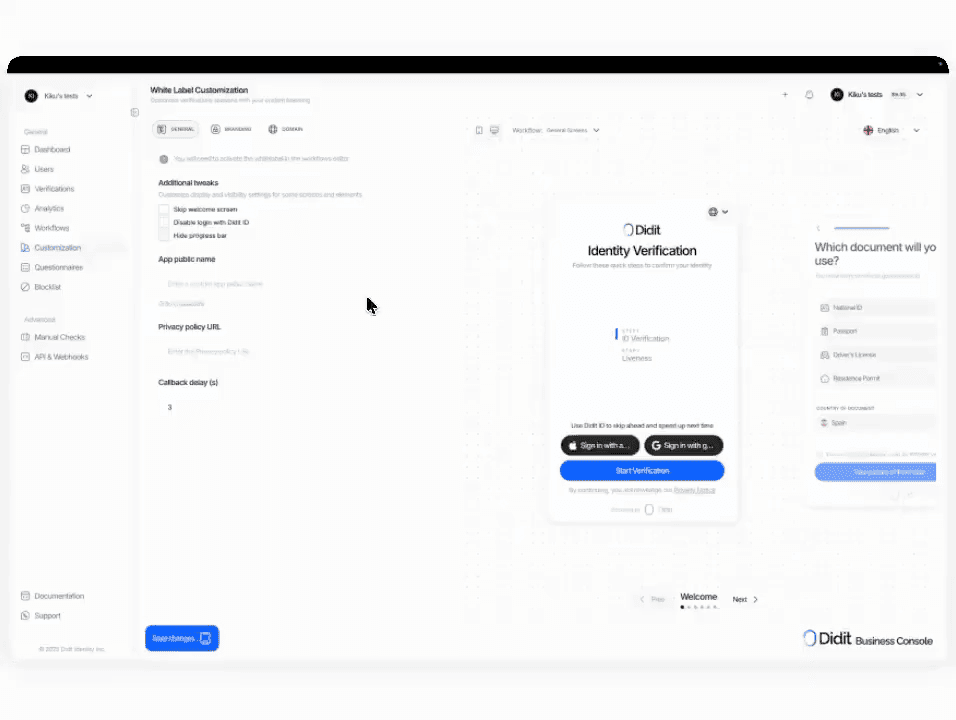
귀사의 브랜드, 저희의 검증
귀사의 도메인에서 플로우를 호스팅하세요. 로고, 색상, 문구, 링크 미리보기 카드를 변경할 수 있습니다. 모듈 가격은 그대로 유지되며, 세션당 $0.20만 추가됩니다.
신분증, 라이브니스, 얼굴 매칭, 제재 목록, 주소, 연령, 전화번호, 이메일, 맞춤 질문 등 필요한 검사를 선택하세요. 대시보드에서 드래그 앤 드롭으로 플로우를 만들거나, 동일한 플로우를 API에 게시할 수 있습니다. 조건에 따라 분기하고 A/B 테스트를 실행할 수 있으며, 코딩은 필요 없습니다.
# 콘솔 -> 화이트 라벨 -> 스타일 에디터
colors: 브랜드 팔레트
logos: 정사각형 + 직사각형
typography: 브랜드 폰트 + 가중치
domain: verify.acme.com
email_from: verify@acme.com

# 워크플로우 -> 설정 -> 옵션
include_custom_style: true귀사의 브랜드 · `verify.acme.com` · TLS 자동$ curl -X POST https://verification.didit.me/v3/session/ \
-H "x-api-key: $DIDIT_API_KEY" \
-H "Content-Type: application/json" \
-d '{
"workflow_id": "wf_acme_kyc",
"vendor_data": "user-42"
}'{ "url": "verify.acme.com/..." }# Didit White Label — integrate in 5 minutes
You are integrating Didit's White Label (custom branding + custom domain)
into <my_stack>. White Label is a CONFIGURATION on top of any workflow —
not a separate API endpoint. Follow these steps exactly. Every URL,
header, and field below is canonical — do not paraphrase or "improve" them.
## 1. Provision an account
- Sign up: https://business.didit.me (no credit card required).
- Or provision programmatically: POST https://apx.didit.me/auth/v2/programmatic/register/
(returns an API key bound to the workspace + application).
## 2. Configure White Label in the console
White Label settings live at Console -> White Label -> Style Editor. Five
groups, every one is customizable:
- Colors — buttons, text, panels, backgrounds (every color element)
- Typography — upload a brand font, set heading + body weights
- Logos — square + rectangular variants, served on every screen
- Layout — border radius for panels, buttons, inputs
- Login screen — show or skip the user-login step entirely
- Custom domain — host the verification UI on your own subdomain
(e.g. verify.acme.com) instead of verify.didit.me
Custom-domain setup:
1. Console -> White Label -> Custom Domain -> Add domain
2. We return a CNAME target. Point your subdomain CNAME at it.
3. Click Verify. We provision a TLS certificate via Let's Encrypt /
ACME (automatic renewal, no action required from you).
4. Domain becomes live within minutes.
Custom email-from:
- Console -> White Label -> Email -> set the "From" name + reply-to address.
- DKIM / SPF records returned for you to add to DNS.
## 3. Enable White Label on each workflow
The customization does NOT auto-apply. You enable it per workflow:
1. Console -> Workflows -> open the workflow you want to brand.
2. Click Settings (gear icon).
3. Under Options, find "Include custom style".
4. Enable the toggle. Save.
Workflows without the toggle keep the default Didit branding — useful for
sandbox flows you do not want to brand yet.
## 4. Use the white-labeled workflow from your stack
Once the workflow has white-label enabled, you call it the same way as any
other Didit workflow:
POST https://verification.didit.me/v3/session/
Authorization header: x-api-key: <your-api-key>
Body:
- workflow_id (required, your white-labeled workflow id)
- vendor_data (optional, your own user id)
- callback (optional, URL we redirect to after the flow)
Response: { url } (the hosted verification link) — redirect the user
there. The UI they see is your brand (your logo, your colors, your
typography), on your domain (verify.acme.com), with your "From" name on
every email we send to the user mid-flow.
## 5. Webhooks
- Register a webhook destination once via
POST https://verification.didit.me/v3/webhook/destinations/
Body: url, subscribed_events: ["session.verified", "session.review_started",
"session.declined", "session.kyc_expired"]
- Response includes secret_shared_key — store it.
- Every webhook delivery carries an X-Signature-V2 header you MUST verify
before trusting the payload. HMAC-SHA256 verification MUST run against the raw body bytes (the raw payload as Didit sent it) BEFORE any JSON parsing — re-serialising the parsed body changes whitespace and key order, which invalidates the signature.Algorithm:
1. sortKeys(payload) recursively
2. shortenFloats (truncate trailing zeros after the decimal point)
3. JSON.stringify the result
4. HMAC-SHA256 with the secret_shared_key
5. Hex-encode, compare to the X-Signature-V2 header.
## 6. Hard rules - do not change
- Base URL for /v3/* endpoints is verification.didit.me (NOT apx.didit.me).
- Auth header is x-api-key (lowercase, hyphenated).
- Webhook signature header is X-Signature-V2 (NOT X-Signature).
- Status casing matches exactly: "Approved", "Declined", "In Review",
"Not Finished" (title-cased, space-separated).
- White Label is a configuration on a workflow — there is NO standalone
/v3/white-label/ endpoint. Do not invent one.
- Removing visible Didit branding does NOT remove your obligations as the
controller of the user journey. You still surface your privacy notice,
link Didit's Verification Privacy Notice + End User Terms, and collect
explicit consent before document + biometric capture where the law
requires it. See https://docs.didit.me/console/white-label for the full
controller-side checklist.
## 7. Reseller / OEM positioning
White Label is the same product your agency, integrator, or compliance-
consulting firm uses to resell Didit under your own name to your own
customers:
- Pricing: $0.20 per session on top of the underlying module price (e.g.
full Know Your Customer (KYC) bundle at $0.33 + $0.20 white label = $0.53 per session, or
standalone ID at $0.15 + $0.20 = $0.35).
- 500 free verifications per month stay applied to your own meter,
regardless of how many resold tenants you have.
- One contract with Didit, one invoice — your customers see only your
brand and your support address.
- Custom email-from + custom domain mean your customers never see Didit
branding mid-flow. We still surface the legally-required disclosures
per the controller-side checklist above.
## 8. Pricing reference (public)
- White Label add-on: $0.20 per session, on top of the underlying module
price. A full KYC bundle goes from $0.33 to $0.53 per white-labeled
session; a standalone $0.15 ID Verification goes to $0.35.
- 500 free verifications every month, forever, on every account — applies
regardless of whether the flow is white-labeled.
- No setup fee, no certificate cost, no per-domain charge.
## 9. Verify your integration
- Sandbox starts on signup at https://business.didit.me - no separate flag.
- Test custom domain locally by adding a /etc/hosts entry pointing your
brand subdomain at our CNAME target before DNS is live.
- Switch to live: flip the application's environment toggle in console.
When in doubt: https://docs.didit.me/console/white-label













개발, 테스트 및 초기 사용자 확보에 적합합니다.
25개 이상의 모듈, 투명한 가격 정책. 자동 볼륨 할인.
대규모 볼륨 및 규제 프로그램에 적합합니다.
사용량이 증가하면 볼륨 할인이 자동으로 적용됩니다. 협상이나 영업팀과의 통화가 필요 없습니다.
Didit은 신원 및 사기 방지 인프라입니다. 저희가 직접 제품을 개발할 때 있었으면 하고 바랐던 플랫폼이죠. 개방적이고 유연하며 개발자 친화적이어서, 단순히 통합해야 하는 블랙박스가 아니라 스택의 실제 구성 요소처럼 작동합니다.
하나의 API로 개인 확인(KYC, 고객 알기), 기업 확인(KYB, 사업체 알기), 암호화폐 지갑 심사(KYT, 거래 알기), 실시간 거래 모니터링을 모두 처리하며, 다음과 같은 스택을 기반으로 구축되었습니다:
기반 기술: 48개 이상의 언어로 된 14,000개 이상의 문서 유형, 1,000개 이상의 데이터 소스, 모든 세션에서 200개 이상의 사기 신호를 분석합니다. Didit 인프라는 모든 세션에서 동적으로 학습하며 매일 발전합니다.
화이트 라벨은 Didit의 전체 인증 플로우를 귀사의 브랜드로 운영합니다. 귀사의 커스텀 도메인(verify.acme.com), 로고, 색상 팔레트, 타이포그래피, 발신 이메일 주소, 파비콘을 사용합니다. 사용자에게 Didit 브랜딩은 전혀 노출되지 않습니다.
동일한 /v3/ Application Programming Interface (API), 동일한 호스팅 캡처 플로우, 동일한 X-Signature-V2 Hash-based Message Authentication Code (HMAC) 웹훅 계약, 그리고 스페인 Tesoro / Banco de España (BdE) / Spanish Financial Intelligence Unit (SEPBLAC)의 인증을 받은 동일한 파이프라인을 기반으로 합니다.
기본 모듈 가격에 세션당 $0.20가 추가됩니다. 자세한 내용은 docs.didit.me/console/white-label을 참조하세요.
기본 모듈 가격에 세션당 $0.20가 추가됩니다.
$0.33에서 $0.53로 변경됩니다.$0.15 Identity Document Verification은 $0.35가 됩니다.설치비, 인증서 비용, 도메인별 요금은 없습니다. 공개 가격은 didit.me/pricing에서 확인하세요.
전체 플로우는 일반적으로 처음부터 끝까지 30초 미만이 소요됩니다. 신분증을 들고, 문서를 촬영하고, 셀카를 찍으면 완료됩니다. 이는 시장에서 가장 빠른 속도입니다. 기존 KYC 제공업체는 동일한 플로우에 90초 이상이 걸리는 경우가 많습니다.
백엔드에서 Didit은 사용자가 셀카를 완료한 시점부터 웹훅이 실행되는 시점까지 p99 기준 2초 미만으로 결과를 반환합니다. 모바일 캡처는 느린 휴대폰과 느린 네트워크에 최적화되어 있습니다: 점진적 이미지 압축, 지연된 Software Development Kit (SDK) 로드, 그리고 사용자가 웹에서 시작하는 경우 QR 코드를 통해 데스크톱에서 휴대폰으로 원탭 핸드오프가 가능합니다.
3분이면 충분하며, 인증서 작업은 전혀 필요 없습니다.
1. Business Console에서 White Label → Custom Domain → Add domain으로 이동합니다. 2. 저희가 Canonical Name (CNAME) 타겟을 반환합니다. 3. 귀사의 브랜드 서브도메인 CNAME을 해당 타겟으로 지정합니다. 4. Verify를 클릭합니다.
저희는 Let's Encrypt와 Automatic Certificate Management Environment (ACME) 프로토콜을 통해 Transport Layer Security (TLS) 인증서를 프로비저닝하고, 자동 갱신을 설정하며, 도메인은 몇 분 내에 활성화됩니다.
인증서 구매, 키 로테이션, 보안팀과의 Domain Name System (DNS) 왕복 작업이 필요 없습니다. 도메인 수명 동안 자동 갱신됩니다.
모든 세션은 7가지 명확한 상태 중 하나로 귀결되므로, 귀사의 코드는 항상 무엇을 해야 할지 알 수 있습니다:
Approved, 모든 검사를 통과했습니다. 사용자를 다음 단계로 진행하세요.Declined, 하나 이상의 검사에 실패했습니다. 전체 플로우를 다시 실행하지 않고 특정 실패 단계(예: 셀카 다시 찍기)를 재제출하도록 허용할 수 있습니다.In Review, 규정 준수 검토를 위해 플래그가 지정되었습니다. 콘솔에서 케이스를 열고 모든 신호를 확인한 후 승인 또는 거부를 결정하세요.In Progress, 사용자가 플로우 중간에 있습니다.Not Started, 링크가 전송되었지만 사용자가 아직 열지 않았습니다. 너무 오래 방치되면 알림을 보내세요.Abandoned, 사용자가 링크를 열었지만 제시간에 완료하지 못했습니다. 다시 참여를 유도하거나 만료시키세요.Expired, 세션 링크가 만료되었습니다. 새 세션을 생성하세요.모든 상태 변경 시 서명된 웹훅이 실행되므로, 귀사의 데이터베이스는 항상 동기화 상태를 유지합니다. 중단되거나 거부된 세션은 무료입니다.
프로덕션 데이터는 기본적으로 유럽 연합의 Amazon Web Services에 처리 및 저장됩니다. 규제 당국이 요구하는 관할권의 경우, 엔터프라이즈 계약을 통해 대체 지역을 요청할 수 있습니다.
모든 곳에서 암호화됩니다. 모든 데이터베이스, 객체 스토어, 백업에서 AES-256 암호화가 적용됩니다. 모든 API 호출, 웹훅, 비즈니스 콘솔 세션에서 전송 계층 보안 1.3이 사용됩니다. 생체 인식 데이터는 별도의 고객 마스터 키로 암호화됩니다.
데이터 보존은 고객이 제어합니다. 기본 보존 기간은 무기한(무제한)이며, 애플리케이션별로 30일에서 10년 사이로 더 짧게 구성할 수 있습니다. 또한 대시보드 또는 API를 통해 언제든지 개별 세션을 삭제할 수 있습니다.
인증 내역: SOC 2 Type 1 & Type 2, ISO/IEC 27001:2022, iBeta Level 1 PAD, 그리고 Didit의 원격 신원 확인이 대면 확인보다 안전하다는 스페인 Tesoro / SEPBLAC / CNMV의 공식 인증이 있습니다. 전체 보고서는 /security-compliance에서 확인할 수 있습니다.
Didit은 신원 인프라에 중요한 규제 기관에 대해 기본적으로 규정을 준수합니다:
자세한 메모, 모든 인증서, 모든 규제 기관 서한: /security-compliance.
세 가지 통합 경로 중 귀사의 스택에 맞는 것을 선택하세요:
세 가지 모두 동일한 대시보드, 동일한 청구, 동일한 성공당 지불 가격이 적용됩니다. 단계별 가이드는 docs.didit.me/integration/integration-prompt에서 확인하세요.